


Customers have come to expect seamless service across a multitude of touchpoints. Whether they’re reaching out through chat, social media, email, or even a traditional phone call, the expectation remains the same – a consistent and high-quality experience.
This heightened customer demand for consistent service is precisely why omnichannel and multichannel helpdesks have become indispensable business tools.
So, how do you decide which type of helpdesk suits your requirements? When it comes to customer support, the choice between multi-channel and omnichannel software isn’t just a matter of jargon. It’s about strategy.
The best omnichannel help desk solution
- Collaborate with ease
- Manage high email volume
- Leverage AI for stellar service
Omni-channel vs Multi-channel helpdesks: A quick comparison
With a multi-channel help desk solution, you’re looking at different isolated channels. Think of it like multiple lanes in a swimming pool, each lane doing its own thing.
On the other hand, Omnichannel is more like a well-coordinated team, with every player knowing what the other is doing. Both have their strengths and weaknesses, and neither is a one-size-fits-all solution. Let’s dive into the specifics:
| Feature | Multi-channel Helpdesk | Omni-channel Helpdesk |
|---|---|---|
| Channel Integration | Multiple separate channels | Seamless integration across channels |
| Customer Experience | Inconsistent across different channels | Consistent and unified across platforms |
| Data Analysis | Isolated data from each channel | Unified data for deeper insights |
| Customer Journey Tracking | Limited tracking across channels | Complete tracking across all touchpoints |
| Scalability | Can be complex with more channels | Easier to scale with an integrated approach |
| Cost | Typically less expensive | Generally more expensive but comprehensive |
| Implementation | Faster to set up individual channels | Requires strategic planning and alignment |
Choosing between multi-channel and omni-channel helpdesk software involves understanding your business needs and customer expectations. If you favor a system where each channel operates independently, multi-channel might be your pick.
If a cohesive, unified experience across all platforms is what you seek, then omnichannel could be the answer. The table above illustrates the key differences, but the right choice? That’s a strategic call you’ll make based on your company’s goals.
Recommended reading
How Does Your Customer Support Benefit from an Omnichannel Help Desk?
By this point, you would have understood how an omnichannel help desk functions. By combining various communication channels into one platform, an omnichannel help desk guarantees that every customer query is acknowledged.
But how does this translate into tangible benefits for your support team? Here’s how:
1. Unified customer experience
With an omnichannel help desk, all customer interactions are centralized. This implies that your support team can access the complete history of customer interactions across different channels in one single platform. A helpdesk ticketing system ensures a smooth, organized workflow for every interaction.. As a result, agents have the ability to offer quick, consistent and informed assistance, which ultimately improves the customer experience.
2. Reduced response times
An omnichannel help desk consolidates all customer queries in one single location. This enables agents to respond faster and more effectively. When the response time per query decreases, it helps your team manage a large volume of queries efficiently.
3. Improved agent productivity
An omnichannel helpdesk makes your support team’s life so much easier. They do not need to juggle multiple platforms to resolve customer issues. This leads to fewer errors and a more productive team.
4. Better customer insights
With an omnichannel helpdesk, you dont have to keep pulling in data from different places to analyse your customer behaviour and preferences. This knowledge can help your support team predict customer requirements with eade, customize their responses, and offer proactive solutions. This results in a more personalized customer journey.
5. Better team collaboration
Having an omnichannel help desk encourages better collaboration within your support team. Agents can readily exchange information, escalate issues, and collaborate on complex inquiries. All these facilitate faster resolutions and a more cohesive support setting.
9 Best Omnichannel Helpdesks for 2025
Modern customer support requires meeting users on their channel of choice – whether email, live chat, phone, social media, or more. Omnichannel helpdesks enable teams to manage these varied channels through a unified interface and workflow. Agents can provide consistent, continuous support across several touchpoints.
Whether you are a small startup or a large enterprise, these platforms offer features and functionalities that will help you streamline your customer service operations.
Here are the top 9 omnichannel helpdesks:
| Tool | Pricing | Free trial | G2 Rating |
|---|---|---|---|
| Hiver | Starts at $19/user/month | 7 days; offers a free plan as well | 4.6/5 |
| Zendesk | Starts at $55/user/month | 14 days | 4.3/5 |
| Freshdesk | Starts at $15/user/month | 14 days | 4.4/5 |
| HappyFox | Starts at $9/user/month | No free trial | 4.5/5 |
| LiveAgent | Starts at $9/user/month | 14 days | 4.5/5 |
| Sprinklr | Starts at $199/user/month | 30 days | 4.3/5 |
| Hubspot | Starts at $15/user/month | 14 days | 4.4/5 |
| Salesforce Service Cloud | Starts at $24/user/month | 30 days | 4.3/5 |
| Zoho Desk | Starts at $7/user/month | 15 days | 4.4/5 |
1. Hiver
Hiver is an omnichannel helpdesk software that helps you manage customer interactions across multiple support channels – email, chat, WhatsApp, phone, and knowledge base. The biggest advantage of Hiver is that its interface looks and feels like your regular inbox, meaning your team can easily adopt it without extensive training.
Another interesting quirk of Hiver is that it helps you manage all support channels and other work emails from the same place. You don’t have to switch between your inbox and your omnichannel help desk on a regular basis.
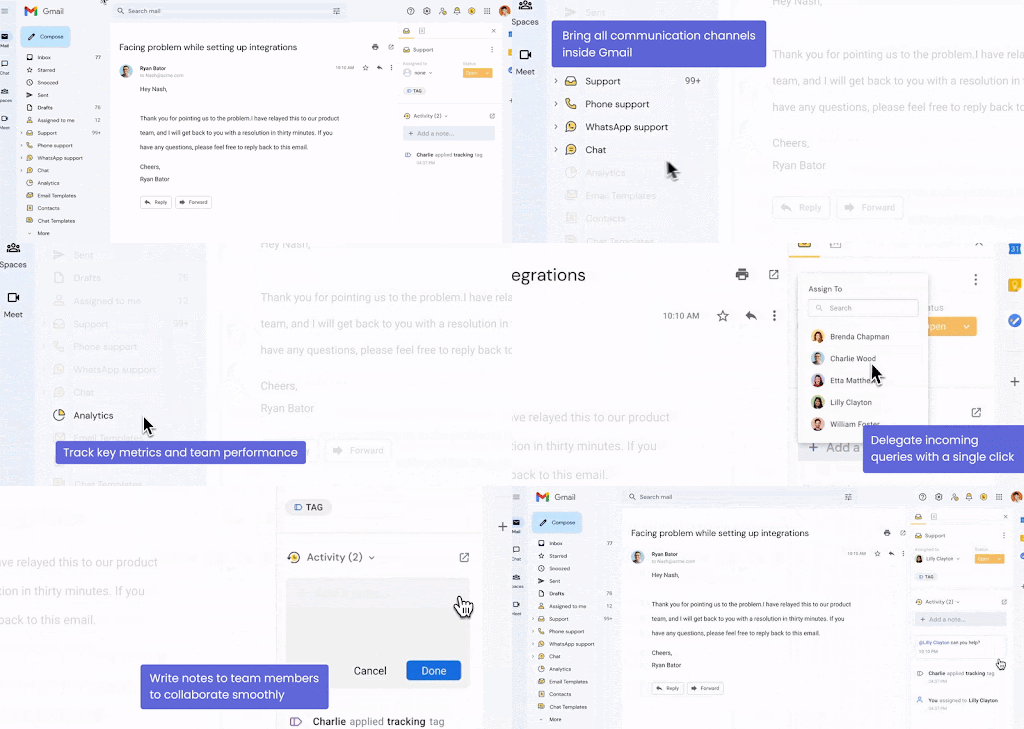
Let’s look at all the support channels that can be managed with Hiver.
Most companies use an ID like info@ or support@ to do email support. Hiver helps you manage such email IDs using a shared inbox.Support staff can access and respond to emails as a team from this shared inbox. Every incoming email can be assigned as a task to someone in the team – either manually or via an automation.

Collaboration is also easy: Team members can leave internal notes to provide context or take help from colleagues, work together on responses, and use email templates for handling frequently asked queries. You can also set up SLAs to ensure responses are sent on time, and gauge customer opinion using CSAT surveys.
Live chat
Respond to customer queries in real time via live chat. You get to easily assign every incoming chat to a dedicated team member – either manually or through automation. For frequently asked questions, such as those on order status or refund policies, you can use chat templates to speed up your responses.
Moreover, get intelligent suggestions on how to respond to customers based on how the conversation is going. This ensures you don’t have to type out responses from scratch every single time.

Additionally, you can monitor and evaluate your team’s performance by tracking essential metrics like turnaround time and average resolution time. You can wrap up each chat by sharing a brief CSAT survey with your customer to gauge customer satisfaction.
Recommended reading
Knowledge base
A knowledge base empowers customers to find answers on their own, reducing the need to reach out to your support team for anything and everything. Setting this up using Hiver takes minutes.

Managing content is just as easy—your team can quickly add, edit, and categorize articles to keep information up to date. Customers can find what they need via a search bar or by browsing through categories. As a result, your support team doesn’t have to deal with every single query. They can focus on the more complicated tickets.
Hiver enables your business to streamline queries arriving in its WhatsApp for Business channel. Instead of juggling multiple devices, support teams can assign, collaborate on, and resolve WhatsApp queries – just like emails – from a centralized platform. Every conversation gets a clear owner, and there’s complete visibility into who is handling what.

The biggest advantage of this integration is that you get to scale WhatsApp support. Unlike the WhatsApp Business app, which limits group access to five concurrent users, Hiver doesn’t have a limit on users. You can add as many team members as needed to handle WhatsApp conversations.
Hiver – Aircall Voice Integration
Hiver’s Voice Inbox, powered by its integration with Aircall, helps teams log and manage customer calls. All incoming calls can be assigned to support staff – everyone knows what they have to work on. You can also check the status of every call. – whether it’s yet to be picked up, work in progress, or closed. Moreover, reps can pull information from Aircall – tags, notes, and call recordings – into Hiver, so that all customer context is in one place.

Pricing
- Free plan: Free forever.
- Lite: $19/user/month, billed annually.
- Growth: $29/user/month, billed annually.
- Pro: $49/user/month, billed annually.
- Elite: Custom pricing.
2. Zendesk
Zendesk empowers support agents to efficiently manage customer interactions across multiple channels within a unified Agent Workspace. Its omnichannel functionalities streamline customer communications across multiple customer touchpoints.

Within the Zendesk Suite, you’ll find various products that can help you improve customer experience. These include the omnichannel helpdesk system, Help Center, Community Forum, Messaging, Zendesk Talk, Zendesk Explore, and Zendesk Sunshine Conversations.
It’s $55 per agent per month Suite Team includes the following omnichannel helpdesk features:
- Live Chat
- Social Media (Additional fees may apply)
- Voice Support (extra cost add-on)
- Help center (No customer portal or community forum)
Pricing:
- Suite Team: $55/user/month, billed annually
- Suite Growth: $89/user/month, billed annually
- Suite Professional: $115/user/month, billed annually
- Suite Enterprise: custom pricing
Save 56% of your recurring costs by choosing Hiver over Zendesk
3. Freshdesk
Freshdesk is a SaaS-based omnichannel helpdesk that provides a comprehensive suite of features for businesses aiming to deliver exceptional customer service. These features include omnichannel support, automated ticket routing, robust reporting, self-service options, SLA management, and more.

Freshdesk efficiently consolidates customer requests from various channels like email, voice, chat, and social media, allowing your team to manage all interactions from a unified interface. It also offers agents a user-friendly experience, supporting their productivity.
Its $49 per agent per month Pro plan includes the following omnichannel helpdesk features:
- Email ticketing
- Knowledge Base
- Social Media (Restricted to Facebook and WhatsApp)
- Freshcaller and Freshchat have to be purchased separately. They have different plans of their own and start at $15 and $19 per agent, respectively.
Pricing:
- Free plan: Free for up to 2 agents
- Growth: $15/user/month, billed annually
- Pro: $49/user/month, billed annually
- Enterprise: $79/user/month, billed annually
Here’s why Hiver is the best Freshdesk Alternative
4. HappyFox
HappyFox is a viable option for small businesses aiming to enhance their customer support efficiency. It provides a user-friendly omnichannel helpdesk software that simplifies customer support for small businesses, offering assistance through email, live chat, phone, and knowledge base channels.

It also facilitates ticket assignment to agents and incorporates automation capabilities, enabling them to streamline processes and boost productivity.
Bear in mind they have a minimum 5-agent requirement.
Its $49 ‘Team’ plan per month includes the following omnichannel helpdesk features:
- Email ticketing
- Knowledge Base
- Live Chat (Available at extra premium)
- Voice Support (Available at extra premium)
- Social Media
- JIRA, Slack and Aircall integration
Pricing:
- Basic: $9/user/month, billed annually
- Team: $49/user/month, billed annually
- Pro: $99/user/month, billed annually
- Enterprise PRO: custom pricing
5. LiveAgent
LiveAgent serves as an online omnichannel helpdesk solution tailored for small and midsize e-commerce businesses. Its feature set encompasses live chat, ticket management, online self-service portals, and change and license management, available as integrated and standalone applications.

The software incorporates a ticket management system that captures the complete conversation history, including chat messages, emails, phone calls, and messages from other communication channels.
It’s $29 per agent per month ‘Medium business’ plan includes the following Omnichannel Support features:
- Email Ticketing
- Knowledge Base
- Customer Forum
- Live Chat (Restricted to 5 users)
- Call centre
- Social Media (add-ons for each social media channel cost $39). To access WhatsApp integration, you must upgrade to the ‘Large Business’ plan at $49.
Pricing:
- Small business: $9/user/month, billed annually.
- Medium business: $29/user/month, billed annually.
- Large business: $49/user/month, billed annually.
- Enterprise: $69/user/month, billed annually.
6. Sprinklr
Sprinklr’s Contact Center as a Service (CCaas) platform offers an omnichannel helpdesk solution that spans various communication channels, strongly emphasizing social media management and live chat for real-time customer engagement.

Sprinklr’s knowledge base also empowers businesses to create a repository of FAQs, guides, and articles for self-service support, reducing support ticket volume and enhancing the overall customer experience.
Beyond live chat and the knowledge base, Sprinklr integrates email, social media platforms, and messaging apps, providing businesses with a unified approach to customer engagement.
Its $199 per agent per month ‘Self-serve customer service solution’ plan includes the following Omnichannel Support features:
- Live chat
- Community management
- Knowledge base
- Social media
Pricing:
- Self-serve customer service solution: $199/user/month, billed annually
- Custom CCaaS solution: custom pricing
7. Hubspot
Hubspot’s Service Hub is a cloud-based omnichannel helpdesk tailored for businesses of all sizes. Notable features encompass reporting, automation, and analytics.

It supports live chat, allowing teams to speak to customers in real-time, and chatbots to help teams quickly answer common customer support questions and scale one-to-one communications. Service Hub also offers a Facebook messenger integration that enables agents to manage their Facebook conversations from their shared inbox.
Its $90 per month ‘Service Hub Professional’ plan includes the following Omnichannel Support features:
- Email and ticketing
- Live chat
- Voice
- SMS (To access this, you’ll have to purchase the marketing hub product separately, starting at $45)
- Social media integration (To access this, you’ll have to purchase the marketing hub product separately, starting at $45)
Pricing:
- Service hub starter: $15/user/month, billed annually
- Service hub professional: $90/user/month, billed annually
- Service hub enterprise: $150/user/month, billed annually
8. Salesforce Service Cloud
Salesforce Service Cloud is a robust omnichannel helpdesk solution that’s built to handle customer interactions across a wide range of channels. Known for its deep customization capabilities, this platform allows businesses to tailor customer experience to their specific needs.

Service Cloud supports email, live chat, social media, phone, and even SMS, all integrated into a single dashboard for easy management. With features like Einstein Bots, teams can leverage AI to respond to common customer queries, so that human agents can focus on more complex issues.
The platform also offers comprehensive analytics and reporting features to gain insights into customer behavior and agent performance.
Salesforce Service Cloud’s $80 per user per month ‘Professional’ plan includes the following Omnichannel Support features:
- Social media
- Self-service portal
- AI capabilities (Einstein bots) to resolve common customer queries (Available with extra cost)
Pricing:
- Starter suite: $24/user/month, billed annually.
- Professional: $80/user/month, billed annually.
- Enterprise: $165/user/month, billed annually.
- Unlimited: $330/user/month, billed annually.
- Einstein for service: $500/user/month, billed annually.
9. Zoho Desk
Zoho Desk is another omnichannel help desk designed for businesses looking for a cost-effective solution without compromising features. It enables customer interactions through multiple channels, including email, social media, live chat, and a self-service portal, all from a single platform.

One of Zoho Desk’s standout features is its AI-powered assistant, Zia, which helps support teams by offering answer suggestions and highlighting urgent tickets. The platform also includes robust ticket management and automation capabilities.
Zoho Desk integrates seamlessly with other Zoho products like Zoho CRM and Zoho SalesIQ, allowing businesses to create a fully connected customer service ecosystem.
The $20 per agent per month ‘Professional’ plan includes the following Omnichannel Support features:
- Phone call
- Social media
- Community forums
- Knowledge base
- Live chat (available at extra cost)
Pricing:
- Free: Free up to 3 agents; but limited omnichannel capabilities
- Express: $7/user/month, billed annually.
- Standard: $14/user/month, billed annually.
- Professional: $23/user/month, billed annually.
- Enterprise: $40/user/month, billed annually.
Features To Look For in an Omnichannel Helpdesk
In the above section, I’ve explained the best omnichannel helpdesk solutions available in the market. But, with these many options, how do you ensure that you pick the right solution for your business?
To decide this, it’s important to know what features will genuinely enhance your team’s efficiency and your customers’ experience. Let’s dive into some of the must-have features.
1. Centralized inbox
A centralized inbox is the heart of an omnichannel helpdesk. It brings all customer communications into one place—whether they’re from email, chat, social media, or phone.
This feature helps your support team stay organized and ensures that no customer query slips through the cracks.

For instance, Hiver does this brilliantly by mimicking your inbox. With Hiver, you can create a shared inbox for your support team that looks like your inbox. This allows teams to manage customer queries without needing long hours of training.
2. Customizable knowledge base
A knowledge base is an excellent self-service tool that helps customers find answers to common questions on their own. A customizable knowledge base feature allows you to create and manage FAQs, guides, and articles that are easily accessible to customers.
This not only reduces the number of incoming tickets but also empowers customers to help themselves.

3. Seamless integrations with other apps
The ability to integrate with other tools and platforms your business is important to set up a seamless workflow. Integrations ensure that your omnichannel helpdesk works well within your existing ecosystem, whether it’s CRM software, project management tools, or marketing platforms.

For example. Hiver integrates seamlessly amazingly well with Trello, Slack, JIRA, Salesforce CRM and other productivity apps, offering a more connected and efficient workflow.
Recommended reading
4. Analytics and reporting functionalities
It is important for every business to understand how their support team is performing. A good omnichannel help desk should provide in-depth analytics that gives you insights into metrics like response times, ticket resolution rates, and customer satisfaction scores.

Hiver offers robust reporting features that let you monitor your team’s performance, so that you identify areas for improvement and recognize top performers.
5. Automated workflows
Automated workflows can help reduce the manual workload and eliminate human error. Features like auto-assignment of tickets, automated responses, and workflow rules can help streamline your support operations. This is especially useful for handling routine tasks.

6. Real-time Collaboration functionality
Support teams often need to collaborate to resolve customer issues efficiently. Look for an omnichannel help desk that offers real-time collaboration features like shared notes, and internal chats. These tools can speed up response times and improve the accuracy of the information while resolving customer queries.

Hiver, for instance, allows teams to leave private notes right beside customer queries and tag colleagues, without having to forward messages or CC them.
The Future of Omnichannel Customer Support
The landscape of customer support is changing quickly due to technological advancements. Also, with the changin patterns of customer needs and expectations, the service you provide should be top-notch, if you want to keep a thriving business.
As we look into the future, various trends are influencing how omnichannel customer support should look. Here is what you can anticipate in the future:
1. AI-powered automation and chatbots
Artificial intelligence is the most talked about advancement impacting various industries – and customer support is not left behind.
AI and automation are already transforming how the customer support teams function, and their influence is only set to grow. AI-powered chatbots are becoming more sophisticated, able to handle more complex queries and also getting proficient in understanding human language with minimal errors.
It’s important to note that this shift is not about replacing human agents but augmenting them. Here’s how a business owner visualizes the impact of AI on customer support.

So, it shouldn’t come as a shock when I say that businesses must and should invest in AI and machine learning technologies to enhance their support capabilities.
AI-driven chatbots in your omnichannel strategy can help you handle routine queries more efficiently so that your human agents can deal with more complex issues.
2. Video-based customer support
While traditional text and voice-based support remains popular, video calls are also becoming increasingly important. Customers appreciate the human touch that comes with voice and video support, especially when dealing with complex issues that require detailed explanations.
This becomes particularly useful when your customers are stuck while using product features. With the help of video-calling, your support team can easily share their screen and navigate the right solution in the call itself for your customer.
Monday.com, a SaaS based project management tool has started incorporating video-based support. And here’s what one of their customers had to say about the experience. Notice how the app extends video support, without compromising the privacy of the customer. This is something commendable!

3. Impact of Predictive Analytics
Customers always look for proactive support. Reactive support in today’s world just dont cut it. Now, with an omnichannel support system, you already have all your customer data in one centralized place.
With the help of machine learning and statistics, you can analyze customer data and behavior, to a point where you start to anticipate needs and address potential issues before they become problems. This is called predictive analysis and is quite powerful to help you create a proactive approach.
This proactive approach not only enhances customer satisfaction but also reduces support costs.
“Predictive analytics involves extracting actionable insights from historical data to forecast future trends, behaviors, and outcomes. By leveraging advanced statistical techniques and machine learning algorithms, organizations can make more informed decisions, optimize processes, and anticipate customer needs.”
Importance of predictive analysis on customer behavior
So, leverage the power of detailed analytics to identify trends and potential issues. Reach out to customers proactively when you anticipate problems or recognize an opportunity to enhance their experience.
Create Your Omnichannel Support Strategy with Hiver
Choosing the right omnichannel help desk comes down to finding a solution that fits your team’s workflow. Ideally, you’ll want to consider features, integrations, pricing, and ease of use. But most importantly, choose a solution that lets your team manage customer conversations across multiple channels without adding complexity.
The best way to decide? Test it out. Take advantage of free trials, book demos, and involve your support team in the process. See how each platform handles email, chat, calls, and other channels in a real-world setting.
One solid contender on your list should be Hiver. Since it is as easy to use as your inbox, your team won’t have to spend a lot of time learning the new tool. Just log in and start managing support queries instantly!
Not just that, it also offers features like:
- Notes and shared drafts, which help agents discuss complex queries internally without forwarding emails.
- Automated assignments ensure that every query—whether from email, chat, or WhatsApp—is instantly forwarded to the right person.
- SLA tracking helps teams meet deadlines,
- Customer satisfaction surveys provide direct feedback to improve support quality.
By bringing these features to a centralized platform, Hiver helps teams stay organized, work faster, and deliver a seamless omnichannel support experience.
Frequently Asked Questions (FAQs)
1. What is an omnichannel help desk?
An omnichannel help desk is a customer support platform that integrates various communication channels—like email, live chat, social media, phone, and more—into a single, unified interface. This means your support team can handle all customer interactions from one place.
2. How does an omnichannel help desk differ from a multichannel one?
While both omnichannel and multichannel help desks support multiple communication channels, the main difference lies in integration. In a multichannel setup, each channel operates independently, meaning information doesn’t easily flow between them. An omnichannel help desk, on the other hand, connects all channels together, ensuring that all customer data and conversations are centralized.
3. Can I try an omnichannel help desk before committing to it?
Absolutely! Most omnichannel help desk providers offer free trials so you can test out the features and see if they’re the right fit for your business. It’s a great way to get hands-on experience and involve your support team in the decision-making process.
4. How does an omnichannel help desk help in providing personalized customer service?
An omnichannel help desk gathers all customer interactions in one place, allowing your team to access a complete history of each customer’s journey. This makes it easier to personalize responses and provide informed support, which can make a big difference in how customers perceive your brand.
5. How can AI and automation improve my customer support with an omnichannel help desk?
AI and automation can significantly enhance your customer support by handling routine queries, providing quick responses, and suggesting solutions based on past interactions. This frees up your agents to focus on more complex issues, leading to faster resolution times and happier customers.
6. When should I use video-based support?
Video-based support is especially useful in scenarios like when your customers need technical support or product demonstrations. It can also be beneficial during customer onboarding.














