


Say you’re a vermiculture enthusiast and you’re looking to find fellow vermiculture enthusiasts. Today, you could simply head to r/vermiculture on Reddit. Or find relevant communities on Facebook and Twitter,
But if you were into vermiculture in the 1980s and 1990s, you had to rely on Usenet newsgroup. Simply put, these were one of the first-ever online communities – in the early days of the internet – that allowed users to post threaded messages in a single location.
Usenet newsgroups still exist, but they’re just not as popular as, say, Reddit or Twitter.
In 1995, a web-based archive of Usenet posts was created by Deja News Research Service. It became the talk of the town owing to its powerful search capabilities. Google acquired them in 2001 and rebranded the archive into ‘Google Groups’.
Soon, the platform expanded beyond just accessing Usenet archives, allowing users to create their own discussion groups and forums.
What is Google Groups?
Google Groups is a service provided by Google that enables people to create online discussion groups and communities. It can be used for a variety of purposes, such as professional networking, support forums, interest-based communities, project collaboration, and more.
It serves as a platform for people to connect, share knowledge, and engage in meaningful discussions with like-minded individuals or within specific organizations.
[cta_block]
7 Types and Categories of Google Groups
Google Groups offers several types of groups that users can create and participate in. Here are the main types of Google Groups that cater to different communication and collaboration needs:
- Email List: This is the most common and basic type of Google Group. It functions as an email distribution list, allowing members to send and receive messages via email. Group owners can add and remove members and also manage permissions for members.
- Web Forum: Web forums in Google Groups provide a platform for discussions that you can participate in. Users can post questions or statements, reply to existing threads, and engage in conversations on various topics of interest.
- Q&A Forum: This type of group is designed specifically for question-and-answer style discussions. Users can ask and answer questions and also engage in discussions related to the topic.
- Collaborative Inbox: A collaborative inbox group is ideal for teams that require shared email management. Think of a scenario where different team members are working out of one common email, such as info@ or support@. You can use a Google Group to manage such group emails to assign incoming queries, track their statuses, and also collaborate.
- Announcement-only Group: As the name suggests, this type of group is used for one-way communication where only the group owner or a few selected individuals can send messages. Other members receive the announcements but cannot respond or post their own messages.
- Restricted Group: You can join a restricted group only on an invite basis. It offers a more private and secure environment for sharing sensitive information or conducting closed discussions within a specific community.
- Usenet Newsgroup Archive: Google Groups also provides access to Usenet newsgroup archives. It allows you to view historical discussions from Usenet, a global network of discussion groups established before the advent of the World Wide Web.
Downsides of using Google Groups for Businesses
As you can see, Google Groups can be used in many different ways.
But the moment you try to use Google Groups for business — say for managing customer support — you’ll be left majorly disappointed.
Why?
Google Groups was never meant to work for businesses.
You see, Google acquired Deja’s Usenet archive in 2001 and renamed it Google Groups. It was meant to help people freely conduct and access threaded discussions.
Deja had a huge archive of discussions around an insanely wide range of topics and also offered a powerful search function — and that got Google interested.
But why would organizations start using it?
Because it was good for information sharing. Companies using Google Workspace (formerly G Suite) thought it would be a good idea to use Groups for managing processes that required sharing emails — such as support.
In such scenarios, teammates would be required to work together to manage emails — and that’s where Groups failed.
Although with the introduction of Collaborative Inboxes, Gmail did try to overcome some of the collaboration lapses that existed with Google Groups. But when you’re looking to manage group emails through Gmail, these updates don’t cut it.
Here are the biggest reasons why Google Groups falls short when it comes to managing team emails:
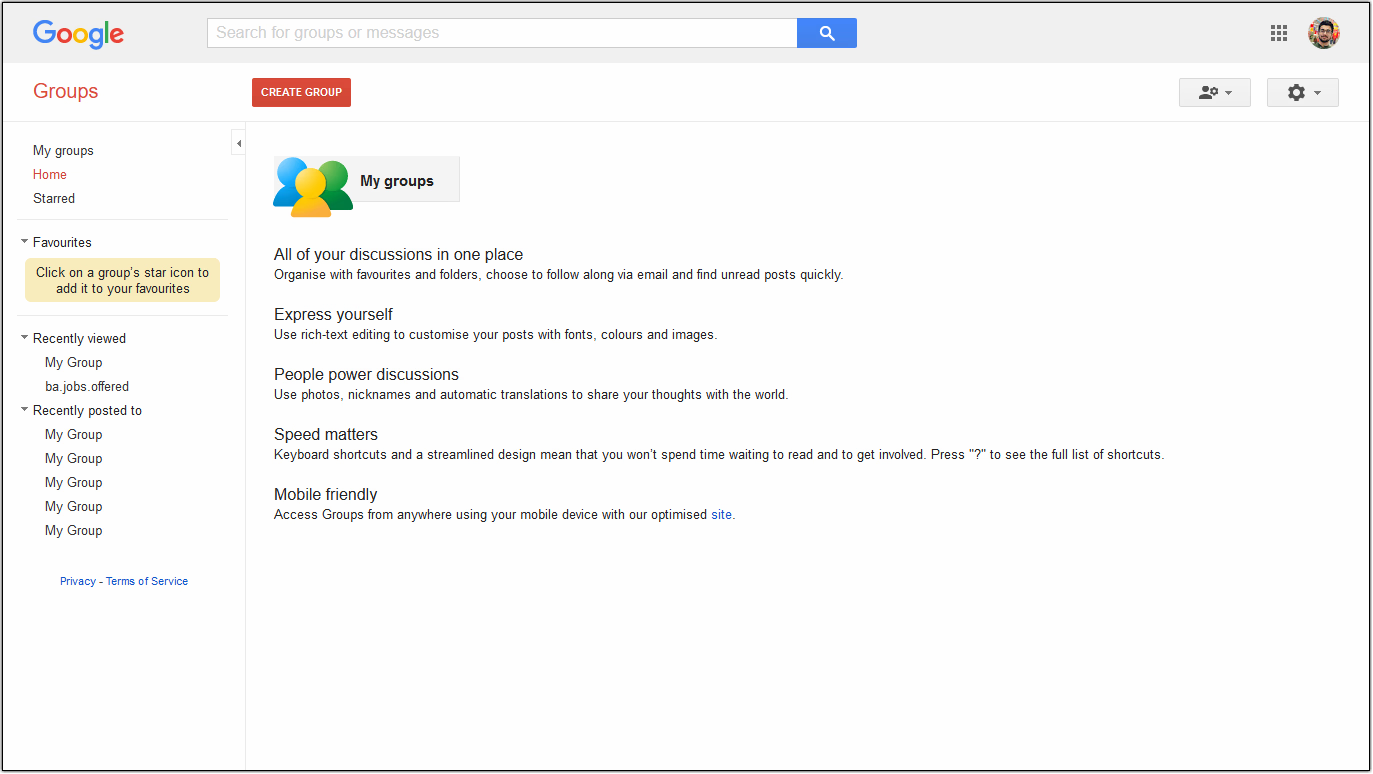
1. Unfamiliar interface (getting used to takes ages)
If you thought Google’s familiar interface is your ally, Google Groups is a whole different ball game.
It comes with a steep learning curve. On top of that, you need to keep switching between your Gmail account and the Google Groups dashboard to get anything done.
Now, what’s worse than swinging between two interfaces like a fly? A non-intuitive UI.
2. Cannot import existing emails to Google Groups
Have a large repository of valuable information in your inbox? This information can prove to be of immense value to your current workflow. Your business decisions could be shaped based on the data, inputs, and insights you receive from them.
But here’s the catch: Google Groups does not give you the option to import all that data. Starting from scratch is not necessarily a great idea always. Not in this scenario, anyway.
Recommended Reads:
The Ultimate Google Groups Guide for Businesses
Using Google Groups for Customer Support: Tips and Tools
10 Best Google Groups Alternatives for Businesses
Here’s a list of alternatives to Google Groups you must consider.
| Tool | Starting Price | G2 Rating |
| Hiver | $19 per user per month (Free plan available) | 4.6 ⭐ |
| Slack | $6.67 per user per month (Free plan available) | 4.5 ⭐ |
| Gmelius | $15 per user per month | 4.4 ⭐ |
| Help Scout | $25 per user per month | 4.4 ⭐ |
| Mailchimp | $2.32 per user per month | 4.3 ⭐ |
| Bettermode | $599 per user per month | 4.6 ⭐ |
| Freshdesk | $15 per user per month | 4.5 ⭐ |
| Drag | $10 per user per month (Free plan available) | 4.5 ⭐ |
| Zendesk | $49 per user per month | 4.4 ⭐ |
| Topicbox | $10 per month | 5.0 ⭐ |
Hiver: Best Google Groups Alternative
Most of the above-mentioned tools require you to learn a new interface. You’ll also need to constantly switch between Gmail and whichever tool you invest in. So, what’s the fix?
Look for a Gmail-based collaboration and communication tool. A tool like Hiver would fit the bill as it comes with a host of advantages.
1. Manage Shared Inboxes right within Gmail
Fun fact: Everyone already knows how to use Hiver! Reason being – anyone who uses Gmail (and that’s most of us!) can easily adapt to it. There is no significant learning curve or new behavior one has to master.
You never have to step out of your Gmail inbox to manage your shared email accounts like sales@, support@, hr@ or @finance.
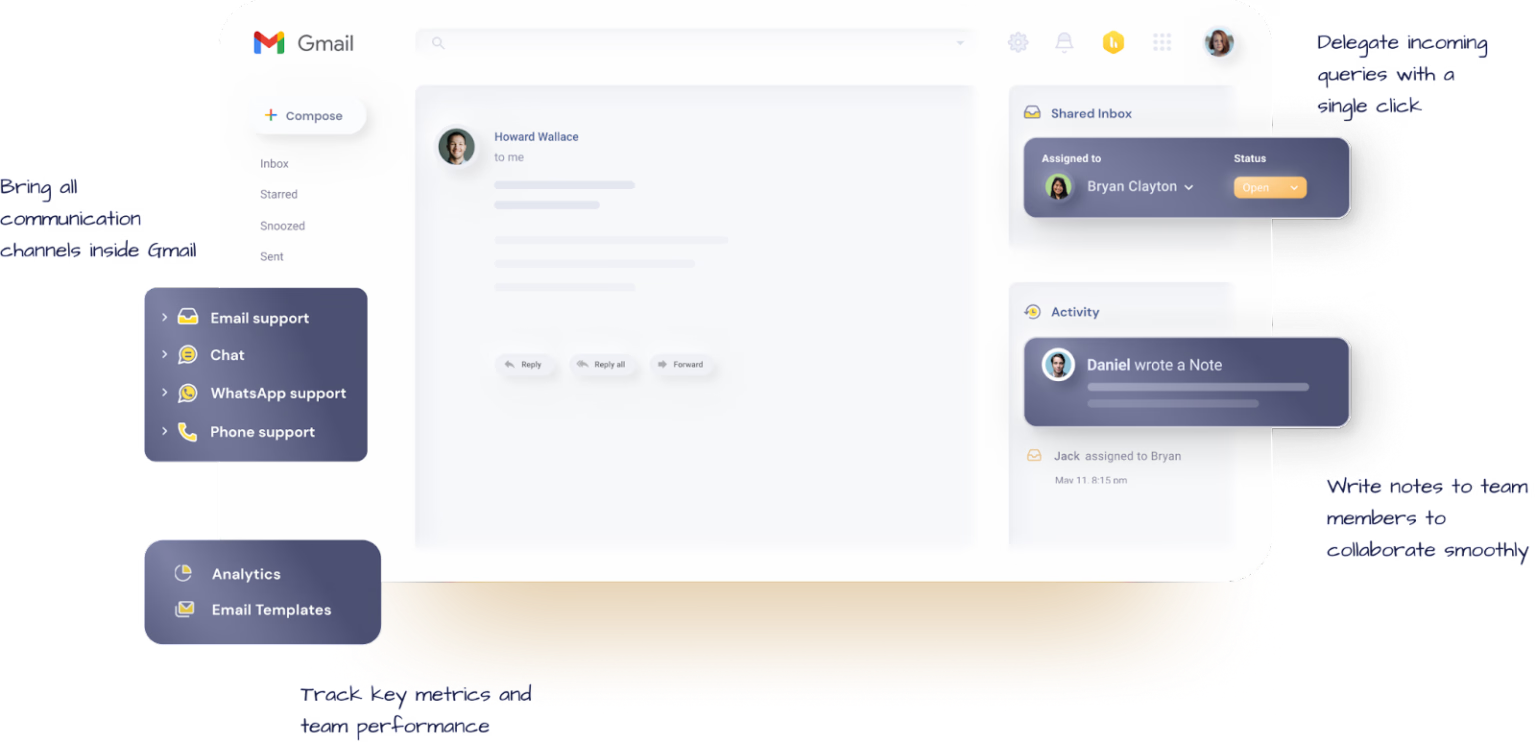
It’s just like using Gmail, except with a few cool new add-ons to its interface.
“Hiver is a very friendly tool. As it sits inside Gmail, it doesn’t give you an alien feel. Everything about it is so simple.” – Christian Sibayan, Manager – Field Operations and Systems, Oxford Business Group
2. Help your team collaborate without bottlenecks
A team is never strong if there is no open communication among the team members. Good team collaboration comes out of good communication.
One way to streamline this process is by forwarding messages to the concerned person. But, the long trail that it leaves behind is not a sight to behold. Another way is to depend on external collaboration tools like Slack – but again, that causes too many distractions.
All of that changes with Notes. Your team members will be able to discuss things privately without having to write more emails or move to external tools.

3. Keep ‘duplication of effort’ at bay
Collaborating through shared inboxes can sometimes be a tricky affair. When the team receives an email in their shared inbox, there is a chance that more than one person ends up replying to the email. It could get worse. What if both send conflicting responses to the same query?
Now you never have to worry about duplication of efforts within the team. With Collision Alerts, you get a notification when another person is replying to an email.
This is especially common in customer support or sales teams. Where agents receive a host of queries, and there is no clarity on whether there’s someone already attending to the customer.

With Collision Alerts, you can be rest assured that team members are always aware of a possible clash. It also goes a long way in saving time, effort and increasing the collective team output.
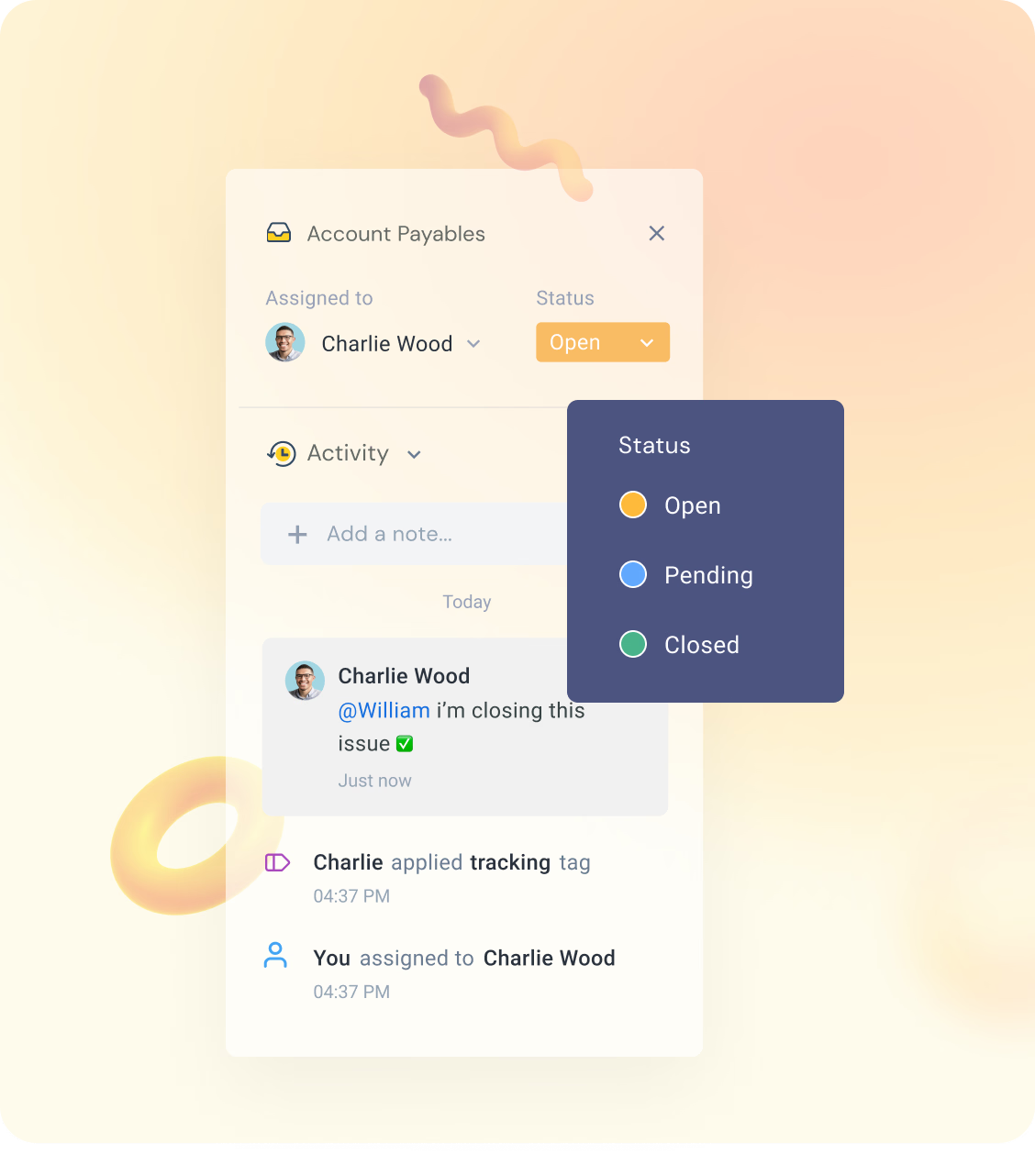
4. Better clarity on the status of emails
Gone are the days of sending reminders enquiring about the status of an email. Hiver lets teams assign the status of every email as either Open, Pending, or Closed. These statuses are more descriptive in nature and closer to reality.
Everyone inside the shared inbox can see the status of every email. With this, teams will no longer have to ask around to know the status of tasks or tickets.
5. Easy access to historical archives
Onboarding a new member is never fun. No matter how much information you plug in, there will still be many loose threads hanging. The usual way out is forwarding emails you think might be relevant to them.
Plugging them into the latest developments in the organization is mandatory. But wouldn’t it be great if you could also give them access to historical data from the company?
With Hiver, everything in the shared inbox is archived and accessible by default. All emails and resources related to the inbox are open for their consumption. If a team member joins after a conversation has happened, they can read all the previous messages to gain context and catch up.
They don’t have to consult a single person on the team for help (unless they want to).
6. Improved performance with analytics
Wouldn’t it be great if all that increase in productivity could be tracked and converted to measurable insights into a team’s performance?
With Analytics, track all key metrics for your shared inboxes. Get a better understanding of how your team is doing and work on underperforming areas accordingly.
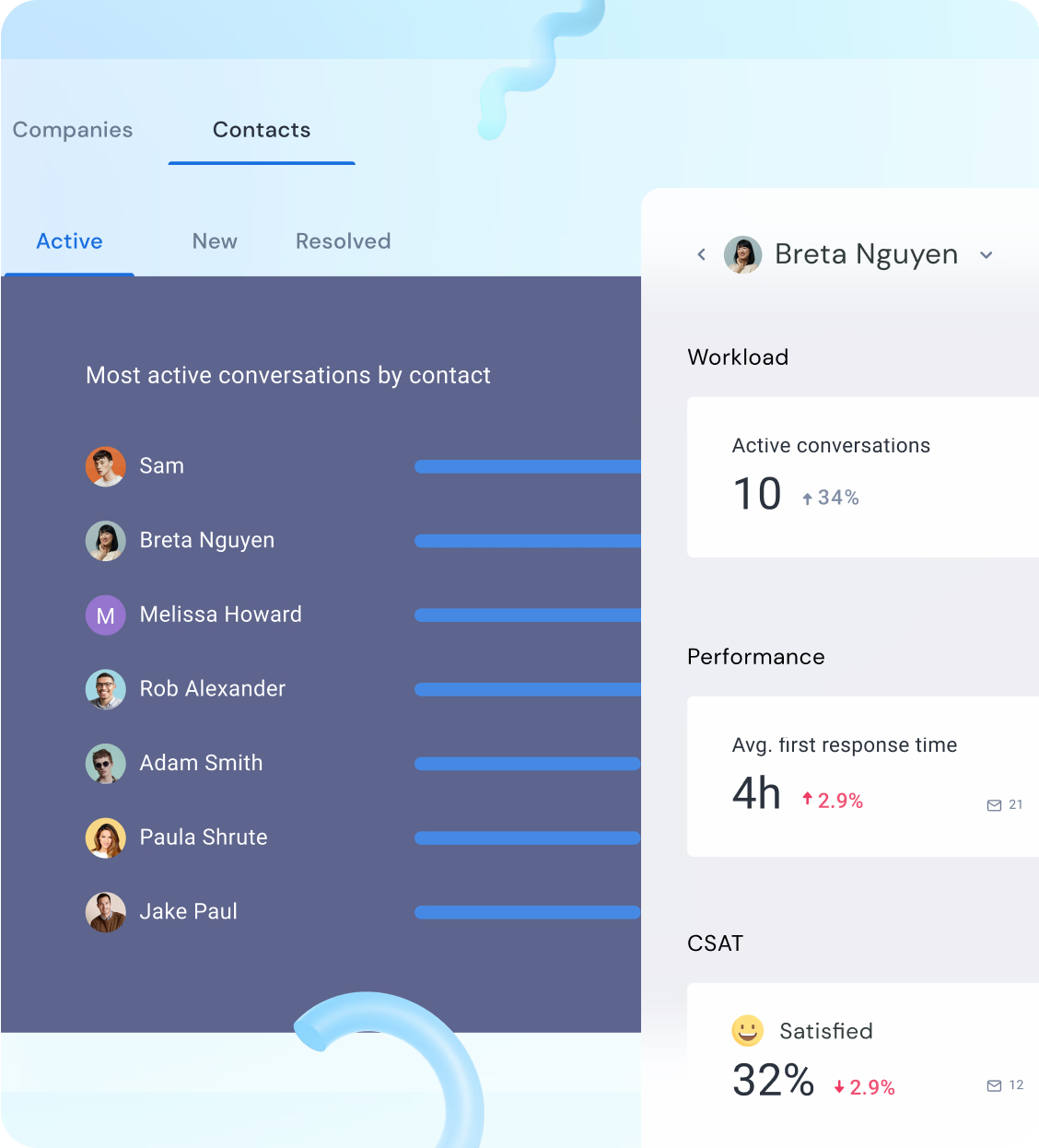
Hiver’s real-time actionable insights help you identify areas of improvement and fix them. It also gives you a breakdown of each metric at the individual team member level.
“We use Hiver for an internal IT-type help desk. It has been very useful to help monitor all the agents and stay on top of our monthly reporting to our stakeholders.” – Hiver user
7. Directly import previous mailbox history
Does migrating to a new platform mean that you lose all the valuable information from your previous inbox?
Companies usually have exhaustive valuable data in their mailboxes, a large chunk of which gets lost unless specifically mined for information. Then there is always that inopportune moment when you need certain information while dealing with clients but don’t know where to begin. With so much at stake, one can’t afford to lose all previous mailbox history.
With Hiver, that is not a concern. It lets you import all your old emails from, say, support@ into the shared inbox. You can now have all your historical information at your fingertips.
What also makes Hiver such a great alternative to Google Groups is the host of essential help desk features like templates, live chat, shared drafts, automations, and customer satisfaction surveys it comes with.
Email 2.0 is not a pipe dream
On paper, a product coming out of the Google ecosystem seems like the most reliable option for collaborating with teams. However, there is so much more room for enhancing Google Groups to its highest potential.
Hiver solves every glitch that Google Groups hasn’t been able to iron out.
Every team with more than one person handling an inbox – right from customer support, sales, and operations to human resources – deserves a robust team management system in place.
It’s 2024. Teams deserve better than having to put in a concentrated effort to collaborate and get things done.
Try out Hiver
(7-day free trial. No credit card needed)














