


The logistics and supply chain ecosystem is undergoing a seismic shift. In recent years, we’ve seen the proliferation of digital freight brokerage startups — Convoy, Uber Freight, Loadsmart, Transfix, Next, and Freightera (among many others).
At the same time, a large number of traditional firms are going the digital way — from papers and forms to dashboards and self-serve portals.
New-age digital brokers are moving much faster than their traditional counterparts. Shipments are matched with drivers in a jiffy. Traditional routes are swiftly turned into multi-movement models to optimize costs.
A key driver behind the digital transformation is super-prompt communication. What does this mean for customer support teams? They are going to receive more emails than ever — and they would also want to triage them in as little time as possible.
And that is when you need a tool that helps you stay right on top of emails. You need a solution that helps you sort and allocate emails to your team in as little time as possible.
This is where Hiver comes in.
Automate your way to efficiency
Assigning hundreds of incoming emails to your team every day is a huge task in itself. A lot of customer support teams have a dedicated person to distribute the email workload to everyone.
Hiver changes that for good. It helps you automate a major share of the email management process so that your team has more time for more critical tasks.
How are automations triggered?
The moment an email arrives, automations are triggered — based on conditions that you specify, including:
- Specific words in the subject line
- The sender’s email address
- The recipient’s email address
- The names in Cc field
You can also combine multiple conditions to trigger an automation. For example, emails coming from jason@shippingpartner.com AND containing the word “Order number” in the subject line.
What can you automate?
Allow me to show you how you can use automations to save your team’s time.
Automatically assign emails to your team
Hiver takes away the manual effort required in assigning emails to teams. There are two ways you can assign emails to your team:
- Auto assignment
- Condition-based assignment
A. Auto assignment
You can have Hiver assign all incoming emails to your team members in a round-robin fashion.
Email 1 – assigned to Jason
Email 2 – assigned to Mary
Email 3 – assigned to Nancy
Email 4 – assigned to Jason
Email 5 – assigned to Mary
Email 6 – assigned to Nancy
Email 7 – assigned to Jason
And so on.
B. Condition-based assignment
With Automations, you can specify conditions based on which emails get assigned to your teammates.
Here are a few examples:
- Every email with “UCC filing” in the subject line is automatically assigned to Stephen on your legal team
- Every email with gwen@yourcompany.com in Cc is assigned to Gwen on your team
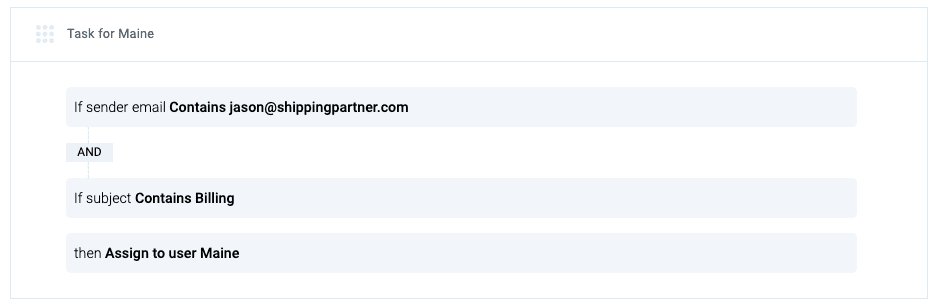
- Every email from jason@shippingpartner.com AND with “billing” in the subject line is assigned to Maine
Time savings for your team
Our research shows that every “auto assignment” saves 2 minutes of your team’s time.
Let’s assume you automate 100 email assignments every day.
Your team saves:
– 3 hours and 20 minutes every day
– 73 hours and 20 minutes a month
– 880 hours every year!
Automatically change the status of an email
When you use Hiver, you can assign a status to every email: Open, Pending, or Closed.
Open – the email is waiting to be handled
Pending – someone is working on the email
Closed – the email does not require an action
With Hiver, you’ll be able to specify conditions based on which the status of an email changes automatically.
Here are a few examples:
- Every email with “remittance” or “invoice” in the subject line is marked as Closed
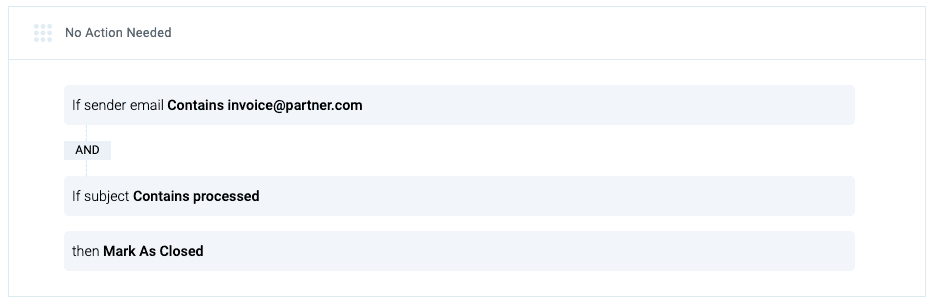
- Every email from invoice@partner.com AND “processed” in the subject line is marked as Closed
Automatically add a Tag to an email
Wondering what is Tags? When you use Hiver, you can use Tags to organize your emails into categories. For example, all your invoices can be tagged “Invoices”; all time-sensitive emails can be tagged “Urgent”.
With Hiver, you can automate a Tag to be attached to an email based on the conditions you specify.
Here are a few examples:
- Tag every email with sarah@yourcompany.com in Cc with “Sarah”
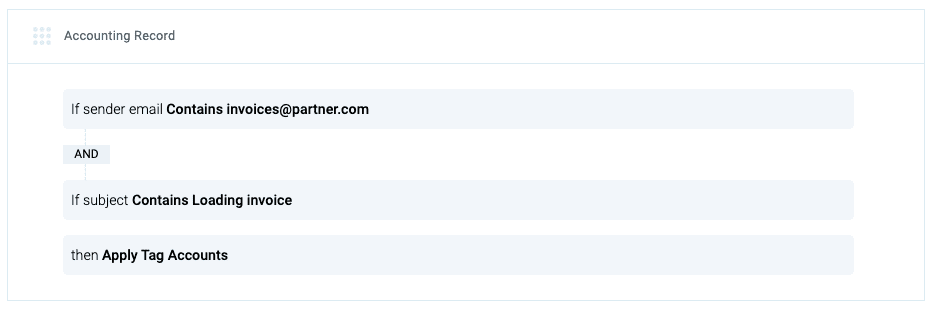
- Tag every email from invoices@partner.com AND with “Loading invoice” in the subject line as “Accounts”
Would you like to learn more about how Hiver can help save your team’s time through automations? You can always request a demo.














