


For a small business, every customer and every customer interaction counts. This is because when you’re not operating at the scale of an enterprise, even a single customer churning can put a big dent in your revenue.
Supporting customers in a timely and efficient manner, therefore, has to be the topmost priority. This is where customer service software can help.
Firstly, it empowers small businesses to stay on top of every customer query – nothing gets missed, and there’s complete visibility into pending, ongoing, and resolved conversations. Moreover, such businesses often operate with lean teams. Customer service software can help automate repetitive tasks – such as routing complaints or tagging high-priority issues – freeing up valuable time for these teams to focus on more strategic activities that drive business growth.
In this guide, I’ll walk you through the top 12 customer service software options that are well-suited for small businesses. These tools are known for their ease of use, cost-effectiveness, and features that can bring efficiency to how smaller companies support customers.
What is customer service software?
Customer service software is a tool designed to help businesses manage, organize, and respond to customer inquiries. This software often comes with one centralized platform where you can track customer interactions across various channels, such as email, social media, WhatsApp, and phone.
It helps businesses streamline customer conversations, track the status of queries, and maintain a history of all interactions. In most cases, the software works by turning customer queries into tickets which are nothing but unique identifiers. Support staff are assigned these tickets based on expertise and nature of the query.
What are the benefits of customer service software?
For small businesses, every customer counts—and so does every minute of your support team’s time. The right customer service software can streamline how you work, scale your support without growing your headcount, and help you punch above your weight. Here’s exactly how:
- Makes your team more efficient (without burning them out): When you’re running a small team, time is your most limited resource. Customer service software automates repetitive tasks like tagging, routing, and follow-ups—so your agents can focus on solving real problems, not just triaging them.
- Centralizes all conversations: One of the biggest challenges for small teams is staying organized. Customer service tools bring email, chat, phone, and social media into one unified dashboard—so your team doesn’t have to switch between tabs or miss messages.
- Makes performance measurable: Gut instinct only gets you so far. A good customer service software gives you clear metrics—like how quickly your team is responding, what’s dragging resolution times, and which issues crop up most often. With this data, you can spot trends, identify process gaps, and coach your team more effectively.
- Lets you scale without adding headcount: Instead of hiring more support agents every time volume goes up, the software helps you do more with the same team. Features like AI-suggested replies, canned responses, and self-service portals deflect common queries and keep workload manageable. Think of it as hiring an extra team member—without the payroll.
- Helps deliver consistent, high-quality support: With built-in templates, auto-responses, and internal knowledge sharing, your team can maintain a consistent tone and response quality—no matter who’s replying. This is especially useful for small businesses where agents wear multiple hats and can’t afford to start from scratch each time.
Types of customer service software for small businesses
Small businesses have plenty of options when it comes to customer service software—but the key is picking what fits your needs (and team size) bestSmall businesses have a range of customer service tools to choose from. Here are the main types and when each is most helpful:
- Helpdesk software: Best suited for growing teams with rising ticket volumes. It helps track, assign, and resolve customer issues in an organized way—ensuring nothing falls through the cracks.
- Live chat software: Perfect for real-time messaging on your website or app. These tools reduce wait times and allow your team to resolve quick queries on the spot—before the customer drops off.
- Shared inbox tools: A collaborative inbox improves collaboration, prevents duplicate replies, and ensures every query is assigned and responded to. Ideal for small teams managing support@ or info@ email addresses.
- Knowledge base software: Lets you build help centers, FAQs, and how-to articles. Customers can solve issues on their own—especially outside working hours—while your team spends less time on repetitive questions.
- CRMs: While CRMs are primarily used by sales teams, many now integrate with support tools or offer built-in service features. They give your team a complete view of a customer’s history, making it easier to offer personalized, context-rich support.
Key features small businesses should look for in customer service software
When you’re running a small team, every minute (and message) counts. The right software should help you scale great service without burning out your team. Here’s what to look for:
- Effortless team collaboration: Look for features like shared drafts, internal notes, collision detection, and clear ownership. These help your team work together on queries without stepping on each other’s toes. No more “oops, I already replied to that.”
- Smart automation for repetitive tasks: You shouldn’t have to manually assign every ticket or write the same reply 50 times a week. Features like auto-assignment rules, canned responses, and SLA alerts can shave hours off your team’s workload—and improve consistency, too.
- Unified omnichannel inbox: Your customers don’t care which channel they’re on—they just want help. Whether it’s email, chat, social media, or a contact form, your software should bring all messages into one view so your team can respond quickly and contextually.
- Tight integrations with existing tools: Support teams work best when they can see the full picture. Your customer service tool should integrate with your CRM, e-commerce platform, or billing system—so agents don’t waste time toggling between tabs or chasing down info.
- Built-in reporting and insights: You need to know what’s working and what isn’t. Tools that offer reports on response time, resolution time, CSAT, and ticket trends give you the clarity to coach your team, optimize workflows, and set realistic goals.
What to consider when choosing customer service software for your small business
There’s no shortage of customer service tools out there—but not all of them are built for small, fast-moving teams. Here’s what you really need to think about before making a call:
1. Budget that fits (without surprise add-ons)
Most small businesses operate on tight budgets, and support software should help—not hurt—that balance. Look for tools that offer transparent pricing, flexible plans, and essential features right out of the box. Free trials are great—but check what’s included after the trial ends. You shouldn’t be paying extra for basic automation or analytics.
2. Ease of use (for your whole team)
Your team shouldn’t need weeks of training to figure out how to reply to a customer. Look for tools with clean interfaces, intuitive workflows, and minimal setup. The faster your team can onboard, the quicker they can focus on helping customers.
3. Scalability / Flexibility
Today you might be handling 50 conversations a week. Next year, it could be 500. Your support software should scale with you—adding users, channels, or automation without slowing you down or requiring a full migration.
4. Helps meet your business goals
Every team’s needs are different. Some need deep automation, others want better visibility across channels. Before picking a tool, ask: Will this help us respond faster? Reduce manual work? Improve collaboration? Choose based on the outcomes that matter to your team—not just a long list of features.
Recommended reading
12 best customer service software for small businesses
Now let’s look at the top 12 customer service software for SMBs:
| Tool | Key Features | Pricing |
|---|---|---|
| Hiver | – Multi-channel support – Automation – Analytics – SLAs – Email management – 24×7 support | – Free plan – Paid plans start at $19/user/month |
| Freshdesk | – Multichannel support – Parent-child ticketing – Intelligent assignment – Customizable features | – Free plan – Growth plan starts at $14.34/user/month |
| Help Scout | – Customizable plans – Email and chat support – Knowledge base – Integrations | – Starts at $22/user/month |
| Zoho Desk | – Multichannel support – Sentiment analysis – Workflow automation – Knowledge base | – Free plan – Standard plan starts at $15.55/user/month |
| Zendesk | – Email and social media support – AI-powered automation – Robust integrations – Community forums – Knowledge base. | – Startups can get Zendesk for free for six months –Foundational Support plan starts at $19/user/month |
| Crisp | – Multi-channel customer messaging – AI chatbot – Automated responses – Real-time analytics – Co-browsing | – Free plan available – Paid plans start at $45/month |
| WotNot | – Chatbot automation – No-code bot builder – Chatbot analytics – FAQ builder | – Free plan – Starter plan from $99/month |
| HappyFox | – Multilingual support – Ticketing system – No-code self-service portal – Reporting and analytics | – Starts at $21/user/month |
| ProProfs Desk | – Shared inbox – Chatbots – Internal collaboration – Knowledge base – CSAT surveys – Mobile app | – Free trial – Essentials plan from $15/user/month |
| Customerly | – AI-powered chatbots – Centralized CRM – Marketing automation – Customer segmentation | – Free trial – Essential plan starts at $9/month |
| Gorgias | – E-commerce helpdesk – Shopify integration – AI automation – Omnichannel support | – Starter plan starts at $10/month |
| Chatwoot | – Open-source – Multi-channel support – Automation – Self-hosting – Customizable | – Free plan available – Paid plans start at $19/user/month |
1. Hiver
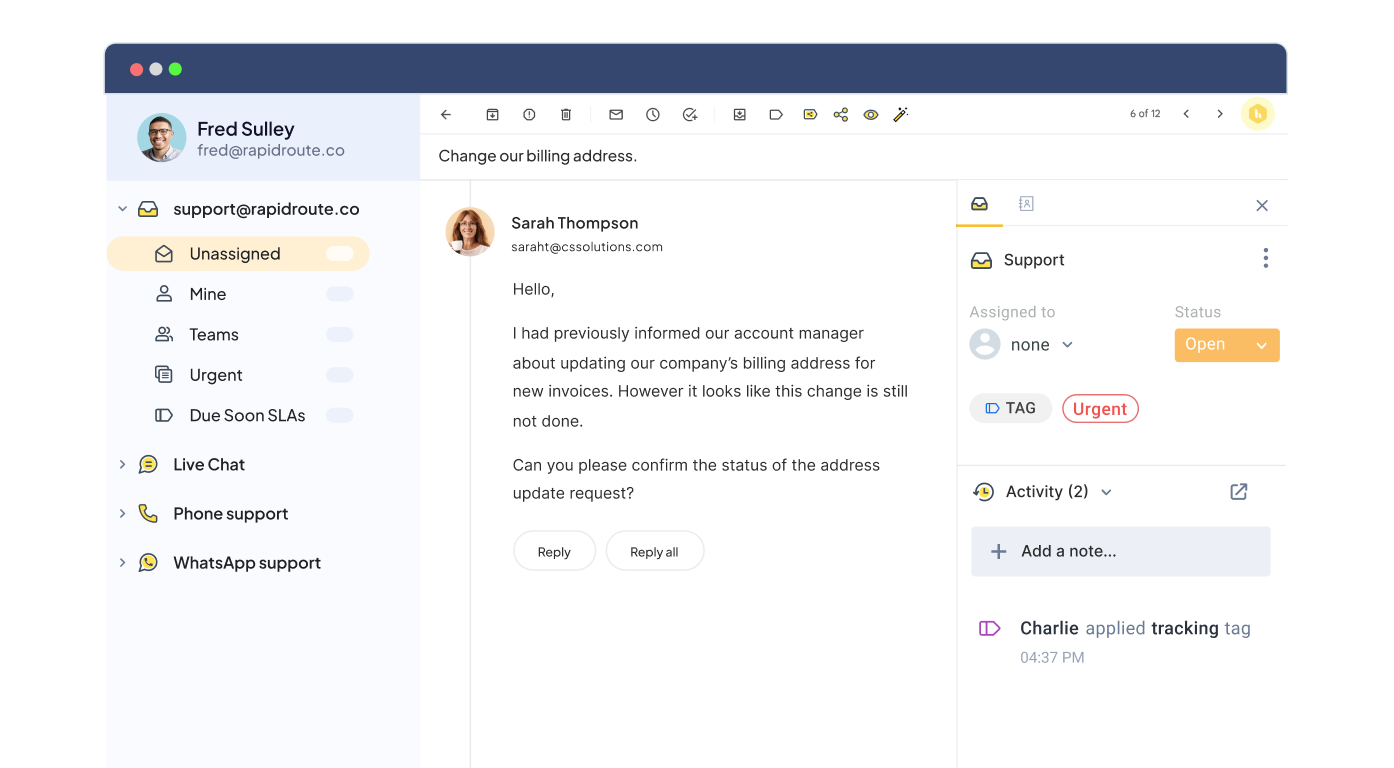
Hiver is an AI-powered customer service platform that offers good value for money. For starters, it comes with an interface that looks like your personal inbox. Just like how your inbox has a left side panel, so does Hiver – to help manage support channels such as email, chat, voice, and WhatsApp.
If you’re running a small business, you wouldn’t want to spend a lot of time and effort on migrating your team to a complicated system and figuring out how to use it.
Secondly, it comes with powerful features such as automation, analytics, SLAs, and CSAT surveys.
What’s also worth highlighting are Hiver’s AI co-pilot capabilities – which are way more reasonably priced compared to other tools like Intercom. It’s like having a smart personal assistant that can instantly search through your knowledge base and offer the most accurate responses to customer queries. What makes the copilot even more handy is its ability to pull data from third-party tools integrated with Hiver. Need customer order details from Salesforce or NetSuite? Not a problem. The copilot can fetch everything you need without needing to switch tabs or apps.
Features you’ll love:
- Assign queries to the right team members in just two clicks. Drive ownership and accountability across your support team.
- Features like live chat, voice call support, and WhatsApp messaging allow you to offer real-time support to your customers.
- Set up automations to take care of routine tasks such as tagging and routing queries. This will allow your team to focus on more critical and strategic tasks.
- If you don’t have the bandwidth to answer every customer query manually, you can set up a knowledge base using Hiver. Create a repository of FAQs, troubleshooting guides, and other helpful articles that empower customers to resolve issues without waiting for help.
- Loop in colleagues into customer conversations using Hiver’s Email Notes. You can also share response drafts for your supervisor or manager to review before sending it to customers.
- Track key such as response and resolution time, volume of tickets that are pending, resolved and work in progress, and customer satisfaction scores. You can also create custom reports based on what matters to you.
- Integrate your support workflows with 100+ apps including Salesforce, Asana, Jira, Slack, and more.
| Pros | Cons |
|---|---|
One inbox for everything: Hiver lets you manage your work emails and customer queries from one central inbox. There’s no need for constant tool-switching. | No social channels supported: Hiver doesn’t support any social channels like Facebook, Twitter, or Instagram. |
| 24×7 support across all plans: Companies using Hiver get access to 24×7 priority support irrespective of their size. | Limited customization options: Although easy to use, Hiver lacks deep workflow customization, making it less flexible for businesses with complex support processes. |
Pricing: Hiver offers a 7-day free trial. After that, you can either opt for Hiver’s ‘Forever Free’ plan or one of the paid plans, depending on your specific use case.
Hiver’s forever-free plan is an ideal choice for small businesses operating on a tight budget. The plan includes important customer support channels such as a shared inbox, chat, phone and WhatsApp. It also comes with email templates (for providing faster responses), shared drafts and internal notes (for collaborating on tickets), a knowledge base for self-service, and Slack integration.
– Try the forever-free plan
– Take a demo
– Try out an interactive tour
Hiver’s paid plans come with more advanced capabilities and start from $19 per user per month.
My unbiased take: If you’ve ever struggled with clunky, over-complicated helpdesk software, Hiver ought to be a breath of fresh air. There’s no need to switch between tabs or deal with confusing interfaces – it’s as easy as using your inbox. The tool’s free plan also packs a punch! One caveat though: if you’re looking to deliver support across social media channels, Hiver may not be the right fit for you.
2. Freshdesk
Freshdesk is one of the most popular customer service software in the market– and for good reason. It’s known for its simple interface and ease of use. Everyone in your support team can keep track of incoming support tickets and their status, and stay in the know about who’s handling which ticket. Freshdesk offers multichannel customer support across channels like email, phone, chat, and social media in 26 distinct dialects. It also comes with self-service features like a knowledge base and support forums.
The platform offers a free plan tailored to the needs of small businesses and startups, allowing them to manage customer support operations without incurring initial costs. As businesses scale, they have the option to upgrade to higher plans, without incurring a lot of expenses.

Features you’ll love:
- With its parent-child ticketing feature, you can resolve complex customer issues by splitting them into minor tickets.
- Auto-assign tickets to customer service staff based on their current workload or skill.
- Curate reports to understand the performance of agents against key metrics like first response time and average resolution time.
- Freddy, Freshdesk’s AI co-pilot, helps improve agent productivity and support quality by offering conversation summaries and response suggestions.
Pricing: Freshdesk offers a free 21-day trial with all its features. It has a free starter pack for unlimited agents but with limited features. Its ‘Growth’ plans start at $14.34 per agent per month.
My unbiased take: Freshdesk is one of the best “bang for your buck” software on this list. It’s also a great choice because it can scale well – you can start with a basic free version and scale to the enterprise plan if need be. The downside is that with so many features and configurations, small businesses can find it overwhelming to use.
Recommended reading
A Freshdesk Alternative that doesn’t force you to leave your inbox
3. Help Scout
Help Scout is great for growing customer support teams looking to offer email, chat and self-service support from a centralized helpdesk platform. It comes with a rich feature set, including ticket routing and prioritization, task automation, agent performance reports, collision detection, and response templates. It even lets you customize your dashboard with the tools and workflows your team needs to deliver excellent support.
Help Scout provides a startup program that offers eligible startups six months of free access to all its features.

Features you’ll love:
- Help Scout’s Fair Billing Policy allows businesses to only pay for what they use, giving them the flexibility to grow without excessive financial strain.
- Help Scout also includes a knowledge base with a 24×7 AI assistant for instant responses to customer queries.
- Help Scout’s embeddable widget, Beacon, offers customers instant access to relevant help articles, live chat, and their support history.
| Pros | Cons |
|---|---|
| Easy to use: Its intuitive design allows teams to quickly start managing customer queries without extensive training. | Limited multi-channel support: It’s primarily focused on email, chat and self-service, lacking built-in support for social media and messaging channels. |
| Straightforward pricing: Help Scout’s pricing is much more straightforward than that of many other help desk tools in the market. All its plans allow unlimited users. | Basic analytics and reporting: The platform’s analytics tools are less comprehensive compared to other options. |
Pricing: Help Scout offers a ‘Free’ plan for up to 50 contacts per month with unlimited users. Its ‘Standard’ plan is priced at $50 per month for 100 contacts and unlimited users.
My unbiased take: Help Scout is all about keeping things simple! And it nails that for email and chat support. It’s easy to pick up and use. But if you’re looking for fancy reports or want to be everywhere (social media, messaging apps and the like), it might not be enough. A great choice if you value doing a few things well over doing everything okay.
Recommended reading
4. Zoho Desk
Another popular customer support software that is ideal for small businesses is Zoho Desk. It comes with essential helpdesk features like ticket tracking, task automation, and performance reporting functionalities that streamline your team’s support processes.
Zoho Desk lets you deliver multichannel support via email, social media, live chat, web forms, and telephone in multiple languages.

Features you’ll love:
- It gives you deep context into every incoming request based on previous customer interactions.
- It helps you automate workflows, offer multichannel support, and track important support performance metrics. It even comes with a knowledge base feature to let your customers self-serve.
- Its AI assistant, Zia, provides smart replies to common customer queries allowing agents to attend to more critical issues at hand.
| Pros | Cons |
|---|---|
| Cost-effective: Its reasonable pricing compared to other helpdesk solutions makes it affordable for small businesses. | Potentially overwhelming interface: Its extensive set of features can be overwhelming for new users, requiring a steep learning curve. |
| Omnichannel support: It consolidates support requests from email, live chat, phone, social media, and self-service portals into a single platform. | Customization limitations in lower tiers: The free plan has limitations on customization options. |
Pricing: Zoho Desk offers a forever ‘Free’ plan for three users with limited features. Its ‘Standard’ plan is priced at $14 per agent per month.
My unbiased take: Zoho Desk is a solid, all-around helpdesk option for small businesses, even more so if you already have other Zoho tools in your tech stack. It’s got a great set of features, and its price is reasonable. The omnichannel support functionality is a big plus. Its UI, however, can be slightly overwhelming.
5. Crisp
Crisp is an AI-powered customer messaging platform lets you handle customer conversations across email, live chat, social media, or even voice calls – from one single platform. It does this through powerful third-party integrations.
One of Crisp’s standout features is its AI chatbot, which learns from past conversations to provide instant responses. Another cool feature is its ability to transcribe audio messages into text, so that nothing gets lost in translation.
From what users say, it’s generally considered pretty easy to set up and works well across different channels.

Features you’ll love:
- Crisp’s Magic Map feature provides a live, real-time map displaying all active visitors on your website. You get insights into user behavior, allowing you to engage with them at the right time.
- The tool allows you to see what customers are typing before they hit send. This makes it easier to deliver proactive and faster responses.
- It offers co-browsing and screen-sharing capabilities, allowing support agents to assist customers in real-time.
| Pros | Cons |
|---|---|
| All-in-one platform and affordability: Crisp combines chat, email, CRM, and marketing tools in a single platform at a relatively affordable price. | Basic CRM functionality: Although Crisp offers CRM functionalities, they are not as extensive as dedicated CRM systems. |
| Easy to use and set up: Crisp’s seamless interface and quick setup make it perfect for small teams with limited technical expertise. | Complexity and customization learning curve: Users report that creating in-depth campaigns or complex workflows can be confusing and may require some technical aptitude. |
Pricing: Crisp offers a free plan with 2 seats and a few essential features. Its ‘Mini’ plan, tailored to small businesses, starts at $45 and includes 4 seats.
My unbiased take: Crisp’s all-in-one approach is tempting. Combining chat, email, CRM, and marketing in one platform can simplify things. Personally, I think its greatest strength is also its greatest weakness–with so much happening, users can quickly feel overwhelmed.
6. WotNot
WotNot automates your customer interactions at scale using chatbots. With Wotnot, you can solve business challenges such as getting more leads, booking more appointments, and scaling your customer support with cutting-edge chatbots.
What’s interesting about Wotnot is that you can use it to provide a personalized support experience for both present and prospective customers–a great plus for small businesses with a strong online presence. Whether your business is in real estate, insurance or healthcare, the chatbots you deploy through Wotnot can provide 24/7 support to users.
Moreover, the company offers a done-for-you service wherein their team of experienced conversation design experts create a conversation flow that matches the needs of your business and regularly optimize this flow.

Features you’ll love:
- No-code bot builder enables you to build bots instantly with a simple drag-and-drop interface.
- Its chatbot analytics offer a bird’s eye view of the bot’s performance through KPIs such as top countries, top intents, average conversation time, and more.
- Ability to proactively reach out to prospects with Outbound Bots.
- Turns repetitive Q&As into a conversational experience with its FAQ builder.
| Pros | Cons |
|---|---|
| Ease of use: The interface is accessible to non-technical users. | Pricing concerns: The pricing structure can be expensive, especially for small businesses or startups. |
| Lead generation and customer support automation: Helps in lead generation, scaling customer support, and improving customer engagement. | No other channels supported: Unlike other tools on this list that offer multi-channel support, WotNot mainly focuses on chatbots. This may not be ideal for businesses that need to manage customer interactions across multiple channels. |
Pricing: Wotnot offers a free plan that includes 100 chats and 500 AI credits. Its ‘Starter’ plan is priced from $99 per month.
My unbiased take: WotNot automates customer interactions at scale with chatbots. If you want to automate your support operations, this might be the tool for you. Bear in mind though, that this focus on AI chatbots means less emphasis on real human-led support. I personally still want to deal with human support agents when I reach out to a company.
Recommended reading
7. HappyFox
HappyFox is an affordable, user-friendly, yet feature-rich support solution for small businesses. It offers all the functionalities of a robust multi-channel ticketing system (email, live chat, phone, and a self-service knowledge base) but is much more competitively priced than many helpdesk solutions with similar feature sets.
The tool also comes with a no-code support portal builder that helps you create a branded and SEO-optimized self-service portal without technical expertise.
Its ‘Starter’ plan, designed for SMBs, includes unlimited agents and 500 chats per month.

Features you’ll love:
- It enables support teams to offer assistant in over 35 languages.
- It has a multitude of third-party integrations.
- Its robust reporting and analytics capabilities allow teams to track and measure support performance.
| Pros | Cons |
|---|---|
| Customization capabilities: HappyFox is highly customizable. You can tailor the tool with your logo, brand colors, links, and content layouts that suit your content structure. | Clunky interface: Some users find HappyFox’s interface dated, especially compared to some of the more modern platforms in the market. |
| Powerful automation: Users rate the platform’s automation capabilities, including ticket routing, canned responses, and workflow automation, quite highly. | Steep learning curve: Some of its advanced features, including workflow automation and customizations, can be difficult to set up. |
Pricing: HappyFox’s ‘Basic’ plan is priced at $21 per agent per month, tailored for small teams with up to 5 agents.
My unbiased take: If you’re looking for dependable customer service software, HappyFox might just be your answer. Honestly speaking, it isn’t the flashiest tool in the market. Neither will it knock your socks off with cutting-edge AI. But sometimes, all you need is a solid tool that does its job–and HappyFox delivers! It offers a reliable help desk experience with all the features you need to keep customers (and your team) happy. If you can get past the fact that it looks a tad old-school, it could be a really good fit!
8. ProProfs Help Desk
ProProfs Help Desk is popular among many small businesses due to its affordability, ease of use, and setup. It provides a range of regular helpdesk features, including ticketing, live chat, knowledge base, and reporting tools to efficiently manage customer inquiries and deliver excellent support.
It also seamlessly integrates with other ProProfs tools, helping businesses consolidate their tech stack.

Features you’ll love:
- The tool lets you manage multiple team inboxes such as support@, info@, returns@, etc., from one place.
- Its ready-to-use chatbot templates (for lead generation, appointment bookings, and customer service) help you create your own chatbot in minutes.
- It comes with collaboration features like internal notes and task collision alerts.
- You can track help desk tickets and offer reliable support on the move with its dedicated mobile app.
| Pros | Cons |
|---|---|
| Affordable pricing: The tool offers a forever free plan, and even its paid plans are more affordable than several of its competitors. | Limited third-party integrations: Many users find that ProProfs’ lack of deep integrations with popular business tools hinders their workflows. |
| Effective team structuring: ProProfs allows you to create a structured hierarchy and categorize team members according to their distinct roles (Admin, Manager, Staff, and Watcher). | Basic reporting capabilities: The tool’s reporting features are less robust compared to other helpdesks. |
Pricing: ProProfs Help Desk offers a ‘Free’ plan with limited features. Its ‘Essentials’ plan starts at $15 per user per month.
My unbiased take: If you just need a basic solution that is super easy to get up and running, and isn’t too heavy on your pocket, ProProfs Desk is a good bet. Just a heads-up: if you want software that grows with you as you scale, this probably isn’t the tool for you.
Recommended reading
10 Best FREE Helpdesk Ticketing Software (An Unbiased Guide)
9. Customerly
Customerly aims to revolutionize small business customer service with its AI-powered dashboard. Using advanced GPT technology, Customerly’s AI chatbots handle customer interactions end-to-end, avoiding the repetitive loops of traditional systems.
In addition, Customerly also includes a centralized CRM. Businesses can consolidate data to better understand their customers, use smart segmentation to reach their target audience more effectively, automate communication, and collect real-time feedback.

Features you’ll love:
- Its GPT-powered chatbots help with instant query resolutions.
- Customerly’s Aura AI learns and adapts with every knowledge base update or new canned response.
- It converts support interactions into helpful articles.
- Its AI Missions feature automates complex tasks like gathering pre-demo details and refund processing.
| Pros | Cons |
|---|---|
| AI-powered support automation: Its AI bot, Aura, is touted to handle over 50% of support inquiries, which is especially helpful for lean teams. | Over-reliance on AI: Given that the tool heavily depends on AI for support, businesses seeking a more human-centric approach may find it lacking in personal touch. |
| Unified platform: The platform includes a wide array of features like help desk, knowledge base, CRM, and marketing automation in one place. | Customization limitations: The tool offers limited customization options for workflows, chatbots, and branding. |
Pricing: Customerly provides a 14-day free trial for users to explore all features. Its ‘Essential’ plan, priced at $9 per month, includes 3 teammates and 1,000 interactions.
My unbiased take: Customerly lets you offload a ton of your customer support to their GPT-powered chatbots and has them handle everything from start to finish. If that appeals to you, this tool might be worth a look. But if, like me, you’re skeptical about AI handling your customers with care or about creating super-personalized experiences for them, Customerly might not be the best fit. It’s betting big on AI, and that’s either a pro or a con, depending on your needs and perspective.
10. Gorgias
Run a small e-commerce business? Then, you might want to check out Gorgias. This AI-powered customer service software is designed specifically for online businesses and integrates with e-commerce platforms like Shopify, BigCommerce, and Magento.
Your agents get to access customer data, process refunds, and manage orders directly from their help desk. Moreover, it lets you serve your customers across major channels, including email, live chat, social media, SMS, and voice, from a single dashboard.

Features you’ll love:
- It allows you to manage orders, refunds, and customer data directly from Shopify, BigCommerce, and Magento.
- Tracks sales generated through customer support interactions, helping businesses measure the direct impact of their support team.
- Its conversational AI automates replies on product recommendations and upsells.
| Pros | Cons |
|---|---|
| Seamless e-commerce integration: Directly connects with Shopify, BigCommerce, and Magento, enabling order management within the helpdesk. | Limited to e-commerce: Best suited for online stores, making it less ideal for general customer support teams. |
| Strong automation and AI features: Automates repetitive tasks, suggests responses, and categorizes tickets to improve efficiency. | Pricing can add up: Pricing is per ticket beyond the monthly limit, which may get expensive for high-volume support teams. |
Pricing: Gorgias’ ‘Starter’ plan is priced at $10 per month, which includes 3 customer support agents and 50 tickets per month. Additional tickets are priced at $0.40 each.
My unbiased take: Gorgias is a no-brainer if you’re running an e-commerce store. The tight integration withShopify, BigCommerce, and Magento is a game-changer for managing support requests, customer orders and data. And the coolest thing is that it helps you turn customer support into a revenue stream. But if you’re not in the e-commerce business, consider the other options on this list.
11. Chatwoot
Chatwoot‘s open-source customer engagement platform lets you connect with your customers across email, live chat, Facebook, X, WhatsApp, Instagram, and more. It has a customizable live chat widget that you can tweak to your brand’s look and feel. Plus, because it’s open source, you have the option to host it yourself and tailor it to your exact needs. In addition to helping you save on costs, its open-source nature also gives you considerable control over your customer data–a huge plus for privacy and regulatory compliance.
Many users love Chatwoot because it offers a great bang for the buck compared to other pricier solutions in the market. It’s an excellent option for small businesses that want a powerful helpdesk without breaking their budget.

Features you’ll love:
- Its pre-chat forms let you collect customer details before conversations for more personalized support.
- The tool keeps a record of conversation history across channels, ensuring context is never lost.
- It offers automation rules to streamline repetitive tasks and canned responses to ensure you don’t have to manually type responses every single time.
- It supports multiple languages, making it ideal for businesses that have a customer base across multiple countries.
| Pros | Cons |
|---|---|
| Open-source and self-hostable: Gives businesses full control over data, customization, and compliance. | Limited third-party integrations: Fewer integrations compared to bigger support platforms. |
| Affordable and feature-rich: Offers essential customer engagement tools at a lower price than many competitors. | Requires technical knowledge: Self-hosting and customization may require developer expertise. |
Pricing: Chatwoot offers a free ‘Hacker’ plan for up to 2 agents, including website live chat. Its ‘Startups’ plan starts at $19 per agent per month and gives you access to additional channels like email, Facebook, Instagram, and WhatsApp.
My unbiased take: If you’re a tech-savvy small business owner, you may be drawn to Chatwoot for its open-source coding and customizability. It is priced well and is packed with some really great features. The only caveat is that you’ve got to have the technical skills to set it up (or the budget to hire someone who does)!
Recommended reading
12. Zendesk
Zendesk is one of the pioneers in the helpdesk space, but its customer service solution is costlier and more complex to set up than other software in its category.
Its ‘Support Team’ plan, designed for small teams, includes email, X (formerly Twitter), and Facebook support. However, if you’re looking to provide support across other channels like phone and chat, you’ll have to opt for its higher-tier paid plans, which can get quite expensive in the long run.
The tool includes easy ticket assignment and tracking features, powerful automation, SLA management, community forums, and a knowledge base.

Features you’ll love:
- Its AI-powered automation can help you improve your team’s efficiency and provide faster and better customer service. It offers automated ticket routing, response suggestions, predictive analytics, and smart article recommendations.
- Zendesk integrates well with your existing tech stack thus improving the performance of tools you’re already using.
- The Zendesk for Startups plan provides its users a free 6-month credit. It also offers them access to a community of customer experience leaders and exclusive resources.
| Pros | Cons |
|---|---|
| Omnichannel support and comprehensive feature set: Provides a unified platform for managing customer interactions across multiple channels (email, chat, social) with robust features. | Pricing can escalate quickly: While affordable at the entry-level, costs can increase significantly as businesses scale and require advanced features or more agents. |
| Extensive integrations: With 1,200+ integrations, Zendesk makes it easy for SMBs to connect with their existing systems and tools. | Overwhelming for basic needs: For SMBs with very basic customer support requirements, Zendesk’s extensive feature set can feel overwhelming and unnecessary. |
Pricing: Eligible startups can get Zendesk for free for six months. For SMBs, the Support Team plan is priced at $19 per agent per month.
My unbiased take: Okay, Zendesk is what some of the biggest companies use. But should you use it? Honestly, if you’re just starting out and need something simple, Zendesk is probably overkill. The best software is one you can utilize effectively. So, you should consider Zendesk only if its wide suite of tools is suitable for your business.
Recommended reading
Frequently Asked Questions (FAQs)
Here are some frequently asked questions about customer service software for small businesses.
1. Why do small businesses need customer service software?
Small businesses need customer service software to maintain a high level of service quality without stretching budgets. When a business is operating at a smaller scale, it’s important to invest in software that can take up manual, repetitive tasks and at the same time, empower the team to make every customer interaction count. That’s what customer service software can do. Simply put, it helps handle customer inquiries at scale, keep track of what needs to be prioritized, and improve key customer satisfaction metrics.
2. Can customer service software integrate with other business tools?
Yes, most customer service software can integrate with other business tools like CRM systems, marketing software, and sales platforms. Such integrations ensure that tool switching is minimal and all customer context is available at one single place.
3. Is customer service software cost-effective for small businesses?
Yes, there are customer service software that can be cost-effective solutions for small businesses. You need to look for software that offers free plans or ones that offer the most value for money.
4. Can small businesses customize customer service software to fit their needs?
Many customer service solutions offer customization options to fit the specific needs of small businesses. This includes custom workflows, personalized communication templates, and configurable roles and permissions to align with the business’s unique processes.
5. How easy is it to implement customer service software in a small business?
Modern customer service solutions often come with user-friendly interfaces and helpful onboarding support, making it pretty easy to get started. But not all solutions are that straightforward. Some can be quite complex and might need considerable technical know-how for setup and integration.
6. How does customer service software help small businesses understand their customers better?
Customer service software can gather and analyze customer interaction history, revealing their preferences and behaviors. As a result, small businesses can personalize their services and products to customers’ needs, creating deeper connections and tailored experiences.
The final verdict: Which customer service software is best suited for your small business?
So, I’ve laid out some of the best small business helpdesk options before you. Some come with shiny interfaces, some hefty AI promises, and some probably even have features you don’t fully understand. But at the end of the day, what matters is whether or not the customer service tool you choose is able to meet your business objectives, suit your budget, and, most importantly, serve your customers well.
If I were you, I’d thoroughly research your processes, team and customers’ needs before jumping onto the helpdesk bandwagon purely based on features. Ask the tough questions. Will investing in a particular customer service tool objectively save you time and money? Will it really improve customer satisfaction? Or will it only add another layer of complexity and frustration? Evaluate, choose wisely, and remember– the human touch is still your business’ most powerful support system.














