


You send out surveys. You ask for NPS scores. You have a live chat window with a CSAT prompt. But what happens next?
Most companies collect feedback — few know how to act on it. And that’s the real difference between a support team that just “checks the box” and one that builds loyalty, drives retention, and shapes better product decisions.
In this guide, we’ll go beyond just tools and tactics. You’ll learn:
- The most effective ways to collect actionable customer feedback
- How to actually use that feedback — across product, support, and engineering teams
- Mistakes to avoid when setting up your feedback loops
Whether you’re just starting out or looking to revamp your existing process, this guide will help you get strategic — and impactful — with customer feedback.
What is Customer Feedback?
Customer feedback is any insight — direct or indirect — that tells you how your customers feel about your product, service, or overall experience. It could come in the form of a CSAT rating, a comment on live chat, an offhand remark during a call, or even silence after a key feature release.
But here’s the thing: feedback isn’t just about fixing what’s broken. It’s about understanding how customers think, what they expect, and where your team can add more value.
When collected intentionally and acted on consistently, customer feedback becomes a company-wide advantage — helping support teams improve processes, product teams prioritize the right features, and marketing teams refine messaging that truly resonates.
Why is Collecting Customer Feedback Important?
You can’t fix what you don’t know is broken. And you definitely can’t double down on what’s working if no one tells you it is.
Customer feedback is how you cut through internal assumptions and build based on what real users actually experience. It helps you move from reactive fixes to proactive improvements — across product, support, and customer experience.
Here’s how high-quality feedback can shape your business:
⚒️ Spot and fix product issues: Whether it’s a bug, confusing UX flow, or a missing feature, feedback helps you catch problems before they escalate. And fix what actually frustrates users, not what you think is broken.
? Build product features people actually want: Your roadmap shouldn’t be driven by gut feel or what competitors are shipping. Use feedback to identify the friction points that matter most to your users — and build from there.
⏱️ Reduce repetitive support queries: If customers keep giving poor CSAT scores or complain about the same help article, that’s a signal. Feedback shows you where your content, workflows, or training need reinforcement.?
Retain unsatisfied customers: Negative ratings or sharp comments are early warning signs. Reach out before churn happens. Often, a thoughtful follow-up is all it takes to turn a detractor into a loyalist.
How to Collect Customer Feedback? 7 Effective Ways
There’s no one-size-fits-all method for collecting customer feedback. It all depends on what you’re trying to learn — and where your customers are most likely to engage.
That said, the smartest teams use a mix of direct and indirect channels. You don’t just want answers to the questions you ask — you want to capture the signals your customers are already giving you. That’s how you build a full picture of what’s working, what’s not, and what needs your attention next.
1. Direct channels
These are channels where you proactively ask customers for feedback — usually through structured formats like surveys, emails, or chat prompts.
? Surveys
Surveys are the most straightforward way to ask customers what they think. Whether it’s a post-purchase CSAT survey, a quarterly NPS check-in, or a product feedback form, they’re useful when you want quantitative insights at scale.
But here’s the catch: longer surveys don’t mean better insights. The more questions you ask, the more rushed and disengaged the responses get. According to SurveyMonkey, each extra question reduces the time and attention a user spends — which means lower quality data.
| No if questions | Average seconds spent per question by a participant | Average survey completion time |
|---|---|---|
| 1 | 75 seconds | 1 minute & 5 seconds |
| 2 | 40 seconds | 2 minutes |
| 3-10 | 30 seconds | 2-5 minutes |
| 11-25 | 25 seconds | 5-7 minutes |
| 16-25 | 21 seconds | 7-9 minutes |
| 26-30 | 19 seconds | 9-10 minutes |
What we’ve seen work best:
?️Time your surveys right — ideally under 5 questions.
❓Ask a maximum of 1 open-ended question if you want qualitative context.
⌛ Time your surveys right — right after a support interaction or onboarding is when users are most receptive.
? A/B test subject lines and intro copy to improve response rates.
? In-app feedback
In-app prompts catch users in the moment — while they’re actively engaging with your product. It’s one of the most effective ways to get specific, contextual feedback without interrupting the experience.
For example, just after someone uses a new feature, ask: “Was this easy to use?” or “What would make this better?”

Or if a user abandons a process midway (e.g. setup, payment), trigger a prompt like:
“What made you drop off?” or “Was something confusing here?”
This feedback helps you improve UX, onboarding, and product flows in real time.
Email is ideal when you’re looking for more thoughtful feedback — especially after key milestones like onboarding, a purchase, or a support resolution. Since customers are no longer in the middle of a task, they have the headspace to reflect and give more descriptive responses.
Use it when you want to dig deeper into the why behind a customer’s sentiment.
For example, after a customer has used your product for a month, you can ask: “What’s working well for you? What’s not?” It gives them space to reflect and share context that a multiple-choice survey might miss.
That said, avoid long-winded asks. Keep your message short, make it clear what kind of feedback you’re looking for, and explain why their input matters.
An example: a few days after a purchase, send a quick email with:
- A simple scale-based question like:
“On a scale of 1 to 5, how smooth was your checkout experience?” - A short follow-up question:
“Is there anything that could’ve made it easier?”
These kinds of targeted asks help you improve specific moments in the customer journey — not just collect feel-good metrics.

? Chat
Live chat is one of the most effective — and frictionless — channels to ask for feedback. The customer is already engaged, the context is fresh, and the interaction is still top of mind.
That’s what makes post-chat feedback prompts so powerful. A simple thumbs up/down, star rating, or one-line comment right after a conversation can offer real-time insight into how your support team is doing.
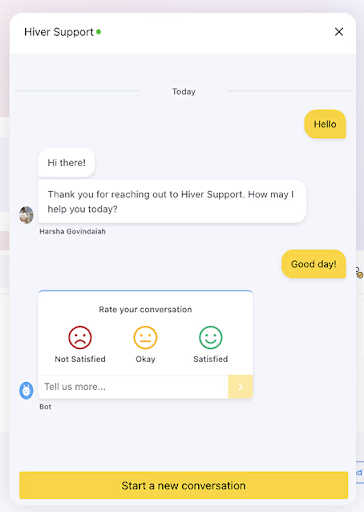
But timing matters. The feedback prompt should only show up after the issue has been resolved. Asking too early — or while the conversation is still ongoing — can feel intrusive or rushed.
One question is usually enough:
“Did we solve your issue today?”
“How would you rate this conversation?”
These short, in-flow asks can help you catch service gaps early, spot coaching opportunities, and identify repeatable behaviors from top performers.
If you’re using tools like Hiver, you can automatically trigger a CSAT survey right after the chat ends. Customers rate the interaction, and the feedback gets logged instantly under the ticket or conversation thread.
Over time, these responses can surface patterns:
- Which agents consistently score higher?
- Which types of queries are leading to poor satisfaction?
- Whether your resolution speed is improving or dropping?

?Social media
Social media is where customer feedback tends to be the most raw — and the most public.
When someone tags your brand on X, leaves a comment on LinkedIn, or posts an Instagram story about your product, they’re often not filling out a feedback form — they’re venting, praising, or sharing an experience in real time.
That makes social platforms a goldmine for unfiltered feedback — but only if you’re actively listening.
Make sure your team monitors:
- Brand mentions (tagged and untagged)
- Comments on your posts and ads
- Replies to product announcements
- DMs on platforms like Instagram or Facebook
When feedback is public, speed matters. A fast, thoughtful response can help you turn a negative post into a trust-building moment — or amplify positive feedback that might’ve gone unnoticed.
Also, don’t treat social media feedback as a silo. Share it with your support, product, and marketing teams.
If you use a social listening tool like Brand24, Sprout Social, or even something lightweight like TweetDeck, you can build simple dashboards that flag repeated keywords, volume spikes, sentiment shifts around a specific topic. That way, you’re not just reacting — you’re learning.
2. Indirect channels
These are channels where customers don’t give you feedback directly, instead their behavior does the talking. It’s about observing usage patterns, clicks, and other actions that help you pick up signals and draw conclusions.
?Website analytics
Website analytics are a powerful source of indirect feedback. Instead of asking users what they think, you observe what they do — and where they struggle or are most engaged.
Tools like Google Analytics or Mixpanel can show you where users drop off in a signup flow, which help articles keep people engaged, or how long visitors are spending on your key landing pages. This tells you more than a survey ever could.
If you want more visual cues, heatmapping tools like Hotjar or Smartlook give you a layer of behavioral context. Heatmaps show where users click, scroll, or hover on a page. Warmer colors (like red or yellow) highlight high activity. Cooler shades (like blue or grey) show low engagement areas.

For example, if you see users are consistently skipping over your pricing FAQs, but spending a lot of time on your refund policy — that’s indirect feedback. Or if users are rage-clicking on a button that doesn’t work, you’ve just uncovered a broken experience.
Use website analytics when you want to:
? Identify blockers in key flows like checkout, signup, or onboarding
? Improve your self-service experience by seeing what users search (and don’t find)
☑️ Spot silent frustration, especially when users don’t raise tickets
?AI – driven sentiment analysis
When you’re getting hundreds or even thousands of messages across email, chat, and social channels, it’s impossible to read through everything manually. That’s where AI-driven sentiment analysis comes in.
Tools like MonkeyLearn, Lexalytics, and AWS Comprehend can scan large volumes of customer conversations and tell you how your customers feel, not just what they’re saying.

For example, if you’re getting repeated emails that say “Where’s my refund?” AI might pick up on a rising pattern of negative sentiment — even if customers aren’t outright complaining. This lets your team dig deeper: Is the refund taking too long? Is the communication unclear? Are expectations being set poorly? You can then fix the root issue before it snowballs into a flood of angry tickets or public complaints.
This kind of analysis is especially useful when:
- You’re looking for trends beyond just keywords — like recurring dissatisfaction in chat or support reviews
- You want to detect issues before they’re escalated
- You need to understand the emotional tone across high-volume interactions
That said, sentiment analysis isn’t always perfect. AI may misinterpret sarcasm or fail to pick up on nuance. So, it works best when combined with direct feedback sources like surveys or reviews — giving you both the quantitative signal and the qualitative context.
When used thoughtfully, sentiment analysis becomes more than just a reporting feature — it’s an early-warning system for your customer experience.
What to Do With the Feedback You’ve Collected
Collecting feedback is just the beginning. What truly moves the needle is what you do next — how you organize it, identify patterns, and turn those insights into action.
If feedback just sits in a spreadsheet with no follow-up, you’re missing the point. Here’s how to make sure that doesn’t happen.
1. Use Feedback to Shape Your Product Roadmap
The real impact of customer feedback shows up when it guides your product decisions. Companies that consistently act on feedback tend to move closer to product-market fit, because they’re building what customers actually need.
To make this actionable, categorize incoming feedback into two buckets:
- Quick wins: Small UX fixes or enhancements that are easy to implement but significantly improve the customer experience.
- High-impact ideas: Suggestions that solve core pain points or open up major new value — even if they take longer to build.
At Hiver, we actively use this approach. One example: some customers requested color-coded shared labels to visually organize conversations better. It was a simple change with high usability value — so we implemented it quickly.
Another time, a good portion of our users asked for auto-assignment rules for incoming emails. This required deeper development and scoping, but it solved a major workflow bottleneck. We added it to our roadmap, built it out, and it’s now a feature that saves our users a lot of time and effort every day.
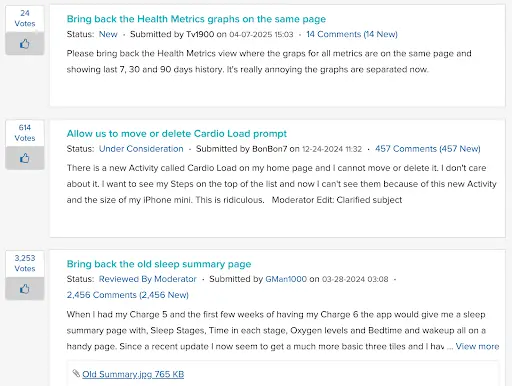
The key is not just listening, but creating ways for customers to share ideas easily — and see that they’re being heard. Take Fitbit’s approach. They created a public suggestion board where users could propose features and upvote others. Even users who didn’t contribute ideas directly helped prioritize the roadmap by supporting others. It turned passive feedback into a crowdsourced signal for the product team.
Digital health platform Fullscript does something similar with their Voice of the Customer (VoC) initiative. They use structured programs to capture customer input across teams and channels — then loop that insight back into product and operations planning. We spoke to Siobhán James, Director of Client Operations at Fullscript, and this is what she had to say.

“We’re taking our VoC program to the next level by determining how we consider customer feedback in product decisions and how we can showcase the impact of those decisions. Excitingly, our Marketing Ops team has a ‘do no harm’ goal for a current campaign, with a key result of less than 10% of users contacting us with negative feedback”
Siobhán James
Director of Client Operations, Fullscript
2. Optimize your conversion path
Customer feedback isn’t just about product or service fixes — it can also reveal what’s slowing people down on your website. Pairing feedback with behavioral analytics can help you fine-tune your conversion paths and reduce friction at key touchpoints.
Start by combining direct feedback (“I couldn’t find the form”) with usage data (where people actually click, scroll, or bounce). This tells you what’s working — and more importantly, where users are dropping off silently.
Here’s how to apply that insight:
? Lower bounce rates: Use scroll maps and heatmaps to understand how far people make it down the page and which elements they’re ignoring. If users aren’t seeing your CTA or are distracted by too many links, adjust the layout or trim the noise.
? Fix funnel drop-offs: Track how visitors move through flows like signups, demo bookings, or checkout. If a large chunk drops off at step two, try simplifying the form, reducing fields, or reworking the page copy. You don’t need guesswork — just follow the data.
? Focus on high-converting channels: Not all traffic performs the same. Use analytics to see which sources (like search, email, or paid ads) bring in the users who actually convert — and optimize those channels.
3. Strengthen Your Support Ops with Customer Insights
Customer feedback doesn’t just belong to the product or marketing teams — it’s a goldmine for support ops too. Feedback from chat transcripts, CSAT scores, and follow-up questions can reveal what’s slowing your team down or frustrating customers.
According to Hiver’s Customer Service Benchmark Report, 51% of support teams analyze tickets to extract insights. But far fewer teams actually act on that data — which is where the real impact lies.
Here’s what that action can look like in practice:
- Recurring delays? Revisit your ticket assignment rules. If some teams are overloaded, consider round-robin distribution or skill-based routing.
- Unclear responses? Use that as a signal to update internal macros, response templates, or even run refresher training.
- Too many handoffs? Automate query routing based on subject lines, tags, or past conversation data so customers land with the right person the first time.
? Real-world example: Sarah Caminiti, Manager, Customer Support, Tailscale, emphasizes the importance of support teams being part of strategic decisions — because no one has better visibility into what’s broken and what customers actually need.

“when a company listens to customer feedback that the support team provides and makes broader changes – not one – time fixes – they stand out from the crowd. This happens because the support team is valued, and the Voice of the Customer is valued”
Sarah Caminiti
Manager, Customer Support, Tailscale
4. Identify Advocates and At-Risk Customers Early
Customer feedback can help you identify who loves your brand and who might be about to leave. Start by analyzing your CSAT, NPS, and open-text responses.
? Spot your advocates
Customers who consistently leave high ratings (4 or 5 on CSAT or 9–10 on NPS) and use emotionally positive language — things like “you saved my day” or “the only team that gets it right” — are likely to be your brand promoters.
Here’s how to make the most of that:
- Tag them in your CRM and follow up while the sentiment is fresh.
- Invite them to join a referral program, leave a public review, or contribute a case study.
- Use their feedback to shape messaging that reflects what loyal users love most.
? As Stephanie Ouellet, a customer support expert, notes: some of your best advocates aren’t the loudest — they’re the ones quietly making repeat purchases or referring others behind the scenes. Track these behaviors, and acknowledge them with thoughtful outreach.

“Measuring repeat purchases or referrals that come into your business based on current customers is also a good way to see how effective your loyalty / ambassador programs are in bringing in new customers. ”
Stephanie Quellet
Senior Customer Service Manager at Earth Eated
? Flag at-risk customers
Negative signals often come subtly. A 2-star CSAT score with a vague “still waiting for help” comment might seem small, but it’s a red flag. So is an NPS response that mentions “lack of follow-through” or “slow replies.”
Here’s how to handle it:
- Route low-rated responses straight to your Customer Success or Escalations team.
- Set up auto-notifications or SLAs for follow-up within 24 hours.
- Go beyond the apology — clarify the issue, take ownership, and show a clear path to resolution.
Turn Customer Feedback into Actionable Insights
Customer feedback isn’t just helpful — it’s directional. It shows you where customers are getting stuck, which features are hitting the mark, and where expectations aren’t being met.
When you act on that feedback:
- You reduce churn by addressing friction points before they become dealbreakers.
- You build smarter products by prioritizing the features and fixes your users actually ask for.
- You sharpen your experience — tailoring messaging, support flows, and onboarding around real customer behavior.
The faster you close the loop, the more trust you build, and the easier it becomes to grow your business sustainably.
Frequently Asked Questions (FAQs)
- What is the best way to collect customer feedback?
The most effective way to collect customer feedback is to use a combination of direct and indirect methods. Direct channels include surveys, in-app prompts, and post-interaction emails — which give you structured responses. Indirect methods like website analytics and sentiment analysis help you understand customer behavior without explicitly asking for input. Together, they offer a complete picture of what customers are experiencing.
- When is the best time to ask for customer feedback?
The best time to ask for feedback is immediately after a key interaction — like a support resolution, product onboarding, or purchase. This ensures the experience is still fresh in the customer’s mind, which leads to more accurate and actionable insights.
- How do you act on customer feedback?
Start by organizing your feedback into categories — such as usability issues, feature requests, or customer service complaints. Prioritize items based on how often they come up and how much they impact the customer experience. Then take visible action, and close the loop by letting customers know what’s changed. - What is a CSAT survey, and how does it work?
A CSAT (Customer Satisfaction) survey is a quick way to measure how satisfied a customer is with a specific experience — typically a support interaction. It usually involves asking a single question like: “How satisfied were you with your experience?”
Customers respond on a scale, often from 1 (very dissatisfied) to 5 (very satisfied). CSAT surveys are easy to deploy via email or chat and offer a real-time snapshot of service quality.














