

There’s a common misconception that effective customer email management is about getting personalization right. But, it’s not.
The real problem is processes, which break down when companies scale. Support teams rarely ask “How do we personalize better?” Instead, they ask:
“How do we avoid duplicate responses?“
“How do we assign ownership efficiently?“
“How do we prevent missed emails?“
In this guide, we’ll walk you through actionable ways to sort incoming emails, prioritize better, and proactively identify process bottlenecks.
What is customer email management?
Customer email management is the system your support team uses to assign, prioritise, and respond to incoming emails from customers. The goal here is to ensure nothing gets missed, delayed, or duplicated.
When done properly, the right person gets to handle every message, urgent emails are prioritized, and responses are sent to customers in a timely manner.
How do you reach this stage? That’s where a well-managed email queue system can help. Think of it as a virtual waiting line of customer emails where every email has an owner and is assigned a priority level. It gives your team visibility, ownership, and a clear workflow—so nothing falls through the cracks, even on the busiest days.
5 essential workflows that help with customer email management
1. Skill-based and load-based assignment
When the right person handles the customer query from the start, customers get faster, more accurate answers—because they’re talking to someone who actually knows the topic inside out.
This is what skill-based assignment is about. It routes queries to support staff based on expertise. You can use a customer service platform like Hiver to set up an automated workflow for this.
For example, emails with “invoice” in the subject line go directly to Cindy from the Finance team, while anything mentioning “error” or “bug” goes to Ryan from the product team.
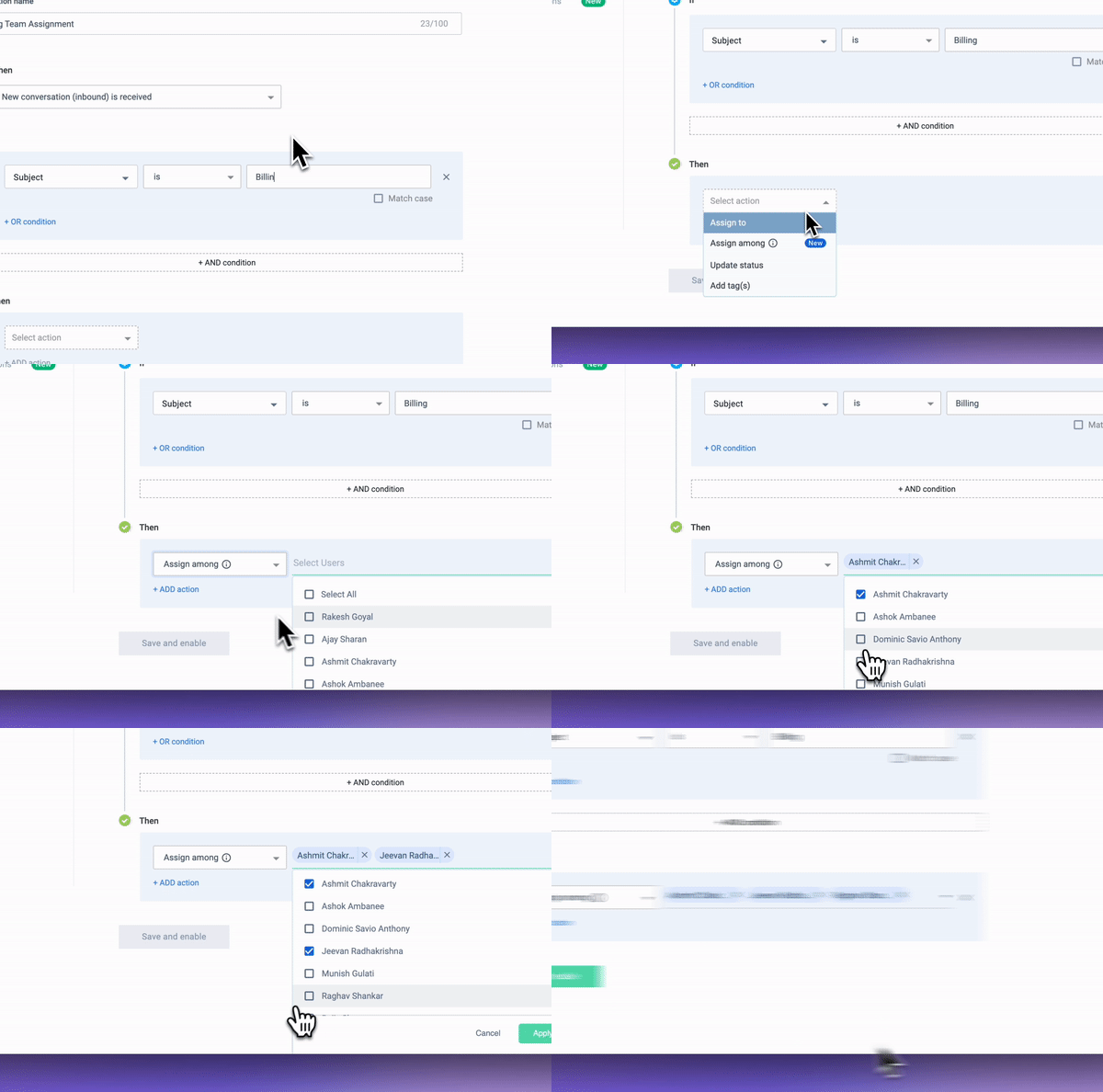
Load-based assignment is designed to prevent your team from being overworked. You can set a daily limit for every team member – say 10 emails – and once that limit is reached for someone, the system stops assigning them new queries.
This ensures no one is stretched too thin, and everyone knows exactly what they’re responsible for.

2. AI-powered triage system
When you handle hundreds or thousands of customer emails daily, an AI-powered triage system can make life easier.
Tools like Zendesk, Freshdesk, and Decagon use AI to scan emails for keywords, tone, and urgency, based on which a relevant course of action is decided. A frustrated complaint can go to a senior support staff, while a basic product question gets assigned to someone more junior.
Interestingly, AI can also suggest responses to customer emails. Take Hiver’s AI bot, Harvey, for instance. It recommends pre-written templates that you can use as a response, helping you save time and effort in resolving queries.

3. Geo-based and language-based assignment
When you’re handling customers across the world, it’s ideal to have a specific set of support staff manage all emails from a specific location. This is because cultural norms and traditions differ across locations, and so do customers’ expectations on communication.
For instance, customers from Japan might expect more structure in responses with appropriate salutations, while those from Western countries might be accepting of a more casual tone.
Most customer service tools help you set up workflows to ensure emails from specific customers or regions are assigned to designated team members. For instance, all emails from a customer in Germany—or even from a specific account—can be automatically assigned to one support staff.
4. Tiered escalation frameworks
Not every customer email needs the same level of attention. Some questions are simple and can be answered in seconds, while others need deeper investigation or approval from higher-ups. A tiered escalation framework helps teams decide when and how to escalate an issue, ensuring customers get the right level of support without unnecessary delays.
Most support teams follow a three-tier escalation framework. Here’s what it typically looks like:
- Tier 1 handles common, repetitive issues that don’t need deep technical or policy knowledge. Example: password resets, billing queries, account updates, and FAQs.
- Tier 2 manages more complex or sensitive requests that need deeper product knowledge. Example: technical troubleshooting, edge cases, or policy clarifications.
- Tier 3 deals with high-impact or time-sensitive issues that impact VIP customers.
Examples: security breaches, legal concerns, or high-value refunds.
These emails can be easily managed by setting rule-based automations. For example, a simple “reset password” request can go to Tier 1 support, while a “billing dispute” can be automatically escalated to a senior support staff.
5. Unassigned queues
For support teams that receive a relatively smaller volume of emails (less than 100 per day), automations might not be necessary. Instead, team members can pick up emails from the customer support inbox and start responding to them.
One scenario where things would get tricky is if a support staff has to hand off a customer email to a colleague. In such cases, they’d have to provide full context to the agent who is taking over. Most support tools provide a way to do this – using internal notes and comments. This functionality also lets anyone see all the action taken on a specific customer email as updates.

Top 7 Customer Email Management Tools
1. Hiver – Unify all customer emails in a centralized platform
Gone are the days where you needed a conventional help desk to manage customer emails. Tools like Hiver come with an intuitive, inbox-like interface and help your business manage multiple support channels – email, chat, WhatsApp, and phone – effortlessly. Everything about Hiver is so familiar that you can get started in less than 15 minutes.
Its core strength is the shared inbox feature, which lets you assign, collaborate, and track emails arriving in support email IDs like info@ or support@.
Once you install Hiver, you’d notice that all customer emails arrive in a dedicated ‘Unassigned’ tab. From here, you can assign emails across your team, and anyone can add notes to emails asking for help.

Key features:
- Multi-channel support: Manage email queries, chats, phone calls, and WhatsApp messages from an extremely easy-to-use interface.
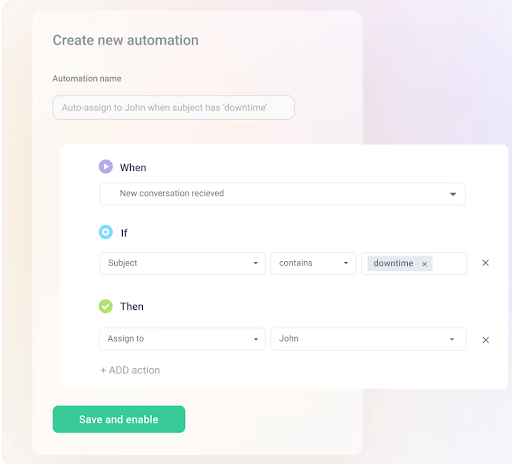
- Automations: Set up rules to route emails, tag them based on type or priority, or close them, in cases of redundant ones like invoice confirmations. You can also assign customer emails in a round-robin format in order to evenly balance workload.
- Knowledge base: Create and manage a knowledge base which has answers to FAQs, enabling customers to self-serve.
- Customer portal: Provide a portal where customers can submit and track issues. This cuts down on follow-ups and gives customers peace of mind that their request is being handled.
- Integrations: Connect seamlessly with 100+ tools – HubSpot, Salesforce, Jira, Slack, and QuickBooks amongst others – in order to bring all customer context in one place.
- AI-copilot: Pulls in information from your knowledge base and drafts a response to a customer email.
- Other AI functionalities: Summarize long conversations into concise notes, which is ideal for handoffs or for getting context on what’s being discussed.
- Tags: Categorize emails with color-coded tags, based on type or priority.
Pricing:
Has a forever free plan that includes a shared inbox, live chat, and robust collaboration features. For more advanced capabilities like workflow automations and the analytics, you’d have to subscribe to their paid plans starting at $19/user/month.
2. Decagon AI – AI-powered customer service solution
Decagon is an AI-first customer service platform designed to completely automate support at scale. Its generative AI agents don’t follow pre-written scripts—they read the customer’s message, understand context, and write responses on the spot.
This results in customers getting faster and getting faster and organic responses without even having to talk to a human. Unlike rule-based bots, Decagon’s AI learns from past interactions, and is designed to improve over time.

Key features:
- Autonomous AI agents: Let the tool fully take over repetitive support requests—order status, cancellations, account updates, and more. Responses are generated in real-time and tailored to each customer.
- Watchtower (Quality Assurance): This feature automatically reviews and provides feedback on conversations handled by both AI and human agents
- Built-in analytics: See deflection rates, average handling time, resolution quality, and what topics AI handles best—so you can track performance and know when to step in.
Pricing:
Cost is not explicitly mentioned on their website. But from what I know, they offer flexible pricing options, including per-conversation and per-resolution models. For detailed pricing information, it’s best to contact Decagon directly.
3. Kayako – Unified email and messaging support
One of Kayako’s strengths is that it neatly organizes and tracks customer emails, ensuring nothing goes missing.
Its SingleView™ feature ensures support teams don’t have to juggle between tools or email threads. They get a complete timeline of all past interactions with a specific customer in one single place. This includes chat requests, help centre visits, and even social interactions. It’s something that helps your team personalize responses and answer with context.
You can also set up a knowledge base with Kayako with answers to FAQs and detailed how-to guides.

Key features:
- Email ticketing system: Convert emails into trackable tickets. View status and owners of these tickets in one place.
- Collaboration tools: Write notes inside tickets to get help from colleagues and double-check responses before sharing them with customers.
- Automation & workflows – Set up rules to categorize, prioritize, and escalate customer emails automatically.
- Multi-channel support – While email is the focus, Kayako also supports chat and social media interactions.
Pricing:
Starts at $15/user/month
4. Missive – Collaborate with teams in real-time
Ever found yourself forwarding an email to a teammate, then following up on Slack, and then updating the status on a task manager? Missive eliminates all the back and forth by combining email, chat, and task management into one shared workspace.
Upon installing Missive, you’ll notice that the interface is divided into three panels for optimal workflow:
- Left panel: Toggle between views like “Assigned to me,” “Team inboxes,” and “Archived” so you know exactly what needs attention.
- Middle panel: Browse all emails within that view.
- Right panel: Reply to customers and leave internal comments or tag teammates directly on the thread—no need to switch tools.
This intuitive layout ensures that team members can manage and respond to customer inquiries without switching between tools.
Missive is also known for its integrations as it connects with a ton of third-party apps like HubSpot, Trello, and OpenAI. For instance, when you open a customer email on Missive, you can use the HubSpot integration to surface details about the customer such as MRR and past transactions, to get more context.

Key features:
- Reply together in real-time: Co-write replies with teammates directly inside the email composer.
- Automate repetitive work: Set rules to auto-assign emails, tag them based on keywords, or trigger follow-ups.
- Built-in chat: Every email thread in Missive has a built-in sidebar chat window. You can @mention teammates, ask questions, or leave updates here.
Pricing:
Starts at $14/user/month
5. Zendesk – Comprehensive ticketing system for enterprises
If you’ve ever looked into customer service software, you’d have stumbled upon Zendesk. It’s quite popular for the range of features it offers – ticketing, automations, AI, and analytics.
With Zendesk, every customer email is turned into a ticket, and every ticket has a unique ID which helps with tracking. Also, if your team deals with a lot of repetitive requests, you can:
- Create and share pre-written responses.
- Use an AI chatbot on your website or mobile app to take up straightforward questions.
- Route queries based on expertise or priority, and set up auto-responders to acknowledge customer emails.
That said, a lot of users find Zendesk’s interface overwhelming. So, setting up workflows can take time. Also, while Zendesk’s basic plan covers the essentials, some of its best features—like advanced automation, AI assistance, and deep analytics—are locked behind higher-tier plans.

Key features:
- AI-powered automation: Use triggers and bots to speed up responses and eliminate repetitive tasks.
- Agent workspace: View all customer conversations—be it on email, chat, phone, or social—in one place. Teams don’t have to switch tabs or tools.
- Reporting & analytics – Monitor support metrics like response times, resolution rates, and customer satisfaction. For instance, Zendesk Explore shows you exactly how many tickets are still unresolved, how long they’ve been open, and how long it’s been since the last response was sent on a ticket. You can also check the number of tickets that haven’t received any response at all.
Pricing:
Starts at $19/user/month.
6. Timetoreply – Email analytics tool to measure team performance
We’ve all experienced the regret of missing a crucial customer email. Timetoreply addresses this challenge by providing real-time analytics on your team’s responsiveness on email.
The tool lets you set specific Service Level Agreements (SLAs) tailored to both business goals and customer expectations. For instance, you might establish a 2-hour response window for high-priority clients.
Once these SLAs are in place, Timetoreply actively monitors incoming emails and alerts your team when a response deadline is approaching, to prevent SLA breaches.

Key features:
- Real-Time Alerts: Receive notifications when emails near their response deadlines
- Customizable SLA Tracking: Define and monitor response time goals for different accounts or customer segments.
- Seamless integrations: Connect Timetoreply with tools like HubSpot and Zapier to automate workflows and sync data across platforms. For example, when a sales email goes unanswered for over two hours, you can automatically trigger a Slack alert or create a follow-up task in your CRM.
Pricing:
Starts at $19/user/month
7. Help Scout – Simple shared inbox your customer service teams
Help Scout helps support teams manage all customer conversations—from emails to live chat—in one intuitive, organized workspace. Team leads can assign conversations, leave internal notes, and see who’s working on what.
When you open a message, Help Scout shows you the full customer history: previous conversations, notes from teammates, and key details like company name or MRR. Your team gets the context they need to reply faster and with a touch of personalization.
You can also add Beacon, a multichannel widget that sits inside your website or app and lets customers search help articles, start a chat, or send your team a message.

Key features:
- Shared inbox – Manage all customer emails in one central place, without losing track of who’s handling what.
- Customer context: See customer info and past interactions right next to each message. No digging through tools to personalize your response.
- AI summarizer: Automatically condense long threads into short, clear summaries—so agents spend less time reading and more time replying.
Pricing:
Offers a free plan. Paid plans start from $50/user/month
Trends in Customer Email Management: AI and Automation
AI isn’t just for chatbots anymore—it’s transforming the way customer service teams handle emails. Instead of manually sorting, tagging, and drafting responses, AI can predict customer needs, prioritize urgent emails, and even suggest replies before your support reps type a single word.
1. Predictive response suggestions
Writing the same email response over and over can take up precious time and effort. Instead, you can use AI to analyze a customer’s message and generate a draft of the response on the spot. This feature uses your company’s help articles, past conversations, and internal documentation as source content.
For example, if a customer asks about a refund, the system doesn’t just fetch a template—it pulls information from your refund policy, references the customer’s order history, and writes a tailored reply. All your team needs to do is review, adjust if needed, and hit send.
✅ Where to use it:
?Frequent inquiries on refunds, cancellations, or troubleshooting
?Personalizing emails at scale
?Ensuring consistent messaging across all customer communication
2. Sentiment Analysis for Priority Tagging
Some emails can wait—others need immediate attention. AI-powered sentiment analysis scans customer emails for urgency and emotion, automatically tagging messages as “high priority” if any negative emotion is detected.
A polite inquiry like “Can I get a refund?” may be tagged as low priority, while “I’m extremely disappointed with my purchase, and I need a resolution ASAP” gets flagged as urgent. This helps agents focus on the most critical emails first, instead of working through the inbox in order.
✅ Where to use it:
?Identifying high-priority complaints that need immediate action
?Automatically routing urgent issues to senior support staff
Identify a Customer Email Management Tool that Helps You Build Workflows
Email is a very busy customer communication channel – and that’s exactly why it can get messy. Without a clear system in place, conversation threads get buried and accountability becomes murky.
Investing in a platform – from the list mentioned above – can bring order to this chaos, enabling you to build the workflows we’ve discussed. If you want to read about more specific workflows that your team can create to manage customer emails better, check out this guide.
Frequently Asked Questions (FAQs)
1. What are some best practices for managing large email queues?
- Prioritize and categorize customer emails.
- Split a large queue into smaller, manageable segments. This reduces the psychological burden on staff and improves focus.
- Regularly update self-service resources to reduce incoming email volume.
- Rotate staff roles and responsibilities to prevent burnout.
2. What metrics should be monitored to assess the effectiveness of email queue management?
Key metrics include the volume of unresolved tickets, the volume of resolved tickets, average handling time, and CSAT scores.
3. How can you effectively reduce response times in email queues?
To reduce response time in email queues, consider implementing automated workflows. For instance, you can implement a workflow that prioritizes customer emails based on keywords like ‘urgent’ or ‘ASAP’ in the subject line or body.
4. How do you manage customer emails?
Managing customer emails efficiently requires a structured system that prioritizes, assigns, and automates responses to prevent delays and backlogs. Here’s how you can do it:
- Automate Email Assignments
- Prioritize Urgent Emails
- Use Templates & AI Suggestions
- Implement a Tiered Escalation System
5. How to select a customer email queue management tool?
To select a customer email queue management tool, focus on the following key features:
- Rule-based Automation: Route emails based on specific criteria like keywords or sender info.
- Collaboration Tools: Enables team collaboration within email threads by writing internal notes.
- Analytics and Reporting: Offers insights into the volume of incoming queries, average resolution time, and other key team performance metrics.
- Customizable Templates: Create and share templates to respond to commonly asked questions.
- Sentiment Analysis: Prioritizes emails by analyzing tone and urgency.














