

Hiver Updates: Automations and Better Workload Visibility

product updates - automated workflows

Table of contents

    Start using Hiver today

    • Collaborate with ease
    • Manage high email volume
    • Leverage AI for stellar service

    We’re back with yet another set of product updates from Hiver town! This update introduces an all-new approach to auto assignments and a major upgrade to the “Team” view. We’ve also sprinkled some goodness around how you consume the activity history of a conversation.

    What’s new?

    • Auto-assign conversations with ease ?
    • Get better workload visibility with the redesigned team view ?
    • Enhanced activity timeline for easier readability ✨

    All new Auto-assignment

    The Auto-assignment feature helps automatically assign new conversations across users in your shared mailbox in a round-robin manner. You can select users who should automatically be assigned conversations. In addition to this, you can permanently exclude certain users from ever being automatically assigned conversations. This is handy when you want to exclude non-participating members of the shared mailbox. Learn more about this.

    All new Auto-assignment

    All new Auto-assignment

    Redesigned team view

    The “Team” view in Hiver helps you keep track of open conversations that your team’s currently working on. We’ve redesigned it to give you an overview of how the workload is distributed across your team in a single glance. Now you can make quick decisions on redistribution of work or even get your team to cover for a colleague in their absence with ease.
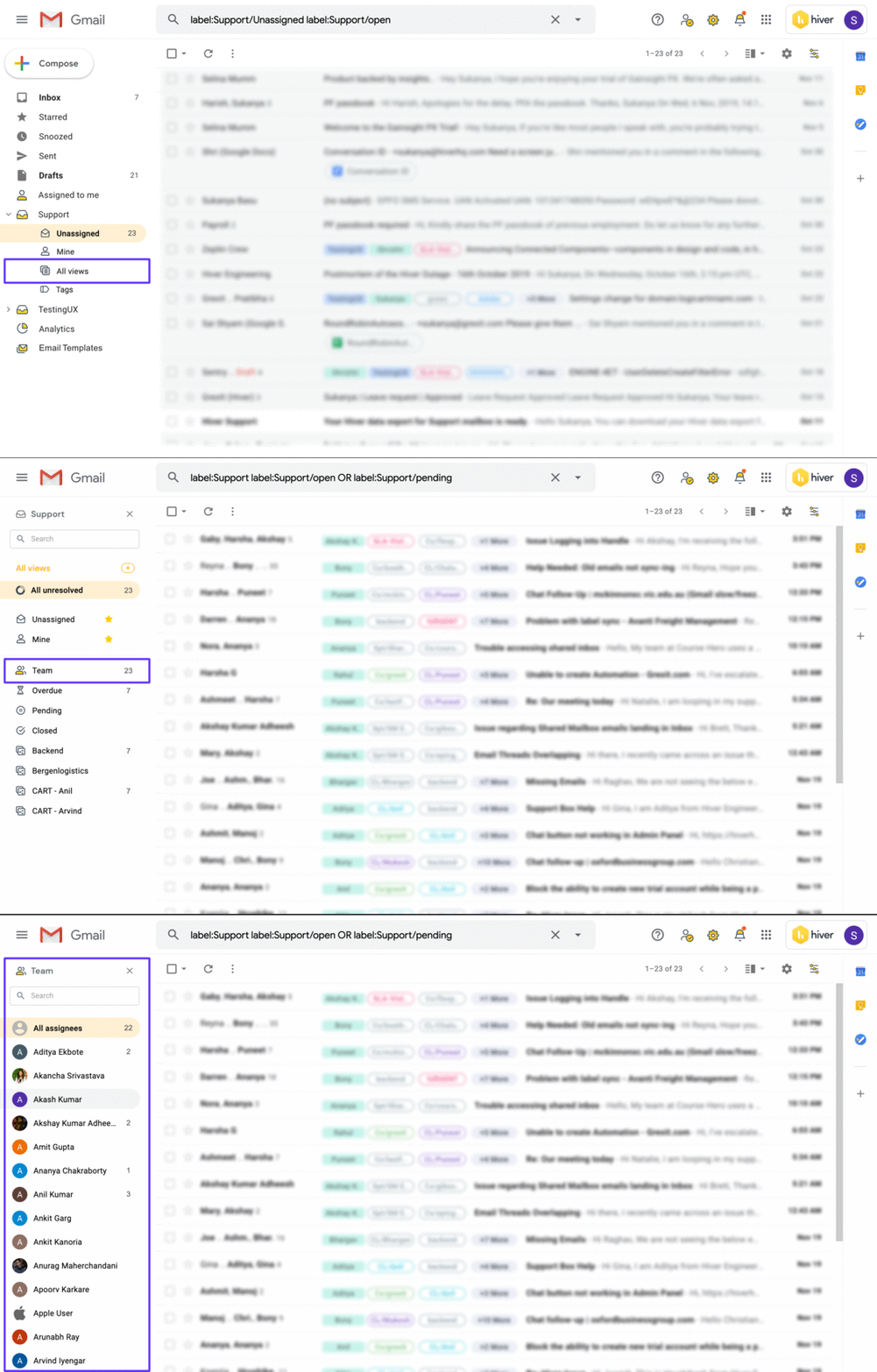
    Redesigned “Team” viewRedesigned “Team” view

    Redesigned “Team” view

    Enhanced activity timeline

    We’ve made improvements to the activity timeline, making it easier to consume the history of a conversation. We’ve grouped activities by day to give more prominence to the sequence of events and reduce clutter. In addition to this, you can use the “pop-out” feature to have a more detailed look at the activities.

    Activity pop-out feature

    Activity pop-out feature

    Product manager by day, coffee connoisseur by night

    Related articles

    Resources that help you improve customer service

    Thanks for subscribing!

    10,000+ teams found a better way to
    deliver customer service. Your turn.

    Get unlimited users on the Free plan  ✦  No credit card needed

    Overall Rating

    based on 2,000+ reviews from

    Review sites
    security-icons@2x

    Get Hiver's Chrome extension for Gmail to start your 7-day free trial!

    Step 1

    Add Hiver’s extension to your Gmail from the Chrome Webstore

    Step 2

    Log in to the extension to grant necessary permissions

    Step 3

    Enjoy your 7-day free trial of Hiver

    Try Hiver for free

    Get unlimited users on the Free plan  ✦  No credit card needed

    veolia grey popup 2x
    kiwi grey popup 2x
    upwork grey popup 2x
    NYU grey popup 2x
    appsflyer grey popup 2x

    “Our clients choose us over competitors due to our speed and quality of communication. We couldn’t achieve this without Hiver”

    Fin Brown

    Project Manager

    Getitmade@2x

    Get in touch with us

    Fill out the form and we’ll get back to you.

    Get a personalized demo

    Connect with our customer champion to explore how teams like you leverage Hiver to:

    veolia grey popup 2x
    kiwi grey popup 2x
    upwork grey popup 2x
    NYU grey popup 2x
    appsflyer grey popup 2x

    10,000+ teams globally use Hiver to deliver exceptional customer service

    veolia grey popup 2x
    kiwi grey popup 2x
    upwork grey popup 2x
    NYU grey popup 2x
    appsflyer grey popup 2x











