

Have you noticed that small chat box that often pops up when you visit a website? That’s what we call a live chat widget. Live chat widgets are revolutionizing the way businesses engage with customers online.
Think of it as your always-on, digital customer service rep, ready to assist at any moment.
Why is this important for your business? Providing real-time assistance can be a game-changer today. And with a live chat widget, you can connect with your customers instantly. Imagine you run an e-commerce store a shopper is uncertain about a product. With real-time chat support, you can give them immediate guidance, increasing the likelihood of a purchase and enhancing their overall shopping experience.
This comprehensive guide breaks down everything you need to know about integrating live chat widgets into your website. Let’s dive in.
What is a Live Chat Widget?
A live chat widget is a software application that integrates into your website to enable real-time, text-based interactions between your team and your website visitors. It’s like having a virtual front-desk attendant that’s always available.
It lets visitors chat with you in real-time. No need for them to pick up a phone or wait for an email reply. They type, you respond, right there on the web page.
Why is a live chat widget important? Well, people don’t like to wait. Quick answers can make the difference between a sale and a missed opportunity. A live chat widget ensures you’re there to help, advise, or even upsell when your customers or prospects are most engaged.
Provide real-time support to your customers
- Collaborate on chats
- Auto-assign chats to support reps
- Leverage AI for stellar service
How Does A Live Chat Work?
A live chat widget is like a virtual help desk on your website. It allows customers to chat in real time with a representative of your business. Here’s a closer look at how it functions.
When a visitor lands on your site, the live chat widget appears as a small chat box, typically in the bottom (left or right) corner of the page. It can pop up with a greeting, inviting the visitor to ask any questions they might have. Let’s say a customer is browsing a clothing brand’s site, and has a question about the fitting of a shirt. Instead of sending an email and waiting for a response, they can simply type their question into the live chat widget and receive an immediate response from the support team.
Behind the scenes, when a message is sent, it’s routed to a customer support agent who is available to respond. This could be an actual human or, for basic queries, an automated bot programmed with answers to common questions.
For example, if a customer inquires about return policies, the live chat widget can provide them with the information instantly. If the query is more complex, like asking for a comparison between two products, a human agent can take over the chat to provide more detailed and personalized service.
This direct line of communication is designed to be quick and convenient, helping customers make decisions faster and improving their overall experience with your business. By integrating a live chat widget, you effectively open a proactive channel of communication, where you can also initiate the conversation based on customer behavior, offering help and recommendations.
Why Does Your Business Need a Live Chat Widget?
If you’re still on the fence about adding a live chat widget to your website, let’s delve into some reasons why it’s essential for any business operating in today’s digital landscape.
- Immediate Customer Engagement – Imagine a visitor landing on your product page. They’re interested but have a question. Instead of sending a email about the query and waiting for a response, they get instant answers via the live chat widget. Immediate engagement keeps them on the page and increases the chances of conversion.
- Reduced Cart Abandonment – Cart abandonment is a widespread issue in online shopping. One common reason is unanswered questions. A live chat widget can tackle this problem head-on, offering real-time assistance to seal the deal.
- Boost Customer Satisfaction – Quick and helpful responses aren’t just good for sales; they also contribute to customer satisfaction. A live chat widget enables you to solve problems in real-time, turning potential negative experiences into positive ones.
- Multi-tasking Capabilities – In traditional customer support channels like phone, agents can only assist one customer at a time. However, a live chat widget allows agents to handle multiple queries simultaneously, thereby improving efficiency without compromising quality.
- 24/7 Accessibility – While having a round-the-clock human support team may be impractical for many businesses, a live chat widget can fill in the gaps. Smart automations within the live chat can handle basic queries during off-hours, ensuring customers are never left hanging.
- Triage Support Tickets – Not all customer queries require immediate attention. A live chat widget can help prioritize issues, routing more critical problems to human agents while frequently asked questions can be handled by providing automated responses.
- Gain Competitive Advantage – In a hyper-competitive market, standing out from the crowd can be challenging. This is where offering live chat can show that you’re committed to being there for your customers at all times.
- Gather Valuable Data – Beyond enabling real-time interactions, a live chat widget also comes with analytics functionalities. It helps you understand customer behavior on web pages, common customer queries, and more. You can analyze customer queries to find out what people are most curious or concerned about, helping you refine your products or services.
Recommended reading
How to Choose the Right Live Chat Widget for Your Business
Selecting a live chat widget is a significant decision for any business. This isn’t a one-size-fits-all situation. For ease of understanding, this section is divided into two parts:
- Guidelines To Help You Make An Informed Choice
- Key Features To Look For In A High-Quality Live Chat Widget
1. Guidelines To Help You Make An Informed Choice
Following these guidelines can make it easier to select the best live chat widget for your business:
- Identify Your Business Needs – The first step is to outline what you expect from a live chat widget. Are you looking to enhance customer service, boost sales, or perhaps both? Understanding your goals can help you pick a widget with features that align with your needs.
- Evaluate Budget Constraints – While it’s tempting to go for all the bells and whistles, remember to consider your budget. Thankfully, there are live chat widgets available at different price points, so decide what features are non-negotiable and start from there.
- Seek Professional Advice – If you’re stuck, don’t hesitate to consult experts or peers in your industry. They can offer valuable insights into what to look for in a live chat widget based on practical experience.
- Test Before You Buy – Most vendors offer free trials or demos. Take advantage of this to test out the widget’s functionality, speed, and ease of use before making a final decision.
2. Key Features To Look For In A High-Quality Live Chat Widget
Selecting a live chat widget isn’t just about adding another tool to your website. It’s about it’s about enhancing your business’s customer service capabilities.
Here are some must-have features you should look for in a high-quality live chat widget.
- Easy Integration – The first order of business is ease of integration. You want a widget that can seamlessly fit into your existing website and backend systems. No one has the time for complicated setups or compatibility issues. Also, a top-notch live chat widget isn’t just confined to your website. It should be able to integrate with other platforms where your customers might interact with you, such as social media or email.
- User-Friendly Interface – Both your team and your customers will be using this widget. It should have an intuitive, easy-to-navigate interface. For example, finding the chat history or uploading a file should be a breeze.
- Automated Responses – Let’s face it, some questions are asked repeatedly. Your live chat widget should have an automated response feature for handling common queries, freeing up your human agents for more complex issues.
- Customization – Your live chat widget should reflect your brand, from logo to color scheme. This feature allows you to offer a more consistent customer experience across all touchpoints.
- Secure Data Encryption – Customer data should be treated like gold. Ensure that the live chat widget you choose has robust security measures, like end-to-end encryption, to protect data.
- Analytics and Reporting – Data is your friend. A high-quality live chat widget should come with robust analytics and reporting features. You should be able to track metrics like response time, customer satisfaction, and chat outcomes to assess performance.
- Mobile Responsiveness – With the increasing number of people shopping via mobile devices, it’s essential that your live chat widget is mobile-friendly. The user experience should be as smooth on a smartphone as it is on a desktop.
- Scalability – Your business will grow, and your live chat widget should be able to scale with you. Scalability ensures that as you expand, the widget can handle an increased volume of queries and questions without hiccups.
Top 10 Live Chat Widgets for your Business
The live chat widget you choose can greatly impact your customer engagement and satisfaction. Here’s a list of the best live chat widgets in 2023 to guide you in your decision-making:
| Live Chat Widget | Starting Prize | Free Trial | G2 Rating |
|---|---|---|---|
| Hiver | Has a free plan. Paid plan starts at $9/month/user | 7 days | 4.6 ⭐ |
| Intercom | $74/month/user | 14 days | 4.5 ⭐ |
| Zendesk Chat | $55/month/user | 14 days | 4.3 ⭐ |
| LiveChat | $20/month/user | 14 days | 4.5 ⭐ |
| Tawk.to | Free suite | – | 4.5 ⭐ |
| Freshchat | $19/month/user | 14 days | 4.4 ⭐ |
| Tidio | $29/month/user | 7 days | 4.7 ⭐ |
| Drift | $2,500/month/user | 14 days | 4.4 ⭐ |
| Olark | $29/month/user | 14 days | 4.3 ⭐ |
| HelpCrunch | $12/month/user | 14 days | 4.7 ⭐ |
1. Hiver
Hiver is a customer service platform that comes with a powerful live chat functionality. Companies looking to provide real-time support can set up a chat widget on their website using Hiver, and the best part is that the whole process takes only 15 minutes.
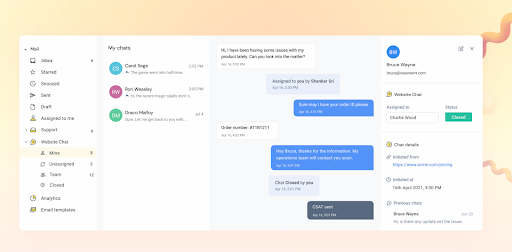
Using Hiver, you and your team can proactively initiate conversations with website visitors, get AI-powered suggestions for responses, and create and share templates for commonly asked questions. Another handy feature is the ability to embed knowledge-base articles into chat conversations.
If you have a group of support agents arming chat, you can assign incoming conversations either manually or through automation, and get full visibility into who is working on what chat and their respective status. Automated assignments are based on pre-defined conditions so that certain customer chats go to certain frontline staff. And for managing chat conversations on the go, you can use the Hiver mobile app.
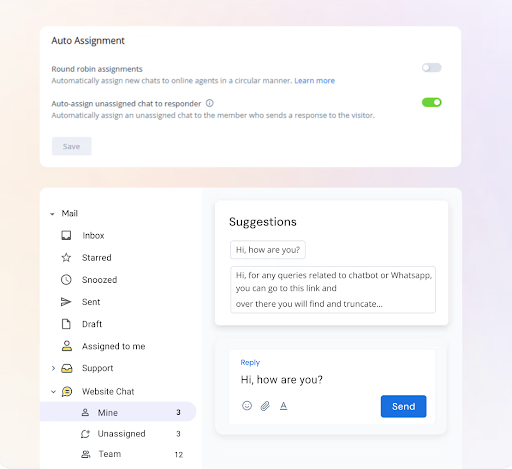
Hiver’s chat widget works best when used in tandem with a chatbot, which is also available on the platform. The chatbot can effectively answer straightforward and repetitive queries (think refund policies and order statuses) and when needed, seamlessly transfer customers to frontline staff.
But Hiver isn’t just about helping teams provide chat support. It brings other critical support channels – email, phone, WhatsApp, and knowledge base – and your work emails into one single dashboard. This ensures teams don’t have to constantly switch between apps.
Key Features
- Query Assignment: You can assign incoming customer chats to specific agents, ensuring that the right person is handling each query.
- Automated workflows: Do away with manual, repetitive tasks. Automate everything from assigning and tagging queries, based on expertise or keywords, to sending out standardized responses.
- AI-powered suggestions: Get intelligent suggestions on what to respond to customers based on how the conversation is going. This helps you respond faster and proactively adapt to the situation.
- Chat Templates: Create and share custom chat templates with your team. These can be used for answering recurring questions.
- Cross-Team Collaboration: Agents can share chat transcripts with other teams in scenarios where a query needs inter-department collaboration.
- Missed Chats and Escalations: Send automated warning emails if frontline agents don’t respond to chats within a specified time.
- Chat analytics: Measure important metrics like chat volume, team workload, and response times. You can also gather customer feedback with post-chat CSAT surveys.
- Customer Feedback: After a live chat session, you can send a Customer Satisfaction (CSAT) survey to collect valuable feedback.
- Customization: The chat widget can be customized to match your brand guidelines. You can add your company logo, tweak the welcome message, and change the color of the widget.
- Mobile Support: Agents receive push notifications on their mobile devices for new chats, messages, or specific assignments, allowing them to respond even when away from their desk.
Pricing:
The good news is that you can use Hiver’s live chat widget for free. But if you need more features like chatbots and real-time analytics, you’d have to upgrade to one of the paid plans, which starts at $9/user/month.
Why Choose Hiver?
Hiver is a great option for businesses that want an easy-to-use and powerful live chat widget. Also, if you’re not looking to spend much and want to get started right away, the forever-free plan is a great choice.
2. Intercom
Intercom offers a Business Messenger designed to improve customer relationships by enabling real-time conversations. The platform aims to provide a more personalized way to reach customers via live chat. The platform aims to provide a more personalized way to reach customers, whether the team is available for live chat or will respond later.

Key Features
- In-Product Chat: Intercom makes it easy for customers to get help right when and where they need it, directly within the product they are using.
- Flexible Timing: The chat feature is designed to be convenient for both the end customer and your team, allowing conversations to happen either in real-time or at a later time.
- Conversation History: Intercom saves chat history, enabling customers to return to a chat whenever they like, on any device.
- Multi-Channel Support: The Business Messenger holds all your conversations across different channels in one place, allowing you to assist multiple customers simultaneously.
- Extended Capabilities: Beyond live chat, Intercom’s Business Messenger also includes bots, apps, and in-app messages to provide a comprehensive customer engagement solution.
Pricing
Intercom has a majorly 3 pricing packages:
- Starter plan starting at $74/month
- Pro plan starting at $395/month
- For the Premium plan pricing, you need to contact their sales team.
Why Choose Intercom?
Intercom stands out for its robust customer segmentation and personalized messaging capabilities.
3. Zendesk Chat
Zendesk is a customer service platform for enterprises, that includes live chat as one of its core features. With its live chat widget, it helps companies provide real-time support to their customers.
Key Features:
- Real-Time Support: Zendesk’s live chat allows for immediate interaction with customers, helping resolve queries in real-time.
- Integration: Zendesk’s live chat is part of a broader suite of customer service tools, allowing for seamless integration with other channels like email and social media.
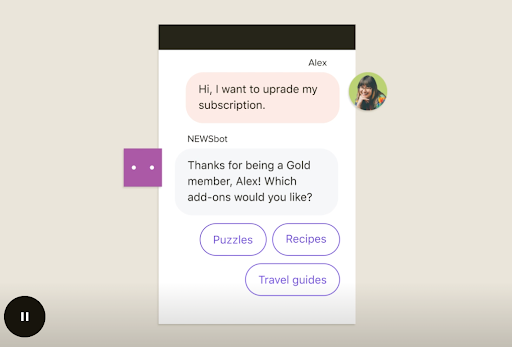
- Efficiency: With Zendesk you can integrate, automated answers for commonly asked questions within your chatbots. These bots can engage users in a more conversational manner, guiding them to solutions or gathering more information to better assist them. This reduces the load from your customer service team, and allows them to cater to more complex issues.
- Scalability: As your company grows, Zendesk’s live chat widget can scale with it. It can help you handle higher volumes of customer queries.
Pricing:
Chat option is available in Zendesk’s Suite Plan. Zendesk Suite Plans offer a complete solution for ticketing, messaging and help center.
- Suite Team: Priced at US$ 55 per agent/month (billed annually) for 5 agents.
- Suit Growth: Priced at US$ 89 per agent/month (billed annually) for 5 agents.
- Suit Professional: Priced at US$ 115 per agent/month (billed annually) for 5 agents.
- Suit Enterprise: Custom pricing. You would have to contact the sales team for this plan.
- Suit Enterprise Plus: Custom pricing. You would have to contact the sales team for this plan.
Why Choose Zendesk Chat?
Zendesk is a strong choice for enterprises and large businesses looking for in-depth analytics and reliable performance.
Recommended reading
4. LiveChat
LiveChat is a comprehensive customer service platform designed to designed to help companies delight their customers and eventually, drive sales. With LiveChat, you can support your customers across multiple channels such as Messenger, Email, Apple Messages, SMS, and WhatsApp. Live chat as a support channel is one of its core offerings.

Key Features
- Easy Setup: LiveChat offers a quick and easy setup process, allowing you to preview how the chat widget will look like on your homepage.
- Capture and Qualify Leads: The platform enables you to capture leads with custom forms and AI chatbot automations. It also allows you to track sales and business goals automatically.
- Product Showcasing: You can display your products in elegant product cards in the chat box itself. This helps you drive more sales while chatting with customers.
- AI Automation: Chatbots can engage, nurture, qualify, and convert leads on their own across different channels. The platform also offers automatic visitor segmentation based on their activities on your site.
- Easy Integration: LiveChat can be integrated with over 200 tools, including WordPress, Google Ads, TeamViewer, Mailchimp, Shopify, and more.
Pricing:
LiveChat has different pricing packages:
- Starter Plan: Priced at $20 per agent per month (billed annually)
- Team Plan: Priced at $41 per agent per month (billed annually)
- Business Plan:Priced at $59 per agent per month (billed annually)
- Enterprise Plan: Custom pricing – you’d need to contact their sales team to know more.
Why Choose LiveChat?
Choosing LiveChat’s live chat widget offers businesses a comprehensive customer service solution that goes beyond real-time support. The platform is designed to fuel sales by capturing and qualifying leads through custom forms and AI chatbot automations. Its proactive customer support features anticipate customer needs, and enable faster responses.
5. Tawk.to
Tawk.to is a 100% free live chat software designed to help businesses communicate with their customers. The platform allows you to monitor and chat with visitors on your website, respond to support tickets, and even create a help center for customer self-service. It offers an easy setup and is secure to use.

Key Features
- Easy Setup: Adding Tawk.to to your website only involves incorporating a small JavaScript snippet, making the setup process quick and straightforward.
- Real-Time Monitoring: See which pages your visitors are on in real time, and view their activity across their entire journey on your website.
- Multi-Channel Support: In addition to live chat, Tawk.to offers email ticketing, a knowledge base, and team chat functionalities.
- Customer Data in One Place: Tawk.to provides a unified view of all your customer interactions, making it easier to manage customer relationships.
- Customization: You can customize the chat widget to match your brand guidelines, including custom colors, messages, and position on the website.
Pricing:
Tawk.to is a completely free chat application which businesses can try who are just starting to try out live chat integration.
Why Choose Tawk.to?
Choosing Tawk.to for your live chat needs is a no-brainer if you’re looking for a free and simple way to talk to your customers. It’s not just about chatting; you can also keep track of customer activities on your site and even offer a help center. The platform is easy to set up, secure, and can be customized to fit your brand.
6. Freshchat by Freshworks
Freshchat is a part of Freshworks’ AI-driven Customer Service Suite and aims to help companies engage with their customer base in real-time. It is designed to help businesses better engage with their customers through live chat, allowing for real-time conversations, chatbots for automation, and multi-channel messaging.

Key Features:
- Channel Freedom: Freshchat allows you to engage customers on various channels, including SMS, live chat, email, and voice.
- Bot-Driven Support: The platform enables you to easily create and deploy AI-driven bots across your website and native apps.
- Unified Agent Workspace: Agents are equipped with all the context they need to deliver personalized experiences, including details like past purchases and open issues.
- Admin and Analytics: The platform offers insights into customer behavior and team performance, helping you make informed decisions for scaling your business.
Pricing:
- Free plan – Free forever for up to 10 agents
- Growth Plan:Priced at $19 per agent per month (billed annually)
- Pro Plan: Priced at $49 per agent per month (billed annually)
- Enterprise Plan: Priced at $79 per agent per month (billed annually)
Why Choose Freshchat?
Freshchat lets you talk to customers on different channels and even uses smart bots to handle some tasks. Agents get all the info they need to help customers better. Plus, you can look at how things are going and make them even better with analytics. It’s like a one-stop-shop for talking to customers.
Hiver vs Freshdesk: Reasons, Reviews, and Ratings

7. Tidio
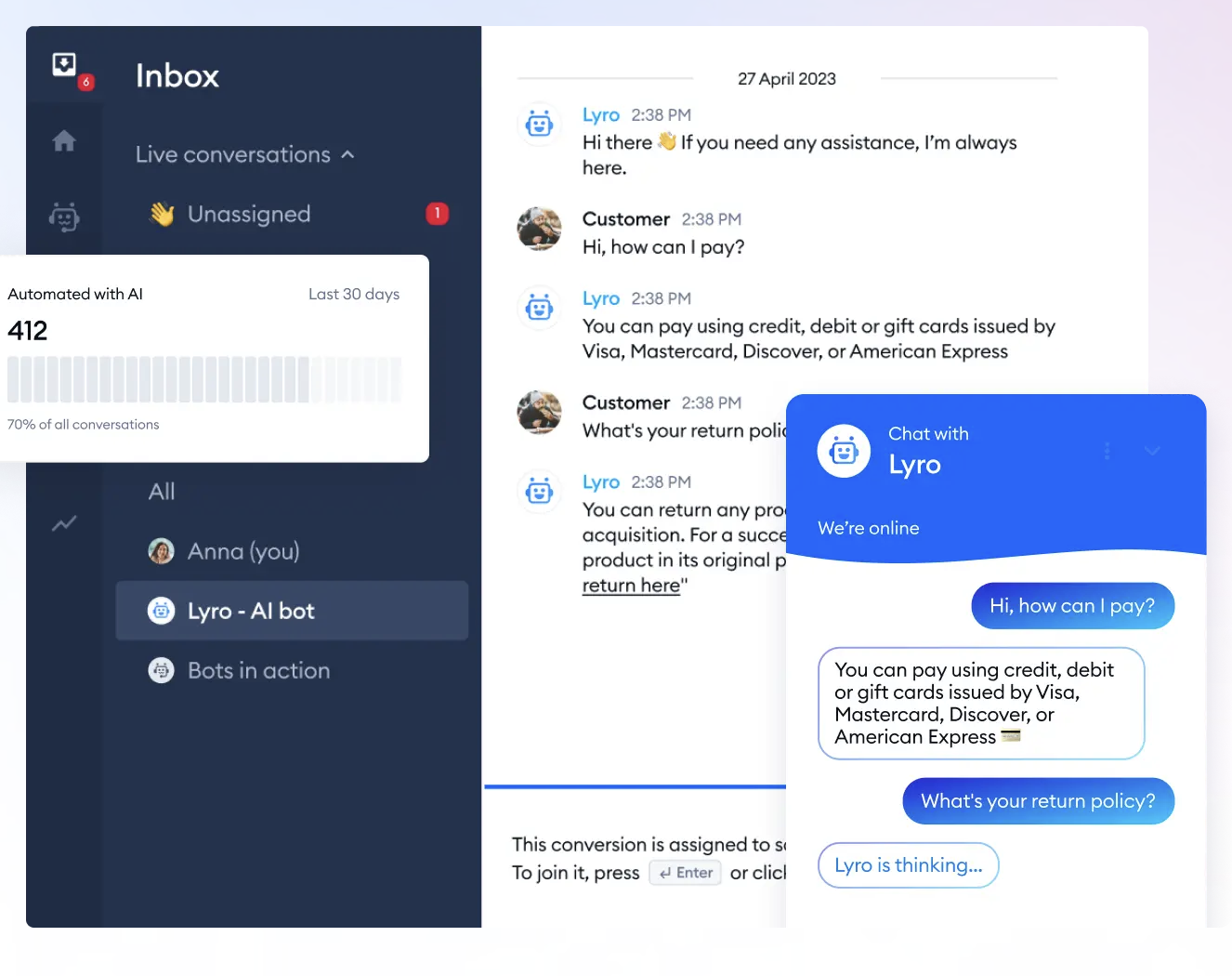
Tidio is a customer service software that combines conversational AI with live chat. It aims to solve up to 70% of customer problems using conversational AI. The platform also offers real-time tracking of users across your website and provides dedicated helpdesk tools for managing all your chats.
Key Features:
- AI Chatbots: Tidio’s AI, named Lyro, can answer common customer questions, freeing up your agents for more complex issues.
- Smart Views: The platform sorts conversations based on customer intent, helping you respond faster.
- Chat Templates: Engage website visitors with live chat and offer personalized discounts based on their activity. You can also use pre-defined chatbot templates to generate leads.
- Multichannel Support: Tidio allows you to see all your WhatsApp, Messenger, Instagram, email, and live chat messages in one panel.
- Analytics: Make data-driven decisions with conversation-related metrics and see how users rate Rate the quality of support you provide.
Pricing:
Standard packages include
- Free Plan: Free for 50 live chat conversations
- Starter Plan: Priced at $29 per month for 100 live chat conversations
- Communicator Plan: Priced at $25 per month for unlimited live chat conversations
- Chatbots Plan: Priced at $29 per month for 50 live chat conversations and 2k-40k chatbot triggers
Additionally, Tidio also provides bundled and personalized solutions
Why Choose Tidio?
Tidio is a top pick if you want a chat tool that’s easy and smart. It uses AI to answer most customer questions, so your team can focus on the big stuff. You can also see what customers are up to on your site and chat with them in real time. Plus, it works with other apps you use, like WhatsApp and email. It’s a full package that keeps things simple.
Recommended reading
8. Drift
Drift is an AI-powered conversational platform that combines chat, email, and video to offer personalized experiences to customers. It aims to speed up sales cycles and increase productivity by engaging prospects who visit your website with valuable, real-time conversations.

Key Features
- AI-Powered Chatbots: Drift uses AI to have human-like conversations with customers, available 24/7.
- Real-Time ABM Notifications: Get instant alerts for target account engagement, helping you to act at the right time. For instance, you can get instant alerts on WHO is active on your site, WHAT is their designation and WHICH company are they from. Knowing this helps you personalize conversations to the tee.
- Meeting Scheduler & Real-Time Notifications: Allows for 24/7 scheduling of meetings and even sends engagement alerts to keep you updated.
- Video Messaging: Drift’s video messaging feature allows users to create and send personalized video messages to leads or customers. This can be more engaging than a standard text message or email.
- Prospector & AI Engagement Score: This feature is particularly useful for sales team. Drift’s AI-powered Engagement Score tells you which of your leads are the most engaged and most likely to buy based on their interactions with your brand’s marketing and sales motions.
Pricing:
Drift provides various packages:
- Premium Plan: Starting at $2,500 per month (billed annually)
- Advanced Plan and Enterprise Plan comes with custom pricing for which you have to contact sales
Why Choose Drift?
Drift is good if you want to talk to customers and also sell more. It uses smart bots to chat anytime, and you get alerts when important prospects visit your site. You can even set up meetings easily and send video messages to make things personal.
9. Olark
Olark is a live chat software designed to make it easy for customers to talk to you. It offers real-time chat features to engage customers, answer their questions, and gather feedback.
Olark also helps you organize customer data and apply insights to improve your products and services.

Key Features:
- Real-Time Chat: Olark lets you engage with customers in real time, answering their questions and gathering feedback on their experience.
- Customer Data Organization: You can store structured notes and chat transcripts either in Olark or your own CRM.
- Triggered Messages: The platform can automatically send suggestions or special offers to customers at the right moment.
- Offline Messaging: If you’re not available to chat, customers can leave a message, and you can follow up via email.
- Real-Time Dashboards: Olark offers up-to-the-minute reports on chat metrics and customer feedback.
Pricing:
Olark provides tierd pricing packages:
- Standard Plan: Priced at $29 per month per seat
- Olark Pro: This comes with custom pricing, for which you have to contact their sales team.
There are various add on features which comes with varied pricing.
Why Choose Olark?
Olark is a straightforward, easy-to-use option that offers seamless CRM integrations and useful analytics features. You can chat in real time, keep notes, and even send special offers automatically. If you’re busy, customers can leave a message for you to check later. Plus, you get reports to see how things are going. It’s easy to use and helps you learn from your customers.
10. HelpCrunch
HelpCrunch is a live chat software trusted by various businesses to offer excellent support and drive higher sales. It allows you to engage with visitors proactively, offer self-service options through an integrated knowledge base, and provide support across multiple channels and platforms.

Key Features:
- Proactive Engagement: HelpCrunch allows you to initiate chats and convert visitors into leads with personalized messages based on user behavior.
- Self-Service: An integrated knowledge base lets customers find answers to common questions without needing your involvement.
- Multi-device Support: Install the widget in multiple places – website, product, or mobile app so that your costumers can receive uninterrupted support.
- Team Collaboration: A centralized shared inbox lets you manage live chats, customer emails, and social media communication in one place, and you can also collaborate with teammates through private notes.
Pricing
Helpcrunch’s pricing model includes
- Basic Plan: Priced at $12 per user (billed annually)
- Pro Plan: Priced at $20 per user (billed annually)
- Unlimited Plan: Priced at $495 per user (billed annually)
Why Choose HelpCrunch?
HelpCrunch lets you send messages based on what customers are doing on your site. Plus, it has a help center so customers can find answers on their own. You can also manage chats, emails, and social media all in one place. It’s easy to use and covers everything you need.
How to Integrate a Live Chat Widget into Your Website
Integrating a live chat widget on your website doesn’t have to be a complicated process. The installation process may differ depending on the widget you use and the service provider will guide you best.
However, here’s a general step-by-step guide tailored to different platforms, based on industry.
1. For a Content Management System (CMS)
Step 1: Log in to Your Admin Panel
Log in to the backend of your website, where you usually add or edit content.
Step 2: Navigate to Plugins or Extensions
Look for the section where you can add new plugins or extensions.
Step 3: Search for a Live Chat Widget
Use the search function to find a suitable live chat widget. Check its features, ratings, and reviews.
Step 4: Install and Activate
Click on the ‘Install’ button and then activate the plugin.
Step 5: Customize Settings
Once installed, go to the settings and start customizing the widget to align with your brand identity.
2. For an eCommerce Platform
Step 1: Log in to Your Admin Dashboard
Like with the CMS, your first step is to log in to your admin dashboard.
Step 2: Go to the App or Extension Store
Navigate to the section where you can browse or purchase new applications for your eCommerce platform.
Step 3: Search and Select
Use keywords like ‘live chat’ to search for a widget. Review its features, and if satisfied, proceed to add it to your platform.
Step 4: Install the Widget
Follow the on-screen instructions to install the widget. This usually involves a few clicks and possibly pasting a line of code into your website’s backend.
Step 5: Configure the Widget
Go to the settings to customize the widget’s appearance, set automated greetings, and define other functionalities based on your needs.
3. For a Hospitality or Booking Platform
Step 1: Access the Management Console
Log in to your platform’s management console, which is essentially your command center for reservations and customer interactions.
Step 2: Go to ‘Add-ons’ or ‘Extensions’
Locate the section that allows you to enhance your platform’s functionalities. It might be labeled as ‘Add-ons,’ ‘Extensions,’ or something similar.
Step 3: Search for Live Chat Options
Look for live chat features that specifically cater to the needs of hospitality, such as real-time booking assistance or multi-language support.
Step 4: Installation
Follow the guided setup to install your chosen live chat widget.
Step 5: Customize for Your Audience
Remember, hospitality thrives on personal touches. Set up automated greetings that suit your brand tone and the specific needs of your customer base, such as checking in or asking for room service.
4. For a Learning Management System (LMS)
Step 1: Sign in as Administrator
Log into your LMS with admin credentials to gain full access to the system’s functionalities.
Step 2: Navigate to ‘Features’ or ‘Plugins’
Here, you’ll find a host of add-ons that can extend the capabilities of your LMS.
Step 3: Browse for Live Chat
Search for a live chat widget that offers features like virtual classroom support or academic consultation.
Step 4: Add and Enable the Widget
Click to install the widget, and then go into settings to enable it.
Step 5: Set Academic Guidelines
Customize the live chat to align with academic guidelines or any special requirements, such as student privacy regulations or after-school support hours.
5. For a Healthcare Portal
Step 1: Secure Login
Given the sensitive nature of healthcare data, ensure you are logging into a secure admin portal.
Step 2: Access the ‘Features’ Section
Find the section in your dashboard where you can add or modify the platform’s features.
Step 3: Look for HIPAA-Compliant Chat Widgets
Search specifically for chat widgets that offer HIPAA-compliance for secure patient data handling.
Step 4: Install with Care
Follow the widget’s installation guide carefully to ensure compliance with healthcare regulations.
Step 5: Set Up Medical Guidelines
Customize the widget settings to include automated responses for frequently asked medical questions and emergency instructions, keeping in mind to maintain compliance with healthcare guidelines.
Common Mistakes While Setting Up A Live Chat Widget and How to Avoid Them
Implementing a live chat widget is generally a smart move for any business that wants to enhance customer engagement. However, there are several common pitfalls that companies often encounter:
1. Inadequate Staff Training
Mistake: Businesses often underestimate the need for training staff to handle live chat, assuming it’s just like email or phone support.
How to Avoid: Invest time in specialized training programs that cover the nuances of live chat support, including multitasking and delivering quick yet accurate responses.
2. Ignoring Offline Hours
Mistake: Not setting up an automated system for managing chats during offline hours can leave customers frustrated.
How to Avoid: Use chatbots or automated messages to handle basic queries when live agents aren’t available. Let customers know when they can expect a reply.
3. Lack of Personalization
Common Mistake: Businesses often use generic, impersonal automated greetings and responses, which can feel robotic to customers.
How to Avoid: Personalize greetings based on visitor behavior or the webpage they’re on. Use customer data responsibly to tailor responses.
4. Neglecting Mobile Users
Mistake: Some businesses forget to ensure their live chat widget is mobile-friendly, leading to a poor user experience for a significant chunk of their audience.
How to Avoid: Opt for a live chat widget that is responsive and offers a seamless experience on mobile devices. Always test how the chat widget performs on different screen sizes.
5. Overcomplicating the Interface
Mistake: In an effort to be comprehensive, some businesses overload the chat interface with too many options or fields.
How to Avoid: Keep the interface clean and user-friendly. Only include necessary fields and options that enhance the customer experience without overwhelming them.
6. Ignoring Analytics
Mistake: Businesses often fail to analyze chat data, missing out on valuable insights that could improve service.
How to Avoid: Regularly review metrics like response time, customer satisfaction scores, and common queries to continually refine your chat services.
7. Inconsistent Branding
Common Mistake: Some businesses neglect to customize the look and feel of the chat widget, resulting in a disjointed brand experience.
How to Avoid: Choose a chat widget that allows you to customize colors, fonts, and logos to align with your brand identity.
A Live Chat Widget for Your Business
Live chat widgets serve as a powerful tool for businesses looking to elevate customer engagement and support. From choosing the right platform based on your specific business needs to implementing it correctly, every step counts. Factors such as ease of use, customization options, and analytics capabilities should guide your selection. It is equally important to avoid common pitfalls, to make the most of your live chat capabilities.
The key to success with live chat widgets is integrating them seamlessly into your existing business operations. If you’re looking for an easy-to-set-up live chat widget, you might want to check out Hiver. It’s live chat functionality easily integrates with your inbox and also offers real-time analytics to gauge important metrics.
Frequently Asked Questions
1. What is a live chat widget?
A live chat widget is a small interactive box typically embedded on a website that allows visitors to chat with support or sales teams in real time.
2. How does a live chat widget work?
It connects website visitors to your support or sales team instantly via a chat interface. Agents receive messages on their dashboard or helpdesk and can reply in real-time or set up automated responses.
3. Why should I add a live chat widget to my website?
Live chat widgets improve customer support, boost engagement, reduce bounce rates, and increase conversions by offering instant help when users need it.
4. Where should I place a live chat widget on my website?
Most websites place the widget at the bottom-right corner of the page, where it’s visible but not intrusive. It should be easily accessible on all key pages like product, pricing, and support pages.
5. Can a live chat widget be automated?
Yes, most live chat widgets support automation through chatbots, canned responses, or workflows to answer common questions instantly and route complex queries to agents.
6. Are live chat widgets secure?
Yes, most modern live chat tools use encryption and comply with data privacy standards like GDPR. Always check the provider’s security certifications and privacy practices.














