

Introducing Shared Mailboxes For Gmail

Table of contents

    Start using Hiver today

    • Collaborate with ease
    • Manage high email volume
    • Leverage AI for stellar service

    Email is awesome. It’s the one tool that all of us use every day for a variety of personal and professional purposes. But, email is a simple communication channel and was never designed to cater to all that we use it for today.

    With Hiver, we’ve been helping companies be a lot more efficient with their email. We help teams use Gmail efficiently for customer support, sales and managing projects, and over the last few years, working with thousands of companies, we’ve learnt a lot about how we can take email productivity to the next level.

    Today we’re launching Shared Mailboxes for Gmail – our new feature that lets you easily manage shared email accounts like support@mycompany.com, sales@mycompany.com from your Gmail. This is just the right tool to manage and collaborate on shared mailboxes in your company for sales, support, hiring etc.

    This works simply by letting you and your team access emails sent to the shared email account right from your Gmail and then allowing you to assign emails as tasks.
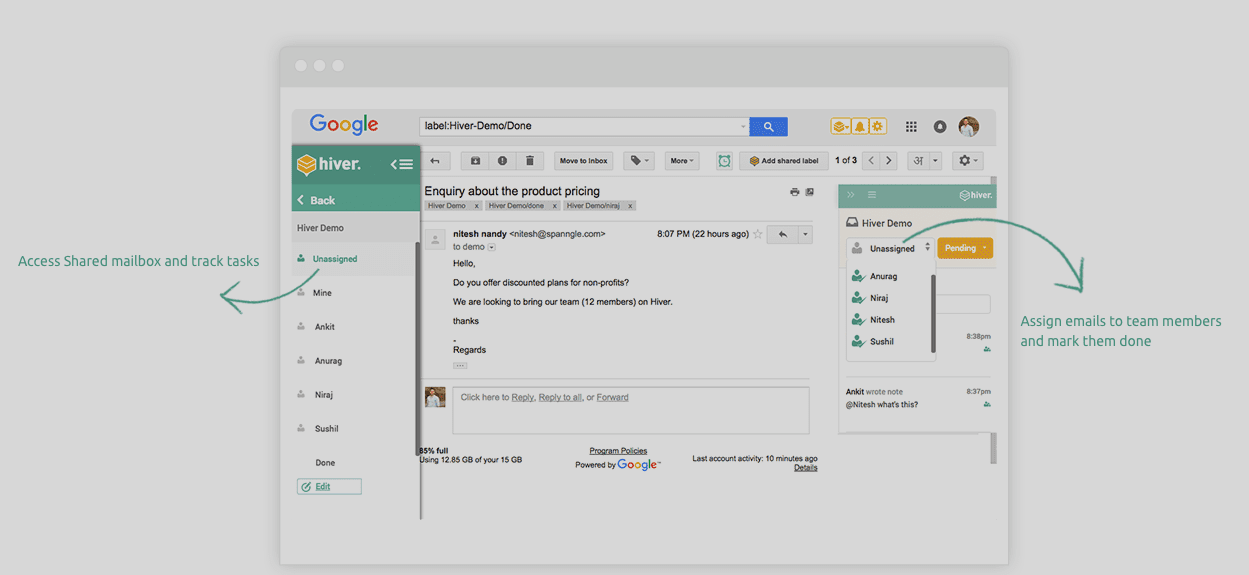
    Screen Shot 2016-07-26 at 5.14.28 PM

    The other super useful feature here is collision alert which tells you when someone else is replying to an email that is shared with you using Gmail shared labels.
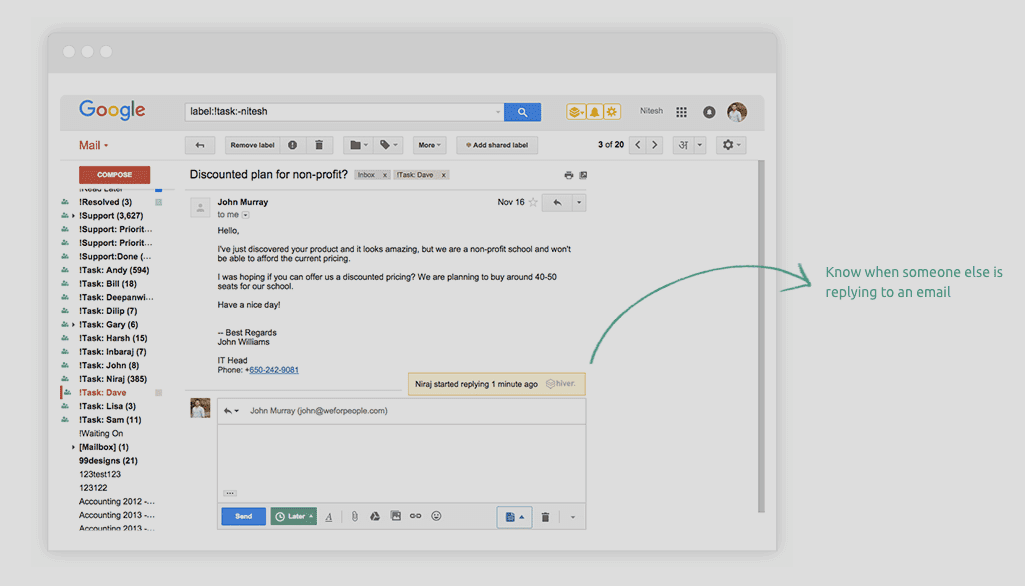
    Screen Shot 2016-07-26 at 5.23.51 PM

    You also get analytics on usage and responsiveness of your team, email notes and task reminders with Shared Mailboxes.

    Shared Mailboxes for Gmail are really the simplest way to manage your shared email accounts.

    Try it out, and let us know what you think.

    Author

    Niraj is the CEO and Co-founder of Hiver – a customer service solution that works within Gmail. Niraj can be reached on Twitter at nirajr.

    Related articles

    Resources that help you improve customer service

    Thanks for subscribing!

    10,000+ teams found a better way to
    deliver customer service. Your turn.

    Get unlimited users on the Free plan  ✦  No credit card needed

    Overall Rating

    based on 2,000+ reviews from

    Review sites
    security-icons@2x

    Get Hiver's Chrome extension for Gmail to start your 7-day free trial!

    Step 1

    Add Hiver’s extension to your Gmail from the Chrome Webstore

    Step 2

    Log in to the extension to grant necessary permissions

    Step 3

    Enjoy your 7-day free trial of Hiver

    Try Hiver for free

    Get unlimited users on the Free plan  ✦  No credit card needed

    veolia grey popup 2x
    kiwi grey popup 2x
    upwork grey popup 2x
    NYU grey popup 2x
    appsflyer grey popup 2x

    “Our clients choose us over competitors due to our speed and quality of communication. We couldn’t achieve this without Hiver”

    Fin Brown

    Project Manager

    Getitmade@2x

    Get in touch with us

    Fill out the form and we’ll get back to you.

    Get a personalized demo

    Connect with our customer champion to explore how teams like you leverage Hiver to:

    veolia grey popup 2x
    kiwi grey popup 2x
    upwork grey popup 2x
    NYU grey popup 2x
    appsflyer grey popup 2x

    10,000+ teams globally use Hiver to deliver exceptional customer service

    veolia grey popup 2x
    kiwi grey popup 2x
    upwork grey popup 2x
    NYU grey popup 2x
    appsflyer grey popup 2x












