


Hiver’s latest study found that 77% of customers prefer email over other support channels to contact a business.
Which is why it’s not surprising to see companies make use of group email IDs such as support@, finance@, hr@, or sales@yourcompany.com to manage incoming queries and requests.
But when you use a group email (an email ID that multiple users can log into), it comes with several drawbacks.
- Establishing ownership becomes tough and teams have a hard time knowing who is working on what.
- Collaboration issues set in leading to missed or delayed responses.
- No means to track team performance and stay on top of metrics such as response and resolution time.
This is where a dedicated team email management software can make a difference.
What is an Email Management Software?
An email management software helps teams receive, sort, organize, and respond to emails. It is useful not only to streamline both internal and external communication but drive visibility and ownership across the team.
Here are some benefits of using an email management tool:
- Unlike basic solutions like Google Groups, email management tools allow you to assign emails to team members easily. This way, everyone knows what they need to work on.
- Get complete visibility into who is working on what.
- Stay on top of an overflowing inbox by using workflow rules and assignments.
- Automate repetitive tasks and speed up response times.
- Track key metrics and get access to in-depth reports on team performance.
A Quick Rundown of the Top 11 Email Management Software
Here is a list of the 11 best team email management software to help you determine what will work best for your team.
| Software | Key Features | Pricing |
|---|---|---|
| 1. Hiver | – Shared Inbox – Works inside your inbox – Email assignment and tags – Internal Notes – Real-time workload view – Canned responses – Email workflow automation – Reporting & analytics | Starts at $19/user/month |
| 2. Gmelius | – Shared inbox – Gmail Kanban boards – Quick notes and shared drafts – Meeting scheduler | Starts at $15/user/month |
| 3. Drag | – Email tracking – Shared labels – Drag boards – Due dates tracking | Starts at $5/user/month |
| 4. SmartReach.io | – Shared inbox – Sentiment analysis – Multichannel outreach – AI-generated content | Email Outreach plan starts at $29/user/month |
| 5. HappyFox | – Unified inbox – Reporting and analytics – Private notes – Smart rules for workflows | Agent-based: $39-$99/agent/month Unlimited Agents: $1499-$4999/month |
| 6. Zendesk | – Unified Workspace – Email templates – Email triggers and workflows – Internal notes for collaboration – Built-in SLAs | Starts at $49/agent/month |
| 7. Groove | – @mentions and Slack notifications – Collision detection – Internal notes – Auto-reply personalization | Starts at $15/user/month |
| 8. Front | – Omnichannel inbox – Workflow Automation – Internal Collaboration – Advanced analytics | Starts at $19/user/month |
| 9. Freshdesk | – Custom views – Automated email assignment – Merging of tickets – Canned responses – One-click reports | Starts at $19/user/month |
| 10. Help Scout | – Saved replies library – Conversation history, detailed reports | Standard: $25/user/month Plus: $50/user/month Pro: $65/user/month |
| 11. SupportBee | – Email categorization – Email assignment – AI summarizer for emails – Collision alerts | Starts at $20/user/month |
1. Hiver
Handling emails as a team—whether customer complaints or internal requests—shouldn’t be a daily balancing act.
Hiver ensures it isn’t by providing a collaborative inbox for your team to handle all emails arriving in inboxes like info@, support@ and help@. What teams love about Hiver is that it’s an extension to their Gmail and Outlook inbox and as a result, they don’t have to migrate to an external system and undergo extensive training.
“Hiver provides the functionality to manage a shared email address between multiple people directly through Google’s email interface. New emails pop into the Hiver managed folders where your assigned team can all see them. It’s very simple to manage the emails through assignments, comments, and tags. Hiver takes the chaos of a Google group or shared email address and adds a layer of functionality and workflow. It is a gamechanger” – G2 Review

Once you install Hiver, all your team inboxes appear on the left side panel of your inbox – the same place where you have other tabs like ‘Starred’ and ‘Sent’. This makes it really super easy to toggle between multiple shared inboxes and your personal inbox tab.
It’s worth mentioning that Hiver offers a forever-free plan that lets you set up one shared inbox, along with other support channels such as chat and WhatsApp.
Key features include:
- Color-code conversations to categorize, prioritize, and share them with your team.
- @mention anyone across the organization and write a note to discuss emails.
- Real-time view of your team’s workload helps you assign emails in a balanced manner.
- Create and share email templates with your team. These templates can be customized using placeholders, adding a touch of personalization when responding to emails.
- Reduce manual, repetitive work with rule-based tagging and assignment of emails. For instance, you can create an automation to assign all emails from a specific sender to a customer.
- Track team performance by measuring key metrics such as first response time and average resolution time for every shared inbox. You can also create custom reports to track metrics that you specifically want.
Pricing:
Hiver offers a forever-free plan that offers one shared inbox. Paid plans are as follows:
- Lite: $19/user/month
- Pro: $49/user/month
- Elite: $79/user/month
2. Gmelius
Gmelius helps create a collaborative workspace within Gmail where teams can get real-time visibility of their workload, distribute tasks effectively, automate grunt work, and collaborate faster.

Key features include:
- A shared inbox solution supporting 2-way integrations with your existing tools
- Gmail Kanban boards that convert email conversations into task cards
- Quick notes for internal discussions
- Shared drafts to collaborate on replies and craft accurate responses
- Meeting scheduler to schedule and coordinate meetings
Pricing:
- Flex: $15 per month for your entire team
- Growth: $24 /user/month, billed annually
- Pro: $36/user/ month, billed annually
3. Drag
Drag is an extensive all-in-one workspace within Gmail. It comes with boards and collaboration tools that are designed to help your teams streamline customer service workflows, visualize sales pipelines, and close deals.

Key features:
- Email tracking to know who has clicked and viewed emails
- Shared labels and color codes to organize boards based on urgency, time zones, etc.
- Drag boards with different permission levels can be used to streamline cross-functional collaboration
- Due dates can be added to emails and tasks to ensure your teams never miss a deadline
Pricing:
- Starter: $5/user/month
- Plus: $10/user/month
- Pro: $15/user/month
4. SmartReach.io
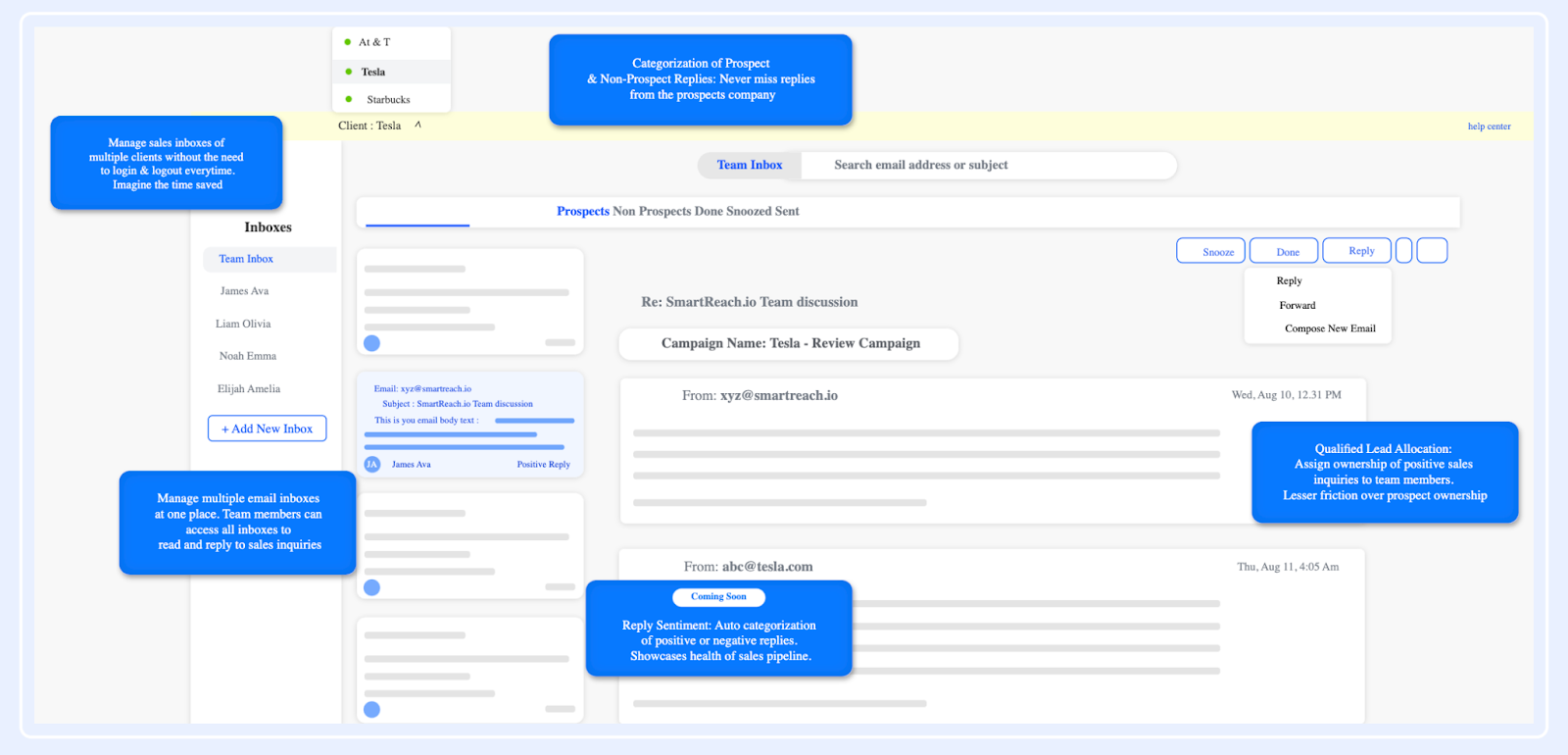
SmartReach.io is a sales engagement platform that helps businesses increase lead conversion and shorten sales cycles by delivering effective cold outreach campaigns.
With SmartReach, effortlessly find and connect with your ideal prospects. Explore a wide range of features designed to enhance prospecting and boost engagement for your sales team.
Key Features:
- Increase transparency across sales & marketing team with the shared inbox
- Auto-categorization of positive & negative replies with reply sentiment
- Cold outreach via multiple channels like LinkedIn, WhatsApp, email, text & call
- Increase audience reach and possibilities of getting response with multichannel outreach
- AI-generated email content & subject line based on the input provided.
- Some of the prominent features that helps increase deliverability are spintax, hyper-personalization, custom merge tags, detailed reporting and many more
Pricing:
- Email Outreach Plan starts at $29 per user per month
- Sales Outreach Plan starts at $49 per user per month
- For Agency & Enterprise plan, reach out to the sales team!
5. HappyFox
HappyFox is a customer support platform designed to simplify and streamline your support process. By automatically converting emails, phone calls, chats, and web requests into tickets, it ensures efficient tracking and prioritization of customer inquiries.

Key features include:
- A unified inbox from where all customer requests can be managed
- Queues to prioritize and resolve support requests better
- Private notes to streamline internal communications
- Smart rules to automate ticket assignments
Pricing:
HappyFox offers two different pricing models
- Agent-based Pricing:
- Mighty: $39 per agent per month
- Fantastic: $59 per agent per month
- Enterprise: $79 per agent per month
- Enterprise Plus: $99 per agent per month
- Unlimited Agents Pricing:
- Starter: $1499 per month
- Growth: $1999 per month
- Scale: $2999 per month
- Scale Plus: $4999 per month
6. Zendesk
Zendesk is a multi-channel customer service tool. One of its power functionalities is team email management – helping teams assign, track, and collaborate on customer emails.
But, the downside of using Zendesk is that it’s got a complicated user interface. That means you and your team need to spend a lot of time and effort figuring out how the platform works.

Key features include:
- Dynamic request forms to gain more context on incoming requests
- Mobile app to respond to customer queries on the move
- Built-in SLAs to meet deadlines
- Pre-designed responses called macros to take care of repetitive queries
Pricing:
Zendesk has three tiers of pricing for small to large-sized businesses.
- Suite Team: $49 per agent per month
- Suite Growth: $79 per agent per month
- Suite Professional: $99 per agent per month
For enterprise companies, Zendesk has two tiers of pricing:
- Suite Enterprise: $150 per agent per month
- Additional and more powerful enterprise plans start at $215 per agent per month
7. Groove
Groove is a popular help desk software that has an intuitive shared inbox feature. With Groove, teams can prioritize and resolve customer emails – from a familiar interface.

Key features include:
- @mentions and Slack notifications to always keep your teams in the loop
- Collision detection triggers to avoid duplicate responses
- Internal notes to help teams collaborate better
Pricing:
Groove offers 3 pricing plans each under the monthly and yearly models.
- Starter: $15/user/month
- Plus: $25/user/month
- Pro: $45/user/month
8. Front
This customer communication tool has built-in collaboration features that let your team efficiently manage incoming email queries and requests. Front has an interface inspired by that of commonly-used email clients and is quite simple to use. You can easily loop in team members without creating endless threads and provide timely support to your customers.

Key features include:
- Omnichannel inbox that consolidates messages across channels into a single interface
- Integrated customer details such as account data and message history, are displayed alongside the customer message
- Advanced analytics to monitor team performance and customer experience
Pricing:
Starts at $19/user/month
9. Freshdesk
Freshdesk is a comprehensive customer support platform. Its email management feature will help your teams convert incoming customer emails into tickets, enabling you to track and respond to customer emails seamlessly.

Key features include:
- Multiple custom views to better manage tickets
- Merging capability to consolidate related tickets into one
- Canned responses and autoresponders to speed up resolution times
- One-click reports to get detailed insights on email activities, spot outliers, and identify trends in customer queries
Pricing:
Front offers four pricing options.
- Starter: $19 per person per month
- Growth: $49 per person per month
- Scale: $99 per person per month
- Premier: $229 per person per month
10. Help Scout
Help Scout is a powerful support tool that lets teams manage all customer emails from a centralized platform. It makes it easy for you to assign, track, and collaborate on these conversations in real time.

Key features:
- A searchable library of saved replies to respond to FAQs in seconds
- Conversation history and customer data are displayed with the most recent messages to provide much-needed context
- Detailed reports on outreach volume, response times, and other custom data points that matter to your team
Pricing:
Help Scout offers three types of pricing options.
- Standard: $25 per user per month
- Plus: $50 per user per month
- Pro: $65 per user per month
11. SupportBee
SupportBee is a ticketing system that has a shared inbox to streamline customer email communication. The tool offers the familiarity of an email interface and offers multiple functionalities such as email assignment, automation, and draft replies.

Key features include:
- Emails can be categorized as ‘Answered’, ‘Unanswered’, or ‘Archived’, to keep inboxes organized
- Drafts can be created and shared with team members to collaborate on customer responses
- Log all actions taken on a ticket, to keep teams accountable and informed
Pricing:
- Personal: $39 annual
- Business: $59 annual
How to Choose the Right Email Management Software?
With plenty of options available in the market, choosing the right email management software may seem challenging. We lay out a few of the most important factors that you need to consider before finalizing one:
- Features: Opt for a tool that is backed with advanced capabilities to help you manage emails in an effective way. With a tool like Hiver, you can ensure that every email gets a dedicated owner and can be tracked till resolution. That’s not all. By setting up SLAs, you can be assured that customers get timely responses to their queries.
- User interface: The software should have an easy-to-use interface that lets you smoothly navigate the platform. Since Hiver works right out of Gmail, its interface is very intuitive – meaning, your teams don’t have to spend weeks trying to learn a new software.
- Price: This plays a key role when you narrow down on a software. Choose a software that fits your budget and offers good value for money. Hiver has reasonable pricing plans that growing businesses can afford.
Managing emails as a team doesn’t have to be overwhelming
Many tools are out there that help teams manage emails collaboratively. But most of these tools, I believe, add more complexity than needed.
If your team members spend a good chunk of their work hours in their inbox responding to emails, the software you choose should ideally have a similar interface.
This makes the transition smooth for your team. It also completely circumvents any training needed to get started.
Or better, choose an extension like Hiver – that adds collaborative features to your Gmail and Outlook inbox. To know more about how Hiver can fit into your specific workflow, here are some interactive tours you can try out:














