

Working in customer service can feel like a nonstop whirlwind. Think about it: you’re handling a customer complaint one minute, and before you can catch your breath, there’s an escalation that needs your attention.
This whole act of juggling multiple tasks and queries doesn’t help anyone. Your team might end up missing queries or not responding to customers on time.
So, what’s the workaround here? How do you streamline the work you do in customer service?
This is where a good customer support ticketing system can help. Think of it as a platform that brings together all incoming queries, complaints, and requests into a single, easy-to-manage interface. Your team gets a clear overview of which requests are urgent and which ones can wait a bit, and nothing gets lost in the shuffle.
In this guide, I’ll tell you all about how a customer support ticketing system works, why it’s so useful, and which tools are the best in the business.
What are customer support ticketing systems?
A customer support ticketing system is a tool that helps businesses manage customer inquiries and issues. It organizes all incoming requests — whether they come through email, phone, live chat, or social media—into something called “tickets.”
Here’s how a ticketing system works: When a customer reaches out with a problem or question, the system automatically creates a ticket. This ticket is like a digital note that says, “This needs attention.” Each ticket is given a unique number so it can be easily tracked. The ticket then goes into a queue where your support team can see it, prioritize it, and take action. The system keeps a record of all the steps taken to resolve the issue, and once it’s handled, the ticket is closed.
Let’s say, you run an online store and a customer emails you about a delayed order. The ticketing system instantly creates a ticket for that email. Your team sees it, recognizes that it’s urgent, and starts working on it right away. The system tracks everything done to fix the problem and updates the customer along the way. Once the issue is resolved, the ticket is closed, and the customer is happy.
Top benefits of using a customer support ticketing system
Here are five benefits of using a ticketing system for businesses:
- Query Management: A ticketing system offers a centralized platform to manage and track queries. Let’s say, if a business receives customer queries through email, phone, and social media, a ticketing system will consolidate all these into one platform. This helps agents to address queries in an organized manner.
- Performance Analytics: Modern ticketing systems offer analytics to review the quality of support delivered and team performance. Managers can track metrics like response time, resolution time, and customer satisfaction.
- Prioritization and Assignment: Not all tickets are of the same urgency or require the same expertise. A ticketing system allows issues to be prioritized and assigned to the most appropriate team or individual.
- Knowledge Base Creation: Over time, businesses can utilize past tickets to create a knowledge base or FAQs for common issues. For instance, a web hosting company might notice recurring questions about setting up a particular CMS. Using these tickets, they can create a step-by-step guide for customers to refer to in the future.
- Scalability: As businesses grow, so do customer inquiries and other internal requests. A ticketing system helps businesses deal with such requests at scale, without compromising on efficiency or service quality.
7 best customer support ticketing tools
Here’s an overview of seven popular customer support ticketing software.
| Tool | Starting Price | Free Trial | G2 Rating |
|---|---|---|---|
| Hiver | $19/month per user | 7 days | 4.6 ⭐ |
| Zendesk | $55/month per user | 14 days | 4.4 ⭐ |
| Freshdesk | $15/month per user | 21 days | 4.5 ⭐ |
| Help Scout | $22/month per user | 15 days | 4.4 ⭐ |
| Kayako | Details not available | 14 days | 4.0 ⭐ |
| Intercom | $39/month per user | 14 days | 4.4 ⭐ |
| Zoho Desk | $15.57/month per user | 15 days | 4.5 ⭐ |
1. Hiver
Hiver isn’t your typical customer support ticketing tool that is clunky to use and overwhelming to navigate. It’s as easy to use as your inbox yet as powerful as a modern ticketing system.
The platform offers something similar to the left panel of your inbox where you can access and manage all support channels – email, chat, WhatsApp, and voice. You can also create a knowledge base to help customers find answers on their own, something that helps reduce the volume of queries your support team handles.
Hiver is built for businesses of all sizes, with pricing plans starting at $19 per user per month and going up to $49 per user per month. The company also has an enterprise plan if you need to deliver support at a higher scale. For companies on a tight budget, its forever-free plan is worth checking out.
The company also provides 24/7 support across all plans and meets top security standards like GDPR, HIPAA, and CCPA, so that your customer data stays safe.
Key Features
- One centralized dashboard for everything: Manage all customer support channels and regular work emails from the same interface. Prevent constant switching between your inbox and other tools.
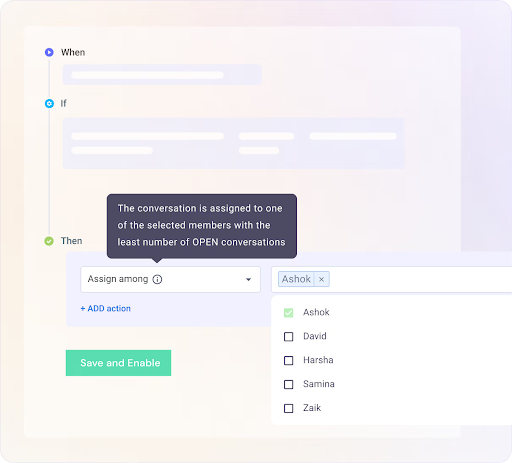
- Automation: Automate query assignment and tagging. For instance, all queries with ‘payment’ in the subject line get assigned to Jake from Finance. You can also use skill-based and round-robin assignments to balance workloads and prevent burnout.
- AI Copilot: Leverage the power of AI to respond faster and with more accuracy. Use the co-pilot feature to link your knowledge base with your ticketing system – this helps support staff get answers to important queries at the click of a button, without having to browse through help articles.
- Customer Portal: Provide a dedicated portal for customers to submit queries and track progress. This ensures customers don’t have to constantly follow-up with you on email and instead, can view all updates to their tickets in one place.
- Live Chat & Chatbots: Support customers in real time with a live chat widget. Get AI-powered suggestions on responses, and set up customizable workflows for your chatbot so that they can handle repetitive queries and pass on the more complicated ones to human agents.
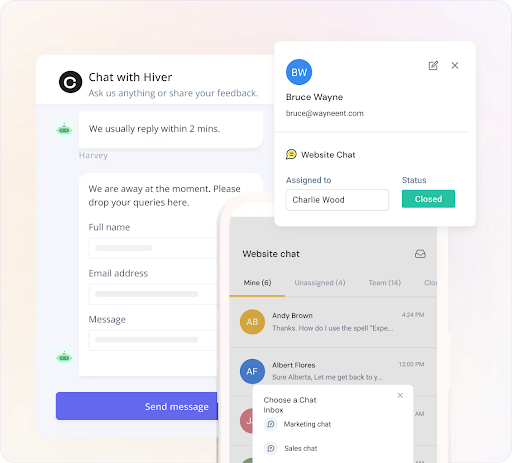
- Team Collaboration: Use internal notes and shared drafts to loop in a team member or manager on a customer conversation and have a discussion. Collision alerts ensure no two agents respond to the same query at the same time.
- Analytics & Reports: Track important customer service metrics—response and resolution time, agent workload, volume of tickets, and customer satisfaction. Customize reports to get insights that fit your business needs. For instance, you can track the first response time of all customer queries that are tagged as ‘priority’.
- Seamless Integrations: Easy integration with 100+ tools—including Slack, Jira, WhatsApp, Asana, and Zapier. Keep your workflows smooth and reduce back and forth between multiple tools.
“Hiver is easy to navigate and allows customers to always be taken care of! I never worry if our team has forgotten an email or not. I use Hiver every day and it allows us to stay organized. This software has been easy to use, implement and integrate into our team. We can always take care of our customers and ensure they are getting the best customer support!” – Hiver User Review | G2
Pricing
- Free Forever: Ideal for small teams or startups, this plan includes essential features like a multi-channel shared inbox, knowledge base, notes and shared drafts, 24/7 support, and more to get you started.
- Lite ($19/user/month): Best for growing teams, this plan offers two shared inboxes, email templates, workflow automation, live chat, knowledge base, and basic analytics.
- Growth ($29/user/month): Designed for scaling teams, it includes unlimited users, advanced analytics, custom reports, and integrations with tools like Asana, Jira, and QuickBooks.
- Pro ($49/user/month): Perfect for high-volume support teams, this plan comes with five shared inboxes, AI automation (Harvey), chatbots, CSAT surveys, SLA tracking, and advanced reporting.
- Elite (Custom Pricing): For large teams, Hiver offers unlimited shared inboxes, skill-based auto-assignment, HIPAA compliance, enterprise-grade security, a dedicated success manager, and more.
2. Zendesk
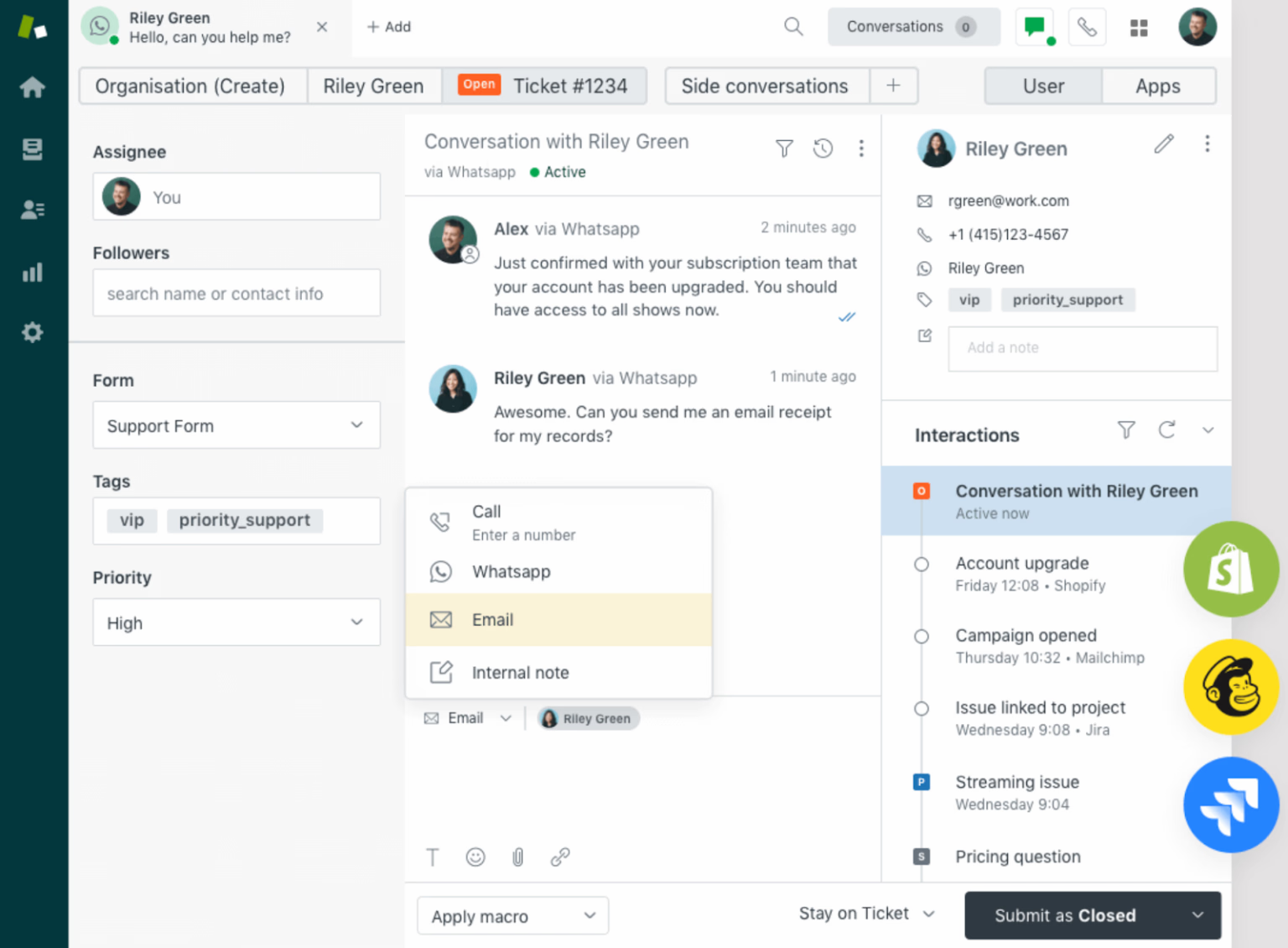
Zendesk is a popular customer support software, meant for large organizations and enterprises. It brings together various support channels, like email, chat, and a knowledge base, in a unified platform. Agents can sort issues, keep track of customer chats, and handle other support tasks.
However, it has some drawbacks. It’s more expensive than many other support ticketing systems and can be hard to set up. For instance, teams using Zendesk have to pay 2x more than HIver. Additionally, if you need assistance from Zendesk’s support team, they charge anywhere between $1500 to $2800.
Key Features
Skills-based Routing | Reporting and Analytics | Conditional and Custom Ticket Fields | Pre-defined Responses (Macros) | Self-service Customer Portal
Pricing:
Zendesk’s pricing ranges from $55 to $215 per agent per month, with three tiers for small to large businesses—Suite Team at $55, Suite Growth at $89, and Suite Professional at $115. For enterprise companies, plans start at $150 and go up to $215 per agent per month for more advanced features.
3. Freshdesk
Freshdesk is a customer support ticketing tool for small and medium-sized businesses. It helps organize customer queries into tickets, from different channels like email, chat, and social media. They offer a free plan, which is good for teams on a budget.
However, some users find its design a bit complex, and it doesn’t integrate smoothly with Google Workspace. For example, agents can’t respond to ticket alerts directly from Gmail; they have to open the Freshdesk platform.

Key Features
Parent-Child Ticketing | Team Inbox | Ticket Field Suggester | Freddy AI | Unified Agent Workspace
Pricing
Freshdesk offers four pricing plans, starting with a free plan for unlimited agents with limited features. Paid plans range from $14.36 per agent per month for the Growth plan to $82.62 per agent per month for the Enterprise plan, all billed annually.
4. Help Scout
Help Scout is a ticketing tool for businesses looking to handle customer communication. It has a shared inbox feature that lets teams work together on customer emails. There’s also a special feature called Beacon that offers customers various ways to get answers, such as live chat, FAQ searches, or emailing a question.
But, there are some issues with Help Scout. Internal and external conversations can overlap given the way both sections are designed. So, messages meant for teammates can sometimes mistakenly be sent to customers. Also, setting up Service Level Agreements (SLAs) isn’t straightforward; you’d need to use another tool called Super SLA.

Key Features
Customer Management | Messages Customization | Reporting | Knowledge Base | AI Summarize and Assist
Pricing
Help Scout offers three pricing plans, with prices ranging from $22 to $65 per user per month.
Does Help Scout offer value for money?
5. Kayako
Kayako provides a unified customer service platform that brings conversations from different channels into one view. Moreover, Kayako enhances support efficiency with features like custom views for clear insight into the team’s workload, and delegation features that help with assigning work.
However, Kayako isn’t without its limitations. Based on user feedback, its interface doesn’t quite match the appeal and user-friendliness of some competitors, such as Hiver. Users have also raised concerns about periodic price hikes without added value.

Key Features
SingleView™ | Ticket Collaboration | Live Chat | Customer Portal | Collision Prevention
Pricing
Kayako offers two pricing plans: Kayako Cloud and Classic On-Prem. The pricing details for these plans are not currently available on their website.
6. Intercom
Known as the Engagement OS, Intercom’s ticketing platform facilitates easy collection, tracking, and routing of customer queries. Moreover, Intercom provides a ‘Messenger’ feature that integrates various apps into a single interface. The tool is helpful for managing customer queries, with a focus on real-time messaging.
However, using Intercom can be complex due to its learning curve and many setup options. Additionally, it might be expensive for smaller businesses or those with limited budgets.

Key Features
Multiple Team Inboxes | Workload Management | Intercom Messenger | Automation | Fin Custom Answers | Pre-built and Custom Reports
Pricing
Intercom includes three pricing plans, starting from $29/user/month and its highest plan goes up to$132/user/month.
7. Zoho Desk
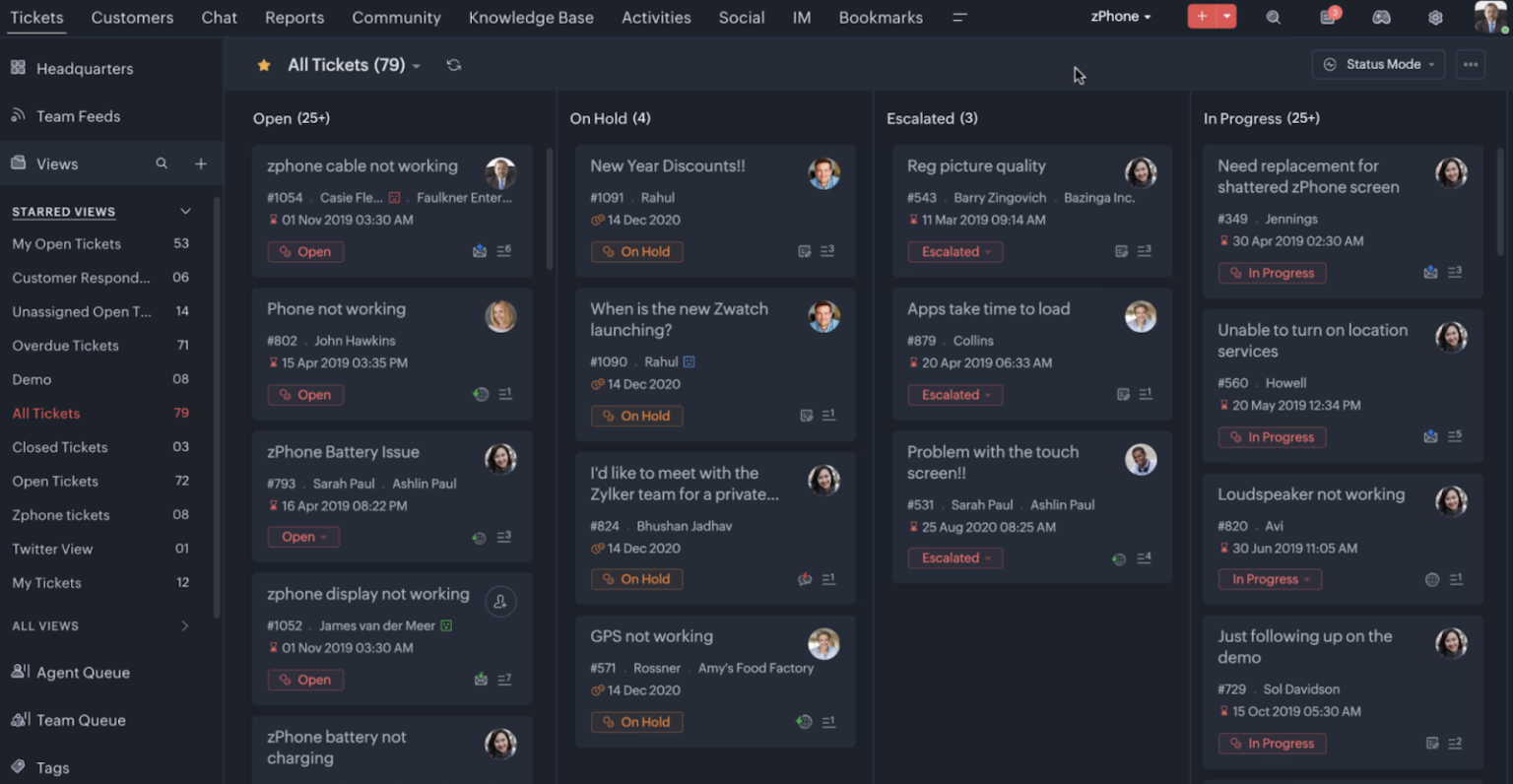
Zoho Desk is a help desk solution tailored for small businesses, owing to its freemium plan. It streamlines communication across various support channels, such as phone, email, live chat, SMS, and social media.
However, some users have expressed concerns regarding its user interface, finding it a bit complex. Additionally, setting up workflows on the platform can pose some challenges.
Key Features
Work Modes | Ticket Assignment | Auto-Tag Tickets | Zia (AI Assistant) | Agent Productivity
Pricing
Zoho Desk offers four pricing plans, ranging from a free plan to $38.32 per user per month. The paid plans start with the Standard plan at $15.57 per user per month, followed by the Professional plan at $25.15, and the Enterprise plan at $38.32 per user per month.
Recommended reading
How to create a ticketing system for customer support?
These are the steps you must follow to create a ticketing system for customer support:
1. Define your requirements: Start by identifying your specific business needs. Consider the following:
- Expected Ticket Volume: Estimate how many tickets you anticipate handling daily.
- Features Needed: Determine essential features such as ticket submission channels (email, web forms), categorization, automation rules, and workflows for assigning tickets.
- Integration Capabilities: Identify existing tools (like CRM systems) that the ticketing system should integrate with to enhance functionality.
2. Choose the right software: Select a software that aligns with your top requirements for a ticketing system. The options range from simple open-source solutions to comprehensive enterprise platforms. Select a tool that is:
- Easy to set up and work around with. Basically, its interface should be user-friendly.
- Cost-effective and doesn’t include any hidden charges
- Equipped with most of the key features you’re looking for in a ticketing system; such as automation, collaboration, multi-channel capabilities, WhatsApp integration, email management, SLA management, and more.
3. Integration with tools: This may include:
- CRM system: To maintain customer history and context.
- Communication channels: Such as live chat, social media, and email to centralize customer interactions.
- Knowledge base: To provide self-service options for customers, reducing the volume of incoming tickets.
4. Train your team: You must focus on the following while training your team:
- Ticket management: How to create, update, and resolve tickets.
- Response protocols: Guidelines for interacting with customers and managing expectations.
- Using features: Training on how to leverage automation and reporting tools to improve efficiency.
5. Monitor and optimize: After implementation, continuously monitor the performance of your ticketing system. Use analytics to track:
- Ticket volume and resolution times: Identify trends and areas for improvement.
- Customer satisfaction: Gather feedback to enhance service quality.
- Team performance: Assess how well the team is managing tickets and where additional training may be needed.
Frequently asked questions on customer support ticketing system
Q1. How does a customer support ticketing system work?
When a customer submits a query or reports an issue, it’s converted into a ticket in the software. This ticket contains all the necessary information, including customer details, nature of the query, and other relevant data. Customer service representatives then address these tickets based on priority and category.
Q2. How is a ticketing system different from a CRM?
While both tools manage customer interactions, a ticketing system is specifically designed for handling support inquiries and issues. A CRM (Customer Relationship Management) tool focuses on managing all aspects of a customer’s relationship with a business, including sales, marketing, and service.
Q3. Can ticketing systems be integrated with other software?
Yes, many ticketing systems offer integration capabilities with CRM systems, email platforms, live chat tools, and other software to provide a seamless customer support experience.
Q4. How do ticketing systems prioritize issues?
Most systems allow for manual prioritization by support agents, but they also provide automation rules that can prioritize tickets based on various criteria like keywords, customer type, or issue severity.
Q5. How can ticketing systems improve agent productivity?
They centralize information, automate workflows, and provide analytics, allowing agents to respond more efficiently and reducing time spent on repetitive tasks.
Q6. What kind of support is available for ticketing systems?
Support options vary by provider but often include online documentation, customer support via chat or email, and community forums. Some vendors also offer dedicated account managers for larger clients.
Q7. How secure are ticketing systems?
Reputable ticketing systems prioritize security with features like SSL encryption, two-factor authentication, and regular data backups. However, security can vary among providers, so it’s essential to check the security features and certifications of any system you’re considering.
Find a ticketing system that works for you
A good customer support ticketing system can make all the difference in how efficiently your team handles customer queries and how effortlessly your customers get answers. With so many options out there, it’s important to find one that actually fits the way your team works—without overcomplicating things.
A few questions to consider before choosing a customer support ticketing system:
- Does it fit into our existing workflow?
- Is it easy to use?
- Does it support multiple channels?
- Are there any hidden charges?
If you’re looking for something simple, affordable, and built for multi-channel support, Hiver is worth checking out. With Hiver, you don’t have to switch platforms or change your existing workflow.
Try Hiver free for 7 days and see how it works for your team.














