


Customer support teams face various types of queries and complaints. Some of them are quite straightforward, like “How do I reset my password?” and others might be more complex.
At the same time, I’m sure your support team would also have to deal with queries that are more technical and complex. In such instances, it becomes rather challenging for typical frontline agents to resolve such queries – which in turn leads to longer wait times. Plus, you’d want agents of certain expertise to handle certain queries, to speed up resolution time.
This is where the tiered customer support model comes in. It’s like organizing a library: Instead of having all books mixed up, you categorize them so that anyone can easily find what they’re looking for. Similarly, this model sorts customer queries and directs them to the agents best suited to handle them.
In this article, we’ll break down the tiered customer support model. We’ll explore what it is, its benefits, and the steps companies can take to introduce it into their support system.
What is a Tiered Support Model?
A tiered support model is a way of organizing your customer support team into different levels (or “tiers”) based on the complexity of customer issues.
- Tier 0: Self-service options like FAQs, help articles, or chatbots—customers solve problems on their own.
- Tier 1: Frontline agents handle basic questions—like password resets or order updates.
- Tier 2: More experienced agents tackle technical or account-related issues that Tier 1 can’t resolve.
- Tier 3: Specialists or product engineers handle complex bugs or escalations.
- Tier 4 (if used): External vendors or third-party support.
This model helps route customer issues efficiently—starting from the simplest level and moving up only if needed.
Key Components of a Tiered Support Model
We’ll be looking at three main tiers of customer support. While companies might have more or fewer levels, having at least three is a good starting point. Let’s go into more detail about these tiers.

1. Tier 1 (First-Level Support)
Often referred to as the “frontline” or “first-level support,” Tier 1 acts as the gatekeeper of the support system. They’re typically the first human point of contact a customer interacts with.
- Responsibilities: Handling routine inquiries, identifying and categorizing issues, directing calls to the appropriate tiers if necessary.
- Examples: Assisting with common tasks like password resets, guiding users on basic functionalities of a software, offering instructions for common hardware setups, or directing users to self-help resources.
2. Tier 2 (Second-Level Support)
One step above Tier 1, these support agents have specialized knowledge that allows them to handle more intricate queries and technical issues that surpass the capacity of first-level support.
- Responsibilities: Handling issues that cannot be resolved by Tier 1, diagnosing issues using advanced tools, and often coordinating with Tier 3 specialists to solve complex challenges.
- Examples: Troubleshooting software glitches that aren’t quite straightforward, rectifying minor network issues, and resolving account-related challenges that might involve deeper system access.
3. Tier 3 (Third-Level Support)
Comprising seasoned experts, Tier 3 is the advanced level of support available. Support agents here are adept at resolving complex technical challenges, often needing to dive deep into systems, codes, or intricate configurations.
- Responsibilities: Conducting in-depth analysis of issues that can’t be resolved by Tier 2, collaborating with product or system developers, recreating and resolving complex bugs, and offering feedback for product improvement based on recurring issues.
- Examples: Debugging critical software anomalies, optimizing system configurations for specialized requirements, or rectifying serious data-related issues that might have broader implications.
Benefits of Tiered Support Model
The tiered support model is highly favored because of the myriad of benefits it offers, such as:
1. Quick wins are handled instantly at Tier 1
Not every customer issue needs a deep-dive. Password resets, order updates, or basic how-to questions can be resolved right at the first level—without slowing down your more experienced team members. This speeds up response time and reduces backlogs.
2. Skilled team members focus on what they do best
Tier 2 and Tier 3 agents don’t have to waste time reading through tickets about tracking links or product returns. Instead, they can focus on solving deeper issues—like system bugs, workflow breakdowns, or account-specific escalations.
3. Clearer growth path for agents
A tiered model gives junior agents room to grow. They can start with Tier 1 tasks, get hands-on experience, and work their way up to more complex cases. This creates an internal learning path without needing a full career switch.
4. Easy to scale with ticket volume
When ticket volume spikes, you don’t need to hire high-level specialists right away. You can add more Tier 1 agents who are trained to handle the bulk of incoming queries, and escalate only the ones that actually need deeper investigation.
5. Escalations follow a set process
With tiers in place, there’s no confusion about who takes what kind of issue. If a Tier 1 agent can’t solve something, it’s passed to Tier 2 with full context. This avoids dropped handoffs, repeated explanations, and internal ping-pong.
Recommended reading
6. Self-service works as a buffer (Tier 0)
Before customers even reach an agent, they can often find answers through help articles, chatbot replies, or community forums. This filters out repetitive questions and gives your team more time to focus on real problems.
7. Reporting becomes more actionable
Because tickets are categorized by tier, you can track patterns—like which issues are eating up Tier 2 time, or which Tier 1 queries should be automated. This helps in spotting gaps in documentation, training, or product design.
Steps to Implement Tiered Support Model
Implementing a tiered support model is a strategic initiative that can vastly enhance the efficiency and effectiveness of your customer support department. Here’s a step-by-step guide to implementing such a model.
1. Map out your common support queries
Start by analyzing your past tickets. Group them by type and complexity—billing questions, login issues, bugs, feedback, feature requests, etc. Host focus group discussions or interviews with your support staff. Their on-ground experience can offer invaluable insights into the current challenges and potential solutions. This helps define which queries belong in Tier 1 vs. Tier 2 or 3.
2. Define responsibilities for each tier
For each tier, write down exactly what kinds of issues the agents should handle—and what they shouldn’t. Avoid overlaps. For example:
- Tier 1 handles basic troubleshooting, order status, account setup.
- Tier 2 tackles product limitations, account escalations, known bugs.
- Tier 3 deals with anything that needs engineering or dev support.
3. Build an escalation workflow
Decide how tickets will move from one tier to another. What qualifies as an escalation? What context should the previous tier provide? Write this down. You can use tags, internal notes, or automation in your helpdesk to guide this process.
4. Set up internal documentation for each tier
Create internal guides for how each tier should respond to common issues, what tools they can use, and when to escalate. This keeps your support team aligned and reduces handoff friction.
5. Train your support team in phases
Don’t drop the structure overnight. Start by training your current team on Tier 1 and Tier 2 processes. Let them experience the model, give feedback, and build muscle before adding more complexity.
Recommended reading
6. Integrate tools for ticket routing and visibility
Use your helpdesk to automate routing based on topic, keywords, or forms. Add collision detection and activity logs so everyone knows who’s working on what. Tools like Hiver, Freshdesk, or Zendesk can help here.
7. Add a Tier 0 (self-service) layer
Once your team tiers are in place, build out a help center, FAQ, or chatbot that handles common questions before they even reach Tier 1. Use historical ticket data to identify what content to write.
8. Track performance across tiers
Monitor metrics like resolution time, number of escalations, and agent workload by tier. This will tell you if your model is working—or if you need to redistribute responsibilities or improve documentation.
Recommended reading
9. Review and adjust quarterly
Your support volume and product complexity will change. Set a recurring review to update tier definitions, optimize workflows, and promote high-performing agents into more advanced tiers.
Metrics to Measure the Effectiveness of Tiered Support System
Measuring the effectiveness of your tiered support system is crucial to ensure that it meets both organizational goals and customer expectations. Here are some of the essential metrics you should consider:
1. First Contact Resolution (FCR)
This metric shows how many issues are resolved at the first interaction, usually at Tier 1. A low FCR means agents may lack training or access to resources. Focus on improving internal documentation or updating macros and response templates to help Tier 1 close more tickets on their own. Easily calculate your first contact resolution rate ->
2. Average Resolution Time (by Tier)
The average resolution time metric gives visibility into how long each tier takes to resolve issues. A rising trend in resolution time at Tier 2 or 3 might point to poor handoffs, unclear notes, or knowledge gaps. This helps you decide whether processes or staffing need to be adjusted.
3. Escalation Rate
It tracks how often tickets move from Tier 1 to higher tiers. Use this metric to review ticket routing and identify training gaps. While some escalation is natural, a very high escalation rate could indicate one of the following:
- Tier 1 support is not sufficiently trained.
- There are major gaps in the product or service offered.
- Customers are facing complex technical issues that need to be fixed at the root level.
4. Customer Satisfaction (CSAT) Score
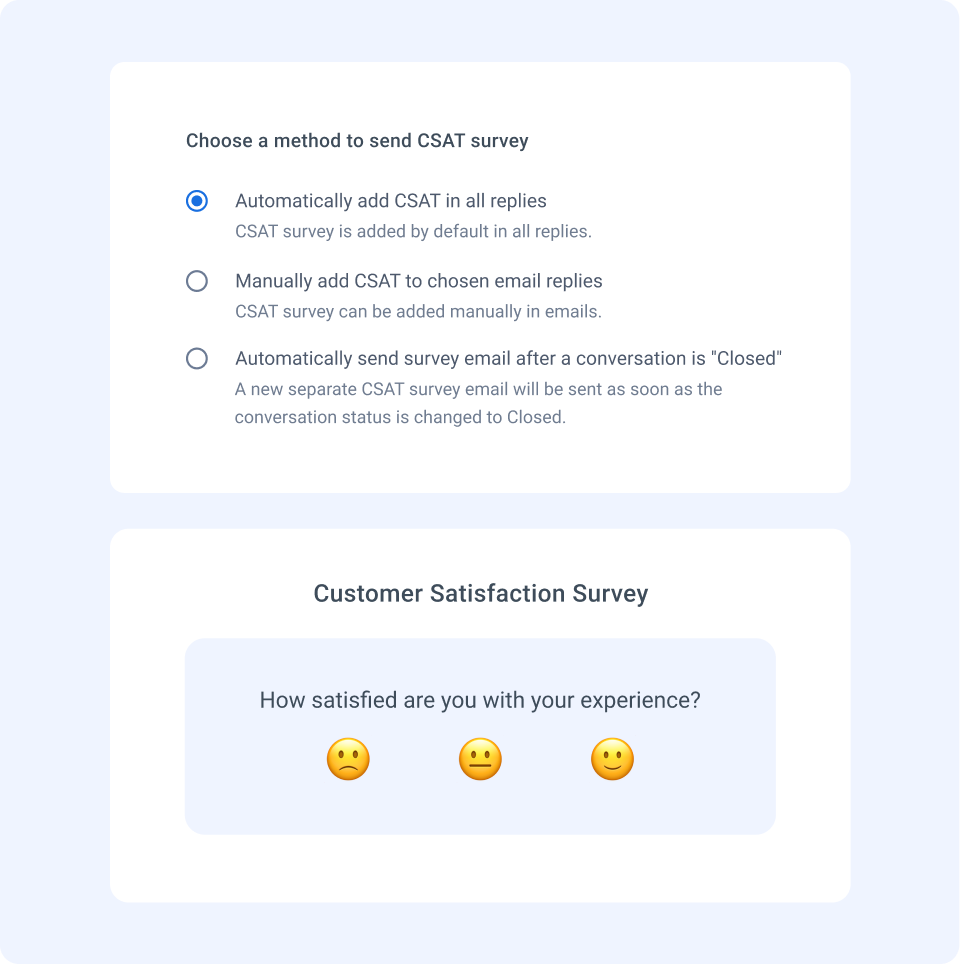
It breaks down customer satisfaction scores by the tier that resolved the ticket. Low CSAT scores at Tier 1 could mean rushed responses, missing context, or poor tone. At Tier 2 or 3, it may be more about delays or technical confusion. Use these insights to review ticket quality and coach your team on both resolution accuracy and empathy.
You can measure CSAT using short post-resolution surveys—just a one-liner like “How satisfied are you with the help you received?” with a 1–5 scale. Tools like Hiver make it easy to collect this feedback directly inside your inbox, right after a conversation ends—no complicated setup needed.
5. Ticket Volume by Tier
This shows how workload is distributed. If Tier 2 or Tier 3 is handling more volume than Tier 1, your tiering logic might need a rethink. Use this metric to rebalance responsibilities and reduce burnout at higher tiers.
6. Backlog per Tier
It helps you analyze which tiers are getting overwhelmed. A growing backlog at Tier 3, for example, might mean the team is understaffed or getting escalations that could have been handled earlier. Prioritize resource planning based on these numbers.
7. Time-to-Escalation
Measures how long it takes to push a ticket from one tier to the next. If this time is high, there may be hesitation, confusion, or delays in getting tickets to the right person. This is useful for tightening workflows and improving SLAs.
Things to Consider When Implementing Tiered Support
Implementing a tiered support model is a significant undertaking, demanding careful thought on multiple fronts. Let’s break down the key considerations:
1. Don’t overcomplicate the tiers
Start simple. You don’t need 4 layers right away. Most teams do well with just Tier 1 (general queries) and Tier 2 (complex issues). Add more only when the volume or complexity demands it—otherwise, you risk slowing everything down.
2. Define what belongs where
Without clear ticket boundaries, agents will either hold on to issues too long or escalate too quickly. Make it easy: document examples for each tier, list out what should be escalated, and train everyone on the “what goes where.”
3. Invest in internal documentation
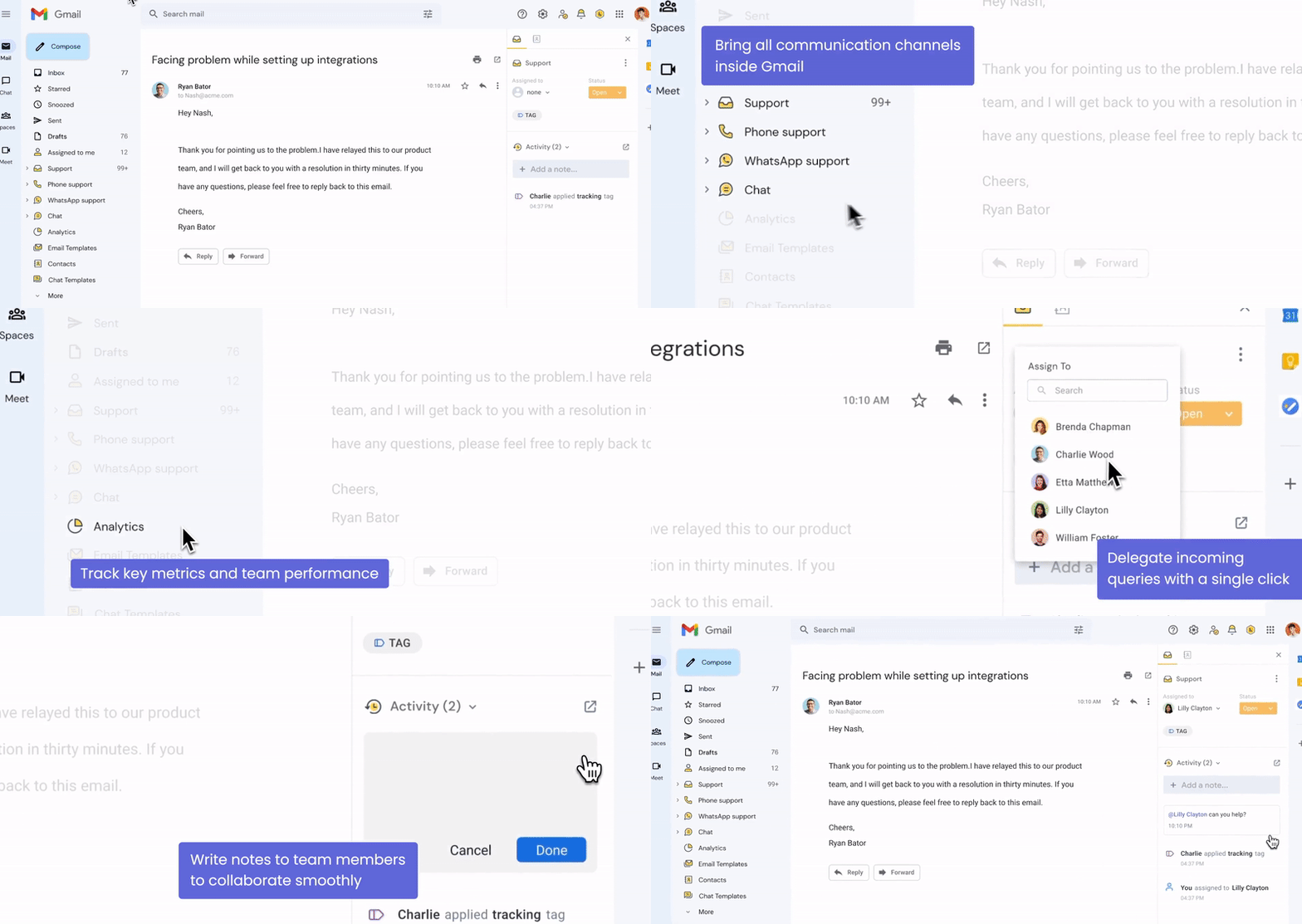
Tier 1 agents should never guess. Build an internal knowledge base with common responses, troubleshooting steps, and escalation triggers. Hiver’s internal notes and shared inbox setup makes this easier by keeping everything in one place.
4. Avoid robotic handoffs
Escalation shouldn’t feel like starting over for the customer. When moving tickets between tiers, add context, notes, and next steps. Use tools that allow private notes or activity logs—so Tier 2 knows exactly what’s been tried already.
5. Monitor escalation patterns early
If Tier 1 is escalating too much too soon, it may not be a training issue—it could be the way tickets are being routed. Keep a close watch in the first 2–3 months and tweak your tier definitions based on actual ticket trends.
6. Match your tiering to team size
A startup with 3 agents doesn’t need tiers—they need shared visibility. A growing team with 10+ agents may benefit from this structure. Use tiered support when it solves a problem, not just because it sounds structured.
7. Keep feedback loops open
Your agents know which tiering rules work and which ones slow them down. Run regular feedback sessions to improve workflows. Many teams track this through tags, shared labels, or by simply reviewing escalated conversations in weekly reviews.
Making It Work: What Makes Tiered Support Successful
Tiered customer support works best when it’s built around real-world ticket patterns—not just a hierarchy for the sake of structure. The goal isn’t to create walls between support levels but to route issues to the right people at the right time.
A good tiered model balances speed with expertise: common issues are resolved quickly at Tier 1, while complex ones reach specialists without delay. But to make this work, you need clear definitions, smooth handoffs, and internal processes that evolve with your team’s needs.
Whether you’re scaling support, handling more volume, or trying to reduce resolution time—tiered support gives you the foundation. Just make sure it serves your customers, not just your org chart.
Frequently Asked Questions (FAQs)
1. What is Tier 1, Tier 2, and Tier 3 support?
- Tier 1: Frontline support that handles basic questions—like account setup, password resets, or general product guidance.
- Tier 2: More experienced agents who handle complex, technical, or account-specific issues that Tier 1 can’t resolve.
- Tier 3: Specialized support—usually product engineers or developers—who solve bugs, advanced configurations, or deep technical issues.
2. What are Tier 1, Tier 2, and Tier 3 customers?
These terms are typically used in customer segmentation, not support levels.
- Tier 1 customers are high-value clients—either due to contract size, long-term relationship, or strategic importance.
- Tier 2 customers are mid-level clients—important but not top-priority.
- Tier 3 customers are usually smaller accounts with fewer support needs or lower revenue potential.
3. What are the 5 levels of support?
Not all companies go beyond three, but when they do, here’s how five levels might look:
- Tier 0: Self-service – FAQs, help docs, and chatbots.
- Tier 1: Basic agent support for common queries.
- Tier 2: Technical support or product specialists.
- Tier 3: Engineering or deep product experts.
- Tier 4: External support teams like third-party vendors or infrastructure partners.
4. What is Tier 1 and Tier 2 IT support?
In IT support teams:
- Tier 1 IT support handles general IT helpdesk tasks—like software setup, password resets, or troubleshooting network issues.
- Tier 2 IT support deals with more complex problems—like system outages, server issues, or technical escalations that Tier 1 can’t resolve.
5. How do I know if I need a tiered support model?
If your support team is growing, your ticket volume is increasing, or your agents often spend time routing tickets manually—it’s time to consider a tiered model. It’s especially useful when your team has mixed skill levels and you want to optimize their time.
6. What’s the difference between tiered support and swarming?
- Tiered support follows a linear escalation model—issues move from one level to the next if needed.
- Swarming involves multiple team members from different roles collaborating on a ticket from the start—especially useful for complex or urgent cases.
7. Can small teams use a tiered model?
Yes, but keep it light. Even with a small team, you can create basic guidelines like: Agent A handles FAQs and chats (Tier 1), while Agent B handles technical requests (Tier 2). The idea is to reduce confusion—not create rigid walls.
8. Which tools can I use to manage a tiered support model?
To run a tiered support system smoothly, you need tools that can handle ticket routing, internal notes, escalations, and visibility across tiers. A few helpful types of tools include:
- Helpdesk software like Hiver, Freshdesk, or Zendesk to assign, escalate, and track tickets based on priority and complexity.
- Internal knowledge bases so Tier 1 agents can solve issues faster and escalate with context.
- Collaboration features like private notes, activity logs, or shared inboxes to avoid duplicate work and missed handoffs.














