


If your company deals with a lot of external vendors or contract workers, managing them manually or on spreadsheets can be a real headache. From onboarding to handling their queries, it eats up a lot of time.
Thankfully, vendor management tools are here to simplify things. These tools help you handle everything regarding your vendors more efficiently, freeing up your team to focus on other important tasks. With vendor management software, all vendor details are centralized and easy to access.
However, choosing the right vendor management software can be tough. It requires careful planning and evaluation. To help you out, we’ve thoroughly researched and compiled a list of the top 11 vendor management software solutions.
What is a Vendor Management Software?
A vendor management software (VMS) is a tool designed to make working with vendors, suppliers, and contract workers a breeze. It streamlines processes such as vendor onboarding, communications, performance tracking, handling contracts, and evaluating vendor risks.
Essentially, it helps companies organize and improve their dealings with the vendors they rely on. It’s perfect for various teams within an organization—whether you’re in HR, support, or supply chain management.
Top 11 Vendor Management Systems
Here’s a quick rundown of the top 11 vendor management solutions. As you read on, you’ll discover their main features, advantages, disadvantages, and pricing details.
| Tool | Starting Price | Free Trial | G2 Rating |
|---|---|---|---|
| Hiver | $19/user/month | 7 days. No credit card required | 4.6 ⭐ |
| Airbase | Price on request | Not available | 4.8 ⭐ |
| QuickBooks Online | $30/user/month | 30 days | 4.0 ⭐ |
| Vanta | Price on request | 7 days | 4.6 ⭐ |
| SAP Fieldglass | Price on request | Not available | 4.5 ⭐ |
| PRM360 | Price on request | 1 day | 4.8 ⭐ |
| Tradeshift Pay | Price on request | Not available | 3.8 ⭐ |
| Onspring | Price on request | Not available | 4.7 ⭐ |
| Genuity | $39.99/month | 30 days | 4.7 ⭐ |
| Productiv | Price on request | Not available | 4.6 ⭐ |
| LeadSquared | Price on request | Not available | 4.6 ⭐ |
1. Hiver
Most vendor management tools require teams to switch to a completely new platform, adding complexity to an already chaotic workflow. AP and AR specialists would have to constantly toggle between their inbox (to manage regular work emails) and an external platform (to manage vendor queries). This is a huge productivity killer.
Hiver, a multi-channel customer and vendor support platform, takes a different approach. It brings all vendor queries and regular work emails into the same interface, ensuring finance teams don’t have to toggle between screens and tools.
You get full visibility into vendor emails and their status, can automate approvals, and process payments faster – without investing in complicated software.
Key Features:
1. Automated email assignment: Hiver lets you automatically assign and tag vendor queries based on specific triggers. For instance, emails with “invoice” in the subject line can be automatically routed to the Accounts Payable (AP) team for faster processing.
Similarly, queries about outstanding payments or collections can go directly to the Accounts Receivable (AR) team. You can also assign vendor emails in a cyclic way—where each incoming email is assigned to the next available AP or AR specialist.

2. Approval workflows (faster payment processing): Manually forwarding emails for approvals is slow and inefficient. With Hiver, you can set up approval workflows right inside your inbox.
Let’s say a vendor sends an invoice for approval. Instead of waiting for finance and management to manually review it, you can trigger an automation workflow so that the right stakeholders get notified about it, and can choose to approve invoices.
3. AI Copilot: Managing vendor emails can be time-consuming, especially when your team has to search for past conversations, policies, or payment details to respond accurately. Hiver’s AI Copilot eliminates this hassle by acting like a smart assistant, instantly surfacing the right information. Instead of manually digging through email threads or the company’s knowledge base, AI Copilot fetches relevant details in seconds.
4. Vendor portal: No more back-and-forth emails with vendors asking, “Has my payment been processed?” or “What’s the status of my request?” Hiver provides a dedicated portal where vendors can submit queries and track their resolution—reducing unnecessary follow-ups and emails.
5. Live chat & AI chatbots: Some vendor queries require immediate responses. This is where Hiver’s real-time chat widget and AI-powered chatbots can help. These can be embedded on your website or mobile app, making it easy for vendors to start a chat and get answers.
For instance, vendors can check their payment status instantly through the chatbot, without having to send an email and wait for a response.

6. Internal collaboration: Finance teams often need to discuss vendor-related queries internally—without clogging inboxes with endless CCs and forwards. Write internal notes to loop in colleagues into conversations with vendors. Use Shared Drafts to get your responses reviewed by a manager or supervisor before sharing it with a vendor.
7. Advanced analytics & reports: Get insights into how efficiently you handle vendor communication. Track and analyze:
- Time taken for payment approvals
- Unresolved vendor queries
- Response times for invoice-related emails
Example: If vendor payments are consistently delayed, reports can help identify bottlenecks in the approval process.
8. Seamless Integrations with ERP & Other Tools: Hiver connects with ERP systems like NetSuite, helping you update and process invoices directly from your inbox. Check out the entire list of 100+ integrations here.
Pros:
- Eliminates delays in invoice approvals with automated workflows.
- Reduces vendor follow-ups with a dedicated portal for tracking queries.
- Ensures no vendor email gets missed.
Pricing:
Hiver comes with four pricing plans:
- Free forever plan
- Lite plan: $19/user/month
- Pro plan: $49/user/month
- Elite plan: $79/user/month
2. Airbase
Airbase is a spend management tool that’s perfect for small to medium-sized businesses. It does more than just track your company’s spending; it also helps you manage your relationships with vendors. From onboarding new vendors to gaining insightful data on interactions with them, Airbase has got you covered. It supports teamwork and risk management to help you build and maintain strong, strategic partnerships with vendors worldwide.
Key Features:
Onboard Vendors: Vendors can easily add their details like contracts and payment information through Airbase’s self-service vendor portal – without needing to contact your team.
Track Performance: Keep an eye on how your vendors are doing with metrics like payment terms, compliance status, spending, and payment history.
Automated Tax Compliance: Airbase uses AI to fill out tax details. The tool checks the tax IDs of both domestic and international vendors, and flags any issues before making a payment. This helps you avoid penalties from incorrect tax filings and even optimize refunds on international taxes.
Vendor Portal: Platform for vendors to manage their details, such as sending invoices, uploading documents, tracking payment status, and more.
Secure Global Payments: Make safe payments to vendors all over the world. Airbase supports over 145 currencies and various payment methods including ACH, checks, virtual cards, and international wires, helping you handle global transactions smoothly.

Pros:
- Seamless integration with popular general ledgers like NetSuite and Sage Intacct.
- Custom approval workflows with Airbase’s advanced approval rules.
- Offers a single source of truth to manage multiple vendors, vet invoices, and eliminate frauds.
Cons:
- UX can be confusing. For instance, getting to the receipt inbox (which is a primary use case) takes too many clicks.
- Basic tasks like booking ledger entries or matching payments can take a lot of time.
- The expense reimbursement module is limited.
“It would be great to have the possibility to submit reimbursements of different types (transport, meals etc.) as bulk, but the single “Category” field doesn’t allow it at the current point.” – Airbase user
Pricing:
Airbase offers three types of pricing plans. To know their exact pricing for each plan, you have to contact their sales representative or book a demo.
- Standard: Add up to 200 employees
- Premium: Add up to 500 employees
- Enterprise: Add up to 5000 employees
3. QuickBooks Online
QuickBooks Online is a cloud-based accounting tool that simplifies the way you manage vendors. It helps you track purchase orders and organize vendor information in a centralized place. For those needing more robust features, QuickBooks Enterprise offers the ability to import and manage vendor data in bulk, which is ideal for handling contracts, and bulk purchases.
Key Features:
Vendor Center: A centralized hub where you can store all your vendor details. Here, you can add or edit information, set payment terms, and keep notes—all conveniently in one place.
Bill Management and Payment Tracking: Track all your vendor bills and payments efficiently. Set reminders for due payments and schedule recurring bill payments to maintain a smooth cash flow.
Vendor Tax Management: Manage tax details for each vendor, apply the correct tax rates to transactions, and generate necessary tax reports, ensuring compliance with tax regulations.

Pros:
- Generate detailed reports on your spending with vendors, track outstanding bills, and review payment histories.
- Automation features like purchase order and bill management streamline processes and help prevent errors.
- Fully integrates with other QuickBooks products like QuickBooks Online Payroll and Intuit GoPayment, as well as third-party apps like PayPal, Shopify, Xero, Salesforce, Square POS, among others.
Cons:
- While users can create custom reports, they cannot open multiple reports simultaneously.
- Syncing bank accounts is limited; users can only sync accounts with major financial institutions, but not with all banks.
- No provision for multiple user login at one time (one employee has to wait for the other to log out).
Pricing:
Quickbooks Online offers four types of pricing editions.
- Simple Start: $30 per month
- Essentials: $60 per month
- Plus: $90 per month
- Advanced: $200 per month
4. Vanta
Vanta’s Vendor Risk Management solution automates the entire process of vendor onboarding, risk assessment, and remediation. This means you can spend less time reviewing vendors and more time enhacning your company’s security. It offers the most in-demand security and privacy frameworks – like SOC 2, ISO 27001, and HIPAA.
Key Features:
Automatic Vendor Discovery and Onboarding: Vanta automatically detects all third-party applications your organization uses. It then helps you centralize this information, making it easy to start risk assessments from one platform.
AI-Powered Security Reviews: Vanta’s AI helps you quickly analyze security documents like SOC 2 reports, reducing the time you spend on security reviews by up to 75%.
Unified Management: Manage your TPRM (Third-Party Risk Management) and GRC (Governance, Risk Management, and Compliance) programs from a single platform.

Pros:
- Vanta includes a built-in system that automatically gives each vendor a default risk score. You can adjust these scores and customize the criteria to fit your company’s needs.
- Link Vanta with your procurement systems to manage security review requests more efficiently, keeping your processes well-organized.
- Vanta partners with AICPA-affiliated auditors for quick and efficient certification. It collects all necessary info in a single database, so you don’t need separate repositories for compliance audits.
Cons:
- The platform and UI can get confusing for users initially. Dashboard alerts are a bit overwhelming when it comes to differentiating between failed alerts, documents requiring updates, etc.
- Although Vanta is a valuable tool, smaller organizations may need to consider the lengthy timeline of 6 to 12 months to see a return on investment.
- Integrations are a bit lacking in Vanta.
“Some categories of Vanta’s integrations are a little bit lacking. They could improve the software overall to support non-vanta-based integrations better. Like an option to upload CSV’s of users from non-supported software for access reviews, or the option to add a non-supported cloud provider.” – Brandon A.
Pricing:
Vanta offers three types of pricing options:
- Core: Price on request
- Collaborate: Price on request
- Scale: Price on request
5. SAP Fieldglass
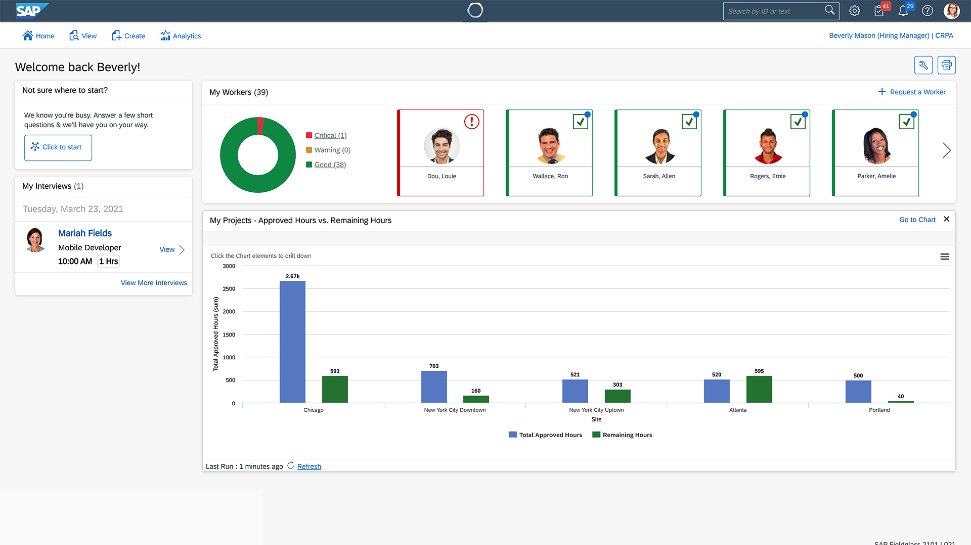
SAP Fieldglass is an advanced vendor management solution that provides services procurement and external workforce management solutions. The platform is designed to help organizations find, hire, and manage various types of workers, including full-time employees, temporary staff, and independent contractors.
SAP Fieldglass also provides a talent management platform that helps companies vet potential hires, choose the right candidate, and manage the payment of freelancers and contractors. Plus, it integrates with Salesforce for enhanced workflow management.
Key Features:
Services Procurement: Manage master contracts and SOWs to ensure compliance. Automate onboarding tasks, such as creating security IDs and system access.
Worker Profile Management: Access comprehensive information on external workers. Assign a unique security identification number to each worker and consolidate all historical data into a single record for enhanced security
Assignment Management: Streamline the team assignment process through a single interface. Allocate one or more resources from your resource pool, or assign one resource to handle multiple assignments across any given day, week, or month.
Pros:
- Benefit from seamless integration capabilities and easily connect SAP Fieldglass to other SAP solutions like SAP SuccessFactors, SAP Ariba, and SAP S/4HANA.
- Track external talent through features like milestone-based payments, attendance tracking, budgeting, time tracking, and fixed and recurring payments.
- Ensure compliance with regional and local tax, and labor regulations using the built-in tax and labor compliance capabilities of SAP Fieldglass. With support for 180 countries and 21 languages, you can meet government mandates easily and ensure that you are compliant with all necessary regulations.
Cons:
- Reporting is complex and the reports take a lot of time to load.
- It can get expensive, particularly for small businesses or those with a limited number of external vendors in their workforce.
- UI is confusing to navigate.
“The UI is a little confusing. It requires formal training before someone can actually use it. The user journey across the UI is not as smooth as it should be. Not just this, but the information on the job page is cluttered and it becomes difficult to map the information you are looking for.” – Vaibhav S.
Pricing:
Not available. You need to contact a SAP representative to know the pricing plan for your business.
6. PRM360
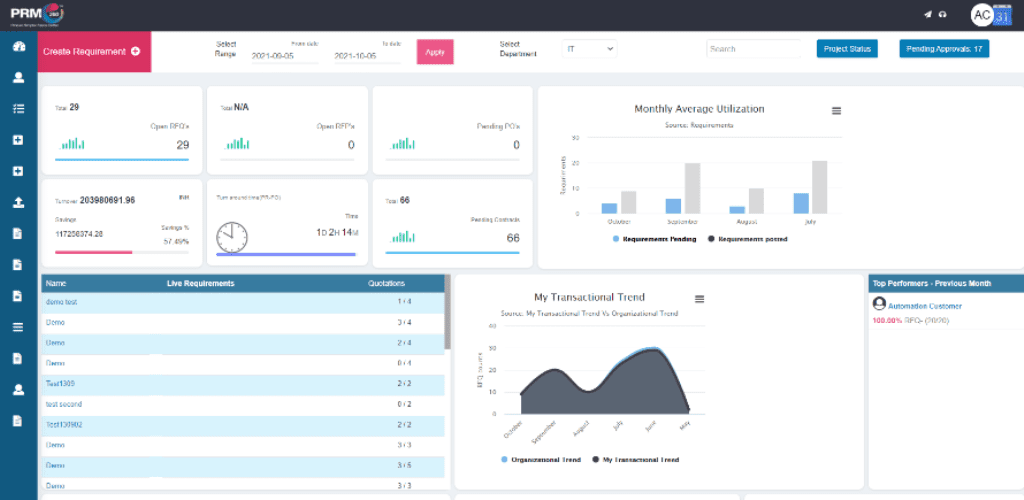
PRM360’s vendor management software module is designed to centralize all vendor and supplier information in one place. It enables easy evaluation of vendor performance for future collaborations, which helps streamline processes from vendor profiling to strategic sourcing and risk management.
Key Features:
Vendor Profiling: Manage vendor deliverables, track performance, compare vendors, and monitor compliance effortlessly. The software integrates seamlessly with ERP systems, allowing for quick access to contracts, quotes, invoices, and purchase orders directly from the vendor master system.
Strategic Vendor Sourcing: Use straightforward sourcing tools to connect and collaborate with thousands of potential vendors. The software ensures that chosen vendors meet all industry-specific eligibility criteria and are reliable, which means no hassles with purchases, no defective goods, and no delivery delays.
Supplier Risk Management: This comprehensive suite of tools provides insights into supplier performance and potential risks, helping to manage market changes and prevent supply chain disruptions.
Pros:
- Keeps all vendor-related data in one place for easy access and evaluation.
- Simplifies finding and collaborating with qualified vendors, ensuring compliance and reliability in procurement activities.
- Vendor bidding process is well organized. The tool offers a feature to assist the vendors participating in an auction.
Cons:
- Currently, there’s no option to remove inactive RFQs.
- Sometimes the system gets slow.
- Doesn’t allow multiple user login within the same company.
Pricing:
Though the pricing is not clearly specified, G2 suggests that for mid-market companies, PRM360 is 37% less expensive than the average Procure to Pay product. And for enterprises, it is 43% less expensive.
Free Trial: 1 day
7. Tradeshift Pay
Tradeshift Pay is an AP Automation and E-Invoicing Solution and an ideal vendor management software for small businesses. Tradeshift empowers businesses to achieve complete digital control over every aspect of their supply chain.
It offers a scalable solution for automating vendor processes and enabling companies to become paperless throughout the entire order-to-pay cycle.
Key Features:
E-Procurement: Gain access to a pool of vetted vendors. Monetize your network of buyers and sellers to create a sustainable business model.
Pay: Using multi-way matching, this feature helps align invoices with purchasing documents, like orders and contracts.
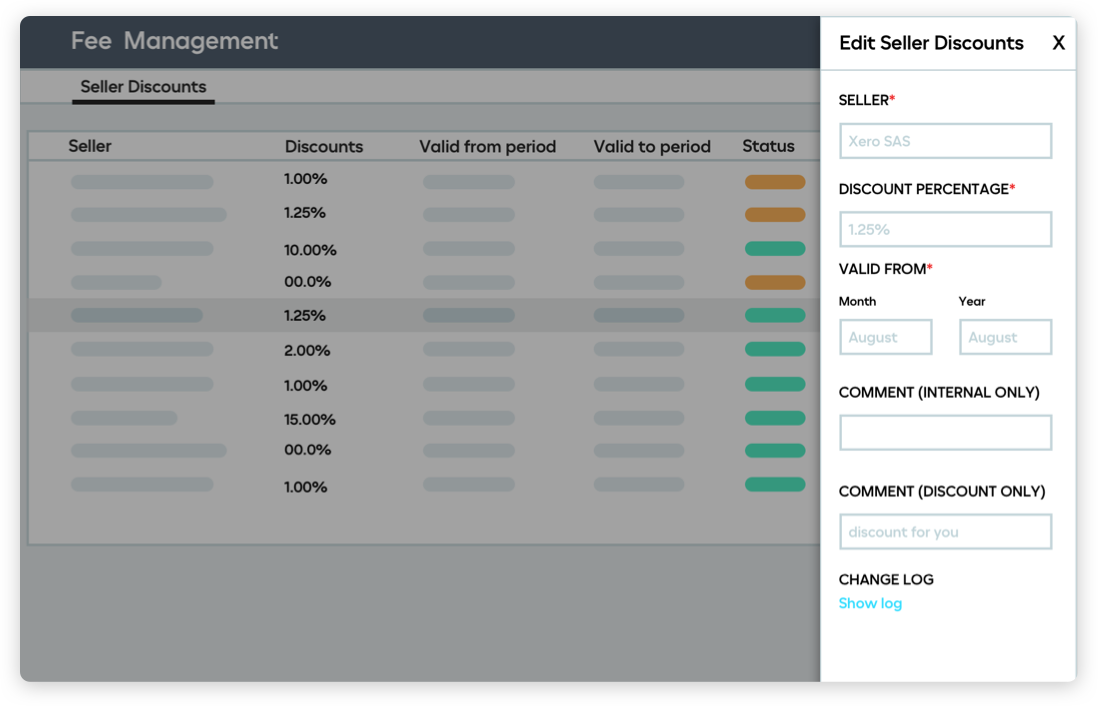
Engage: Give sellers a dashboard view of transaction and payment analytics.
Cash: This feature eliminates the need for sellers to rely on their buyers for underwriting, thus enabling fast and predictable payments.
Sell: Get access to a global network of B2B e-commerce marketplaces. The platform helps businesses reach new customers and create new revenue streams.
Pros:
- Tradeshift’s mission is to connect businesses of all sizes, which is why they offer forever-free invoicing for freelancers, consultants, and small businesses.
- It offers a unified hub that simplifies communication between buyers and vendors.
- Invoice tax compliance in more than 50 countries. Businesses can rely on Tradeshift to handle all local regulations.
Cons:
- The document page organization process can be cumbersome and challenging for new users to understand.
- It lacks automation capability in the submission of invoices and organization of PO documents.
- The platform can get very slow sometimes.
“It can be very slow and seems to frequently have technical issues. It also has a limitation that only one person can receive email notifications. We have 23 locations so either my coworkers have to remember to log in every day or two or I have to sort through the POs and try to forward them on to the correct coworker.” – Tradeshift Pay user
Pricing:
Not provided. You have to contact (+1 (800) 381-3585) or book a demo.
8. Onspring
Onspring’s vendor management software is all about making it easier for you to establish and maintain excellent relationships with third-party vendors. With this software, you can manage the entire vendor lifecycle—from procurement and standardized onboarding to conducting tailored risk assessments.
Key Features:
GRC Suite: Easily manage your governance frameworks (such as ISO, NIST, and CMMC). Assess, categorize, and track vendors.
Real-Time Reporting: Use location-specific data to understand vendor risks and continuity plans across different regions. Update multiple records in one go.
Dynamic Workflows: Onspring offers pre-built templates and customizable options to automate intricate business processes. Users can be easily enrolled in workflows through various means such as data imports, integrations, surveys, or directly through saving, editing, and creating new records.

Pros:
- A standout benefit is its no-code development approach, allowing businesses to easily create customized dashboards, workflows, and applications (by using intuitive drag-and-drop tools).
- Connects policies, risks, and compliance in a single user-friendly tool.
- Quick configuration of different modules without having to go through an arduous change management process.
Cons:
- Doesn’t allow for direct payment to vendors.
- User license management can be tricky.
- Survey feature appears to be limited.
“I wish the survey function had more flexibility (e.g. ability to create surveys real-time from a bank of questions). Additionally, structuring access rights correctly can be a bit cumbersome.” – Onspring User
Pricing:
Not clearly defined. A brief search indicates that it operates on a subscription-based model with two tiers.
- Team plan: Suitable for up to 20 users and costs $175 per user per month.
- Enterprise plan: Caters to businesses with more than 20 users and requires a custom quote.
9. Genuity
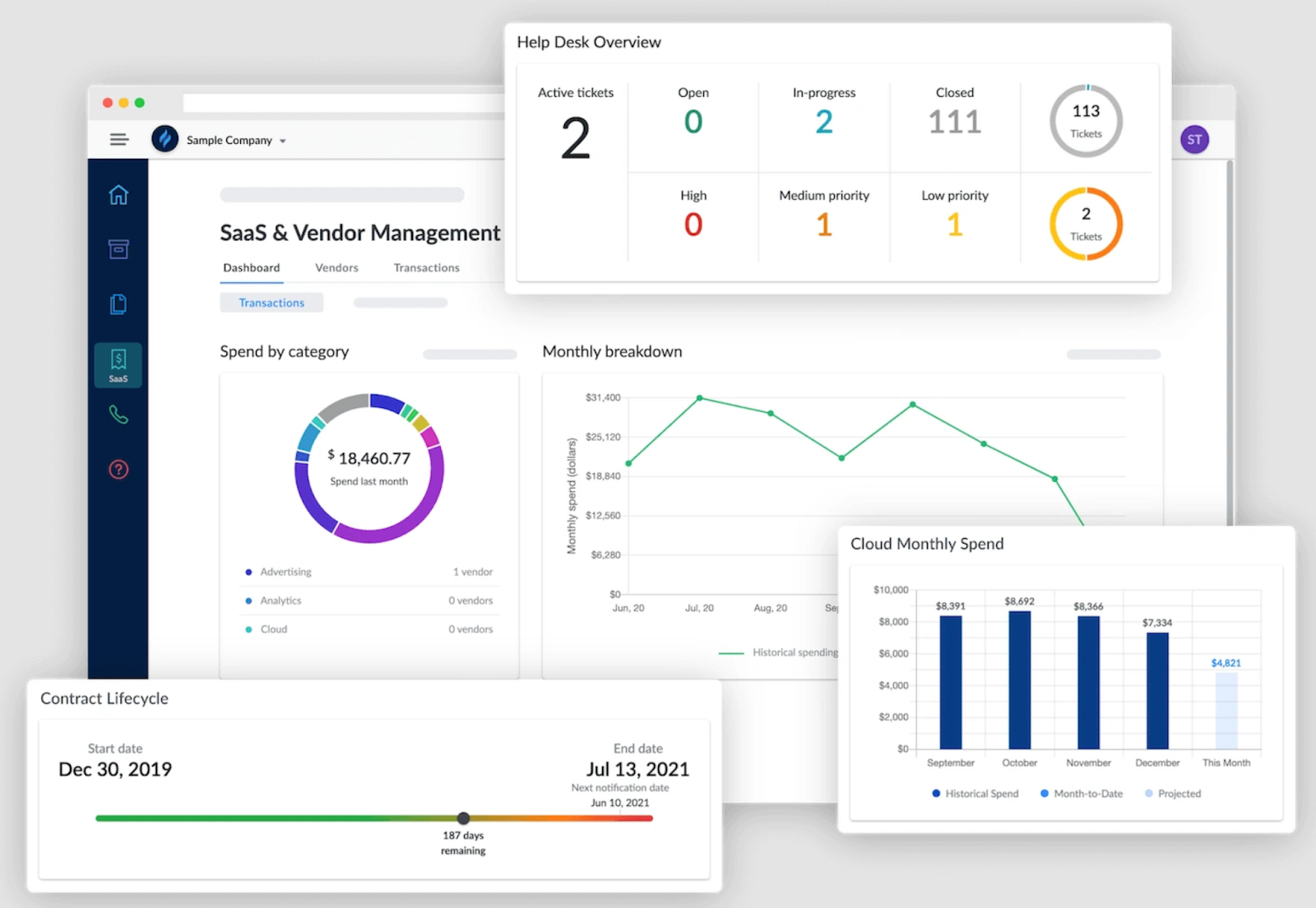
Genuity is an end-to-end IT management platform. It offers an extensive vendor expense management feature, helping businesses optimize their tech stack by managing spend, software usage, contracts, and compliance. With Genuity, you can easily connect to popular tools like Salesforce, Office 365, GSuite, Azure, Xero, QuickBooks, and many others.
Key Features:
Contract Management: Track contract lifecycles and take control of your vendor contracts, through this all-in-one contract monitoring feature.
Asset Management: Get visibility on every company asset, know what you own, and what condition they’re in – through a real-time dashboard.
Telecom Services Management: Effectively manage usage, expenses, network assets, and services across all vendors. Keep track of your telecom activities by location, service type, and features (such as DID or IP address).
Network Monitoring: Gain full visibility into your infrastructure with comprehensive monitoring of all traffic, applications, and systems. Collect real-time performance data and proactively take action.
Pros:
- It makes importing new computers and maintaining information about deployed computers incredibly easy.
- The platform’s interface is simple and straightforward when it comes to adding assets.
- Monitor a wide range of asset types, based on location, contract, depreciation type, and service status.
Cons:
- Currently, it doesn’t support single sign-on. Users will have to create a separate account.
- Doesn’t retain the “last searched item” in the asset list.
- The platform does not currently cater to different global locations.
Pricing:
Genuity provides the entire “Entire IT Management Suite and Enterprise-Savings Tech Marketplace” at a flat rate with no hidden charges. You can try the software for free for the first 30 days (without any credit card requirement). After that, it costs $39.99 per month, and there are no restrictions on the number of users.
10. Productiv
Productiv is an enterprise SaaS management platform that provides a holistic view of all the assets in your vendor portfolio. By facilitating collaboration between Business, Finance, and IT leaders, Productiv allows you to gain insights into application adoption, productivity, and cost reduction.
Key Features:
SaaS Intelligence™: Get a detailed and unified view of your entire SaaS portfolio. Teams can make better decisions and share the information across departments.
Collaborative Spend Management: Easily analyze expenses by application, vendor, category, and employee to gain deeper insights.
Intelligent App Automation: Reduce time spent on manual tasks. Facilitate quick approvals and grant access to employees within minutes.

Pros:
- Super helpful for tracking application, software, and contract renewals.
- Integrations with Okta and other spend systems like Netsuite and Expensify make this a handy tool for getting insights into your SaaS portfolio.
- Super helpful for tracking application renewals.
Cons:
- The interface can be more intuitive. Some features aren’t easily accessible.
- Inability to click on a team member’s name and see the applications they own or use.
- Limitations on connectors. Would be great for users to have additional API connectors to cover more SaaS applications.
Pricing:
Not clearly specified, but on further research, we found that Productiv has two pricing tiers: the Essentials plan and the Enterprise plan. The Essentials plan is free and offers 360-degree visibility, basic analytics for over 20,000 applications, and license recommendations.
The Enterprise plan is customized for larger businesses and includes a dedicated account manager. Both plans come with complete customer service and support ticketing.
11. LeadSquared
As a vendor management software, LeadSquared empowers you to automate onboarding processes, centralize communication, and generate data-driven insights – all within a user-friendly interface. It offers a cost-effective solution for businesses seeking one single platform to manage both vendors and customer relationships.
Key Features:
Automated Workflows: Automate vendor onboarding, communication, and review processes, freeing up your team’s time.
Centralized Communication: Consolidate all vendor interactions (emails, notes, documents) within LeadSquared, ensuring clear communication and easy reference.
Customizable Reporting: Generate reports to track vendor performance, identify areas for improvement, and maintain a data-driven vendor management strategy.

Pros:
- User-friendly interface simplifies vendor management tasks.
- Scalable solution adapts to growing vendor networks.
- Cost-effective option compared to other comprehensive vendor management CRMs.
Cons:
- Lacks some industry-specific features compared to dedicated vendor management software.
- May require customization to fully optimize for vendor management.
Pricing: Available upon request
Benefits of a Vendor Management Software
Here’s what a good vendor management tool can do for you:
- Onboard vendors: Vendors can quickly upload their details—like name, business type, and documents—right into the software. The system checks these for accuracy and compliance automatically.
- Improve communication: The software makes it easy for vendors and businesses to communicate and collaborate on projects – share documents, ask questions, and keep track of projects, all in one place.
- Automate workflows: Automate procurement tasks like creating purchase orders and processing invoices. This cuts down on manual errors and saves time.
- Track performance: Keep an eye on key metrics such as delivery time, order accuracy, payment processes, and satisfaction ratings. You can do all this without the hassle of digging through files and reports.
Frequently Asked Questions (FAQs)
Q1. Is vendor management software suitable for small businesses?
Absolutely, small businesses can benefit significantly from a vendor management software as it helps them manage vendor relationships more professionally and efficiently, even with limited resources.
Q2. What is the difference between vendor management software and procurement software?
Vendor management software focuses on helping companies keep track of commmunication with vendors, make payments on time, and track their performance. Procurement software, on the other hand, is typically used to manage the purchasing process. However, many tools in the market offer both functionalities.
Q3. How does vendor management software handle security and compliance issues?
Most vendor management software includes security features that protect data and ensure compliance with relevant laws and regulations, such as GDPR or HIPAA.
Q4. Can I customize a vendor management software to fit my business needs?
Yes, many vendor management tools offer customizable features that allow businesses to tailor the software according to their specific processes and requirements.
Q5. What should I consider when choosing vendor management software?
Consider factors like ease of use, cost, scalability, customer support, and how well it integrates with your existing systems. It’s also wise to read reviews and perhaps even request a demo before making a decision.
Managing Vendor Communication Is Easy, With the Right Tools
Having a healthy relationship with your vendors involves a lot of factors. You need to communicate on time and with clarity, ensure internal approvals on invoices happen smoothly, and set up workflows that ensure all operations run seamlessly.
You need a tool that can do all of the above, but more importantly, one that is easy to use. That’s where Hiver comes in.
It helps finance teams stay on top of vendor emails, automate approvals, get visibility into vendor communication, and a lot more.
It takes care of all the behind-the-scenes work so that your team can focus on building stronger, long-term relationships with vendors and scaling operations.














