


It’s 2025, and we can’t imagine a world without WhatsApp. Right?
With 2.78 billion users (a number that’s still growing rapidly), it’s just not another app on our smartphones. It’s an essential communication medium, helping people connect with each other across the globe.
But beyond personal messaging, businesses are leveraging WhatsApp to interact with customers and provide them with real-time support.
So, how can businesses unlock WhatsApp’s full potential in helping deliver support? That’s where the Gmail integration with WhatsApp (via a third-party tool) comes in.
Let’s see how this is possible.
What is WhatsApp?
WhatsApp is a popular messaging app that allows users to send texts, voice messages, make voice and video calls, and share images, documents, user locations, and other types of media.
It was developed by Brian Acton and Jan Koum in 2009 and was later acquired by Facebook in 2014. WhatsApp operates on a variety of platforms, including Android, iOS, Windows Phone, and web.
What is WhatsApp Business?
WhatsApp Business is an application developed by WhatsApp Inc. for small to large-sized business owners. It has been designed to simplify the communication between businesses and their customers, providing a variety of additional features not present in the regular WhatsApp application.

How is WhatsApp Business different from WhatsApp?
WhatsApp Business offers business-specific features, such as:
– Business Profile: WhatsApp Business allows businesses to create a business profile, where they can include important information like a description of the business, email address, physical address, and website.
– Catalog: This feature allows businesses to showcase and share their goods or services directly on their profile, making it easier for customers to browse and choose products.
– Automated Messages: Businesses can set up automated responses to frequently asked questions. This helps manage customer expectations and response times.
– Labels: These help businesses organize chats and categorize customers, making it easier to manage conversations at scale.
– Statistics: WhatsApp Business provides simple metrics like the number of messages read, sent, and delivered, so businesses can analyze and improve their communication.
Recommended reading
Learn 5 Ways to Leverage WhatsApp Business for Customer Service
7 Key Reasons to Integrate WhatsApp with Gmail
Integrating WhatsApp with Gmail via a third-party software, like Hiver, can bring significant benefits to both individuals and businesses. Here are seven key reasons for this integration:
- Unified Communication: Allow teams to handle all their communication – email and messaging – from a single platform, providing a more convenient, efficient, and seamless communication experience.
- Easier File Sharing: Easily share documents or media from Gmail to WhatsApp and vice versa. This eliminates the need to download and re-upload files between the two applications, saving time and simplifying collaboration.
- Email-to-WhatsApp Notifications: Teams can receive real-time WhatsApp notifications in their Gmail inbox. This ensures that urgent messages are not missed, even when someone is not actively checking WhatsApp.
- Better Customer Service: For businesses, integrating Gmail with WhatsApp can help improve customer service. Quick responses to queries or complaints can be facilitated through WhatsApp, while formal communications can be handled via email.
- Automated Responses: Integrating these platforms can allow for setting up automated responses to frequently asked questions. This not only saves time but also ensures consistency and accuracy in responses.
- Conversation Histories: Having a unified platform would allow for a consolidated record of conversations across email and messaging. This can be particularly beneficial for businesses, allowing them to track communication history, and analyze trends.
- Enhanced Collaboration: Teams can collaborate more efficiently with the integrated system, sharing emails on WhatsApp instantly.
How to Connect WhatsApp with Gmail (The Easy Way with Hiver)
If you’re constantly switching between WhatsApp (for customer conversations) and Gmail (for emails), you know how frustrating it can be.
So, what if you could manage WhatsApp messages right inside Gmail—just like emails?
Hiver, a customer service platform that is known for its ease of use and 15-minute setup time, takes the hassle out of managing WhatsApp as a support channel. It turns your Gmail into a centralized inbox where you and your team can manage both personal emails and WhatsApp conversations with customers.
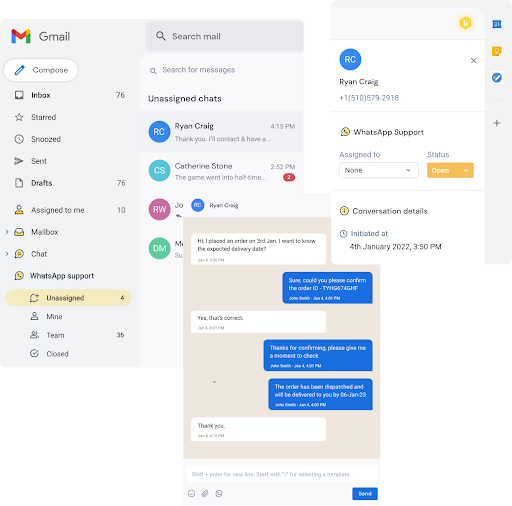
Everyone who is part of this shared inbox gets access to all incoming WhatsApp conversations – they can assign, collaborate on, and respond to these messages. Managers get complete visibility into who is working on what, and the status of every query.
What can you do with Hiver’s WhatsApp integration?
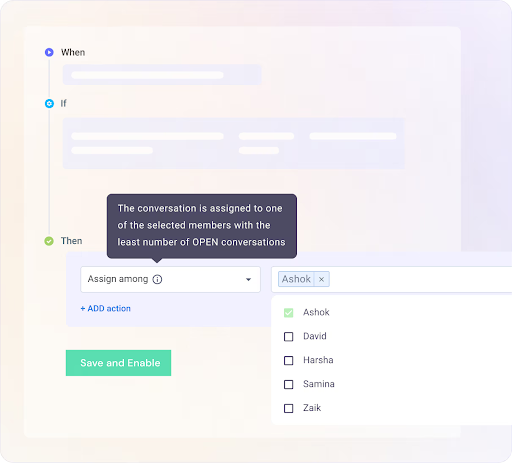
✅ Smart assignment of WhatsApp conversations – Use skill-based or round-robin assignment to automatically distribute WhatsApp queries to the right team members. This ensures you don’t have to manually assign work and can instead focus on more strategic initiatives.
✅ Track key metrics such as first response time and average resolution time: Get an understanding of your support team’s efficiency in responding to queries on WhatsApp. You also have the option to further drill down into these metrics based on type of queries and priority levels — to get a complete picture of process gaps and other bottlenecks.
✅ Manage WhatsApp and email from the same place – Stop switching apps and manage both your inbox and WhatsApp for Business from the same place.
✅ Real-time notifications – Never miss an important customer message. Get instant alerts in Gmail whenever a WhatsApp message comes in.
✅ Multiple support reps can manage WhatsApp together – Whether it’s a single customer chat or an entire WhatsApp group, multiple team members can step in and respond.
✅ Collaborate seamlessly on WhatsApp queries: Write internal notes to have discussions on WhatsApp queries with anyone across your organization. You can also draft a response and share it with your manager for approval.
✅ Personalized customer interactions – See the entire conversation history and context before replying, so your responses feel human, not robotic.
How to Connect WhatsApp + Gmail Using Hiver?
Here’s a step-by-step guide on how you can integrate the tools:
- Access the Hiver Admin Panel: Start by navigating to the Hiver Admin Panel. Here, you’ll find a list of shared inboxes. Select the “Create Shared Inbox” button to begin the process.
- Select the WhatsApp Channel: When you’re creating your new shared inbox, select ‘WhatsApp’ as the channel. This will enable the connection between your Gmail account and WhatsApp.
- Adhere to Facebook Regulations: You’ll be taken to the ‘Getting Started’ screen. Please note that Facebook has a list of regulations that must be adhered to in order to integrate with WhatsApp’s business platform. Ensure you read and understand these prerequisites before moving forward.
- Enter General Information: Once you’ve completed the prerequisites, tap on ‘Next’ to go to the General Information page. Here, you’ll enter your inbox name and the names of the Hiver users (agents) who will be responding to WhatsApp chats.
- Connect Your Number: In the ‘Connect your number’ step, you’ll need to visit your Facebook developer account and retrieve the necessary information. Follow the guide to ensure you complete this step correctly.
- Provide Webhook Details: After adding all the details in the previous step, you’ll need to copy-paste the webhook URL and token and subscribe to webhook events on the Facebook developer account. This is also explained in detail in the guide.
- Complete Setup: Confirm that you’ve completed all the previous steps by ticking the ‘I have completed the above steps’ option and then click on ‘Create Inbox’. Congratulations, your WhatsApp inbox is now ready to use! You can find it in the left panel of your Gmail account, amongst your other Hiver inboxes.
- Test the Setup: Try sending a test WhatsApp chat to your number to see if the system is working correctly. If you encounter any issues with the setup, you can reach out to Hiver support at support@hiverhq.com.

The WhatsApp Gmail Integration Prevents You From App Switching
Integrating WhatsApp with Gmail can provide a huge uptick to your team’s productivity. It ensures all customer context and conversations are in one place, reducing back and forth between apps.
While the integration may seem like a technical challenge, tools like Hiver make it seamless.
Hiver’s advantage is that it helps you add WhatsApp as a channel on your Gmail inbox. This is a very handy addition for support teams that receive customer queries via WhatsApp.
Moreover, Hiver allows you to manage other support channels – email, chat, phone, and knowledge base – so that you can assist customers irrespective of how they reach out to you.
The fact that all these channels — and your work emails — are in one place, is one of the main reasons 10,000+ teams around the world prefer Hiver.














