


WhatsApp has become one of the most popular ways for customers to reach out to businesses. But for many support teams, managing it is far from easy.
You might be using a shared phone, forwarding screenshots, or keeping track of chats on spreadsheets. These workarounds might get the job done—until your team grows or message volume increases. That’s when things start to break down.
A WhatsApp shared inbox offers a more structured way to manage customer conversations. It consolidates WhatsApp messages into a single view, so your team can collaborate, stay organized, and respond without stepping on each other’s toes.
This guide explains what a WhatsApp shared inbox is, how it helps support teams, and which tools you can use to get started.
What is a WhatsApp shared inbox?
A WhatsApp shared inbox brings all your customer chats into one unified space. Instead of conversations being tied to a single phone or agent, everyone on your support team can:
- View ongoing chats in real-time
- Assign or take ownership of conversations
- Leave internal notes for teammates
- Track the entire message history
If WhatsApp is already a key support channel for your business, this setup helps you scale it without losing context or speed.
Common signs you need a WhatsApp shared inbox
If you’re dealing with any of the below issues, it might be time to consider switching to a WhatsApp shared inbox:
? Multiple team members using one WhatsApp account or device
? No clear ownership of who’s responding to what
⏳Customers receiving duplicate replies—or worse, no reply at all
? Delays in responding due to lack of visibility or coordination
? Using third-party tools like spreadsheets to manage support flow
These are all signs that your current setup doesn’t scale—and a shared inbox can help.
Benefits of using a WhatsApp shared inbox
Using a WhatsApp shared inbox makes teamwork much simpler – especially when you and your colleagues have to collaborate on incoming inquiries.
- Clear ownership of chats: Support agents can take ownership of chats, so there’s no confusion about who’s handling a customer query.
- Full context in one place: Everyone on the team can view the full conversation history, even if the customer spoke to another agent earlier. This means smoother handoffs and fewer repeated questions.
- Seamless collaboration: If a query needs escalation or a handoff across shifts, agents can leave notes within the chat for the next person who is taking over— no Slack messages or guesswork required.
- Track team performance and workload: You can see how many chats every team member is handling, monitor response and resolution times, and identify bottlenecks.
- Organize and categorize chats: Use tags like “payment,” “feature request,” or “urgent” to categorize chats and spot trends over time.
- Respond faster: With better coordination and notifications for new messages, your team can respond in less time—without rushing or cutting corners.
WhatsApp Shared Inbox vs Standard WhatsApp
| Feature | Single-user WhatsApp | WhatsApp Shared Inbox |
|---|---|---|
| Accessible by multiple agents | No | Yes |
| Chat assignment | No | Yes |
| Internal collaboration | Manual, via external notes | Built-in notes, @mentions |
| Message history visibility | Only on individual devices | Available to the full team |
| Reporting capabilities | None | Metrics like response time, volume, and more. |
| Suitable for scaling teams | No | Yes |
Key features to look for in a WhatsApp shared inbox
When choosing a WhatsApp shared inbox, you don’t just want a tool that centralizes messages — you want one that actually helps your team work better together. The right features should make collaboration easier, responses faster, and customer conversations more organized and trackable.
- Chat Assignment: Avoid duplicate replies by assigning conversations to specific agents.
- Internal Notes: Add context or instructions that only teammates can see.
- Shared Inbox View: Let everyone see the status of incoming and ongoing chats.
- Notifications: Get alerts for new messages or unassigned conversations.
- Tagging: Label chats by issue type to prioritize or report on later.
- Analytics: Track key performance metrics like resolution time, agent workload, and chat volume.
- Multi-channel Support: Bonus points if the tool also supports email and live chat alongside WhatsApp.
What are the best WhatsApp shared inbox tools?
There are several tools that offer shared inbox functionality for WhatsApp. Here’s a breakdown of some of the top options:
1. Hiver
Hiver is a multi-channel customer support platform that is known for how it combines ease of use with powerful features. It offers WhatsApp as one of the support channels – via a WhatsApp Business API integration.
Using this integration, you can set up a WhatsApp shared inbox inside Gmail. Once you do that, everyone in your team can access all incoming customer chats from a central dashboard.
The shared inbox comes with several powerful features: assign conversations to team members, track the status of conversations in real-time, write internal notes to ask colleagues for help on inquiries, and automate workflows for streamlining operations.
Setting up Hiver takes as much as 15 minutes. Since it works on top of Gmail, the interface would be extremely familiar and easy to navigate for your team.
This is how you can set it up:
- Go to Hiver’s Admin Panel.
- From the left side panel, click Shared Inboxes.
- Here, select WhatsApp as a channel.
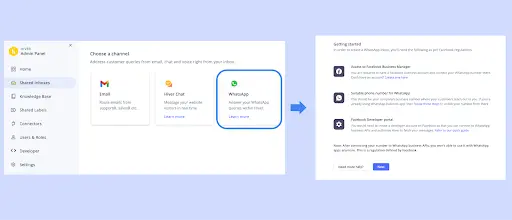
- The ‘Getting Started’ screen displays a set of Facebook guidelines for integrating with WhatsApp’s business platform. Access the prerequisites here. Once completed, click ‘Next’.
- Name your inbox, and add your team members who will manage WhatsApp chats. Follow the guide to complete this step and click ‘Next’ to continue.

- After entering the required details, copy and paste the webhook URL and token into your Facebook developer account. Remember to subscribe to the relevant webhook events outlined in the guide above.
- Hit ‘Create Inbox,’ and your WhatsApp inbox will be set up and ready to go! It’ll be conveniently located in Gmail’s left panel alongside your other Hiver inboxes.
Want to learn the WhatsApp inbox settings in a detailed view? Get the full version here.
Hiver comes with four pricing plans:
- Free forever plan
- Lite plan: $19/user/month
- Pro plan: $49/user/month
- Elite plan: $79/user/month
A 7-day free trial is available.
2. Wati
Wati is a full-service WhatsApp Business API provider that makes handling customer chats straightforward. Its WhatsApp Team Inbox acts as a centralized hub for all customer inquiries that arrive via WhatsApp, enabling your team to get full visibility into workload and provide timely support.

Features include:
- Analytics: Get insights into first response time and average resolution time for all tickets.
- Scheduled Reporting: Export a weekly overview of all tickets. Analyze them at a granular level to identify bottlenecks.
- CRM Integration: Wati integrates seamlessly with popular CRMs (including Zoho CRM), so your customer details and histories are only a click away.
- Template Messaging: Use pre-written messages (templates) to handle commonly asked inquiries. This saves time and ensures consistency in communication.
Wati also includes bulk broadcasts, Click‑to‑WhatsApp (CTWA) links, custom notifications, and a no‑code chatbot for smoother automation. A 7‑day free trial is available, and plans range from around $49/month for basic functionality to about $249/month for advanced features.
3. Zoho TeamInbox
Zoho TeamInbox is a dedicated solution by Zoho to help manage shared inboxes like info@ and support@. In 2023, they made it possible to connect your WhatsApp for Business with the Zoho TeamInbox.
What’s quite impressive is that you can connect multiple WhatsApp business numbers and toggle between them without switching apps or devices.

Features include:
- Centralized message management: All WhatsApp inquiries arrive into a dashboard that everyone in your team has access to. Team members can pick up messages from here and respond to them, without any dependencies.
- Collaborative assignment and internal notes: Assign chats to specific team members. Add comments directly within a conversation to loop in colleagues for help or make note of updates.
- Automation: Handles routine tasks—like assigning messages to specific team members or tagging and archiving conversations—so you can focus on real customer needs.
Get a 14-day free trial. Paid plans start at $4/user/month and go up to $9/user/month. Integration with WhatsApp Business solutions is available, though exact fees depend on WhatsApp’s conversation-based pricing.
4. Respond.io
Respond.io offers a chat-style interface to help businesses manage conversations across multiple channels – website, WhatsApp, social media, and more. One of its core features is a WhatsApp Team Inbox that lets you do two main things: respond to incoming WhatsApp messages and broadcast announcements to a target list.

Features include:
- Unified customer profile: Merge conversations from various channels (like Instagram and WhatsApp) into a single thread for complete context, so returning customers don’t have to re-identify themselves.
- Workflow automation: Build workflows to distribute chats evenly, or assign them to specific support staff. You can also delegate chats based on fewest open conversations, and other such criteria.
- Integrations: Integrate with a range of tools, including Clearbit for data enrichment, plus any app that supports Zapier or Make.com. You can also trigger WhatsApp messages via Webhooks for actions on Shopify, WooCommerce, or Magento—like abandoned carts, shipping updates, or product recommendations.
Get a 7-day free trial of their WhatsApp shared inbox. Paid plans start at $79/month and go up to $279/month. WhatsApp Business Platform (API) fees start at $0.006 per conversation, varying by country. You can calculate the exact rates here.
5. Twilio
Twilio is a cloud-based engagement platform that provides APIs for messaging, voice, video, and more. When it comes to WhatsApp, you can send and receive messages from Twilio’s platform using the WhatsApp Business API.
Do note that Twilio acts as a communication engine. That means firstly you’ll need to integrate it with a shared inbox tool like Front or Hiver to create a collaborative team environment for managing these messages.
Then by connecting your Twilio and WhatsApp Business Account (WABA) to one of these platforms, you get a single inbox where your team can track and respond to interactions with ease.

Features include:
- Transactional messaging: Send one-way WhatsApp messages for alerts, notifications, promotions, or marketing campaigns. You’re billed for each message sent and received, plus any channel fees. It’s a quick way to send updates like shipping statuses or appointment reminders, without needing a two-way chat.
- Conversational API: This is useful for two-way messaging. Unify multiple channels (WhatsApp, SMS, MMS, and more) into one conversation flow, making real-time support and interactive updates easier to manage.
- Contact Center: Get the building blocks for a WhatsApp-oriented contact center. With tools like Twilio Flex, you can route messages to specific agents, track conversation histories, and store customer details for context. It can handle both transactional and back-and-forth chats.
Twilio offers a 7‑day free trial of its WhatsApp Business API. Pricing works on Meta’s conversation-based model—where you pay for each 24-hour window after you send the first message—plus Twilio’s per-message fee. You can calculate the exact fees here.
Why a Shared Inbox is a Smarter Way to Support Customers on WhatsApp
A WhatsApp shared inbox brings structure to an otherwise fragmented support process. With all messages in one place, your team has more visibility, can respond faster, and also collaborate more effectively.
The best part? You don’t need to overhaul your entire system to make this work. Most shared inbox tools offer APIs or pre-built integrations with the WhatsApp Business API, making it easy to plug into your existing support setup. Whether you’re using a CRM, helpdesk, or simply want to keep your workflows intact, connecting WhatsApp can be a lightweight lift.
Frequently Asked Questions (FAQs)
1. How does a WhatsApp shared inbox integrate with my current tools?
Most WhatsApp shared inbox tools offer native integrations or open APIs that connect easily with your current tech stack—whether that’s a CRM like Zoho or HubSpot, an email platform like Gmail, or helpdesk software.
For example, Hiver allows WhatsApp conversations to be handled directly within Gmail, while platforms like Respond.io sync WhatsApp messages with other messaging apps and CRMs. If your current tools don’t have direct integration, many platforms offer webhooks or third-party connectors like Zapier to bridge the gap.
2. Is a WhatsApp shared inbox suitable for small teams?
Yes, a WhatsApp shared inbox can be a huge help for small support teams. Even if you have just two or three agents, features like conversation assignment, shared visibility, and internal notes can dramatically improve coordination and response times. Instead of juggling one shared phone or wondering who last replied to a message, your team can work from the same dashboard, with full context on every conversation.
3. Will I lose access to my previous WhatsApp messages when switching to a shared inbox?
No, most platforms that use the WhatsApp Business API maintain your message history. Once integrated, these tools sync your account and pull in recent conversations so you can continue where you left off.
However, keep in mind that personal WhatsApp messages (those sent through the regular app and not the Business API) typically won’t be included.
4. How secure is a WhatsApp shared inbox solution?
Security is a key concern when handling customer conversations, and most platforms take this seriously. Tools built on the WhatsApp Business API use end-to-end encryption for messages, ensuring that chats remain private and protected in transit. In addition, many shared inbox solutions follow strict data protection protocols, including GDPR compliance, role-based access controls, and audit logs to track agent activity.














