

Small businesses manage a lot daily, and keeping up with vendor payments is one key task. Paying vendors on time builds trust and helps you get the service you need, keeping your operations running smoothly.
The right accounts payable software can relieve stress by automatically handling tasks like tracking due dates, organizing invoices, and processing payments accurately. This means fewer manual checks and less room for error.
In this guide, we share a curated selection of accounts payable software that tackles these everyday challenges head-on.
What Is An Accounts Payable Software?
Accounts payable software is a digital tool that helps businesses streamline the vendor payment process, from receiving and managing invoices to tracking payment deadlines and executing transactions.
Key benefits of accounts payable software:
- Reduces manual workload: Automates invoice processing and payment schedule, saving valuable time.
- Improves accuracy: Minimizes human errors, ensuring payments are correct and on time.
- Boosts cash flow visibility: Offers clear insight into upcoming expenses and vendor payment timelines.
- Improves vendor relationships: Timely, accurate payments foster trust and cooperation with vendors.
?Our exclusive finance report shows that over 50% of finance professionals believe poor communication and collaboration strain relationships with vendors and customers. Accounts payable software directly addresses this.
12 Best Accounts Payable Software For Your Small Business
Finding the right AP automation tool depends on your business needs and financial workflows. To help you choose, we’ve compiled a list of 12 top accounts payable automation tools and insights on what stands out about them.
| Software | Key features | Pricing plan |
|---|---|---|
| Hiver | – Vendor payment management – Invoice approval workflows – ERP integration – Automation workflows | – Free plan available – Light plan starts at $19/user/month |
| QuickBooks Online | – Invoice creation – Expense tracking – Integrated payment processing | – Starts at $15/month |
| Wave | – Invoicing and expense management – Ideal for very small businesses. | – Free plan available – Starts at $8/month |
| Kashoo | – Invoice management – Expense tracking – Easy bank reconciliation | – TrulySmall Accounting (for small businesses): $216/year |
| BILL | – Multi-user collaboration and role assignment – E-payments and cheque printing – Automated bill payments and digital approvals | – Essential plan:$45/user/month – Team plan:$55/user/month |
| Xero | – Order creation and tracking for purchases – Multi-currency support for foreign transactions – Automated bill creation and vendor payments | – Starter: $25/month – Standard: $40/month |
| Sage | – Scalable AP automation with advanced accounting features – Workflow automation – Reporting and analytics | – Starts at £12/month for basic plans |
| Tipalti | – Global AP automation with AI-driven invoice processing – Tax compliance – Support for multi-currency payments. | – Starter plan from $99/month – Custom pricing for advanced plans |
| Airbase | – All-in-one spend management that integrates AP automation – Real-time expense tracking – Corporate card management. | Custom pricing |
| Plooto | – Automated payment approvals – Batch payment processing – Seamless software, QuickBooks and Xero | – Grow Plan at $32/month – Grow Unlimited at $59/month |
| Hyland | – Intelligent document management – Automated AP workflows – ERP integration | Custom pricing |
| AvidXchange | – Invoice capturing – Electronic payments – Integration with 225+ accounting systems. | Custom pricing |
1. Hiver
Many finance teams use a separate, often complicated system to process vendor invoices and email for vendor communication. As a result, they have to constantly switch between multiple tabs.
Hiver ensures this doesn’t happen. It’s an AI-powered tool that lets you manage your financial operations using a single interface. With Hiver, you can easily assign and track emails related to invoices, payments, and vendor onboarding. You can also set up custom approval flows and add invoices directly to your ERP—all from the same interface.
The best part is that Hiver’s UI resembles that of your regular inbox, so your team doesn’t feel like their workflows are being disrupted by a new tool.
? Top features include:
Shared Inbox
Hiver allows you to set up a shared inbox to manage all emails coming to IDs like finance@, payroll@, or accounts@ from a central location. Your team can access multiple shared inboxes from a left-side panel and get complete visibility into incoming conversations. You can see how many vendor emails are in progress and are yet to be picked up and resolved. You can also assign emails to team members and tag them for easier categorization.
Automation
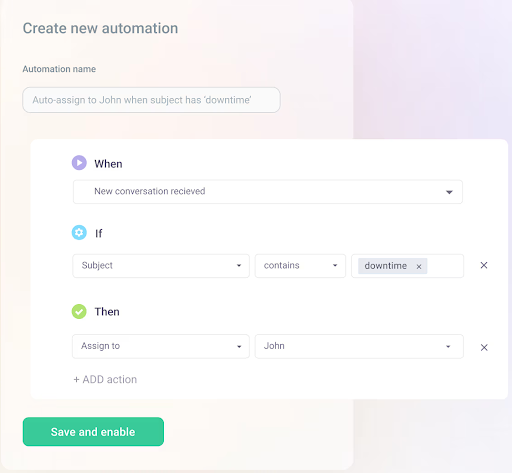
Automate workflows such as email assignment, tagging, and response. You can create workflows based on specific criteria, such as keywords in the subject line, email body, or sender name. You can even set up rules based on custom fields.
For instance, if an email from a vendor contains the keyword ‘urgent,’ automatically route it to Cindy from the AP team. You can also add auto-tag emails with ‘high priority’ or ‘invoice due.’
Collaboration
If you need help from a colleague to resolve a vendor query or invoice, simply @mention the relevant person and write a note to them. These internal discussions are logged in a separate panel next to the primary vendor email, making it easier to refer to them whenever needed.

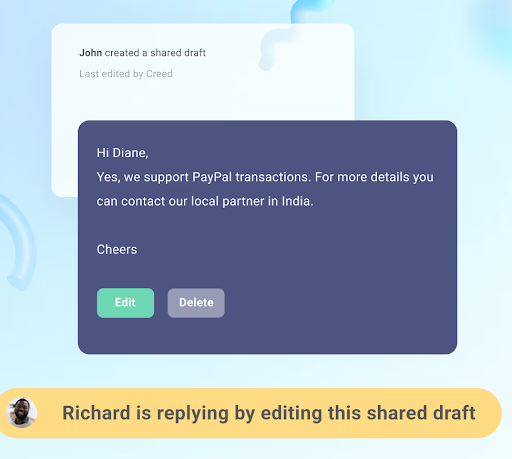
You can also draft a response and share it with your colleague in real-time. This way, you can review and edit emails together before sending them.
To prevent duplicate responses, you have collision alerts. They alert you if you open a vendor query that already has a team member assigned to it.
AI Copilot
The AI Copilot functions like an intelligent assistant. It quickly retrieves the correct information to respond to vendor queries by scanning your KB so that you don’t have to.
Let’s say a vendor emails your finance team asking, “Has my invoice #5678 been approved? When can I expect the payment?”
Instead of manually checking for the information, you can activate the AI Co-Pilot. It can surface the payment status by scanning through previous conversations and integrated accounting tools like QuickBooks or Stripe. It even drafts a response for you that you can review before sending.
Self-service portal
Customers and vendors can track their invoice-related conversations in one place using the self-service portal. For example, a supplier can submit an invoice via the portal and instantly see whether it’s been approved. This reduces a lot of unnecessary back and forth.

Service Level Agreements (SLAs)
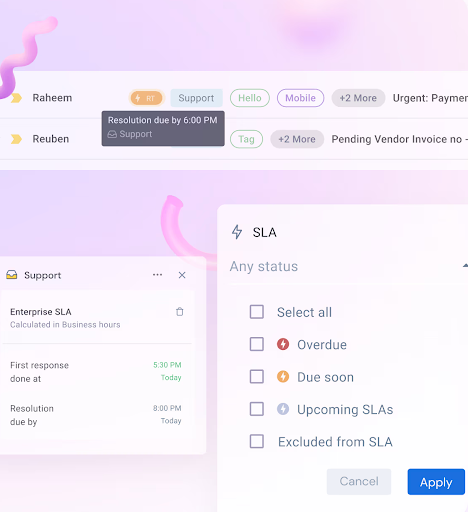
Define SLAs (Service Level Agreements) to ensure vendor queries and payment approvals are handled within a set timeframe.
For instance, you can set an SLA to ensure all vendor invoices must be completed within 48 hours. If no action is taken within 24 hours, a reminder is sent. If the invoice remains pending beyond 48 hours, it automatically escalates to a senior member.
Analytics & reporting
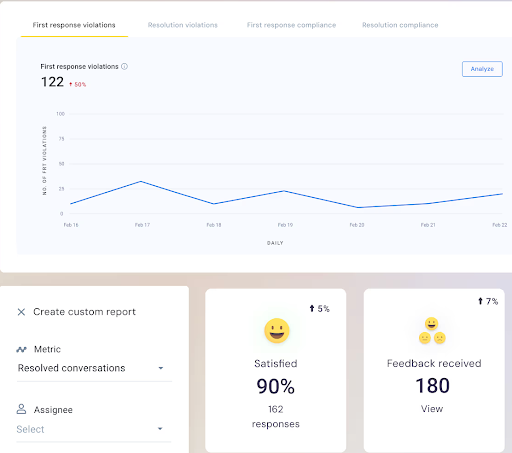
Using reports and analytics, you can gain visibility into pending, overdue, and completed payments. You can also track metrics like response times, resolution times, customer satisfaction, and resolution violations to identify weak areas and make improvements.
Email templates
Save time using email templates for routine tasks like approving invoices, confirming payments, or sending reminders for overdue bills. Plus, they help reduce errors, maintain a polite tone, and ensure you don’t miss any key details.

Integrations
Hiver integrates with over 100+ tools — including leading accounting platforms like QuickBooks, Xero, and Stripe. For example, Hiver’s QuickBooks integration brings every vendor email, invoice attachment, and approval request into one interface. This centralized view eliminates manual data entry, reduces duplicate records, and ensures your AP team never has to switch between multiple apps.
? Case in point: DecksDirect, a 42-person team selling decking supplies online, was struggling with managing invoices and order confirmations using Google Groups. The setup lacked accountability, caused email overload, and slowed the team down. They briefly tried Front but found it hard to adapt. Then, they switched to Hiver.
With Hiver’s shared inbox, everyone has clear visibility into who’s working on what. They assign emails in just two clicks and can use internal notes and @mentions for collaboration. As a result, they process emails 60% faster.

I dug deeper to understand how Hiver helps other accounts payable teams manage finances. Here’s what one user has to say on G2.
Hiver helps our accounts payable team manage their inbox in an organized manner. Our AP team receives hundreds of emails per day, and Hiver helps us delegate and assign emails to our AP organization. As a manager, their analytics feature helps me monitor the work and gives me good insight into responsibilities.
Eric H. | Senior Accountant
Pricing:
Free plan available. Lite plan starts at $19/user/month.
2. QuickBooks Online
QuickBooks is a cloud‑based accounting software developed by Intuit. Designed primarily for small—to medium‑sized businesses, it helps with bookkeeping, invoicing, expense tracking, payroll, and tax management.
QuickBooks organizes financial data in an easy‑to‑use dashboard, streamlining tasks like generating reports and monitoring cash flow.
? Top features include:
- Cut out manual data entry: Automatically capture invoices and schedule bill payments so your team spends less time typing and more time executing.
- Stay ahead of deadlines: Create customizable payment schedules and set smart reminders to ensure you never miss a due date—or rack up late fees.
- Sync your finances in real-time: Connect credit card and bank accounts directly to QuickBooks for up-to-the-minute transaction feeds and faster month-end reconciliations.
- Keep everything in one place: Attach receipts and invoices to transactions, making audits and record-keeping a breeze.
- Onboard with confidence: Benefit from a guided onboarding experience, complete with automated transaction matching, to help you reconcile accounts quickly and accurately.
Quickbooks online is a fantastic tool for accounting firms. Its user-friendly interface makes it easy to navigate, even for those who aren’t tech-savy. The ability to access the software from anywhere is incredibly convenient, especially for remote work. The automated features like invoicing, expense tracking, and bank reconciliation save a lot of time and reduce the chance of erros.
Kaitlyn E. | Secretary/Book-keeper
However, some users noted occasional system glitches that could disrupt workflow.
Pricing:
QuickBooks Online has four flexible monthly plans starting from $15 to $100 per month, each with a 30-day free trial. No long-term contracts are required.
3. Wave
Its aesthetic, clean, and intuitive interface sets Wave apart right from the start. Unlike clunky, overbuilt systems, Wave offers a visually appealing, easy-to-navigate dashboard. This makes everyday AP tasks feel less like a chore and more like a breeze.

Wave’s main advantage is its free core accounting and invoicing modules. This makes it perfect for budget-conscious teams, solopreneurs, and freelancers without dedicated accounting staff.
That means less time figuring out the software and more time executing high-impact financial tasks. You can effortlessly send invoices, track payments, and manage expenses, all from a centralized, modern dashboard that’s refreshingly easy to use.
? Top features include:
- Expense Categorization: Automatically sort expenses by vendor, project, or custom tags for clear visibility and easy cost-saving.
- Recurring Payments: Schedule automatic electronic payments via ACH to ensure timely bill payments without manual effort.
- Cash-flow Forecasting: Create custom reports and visual forecasts to predict cash inflows and outflows, helping you optimize working capital and make informed decisions.
Very easy and practical to use. You do not have to have an accounting background to use it. I found it really useful for invoicing my clients, tracking payments, etc.
Rebecca F.| Managing Partner, | Hospitality
Pricing:
Core accounting and invoicing features are free. Optional add-ons include mobile receipt scanning at $8/month (or $6/month with annual billing), payroll services starting at $20/month for self-service states or $40/month for full tax-service states, and professional bookkeeping support at $149/month.
4. Kashoo
If you’re tired of accounting tools that overcomplicate simple tasks, Kashoo is your no-fuss solution. Designed for small teams that favor speed and accuracy, Kashoo cuts through the noise with a sleek interface, built-in automation, and real-time financial visibility.
Kashoo’s major benefit is its ease of use and cost‑effective pricing. A free invoicing plan with unlimited users means teams can collaborate without added expense. What’s more is that its intuitive design requires virtually no accounting background to get started.
? Top features include:
- Real-time transaction syncing: Connect bank and credit card accounts to automatically import and categorize expenses, cutting out manual data entry and ensuring up-to-date books.
- Fast, customizable invoicing: Create and send professional-looking invoices in minutes, with options to personalize templates and set up recurring billing for repeat vendors.
- One-click reporting: Instantly generate income statements, balance sheets, and tax reports to keep a pulse on cash flow and support smarter payment decisions.
- Simplified reconciliation: Match transactions with bank statements in just a few clicks, speeding up month-end close and reducing reconciliation errors.
Easy to use and fast tool. It took little time to setup (from an accounting standpoint) and works on all platforms (mobile, windows & mac). Since it’s cloud-based, works from everywhere I go. Very stable platform, I haven’t experienced downtime for more than a couple minutes and rearely more than once per year (probably due to maintenance).
Jean-Rene A. | Propriétaire | Small-Business
However, some users pointed out that external integrations are limited, and printing custom-styled invoices is not possible.
Pricing:
Kashoo offers two straightforward annual pricing plans to suit different business needs. The TrulySmall Accounting plan, priced at $216 per year. For growing or established businesses, the Kashoo plan is at $324 per year.
5. BILL
BILL is a comprehensive solution that automates and streamlines the entire AP process, from invoice capture to payment execution. With BILL, finance teams gain real-time visibility into their payables, enabling informed decision-making and improved cash flow management.
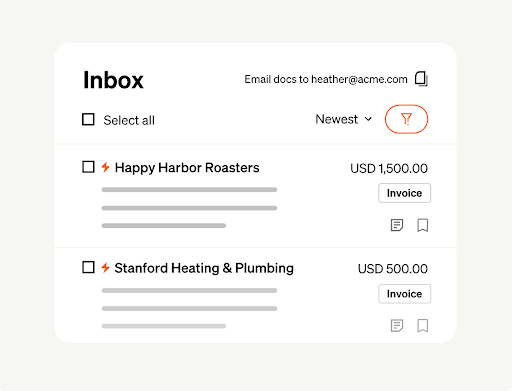
What stands out about BILL is the collaborative, role-based dashboard that acts like a smart to-do list. It shows each team member exactly which invoices need their attention and when. No more bottlenecks, no more confusion.
? Top features include:
- AI-powered invoice capture: Automatically extract and enter invoice data using OCR technology.
- Custom approval workflows: Set up multi-step approval chains by department, vendor, or invoice amount to ensure compliance and control.
- Real-time payment tracking: Monitor the status of every payment—whether it’s in review, approved, or completed—to eliminate guesswork and improve visibility.
- Flexible payment options: Pay vendors via ACH, virtual card, check, or international wire—all from one centralized platform.
Built-in audit trail: Maintain a digital record of every AP action (approvals, comments, payments), simplify audits, and ensure regulatory compliance.
I use Bill mainly for AP. It does it job tremendously well… I have integrated Bill with Web UI and it does it job, especially user interface is good, the process from start to end bill process is good and even a person who is not an accountant can also process bills easily.
Ranjith H. | Accounting Specialist
However, some users have noted that bulk downloading bills related to vendors can be a challenge.
Pricing:
BILL offers two core pricing tiers: The Essentials plan starts at $45 per user per month. Team plan is priced at $55 per user per month.
6. XERO
If you want to simplify your AP process without sacrificing visibility or control, Xero delivers the perfect balance. From bill capture to approval and reconciliation, it lets you manage everything without bouncing between tools or drowning in spreadsheets.
What makes Xero stand out is how it blends automation with real-time collaboration. Need to capture bills from email or a mobile snapshot? Xero handles it. Want a dashboard that shows what’s due, what’s paid, and what’s overdue—all at one glance? It’s built in.
And because it’s part of a broader ecosystem with tools like Hubdoc and integrations like BILL, your AP process doesn’t just work—it flows.
? Top features include:
- Batch payment functionality: Pay multiple bills at once to save time and reduce repetitive payment processing.
- Built-in bill reminders: Get automatic notifications for upcoming due dates, helping you avoid late fees and maintain vendor trust.
- Multiple currency support: Handle bills and payments in over 160 currencies—ideal for teams managing global vendors
- Attach source documents to transactions: Upload receipts and contracts directly to bills, creating a clean audit trail for every payment.
Xero Software is easy to use, cloud-based, and provides real-time updates. It helps small businesses manage their finances in an efficient manner.
Mahima A. | Account Executive
That said, another user mentioned that while the basic features are straightforward, mastering more complex functions (like report customizations or advanced integrations) may require time or additional training.
Pricing:
This platform offers three pricing tiers: the Starter plan at $25/month, the Standard plan at $40/month, and the Premium plan at $54/month.
7. Sage
Sage brings order, accountability, and deep financial insight to your payables workflow. While many platforms focus on automating tasks, Sage goes further, embedding financial discipline into every layer of your AP workflow.
With strong reporting, tight approval controls, and powerful integration capabilities, Sage gives AP teams the kind of governance and visibility that growing businesses often don’t realize they need—until it’s too late.
Its purpose-built for finance teams who want to stay on top of spending, ensure compliance, and make every payment decision count.
? Top features include:
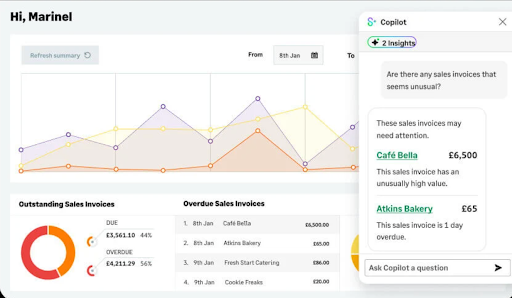
- AI Copilot: Sage’s intelligent assistant helps you surface financial insights, flag anomalies, and suggest actions.
- Automated invoice entry: Upload receipts or connect with tools like AutoEntry to scan and populate bill details, cutting down manual input.
- Supplier payment tracking: Monitor bill statuses, due dates, and history in real-time.
- Bank feeds and reconciliation: Sync your bank accounts to auto-match transactions and maintain accurate, real-time financial records.
- Batch payments and multi-vendor processing: Save time by paying multiple suppliers at once.
Sage Intacct’s accounting software helps in end to end accounting process. I work in the accounts payable and it’s features of creation of new vendor, extracting reports, processing bills – whether a single currency bill or multi-currency bill is easy to understand and once understood easy of use as well.
Mahima A. | Account Executive
That said, one user mentioned that since Sage is so feature-rich, setting everything up exactly how you want it and onboarding your team may take time and effort. The process is not difficult but requires commitment.
Pricing:
Pricing starts at approximately $10 per month.
8. Tipalti
Is your accounts payable team managing international vendors, handling payments in different currencies, and dealing with complex compliance rules? Tipalti is for you.
Unlike tools that streamline only local payment workflows, Tipalti handles global AP at scale by combining automation, vendor self-service, and tax compliance.
What sets Tipalti apart is its ability to automate the entire AP lifecycle—from onboarding suppliers and validating tax forms to executing payments in 190+ countries. For businesses looking to scale without growing their finance headcount, Tipalti acts like an extension of your AP team.
? Top features include:
- Smart invoice capture and validation: Leverage AI and OCR to extract invoice data automatically, validate details against POs, and route them for approval.
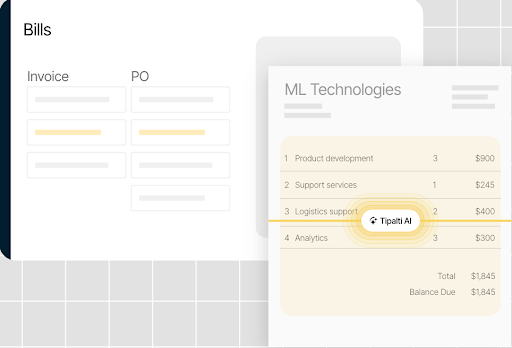
- Built-in PO matching (2—or 3-way): Automatically match invoices with purchase orders and receipts to ensure accuracy and prevent duplicates.
- Advanced fraud prevention: Use AI-powered anomaly detection to identify suspicious transactions and block high-risk payees before initiating payment.
- Real-time reconciliation engine: Automatically reconcile payments across all methods—ACH, wire, card, etc.—and sync with your ERP for up-to-date financials.
I use Tipalti every day for all my AP work, which has minimized my time and effort tremendously. As a primary coder of invoices, I find using Tipalti very easy. The UX/UI of this software is great and works smoothly. We are using the 3-way match, and once we moved to API integration between Tipalti and SAP B1, I cannot complain about the accuracy.
Nathan R. | Senior Accountant
One drawback, as mentioned by another user is that Tipalti’s procurement and accounts payable modules operate separately. This can lead to a lack of cohesion and require additional administrative effort.
Pricing:
Begins at $99 per month.
9. Airbase
If you’re seeking a solution that seamlessly integrates accounts payable with expense management and corporate card programs, consider Airbase.
Unlike tools that focus solely on invoice processing, Airbase provides a unified system that automates the entire spend lifecycle—from purchase requests to payments.
What distinguishes Airbase is its AI-powered touchless AP system, which not only automates invoice processing but also enhances accuracy and reduces the risk of fraud.

? Top features include:
- Guided procurement workflows: Set up pre-configured request processes that route purchases through the correct approval paths before any spending happens.
- Spend policy enforcement built-in: Airbase enforces your company’s spend policies at the point of request and payment, automatically flagging exceptions for review.
- Pre-approval before commitment: Ensure spending decisions are vetted before money goes out the door.
- Role-based access and granular permissions: Customize who can view, approve, or manage transactions at every stage of the AP workflow to support audit and control.
I love that I use Airbase daily but it takes up a small fraction of time as I’m able to effectively and efficiently complete my necessary tasks, including approving team expenses, submitting reimbursements, requesting funds, etc. It is incredibly intuitive to use with no training or previous knowledge required to quickly complete tasks – all I could ask for!
Lucy S. | Senior Customer Success Manager
That said, some users pointed out a few areas for improvement. Airbase’s mobile app lacks some desktop functionality, and due to its extensive feature set, onboarding can be time-consuming.
Pricing:
Airbase offers custom pricing. You need to request a quote for even the standard plan, which is designed for organizations with up to approximately 200 employees.
10. Plooto
If your team wants to avoid enterprise-level systems, Plooto can offer you the right features without the complexity or high cost. Unlike other platforms that may require extensive setup and training, Plooto provides an intuitive interface that allows for quick onboarding and immediate improvements in payment workflows.
What makes Plooto stand out is its focus on automating the entire payment process, from invoice approval to payment execution, all within a single platform.

? Top features include:
- Two-way sync with accounting software: Integrates directly with QuickBooks and Xero to ensure your books stay updated in real time.
- Customizable approval workflows: Set up role-based, multi-level approvals that can be managed remotely, supporting compliance and distributed finance teams.
- Domestic and international payments: Pay vendors across borders with built-in FX support.
- Audit trail and record-keeping: Every action—approval, comment, or payment—is logged and accessible for complete transparency and audit readiness.
- Real-time payment tracking: Monitor where payments stand at every stage—submitted, approved, sent, or received—reducing uncertainty and vendor follow-ups.
Automated collections and payables … pretty much eliminated AR in our firm. Integrates well with Xero and QBO. Easy to send payments to CRA. Support has been pretty good whenever needed. We’ve had no issues implementing Plooto for our clients to help with automate AR and AP. Plooto is something we use several times a week in our firm and I strongly recommend it.
Varun S. | Partner| Small-Business
One drawback, as noted by other users, is the lack of visual reporting on recurring receivables and payables to predict cash flow.
Pricing:
Plooto offers a flat-rate pricing model starting at $32 per month, which includes 10 free domestic payments. Any additional domestic transactions are charged at $0.50 each.
11. Hyland
If your team is struggling with slow, paper-heavy processes, Hyland Automate can help. Unlike other automation tools, it helps you control complicated workflows like invoice approvals, document reviews, or onboarding tasks and turns them into smooth, digital experiences.
What makes Hyland stand out? It connects easily with systems you already use—like SAP, Salesforce, or Workday—so everything talks to each other. You don’t need to be a developer to build workflows either. With its visual drag-and-drop interface, your team can design and manage processes without writing a line of code.
? Top features include:
- Centralized process monitoring: Track the status of workflows, identify bottlenecks, and resolve delays in real time.
- Dynamic task routing: Automatically assign tasks based on conditions like department, priority, or workload.
- Form builder and data capture tools: Easily create custom digital forms to collect information, eliminate paper forms, and kick off automated processes.
- Rules-based automation engine: Apply business logic to trigger next steps automatically—for example, routing invoices over a certain threshold to the CFO.
- Scalable architecture: Designed to handle enterprise-level volumes, making it ideal for organizations with complex or high-volume workflows.
- Audit-friendly logging: Maintain a complete record of every workflow action, decision, and edit—perfect for compliance-heavy industries like finance and healthcare.
Pricing:
Hyland uses a custom pricing model tailored to each business’s size and needs. Costs typically vary based on the number of users or departments, the specific features required (such as AI, integrations, or workflow automation), and the chosen deployment type—whether on-premise or cloud-based.
12. AvidXchange
If you’re tired of manually chasing approvals and matching line items, AvidXchange gives your AP team a powerful edge with AI that actually learns how your business works. Its AI Approval Agent functionality predicts invoice approval patterns based on historical behavior. This helps you reduce bottlenecks, speed up cycles, and anticipate exceptions before they become delays.
Moreover, AvidXchange automates decision-making at scale with machine learning, streamlining everything from PO matching to routing and exception handling. And because it integrates with over 220 ERP systems, it fits into your existing workflows without disruption.

? Top features include:
- Automated invoice intake: Ingest invoices from email, scan, or upload—AvidXchange digitizes and organizes them automatically.
- Supplier self-service portal: Vendors can independently check payment status and update banking details.
- Built-in fraud prevention tools: Enforce dual controls, permission levels, and audit trails to strengthen financial oversight and minimize risk.
- Mobile access for remote approvals: Managers can review, approve, or reject invoices securely from anywhere, supporting hybrid and remote work environments.
- Dedicated implementation and support: AvidXchange provides expert onboarding teams and AP specialists to help tailor the system to your exact workflow.
What I like most is the data is accessible by multiple departments. The property management team, the accounting team, and the executive team have access to review any invoice image, payment details, and comments. Being able to set up work flows helped streamline our A/P process. The integration between AvidXchange and our software is good. I use the software daily.
Verified User in Commercial Real Estate
However, it’s also important to note that many users have pointed out that support often takes a long time to respond.
Pricing:
Pricing is customized based on company size, transaction volume, and specific feature requirements.
How Do You Choose The Right Accounts Payable Software For Your Small Business In 2025?
With so many tools, making the right choice can be tricky. Before you pick an accounts payable software for your team, evaluate your specific needs internally and ensure that the tool meets them.
Prioritize a software that helps you:
- Get started quickly with minimal training and onboarding
- Integrates seamlessly with other accounting tools in your tech stack
- Doesn’t burn a hole in your pocket
- Scales with your business
- Minimizes errors
- Saves time
Take your time to demo a few platforms, ask about customer support, and map the features to your real-world processes. The right software won’t just help you pay bills—it will transform how your finance team operates.
Frequently Asked Questions (FAQs)
1. Are there any free accounts payable software options for small businesses?
Yes, several free or low-cost accounts payable tools are available for small businesses. Wave provides basic invoice tracking and expense management features at no cost. Additionally, Hiver offers a unique approach that allows you to manage invoice approvals and vendor communication using an inbox-like interface.
2. How much does AP automation save?
AP automation significantly reduces costs by streamlining the accounts payable process.
- Automation can decrease labor costs by up to 75%, allowing staff to focus on more strategic tasks.
- According to the Institute of Finance & Management, companies utilizing high levels of automation spend approximately $1.77 per invoice, compared to $8.78 for those with limited or no automation.
3. How do we automate the accounts payable process?
To automate the accounts payable process:
- Review your current AP workflows (e.g., invoice receipt, approvals, payments) to spot manual steps and delays
- Choose AP software with OCR invoice capture, AI data extraction, and ERP integrations.
- Digitize invoices and set up automated approval and payment workflows.
- Train your team and onboard vendors on the new system.
- Integrate the solution with existing systems and monitor performance for continuous improvement.














