


Let’s be honest—email isn’t broken. It’s just bloated.
Between customer queries, internal follow-ups, and endless threads, keeping your inbox under control can feel like a full-time job. And for fast-moving teams, it’s a distraction you can’t afford.
That’s where AI email management makes a real difference.
Instead of manually sorting, tagging, and replying to every message, the right AI tools can take up the heavy lifting and help you focus on what matters.
In this guide, I’ve handpicked the 12 best AI email tools in 2025, and broken down exactly what they do, how they help, and who they’re best suited for.
Features To Look For In An AI Email Management Tool
Choosing the right AI email management tool can significantly enhance your team’s productivity and communication efficiency. Here’s a breakdown of key features to consider:
- AI email triage and prioritization: Email triage helps automatically sort and highlight urgent emails so critical messages get immediate attention.
- AI-powered drafting and summarization: Suggests responses and summarizes long threads to save time and keep communication consistent.
- Workflow automation: Automates tasks like routing emails to the right person, tagging emails as ‘high’ or ‘low’ priority, and scheduling follow-ups. This frees up your team’s bandwidth to focus on complex tasks.
- Contextual awareness: Integrates with calendars and CRMs to deliver richer, more informed replies.
- Collaboration features: Shared inboxes, internal notes, and assignment tools help teams stay aligned and accountable.
- Security and compliance: Look for encryption, secure storage, and regulatory compliance (like HIPAA, GDPR, or CCPA) to protect sensitive data.
- User-friendly interface: A simple, intuitive design ensures quick onboarding and faster team adoption.
- Integration capabilities: Seamless compatibility with Gmail, Outlook, Apple Mail, Slack, and other tools keeps workflows connected.
The Best AI Email Management Tools in 2025
Here’s a quick snapshot of the top AI email tools—what they’re best at, and how much they’ll cost you.
| AI Email Management Tool | Key Features | Pricing |
|---|---|---|
| Hiver | -Shared inbox -Automated Workflows -AI Copilot -AI Summarizer -AI Compose | -Free plan available -Paid plan starts at $19/month |
| MailMaestro | -AI email summarization -Smart drafting -Meeting scheduling -Priority inbox | -Free plan available -Paid plans from $12/month |
| Superhuman | -Superfast email workflow -Snippets & templates, reminders, read status tracking | -Starts at $25/user/month |
| Spark | -Smart inbox -Collaborative email drafts -Built-in calendar -Snooze emails | -Free plan available -Premium plans begin at $4.99/month |
| Clean Email | -Bulk email cleaning -Smart views -Unsubscribe from newsletters | -Starts at $9.99/month |
| Help Scout | -Shared inboxes -Knowledge base -Automated workflows | -Starts at $50/user/month. |
| Zoho Desk | -Ticket management -AI assistant (Zia) -Workflow automation | -Free plan available -Paid plans start at $14/month. |
| Zendesk | -Omnichannel support -AI-powered bots -Customizable workflows | -Starts at $55/agent/month |
| Freshdesk | -Ticketing automation -Canned responses -AI chatbot | -Free plan available -Paid plans start at $15/month |
| Sanebox | -Email filtering -Priority inbox -SaneLater folders | -Plans start at $3.49/month |
| Intercom | -Conversational support -Fin bot -Proactive messaging | -Starts at $39/month |
| Front | -Shared inboxes -Workflow automation -Analytics & Reporting | -Starts at $19/month |
1. Hiver
Hiver is an AI-powered customer service platform that helps your business manage customer queries across email, chat, phone, and WhatsApp — from a central dashboard.
One of its standout features is shared inboxes, which help teams manage group emails such as info@, help@, and support@. Everyone who is part of a shared inbox has access and visibility into incoming email queries.

They can collaborate on responses using internal notes and shared drafts, route queries to the right teammate based on expertise, and integrate with 100+ apps – including Salesforce, HubSpot, NetSuite, and Jira – to bring all customer context into one place.
Within the shared inbox, Hiver offers several powerful AI features. Let’s take a look at those:
AI Copilot
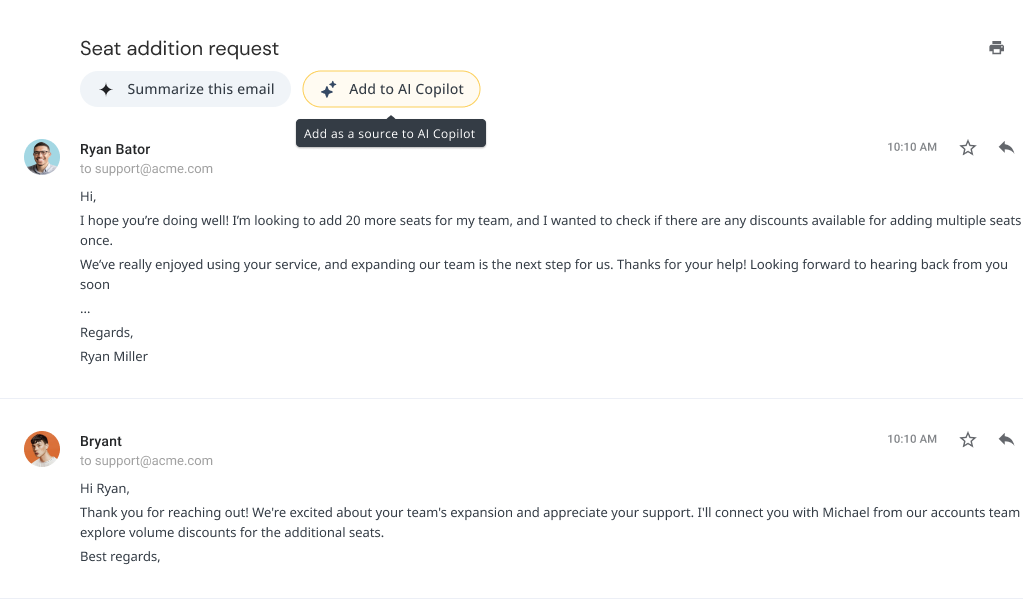
The AI Copilot functionality can draft a response to an email so that you don’t have to type from scratch every single time. It scans information from your knowledge base and other third-party apps and uses that data as source content to come up with a draft response.
For example, imagine a customer emails your support team asking about a refund policy. Instead of manually searching for the policy document and crafting a response from scratch, the Copilot instantly pulls the latest details and drafts a reply. So all you need to do is review, tweak, and send.

?Pro Tip: You can also add past conversations as source content into the AI Copilot. This will help you draft more contextually relevant replies to customer queries.
Harvey – Hiver’s AI bot
For teams focused on improving email efficiency, Harvey does the heavy lifting:
- It auto-closes redundant conversations that don’t need attention. For instance, when a customer replies “Thank you” after an issue is resolved, Harvey detects this and closes the conversation, so your team doesn’t have to do it manually.
- It suggests smart email templates based on the content and context of the incoming email. You don’t need to scroll through your entire template library—Harvey picks the best fit.
- It summarizes long email threads into short, digestible notes. This is incredibly useful for support handoffs, where agents need to understand the full context quickly.

?Case in point: Wheel Wiz was able to take care of redundant emails, such as autoresponders, with Hiver’s AI Bot – Harvey. This allowed the team to focus on important customer queries and improve their average query handling time by 30%, according to Robert Zylc, President and CEO of Wheel Wiz.
AI Compose
Think of AI Compose as Grammarly for customer service emails. It helps correct grammar, adjust tone, and improve clarity, so replies feel polished and professional.

AI Email Writer
Hiver also offers a free AI-powered email writer. Just enter a prompt, choose the tone and length, and the tool will generate a well-structured email draft in seconds.

?How to set up Hiver’s AI email management software
The good news is that Hiver works as an extension to your inbox. So technically, you don’t need to migrate to a new software. All you need to do is:
Step 1: Install the Hiver extension.
Step 2: Create a Shared Mailbox and add your team.
Step 3: Enable Harvey.
Step 4: Enable AI Compose to draft smart responses.
Pricing:
Free plan available. Paid plan starts at $19/month.
2. Maestrolabs
MailMaestro is an AI email assistant that focuses on helping professionals speed through email triage, thread summarization, and meeting coordination, right from their Gmail or Outlook inbox. It’s built for individuals and teams that want to save time on routine email tasks without switching platforms.

Key features:
- AI Email Summaries: Condense long email threads and even attachments into bite-sized takeaways.
- Tone-aware Writing Assistant: Drafts emails that match your voice and writing style, supporting 18 languages for global communication.
- Inbox Triage Tools: Let’s you snooze, flag, or archive emails,
- Meeting Scheduling Assistance: Suggests time slots, drafts calendar responses, and detects scheduling cues.
Pricing:
Starts at $15/user/month. A free trial is available.
3. Superhuman
Superhuman is an AI-powered email client designed to help working professionals, especially founders and C-level executives, process emails faster. With a keyboard-first interface, it helps users triage conversations, generate thoughtful replies on the fly, and automate daily email workflows.
Key features:
- AI-powered email writing: Superhuman’s AI can turn short prompts into complete, personalized emails that match your writing style. The AI constantly learns from your previous communications.
- Split Inbox with auto-labels: Organizes incoming messages by category—like VIPs or tools—so you can zero in on what matters most.
- Automated follow-ups: Ensures you never miss a response by setting reminders and even drafting follow-up emails automatically.
- Team collaboration: Enables real-time sharing and commenting on emails with your team.
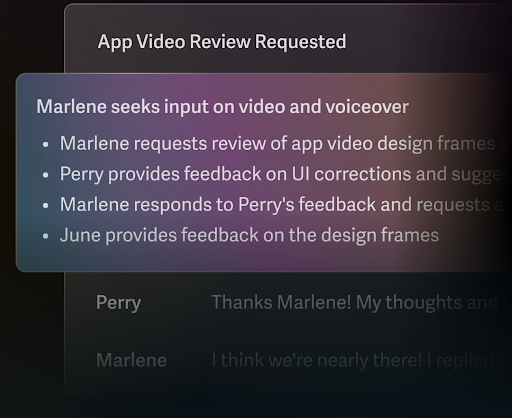
- Auto summarize: Provides concise summaries of lengthy email threads.
Pricing:
Starts at $25/user/month (billed annually). Higher tiers add team features, advanced reminders, and customization options.
4. Spark
Spark combines a distraction-free email experience with built-in AI tools to help professionals write better, respond faster, and collaborate without switching tools. It’s especially strong for solo users and small teams that value simplicity and structure.

Key features:
- AI Draft Generator: Produces polished email drafts from brief prompts, mirroring your tone and intent
- Thread Highlights: Pulls key takeaways from long conversations so you don’t waste time scanning.
- Priority Inbox: Sorts emails into Personal, Notifications, and Newsletters to help reduce mental clutter.
- Collaborative Drafting: Teams can comment, share drafts, and discuss emails internally.
- Snooze Functionality: Temporarily hides low-priority emails and brings them back at a time that works for you.
Pricing:
Free plan available. Premium plans begin at $4.99/month for individuals and $6.99/user/month for teams.
5. Clean Email
Clean Email is built for one core goal: clearing out the noise. It uses automation to bulk organize, filter, and eliminate low-value emails, helping you maintain a distraction-free inbox with minimal effort.

Key features:
- Auto Clean: Automatically archives, deletes, or labels emails based on custom rules for sender, subject, or frequency.
- Unsubscriber: Instantly remove yourself from unwanted mailing lists—no digging through footer links.
- Screener: Blocks messages from unknown senders until you review and approve them.
- Prebuilt Categories: Emails are grouped into folders like Subscriptions, Notifications, and Social—so you can review or clean them all at once.
- Cleaning Suggestions: Offers actionable recommendations based on your email habits and prior cleanup patterns.
Pricing:
Starts at $9.99/month for one account. Multi-account plans start at $19.99/month.
6. Help Scout
Help Scout is built for teams managing group email addresses like support@ or info@. Its collaborative inbox brings structure to shared email workflows, so agents can assign, reply, and resolve faster.

Key features:
- AI Drafts: Automatically drafts email responses by referencing previous conversations and help articles—saving time on repetitive replies.
- AI Assist: Refines replies by adjusting tone and length, correcting grammar, and translating into other languages.
- Suggested Answers: Pulls accurate responses from your knowledge base to help agents respond faster and with consistency.
- Inbox Organization: Offers tagging, workflows, and team assignments to ensure nothing falls through the cracks.
Pricing:
Starts at $50/user/month. AI features are included at no extra cost across all paid plans.
7. Zoho Desk
Zoho Desk is a customer service platform that turns incoming emails into structured tickets and routes them based on skill, urgency, or workload. Its AI assistant, Zia, enhances support operations by automating ticket routing, analyzing customer sentiment, and assisting in crafting personalized responses.

Key features:
- Skill-Based Ticket Assignment: Routes emails to the best-suited agent based on expertise, language, or availability.
- Response suggestions: Surfaces accurate reply options based on agent input and existing help center content.
- Ticket summarization (powered by ChatGPT): Breaks down long tickets into bullet-point highlights, which is ideal for escalations or team handoffs.
- Sentiment Analysis: Analyzes the tone of customer messages to prioritize tickets and tailor responses appropriately.
- Reply assistance (with ChatGPT integration): Suggests context-aware responses by referencing knowledge base articles and previous interactions.
- Anomaly Alerts: Identifies sudden spikes in ticket volume or resolution delays, and notifies managers about the same.
Pricing:
Free plan available. Paid plans start at $14/agent/month.
8. Zendesk
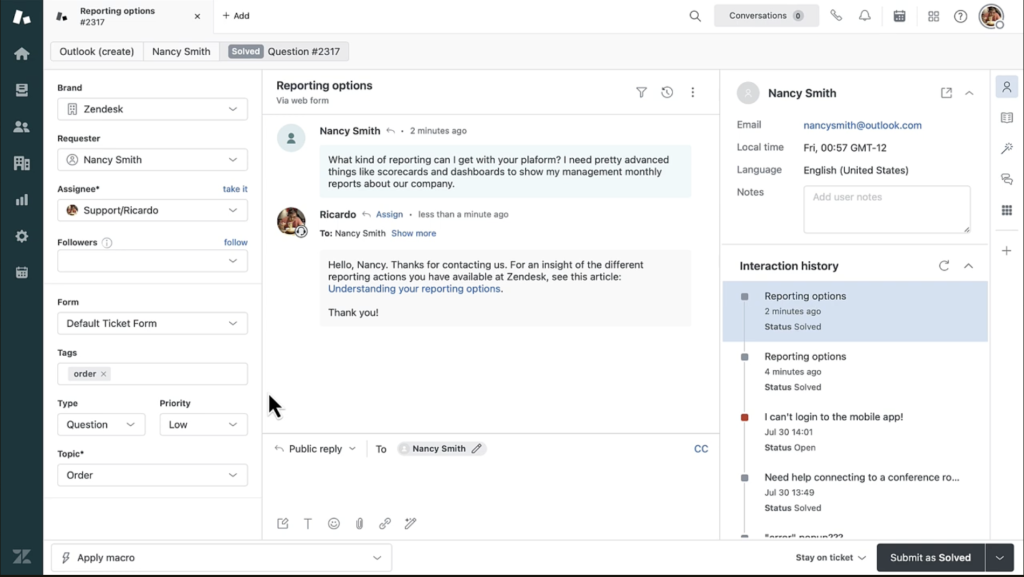
Zendesk is built for high-volume support teams that need scalable, multi-channel infrastructure. Its AI email management features—like automatic triage, response drafting, and real-time agent assistance—are designed to streamline operations and cut manual effort across even the most complex service environments.
Key features:
- Agent Copilot: Assists agents by summarizing ticket conversations, suggesting macros, and adjusting tone to stay on-brand.
- AI Agents: Zendesk’s AI Agents can autonomously resolve routine requests across email and chat—without human involvement. They’re powered by your help center content and pre-trained on common customer intents.
- Intelligent Triage: Sorts incoming tickets by sentiment, language, and topic to ensure they reach the right team fast.
- Generative AI for Voice: Summarizes support calls and transcripts directly into tickets, reducing post-call admin work.
- Macro Suggestions: Identifies repetitive issues and recommends new macros to handle them at scale.
Pricing:
Starts at $55/agent/month. AI features are available as a $50/agent/month add-on for Suite Professional plans and above.
9. Freshdesk
Freshdesk is a cloud-based help desk solution built for growing teams that need to support customers across email, phone, chat, and social. Its clean interface, strong automation engine, and generous free plan make it a go-to choice for companies scaling up service operations. The platform integrates deeply with Freddy—Freshdesk’s AI layer—for end-to-end email management and agent assistance.

Key features:
- Freddy AI Copilot: Provides real-time assistance by suggesting responses, summarizing conversations, and refining the tone of emails.
- Freddy AI Agent: Delivers 24/7 autonomous support across multiple channels, resolving up to 86% of routine queries without human intervention.
- Auto-Triage and Sentiment Analysis: Flags urgent issues by analyzing tone and topic, then routes emails to the right agent or team.
- Email Draft Generator: Enables agents to create comprehensive email responses from brief prompts
- Message Expansion: Takes shorthand notes and fleshes them out into clear, customer-ready responses.
Pricing:
Free plan available. Paid plans start at $15/agent/month. Freddy AI Copilot add-on is priced at $29/agent/month, billed annually.
10. Sanebox
SaneBox is an AI email management tool that integrates seamlessly with your existing email client—be it Gmail, Outlook, Apple Mail, or any IMAP-based service. It intelligently filters and prioritizes your emails, helping you focus on what’s important without the need to switch platforms.

Key features:
- SaneLater Folder: Automatically moves less important emails out of your inbox so you can stay focused on what matters most.
- SaneBlackHole: Eliminate unwanted senders by dragging their emails into this folder; future messages from them are automatically deleted.
- SaneReminders: Get automatic nudges to follow up on emails that haven’t been answered by a certain date.
- SaneSnooze: Temporarily remove emails from your inbox and have them return at a specified time.
- Daily Digest: Receive a daily summary of all the emails SaneBox has filtered, giving you an overview without cluttering your inbox.
Pricing:
Plans start at $3.49/month (Snack), $5.99/month (Lunch), and $16.99/month (Dinner), with a 14-day free trial available.
11. Intercom
Intercom is best known for its live chat and conversational support capabilities—but what sets it apart today is how it blends AI into every part of the customer experience. Its biggest differentiator? Fin, a multilingual AI agent that can handle customer conversations across channels, including email.
Fin helps teams automate replies, detect intent, and triage conversations without losing the human touch. It integrates with Intercom’s shared inbox to manage email queries, generate responses, and escalate complex issues when needed—all in real time.

Key features:
- AI compose: Helps agents rewrite replies, adjust tone, translate messages, or correct grammar—directly within the Intercom inbox.
- Multilingual Email Support: Fin can respond to queries in 45+ languages—no manual translation or handoff needed.
- AI-Powered Email Replies: Fin can instantly draft and send helpful, on-brand replies to common email queries using your help center or custom support content.
- Summarization + Autofill: Generates internal summaries of long email threads and autofills ticket details like subject lines and categories.
- Inbox Visibility: Keeps agents in control of AI-led conversations with full visibility and the ability to jump in anytime.
✏️ Note: Intercom charges an additional $0.99 every time Fin answers a customer’s question. To avail this rate, you must have an active Intercom plan. Any extra resolutions beyond your contract are billed monthly on your regular payment date.
Pricing:
Intercom plans start at $39/month. However, Fin comes as an add-on. It costs $0.99 for every resolved customer query.
12. Front
Front is a customer communication platform that combines the familiarity of email with the efficiency of a help desk. One of its standout features is shared inboxes, which allow your team to manage support@, billing@, and other aliases without confusion or overlap.
Every message is assignable, trackable, and visible to the right people, so there’s no guessing who’s handling what. On top of this, Front’s AI features automate repetitive tasks, suggest responses, and even help agents stay on tone and on track.

Key features:
- AI Compose: Instantly generates clear, polished replies. You can tweak tone, grammar, and language to match your brand voice.
- AI Summarize: Condenses long threads into short overviews, so agents can get up to speed without scrolling.
- AI Tagging: Applies relevant labels to emails, based on topic or sentiment, to keep inboxes organized.
- Suggested Replies: Offers complete responses (as drafts) for common questions, cutting response time significantly.
- AI Translations: Translates incoming and outgoing messages across 18+ languages for smooth multilingual support.
Pricing:
Starts at $19/user/month (Starter). Growth, Scale, and Premier plans offer more advanced collaboration and analytics features.
How to Choose the Right AI Email Management Tool
Not every inbox needs the same AI solution. What works for a five-person support team handling a support@ inbox might completely miss the mark for a solo founder or a 50-person help desk.
1. Start by defining your pain points
Before exploring pricing, figure out where you’re losing time:
- Are you manually assigning incoming emails?
- Spending too long writing replies from scratch?
- Constantly losing track of follow-ups?
- Struggling with irrelevant or noisy messages?
Choose AI that directly solves those friction points.
2. Match the tool to how your team works
The best tool is the one that fits into your existing habits, not one that forces you to relearn everything.
- If your team works out of Gmail or Outlook, consider tools that plug into your inbox (not replace it).
- If you’re collaborating heavily across teams, real-time commenting or shared drafting becomes key.
- For teams that work asynchronously, features like summarization, follow-up automation, or clear ticket ownership matter more.
3. Don’t overbuy on features you won’t use
It’s tempting to chase AI bells and whistles, but here’s the reality: most teams use a few core features daily (like reply assistance or tagging) and ignore the rest.
Focus on:
- Must-haves: e.g., automated routing, language support, draft suggestions
- Nice-to-haves: summaries, tone correction, AI analytics
- Red flags: features that you rarely use or require constant tweaking.
4. Consider the learning curve and maintenance load
Good AI tools are easy to set up and intuitive to use. If it needs a dedicated admin or weeks of training, it’s probably not the right fit, especially for smaller teams. So look for signs like:
- Is onboarding simple?
- Can support reps start using the AI features without training?
- Do workflows break when email formats or phrasing change?
5. Don’t skip the trial run
Don’t just take a product tour—use the free trial to draft emails, handle real queries, and see if it genuinely saves time.
Leverage AI to Take Back Control of Your Inbox
Whether you’re trying to declutter, speed up replies, or deliver better support, the right tool can save hours each week and free your team from repetitive work.
That said, not all inboxes—or teams—are built the same. Some need automation, others need collaboration. Some want better triage, others want better writing. The key is to find a solution that fits your workflow, not the other way around.
Test a few tools. Start small. Look for impact where it matters most—time saved, stress reduced, and conversations handled with clarity.
Because the best inbox isn’t just empty—it’s easy to stay on top of.
Frequently Asked Questions (FAQs)
1. What is AI email management?
AI email management uses artificial intelligence to help automate and organize your inbox. It can sort incoming emails, prioritize urgent ones, suggest replies, auto-categorize messages, and even detect sentiment. This helps reduce manual effort and keeps your inbox under control.
2. Can I use AI to manage shared inboxes like support@ or info@?
Yes. AI can help manage shared inboxes by auto-assigning messages to the right team member, tagging emails based on content, and even drafting replies. Tools like Hiver turn your shared inbox into a collaborative, AI-powered support space without migrating your team to an external platform.
3. What are the best use cases for AI in email?
AI is especially useful for:
- Drafting replies and rephrasing emails
- Detecting tone and urgency
- Auto-assigning or auto-tagging incoming messages
- Decluttering with smart filters (e.g., moving newsletters or spam)
- Auto-follow-ups and reminder emails
- Translating or summarizing long threads
4. Does Gmail have built-in AI email features?
Yes, Gmail offers some native AI features like Smart Compose and Smart Reply, which suggest responses and help complete sentences as you type. However, these are basic. For advanced features like ticket triaging, AI-generated replies, or workflow automation, tools like Hiver plug into Gmail and offer deeper AI capabilities.
5. How does Hiver use AI for email management?
Hiver adds AI to your inbox without changing how you work. Its AI Copilot can draft replies based on your knowledge base, Harvey (Hiver’s AI bot) can auto-close redundant threads, suggest templates, and summarize email conversations. It’s built for teams using Gmail and looking to reduce email clutter while improving response times.
6. Can AI summarize long email threads?
Yes. Many tools now offer AI summarization, which condenses lengthy conversations into quick bullet-point overviews. This is especially useful in support or sales workflows where team handoffs are common.
7. What’s the best AI tool for email?
That depends on your needs. Tools like Sanebox or Clean Email work well to clean up a personal inbox. Hiver or Front is an excellent choice if you’re on a support team handling shared inboxes. For larger operations needing advanced AI automation, platforms like Intercom or Zendesk offer enterprise-grade capabilities.
Start using Hiver today
- Collaborate with ease
- Manage high email volume
- Leverage AI for stellar service














