


Customer service isn’t just about solving problems — it’s about shaping how customers feel about your brand. And without a clear customer service strategy, even great teams end up stuck in reactive mode: firefighting tickets, missing context, and struggling to scale consistency as they grow.
The most successful companies treat support like a core part of the customer experience — with clear systems, aligned teams, and a strategy that connects every touchpoint to the bigger picture.
In this guide, we’ll walk you through how to build a customer service strategy that actually works — not just in theory, but in the real world. Whether you’re starting from scratch or refining what you’ve already got, we’ll help you align your people, processes, and tools to deliver support that drives loyalty and growth.
What is a customer service strategy?
A customer service strategy is the game plan your team follows to deliver great support across every stage of the customer journey. It goes beyond handling tickets — it’s a system that connects your people, processes, and tools to create consistent, high-quality experiences at scale.
Recommended reading
What are the benefits of a customer service strategy?
1. Turn service into a brand differentiator
In crowded markets, great service is often what customers remember — and what they return for. A clear strategy helps you standardize and scale those great experiences, turning support from a cost center into a growth engine. It also sends a message: “We don’t just sell products — we back them up with real help.”
2. Drive customer lifetime value (CLTV)
Support isn’t just about solving today’s problem — it’s about building tomorrow’s revenue. When your team consistently delivers helpful, empathetic service, customers are more likely to stick around. In fact, repeat customers spend 67% more than new ones, according to a research study by Constant Contact.
3. Boost organic word-of-mouth (the good kind)
People talk about service — especially when it’s bad. But when it’s great, they often become your most effective marketers. A clear customer service strategy helps ensure those standout moments aren’t random — they’re intentional and consistent. From fast resolutions to small moments of delight, these interactions drive referrals without spending a dime on ads.
10 Best Practices to Build Your Customer Service Strategy
1. Map the customer journey before designing support
You can’t build a strong customer service strategy without first understanding what your customers actually go through. Journey mapping helps your team walk in the customer’s shoes — so you can design systems that solve real problems, not just internal assumptions.
? Start with customer personas (not just generic segments)
Use your CRM or support platform to build detailed personas. Include not just demographics and company size but goals, blockers, and behavioral traits.
Example persona
Name: Emma Snow
Occupation: Small business owner
Goals: Streamline operations, reduce admin time
Pain Points: Tight budget, low-tech expertise
Knowing who’s reaching out helps support agents respond more empathetically — and tailor tone, tools, and channels accordingly.
? List all customer-facing touchpoints
Map out every direct and indirect touchpoint: email, live chat, knowledge base, contact forms, WhatsApp, and even social comments or reviews. Then, evaluate them by friction:
- Where do delays happen?
- Are help articles too generic?
- Does chat escalate issues fast enough?
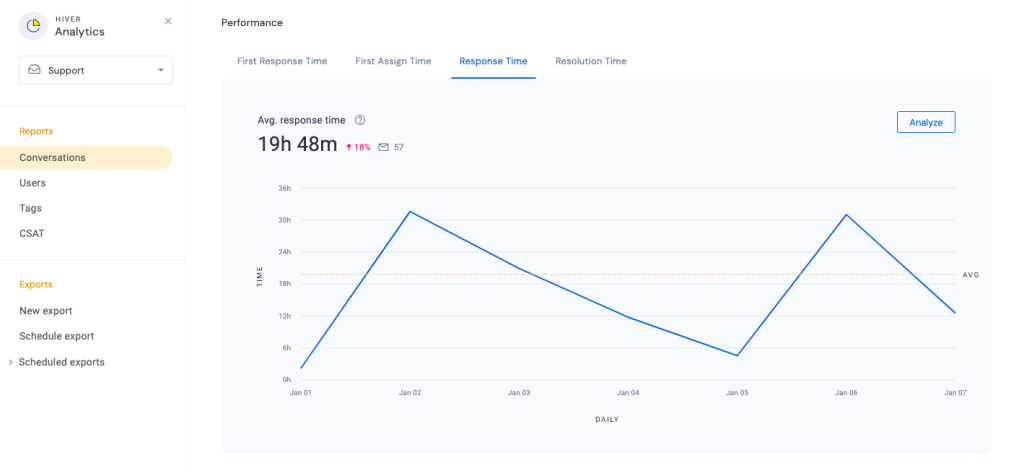
Hiver users often rely on ‘Conversation Reports’ to analyze where customer response times lag and which channels are overburdened.
? Collect feedback across key journey stages
Don’t wait until a customer is frustrated. Set up lightweight check-ins after onboarding, mid-adoption, or post-resolution. Short CSAT surveys or in-context feedback widgets (like thumbs up/down on a help article) can reveal experience gaps early.
? Create a visual journey map with pain points, not just steps
Go beyond flowcharts and include emotional touchpoints. Where do customers feel confident? Where are they confused or left hanging?
Use color-coded diagrams to highlight decision points, blockers, and drop-off areas. Many teams even role-play these journeys to help agents build muscle memory for handling tough situations.
?Pro Tip: Assign each persona to a team member and run a support scenario as if they were that customer. It’s a low-cost way to build empathy — and identify tone or process gaps you won’t catch in a spreadsheet.
2. Set clear, measurable goals for your support org
One of the biggest reasons customer service teams stagnate is unclear goals. When success is measured vaguely — “resolve tickets faster” or “do better on CSAT” — teams stay stuck reacting instead of improving.
The key is to set goals that are specific, measurable, and tied to real outcomes.
- Start by linking team goals to broader business impact. For instance: “Reduce first response time by 25% in Q2 to improve NPS among enterprise clients by 5 points.” This goal doesn’t just push for speed — it shows how that speed ladders up to loyalty and retention.
- Next, get concrete. Use the SMART framework — goals that are Specific, Measurable, Achievable, Relevant, and Time-bound. Instead of “We need to improve onboarding,” go with: “Ensure 90% of new customers complete onboarding within five business days by the end of Q3.”
- Finally, cascade your goals. Don’t stop at team-level KPIs. If your broader goal is to increase self-service adoption, an agent-level target might be: “Guide 30% of chat users to helpful knowledge base articles during conversations.”
That kind of alignment — across the team, individual agents, and broader business outcomes — creates momentum.
“I’m a big fan of dashboards. They can be real-time, like monitoring an incoming case queue, or they can be updated weekly. When one of the companies I worked in was setting up Knowledge Management, we had a weekly scorecard tracking things like new articles written, how many cases were linked to articles, and how many articles were linked to cases.”
~ Miles Goldstein, Customer Support Leader
3. Hire and train for consistency, not just soft skills
Support isn’t just about being friendly — it’s about being reliable. Customers should get the same high-quality experience whether they’re chatting with Priya in Mumbai or Jordan in Chicago.
That kind of consistency doesn’t happen by accident. It starts with hiring the right people — and training them in the real-world context they’ll need to handle conversations with empathy, clarity, and confidence.
? Hire for adaptability, empathy, and clarity
Today’s support professionals need more than product knowledge. They need to:
- Adapt to changing customer expectations
- Stay calm under pressure
- Communicate clearly — without sounding robotic or overly formal
- Learn tools quickly and troubleshoot independently
In interviews, use real-world role-play scenarios to test how candidates think. For instance: “An enterprise client threatens to cancel due to a missed delivery. Walk us through how you’d handle it.”
Look for responses that show empathy, ownership, and a problem-solving mindset — not just textbook answers.
? Train using real tickets, not just product walkthroughs
Most training programs focus on product walkthroughs. But what really moves the needle is learning how to respond to real people. Build a small training library of past tickets — both wins and misses. Break them down as a team:
- What was the tone like?
- Could we have handled that faster or more empathetically?
- What would we do differently today?
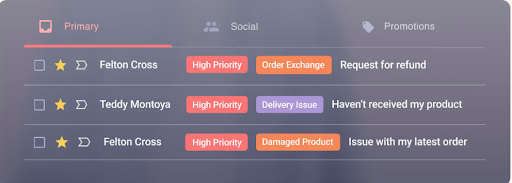
? Pro Tip: With Hiver, you can auto-tag tickets by topic, urgency, or sentiment. This makes it easy to organize training material — like pulling all “billing complaints” or “shipping delays” into one folder.
? Reinforce knowledge through peer reviews and syncs
Consistency isn’t a one-time effort. Create monthly loops where senior agents share tricky cases, lessons learned, or small wins. You’ll surface edge cases others haven’t seen — and avoid the “tribal knowledge” trap.
What Zappos gets right: Every employee — regardless of role — spends their first four weeks in support. Then, they’re offered $2,000 to walk away. Only those who really want to stay do. That kind of intentional training pays off in long-term culture and quality.
4. Don’t overload your team with too many tools
Support leaders often fall into the trap of adding tools to “solve” inefficiencies. But more tools don’t automatically lead to better support. In fact, they often make things messier — especially if those tools don’t talk to each other.
The smarter approach is to build a lean, well-integrated stack that covers the essentials: one place to manage conversations, one to store customer data, and a few to help automate the routine stuff. That’s it.
Start with a strong customer service platform — your command center for all customer communication. This should ideally include email, chat, voice, and social support, all in one view. Tools like Hiver let your team manage everything from inside your inbox, while offering powerful features like analytics, automations, and AI co-pilot.
Then, make sure your CRM is synced with your service platform so agents can see customer history, plan details, and previous conversations without switching tabs. Project management tools like Asana or ClickUp can help with escalations or internal follow-ups — especially when customer issues require product, engineering, or logistics teams to step in.
And finally, automation tools like Zapier can keep everything stitched together: trigger alerts for SLA breaches, auto-update ticket statuses, or send follow-up reminders — no manual work needed.
A quick note on AI: choose tools that use AI to assist, not replace. For example, Hiver’s AI Copilot can instantly pull refund history, past emails, and purchase details to help agents respond faster — all from within the inbox.
5. Be where your customers are — and staff those channels right
The best customer service teams don’t wait for customers to reach them — they’re already present where customers expect them to be. That doesn’t mean you need to support every channel under the sun. It means picking the right channels — and doing them well.
According to a Hiver study, 77% of customers prefer email, while 63% use live chat to connect with brands. At the same time, self-service is on the rise — with SuperOffice reporting that 40% of consumers now prefer using a knowledge base over contacting support.

Email remains the top support channel, with 77% of customers relying on it
These stats clearly show a trend: modern customers expect fast, accessible support across multiple touchpoints — and they’ll switch between these channels mid-conversation if needed.
Here’s what we recommend:
- Choose 2–3 core channels: Email is essential, chat is great for urgency, and self-service can reduce volume. Start there and expand only if needed.
- Ignore the noise: Don’t add support channels just to check a box. Choose the ones your customers actually use — and manage them well.
- Maintain continuity: Customers shouldn’t have to repeat themselves. Integrate tools so past conversations are visible no matter the channel.
With tools like Hiver, agents can view the entire conversation history — no matter which channel the customer used. Whether it’s email, live chat, or WhatsApp, every interaction is logged in the same shared inbox. That’s the kind of continuity that builds trust.
6. Create a communication playbook your team can actually use
A strong communication playbook helps your customer support team stay on the same page — whether they’re responding to a simple login issue or escalating a frustrated enterprise client. It acts as a living guide to your tone, vocabulary, escalation paths, and response standards.
It’s also an essential training asset: new agents can get up to speed faster, and seasoned reps have a reliable reference for edge cases.
? Define your voice — and show what a good response sounds like
Don’t just say “be empathetic.” Share real examples of what to say and what to avoid.
❌ “We’re sorry your order is delayed.”
✅ “I know how frustrating shipping delays can be — especially when you’re expecting something important. I just checked with our logistics team, and your order is now scheduled to arrive by Thursday.”
? Use templates to stay consistent
Build a bank of responses for common scenarios — like order delays, refund requests, or account issues. This saves time and keeps the customer experience uniform.
Tools like Hiver let teams create and use shared templates right inside their inbox.
? Make training ongoing
Use your playbook during onboarding, but don’t stop there. Review real tickets in team meetings. Run occasional role-plays. And treat the playbook as a living resource your team can contribute to.
? What to avoid
- Don’t use technical jargon.
Say: “We hit a technical issue.”
Don’t say: “The API returned a 500 error.” - Don’t follow scripts blindly.
A robotic reply like “I understand. May I have your order number?” won’t cut it.
Instead: “I hear how frustrating this is, especially if it was a gift. Let me look into this right away — could you share the order number?”
?Pro Tip: Keep your playbook lightweight, searchable, and easy to access — tools like Notion or Google Docs work great. Tag examples by situation or customer type so agents can find what they need quickly.
7. Set SLAs that drive accountability
When customers reach out, they’re not just looking for answers — they’re looking for reliability.
That’s where SLAs (Service Level Agreements) come in. SLAs set clear expectations for how quickly your team will respond to and resolve issues. They bring structure to your support process and create a shared definition of what “timely support” actually means — both for your team and your customers.
? Why SLAs matter
A recent survey found that 52% of customers expect resolution within 24 hours. And yet, many teams still rely on vague goals like “respond as soon as possible.”
Without SLAs, there’s no consistent way to track performance or hold teams accountable when standards slip.
? How to make SLAs work in practice
Create SLA tiers based on issue type, customer segment, or support channel. For example:
- Priority 1: System outage → first response in 30 mins, resolution in 2 hours
- Priority 2: Billing issues → response in 2 hours, resolution in 12 hours
- Priority 3: General queries → response in 4 hours, resolution in 24 hours
Once SLA rules are in place, use your support tool to auto-assign deadlines and flag breaches. If a ticket goes unanswered, the right person (manager or lead) should get notified immediately.
Tools like Hiver let you create custom SLAs and trigger alerts when timelines are at risk, helping you stay proactive instead of reactive.

Finally, use weekly or monthly reports to identify where delays happen, which ticket types are slipping, and which agents may need support.
?Pro Tip: Don’t borrow SLA goals from other companies. Set targets that reflect your team’s actual bandwidth and support volume. It’s better to promise a 6-hour reply and deliver on it than promise 1 hour and miss the mark.
8. Track the right metrics — then act on them
Your customer service strategy isn’t complete unless you’re measuring its impact.
But tracking everything can quickly become overwhelming. Instead, focus on metrics that reflect your goals — whether that’s faster resolution, happier customers, or a more efficient team.
Here are some of the most useful ones to start with:
? First Response Time (FRT)
How quickly do agents acknowledge customer queries? Faster FRT builds trust and reduces frustration, even if the full resolution takes longer.
? Average Resolution Time (ART)
This shows how long it takes to close the loop. If it’s creeping up, it could point to complex workflows or resourcing gaps.
? First Contact Resolution (FCR)
How many issues get resolved in the first reply without back-and-forth? High FCR = better efficiency and fewer frustrated customers.
? Customer Satisfaction Score (CSAT)
Usually gathered via short surveys after an interaction, it tells you how satisfied customers are with the help they receive.
? Net Promoter Score (NPS)
This tracks how likely customers are to recommend your brand, often influenced by the quality of support.
? Customer Effort Score (CES)
How easy was it for a customer to get help? Lower effort often correlates with higher loyalty.
? Reopened Tickets
If customers keep writing back on the same issue, your resolutions may be incomplete or unclear.
? SLA Adherence
How often does your team meet promised response and resolution times? Falling short here could signal volume spikes or process breakdowns.
? Ticket Volume & Trends
Are support queries rising or falling over time? Break it down by issue type to identify recurring friction points.
? Workload Distribution
Make sure work isn’t piling up with a few agents while others are underutilized. Balanced workloads help maintain quality and morale.
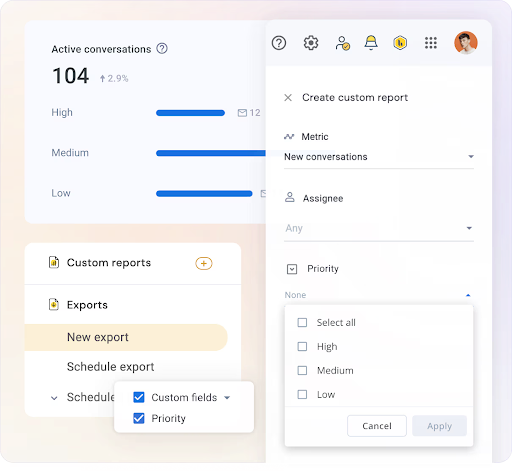
? Pro Tip: Go beyond standard dashboards. With tools like Hiver, you can create custom reports filtered by tag, agent, or ticket type — like “high-priority billing issues” or “SLA breaches.” This helps you spot trends, forecast staffing needs, and back decisions with data.
9. Plan for crisis moments before they happen
No matter how well-structured your customer service strategy is, things will go wrong — outages, bugs, payment failures, even PR blowups.
In high-stress moments like these, your support team isn’t just solving issues — they’re protecting your company’s reputation. A clear crisis management plan helps them stay focused, act quickly, and maintain customer trust when it matters most. Here’s how to build one:
? Anticipate your high-risk scenarios
What could go wrong that would lead to a flood of tickets or negative sentiment? Common triggers include:
- Service downtime
- Login or payment failures
- Product bugs post-deployment
- Negative press or viral social media complaints
- Security breaches or data leaks
For each, define the internal teams involved and the tools required.
? Establish clear internal roles
During a crisis, confusion kills speed. Decide in advance: Who drafts public messages? Who talks to affected customers? Who monitors social channels? Who approves sensitive replies?
? Create pre-approved message templates
Draft flexible responses for email, chat, and social media that your team can adapt quickly, including status updates, acknowledgments, and apology messages. This avoids scrambling for the right words under pressure.
? Train your team on the plan
Don’t wait for a crisis to test your process. Hold short simulations or walkthroughs with your support team and cross-functional stakeholders (like engineering or comms). Make sure everyone knows escalation paths and approval flows.
? Monitor early warning signs
Set up alerts for spikes in ticket volume, negative keywords, or SLA breaches. Customer service tools can detect anomalies and help route urgent issues to the right people immediately.
For example, if tickets tagged “login failure” spike by 3x in an hour, Hiver can auto-assign them to your backend team and escalate if no response is logged in 15 minutes.
10. Keep your help articles updated — your AI depends on it
Your help center isn’t just for customers anymore — it’s also the brain behind your support AI.
Today’s AI copilots and agent assistants rely heavily on your knowledge base to draft accurate responses, summarize resolutions, and answer FAQs in real-time. If your help articles are outdated, incomplete, or inconsistent, your AI becomes less helpful, and your support team double-checks or rewrites what it suggests.
Here’s how to ensure your help content stays up-to-date and useful.
? Set a regular audit cycle
Assign owners to review help articles monthly or quarterly. Prioritize high-traffic articles, those linked most frequently by agents, or those with a high bounce rate.
? Create a version control process
Every time your product, policy, or process changes, have a trigger to check for affected help docs. Collaborate with product and ops teams to get ahead of upcoming changes.
? Track search and fallback failures
Look at what users and agents are searching for — and failing to find. If your AI assistant frequently responds with “I couldn’t find that information,” it’s a signal that your knowledge base is missing key content.
? Involve your support team
Your frontline agents know which articles are outdated, unclear, or frequently misunderstood. Create a simple feedback loop — a Slack channel, form, or tagging system — to collect suggestions.
? Pro Tip: In Hiver, you can link your knowledge base to the AI Copilot. Updating articles improves what the AI fetches, which means agents spend less time rewriting replies — and customers get faster, more accurate answers.
Examples of Great Customer Service Strategies
Let’s look at a few real-world brands that have turned their customer service strategies into a competitive advantage, not just through policies but through thoughtful execution.
1. Chick-fil-A: Training frontline staff to lead with empathy
Ranked #3 on Forbes’ 2025 Best Customer Service list, Chick-fil-A has built its reputation around intentional training and operational discipline.

Employees are taught to engage with customers warmly — using eye contact, smiles, and personalized conversations — and are empowered to resolve issues directly. In some cases, franchise owners personally call unhappy customers and offer a free meal to make it right.
Why it works: Their strategy prioritizes emotional intelligence as much as operational efficiency, turning everyday interactions into moments of loyalty-building.
2. The UPS Store
Despite being a large-scale logistics network, The UPS Store’s customer service approach is highly localized and personalized. Their staff goes the extra mile — from hand-packaging fragile, sentimental items to tracking international deliveries proactively.
In one instance, a customer shipping personal heirlooms to Australia received daily updates from staff to ease her anxiety, and the package arrived earlier than expected.
Why it works: Their strategy focuses on trust and follow-through, especially in high-stress or high-stakes situations.
3. Nordstrom
Nordstrom’s customer service playbook is simple: train employees thoroughly, then trust them to make judgment calls.
When a mother struggled to find the right shoes for her daughter’s wedding, a Nordstrom associate located the pair in another city, had them shipped express, and followed up to ensure they fit. The associates didn’t need approval to make it happen — they were empowered to do what was right.
Why it works: Nordstrom’s strategy removes red tape and encourages proactive problem-solving, which results in more personalized and memorable experiences.
The growing role of AI in customer service strategy
AI is no longer a nice-to-have — it’s quickly becoming a core pillar of modern customer service strategy.
From virtual assistants to real-time suggestions for agents, AI is helping support teams work faster, reduce burnout, and improve resolution quality. But what does this shift look like on the ground?
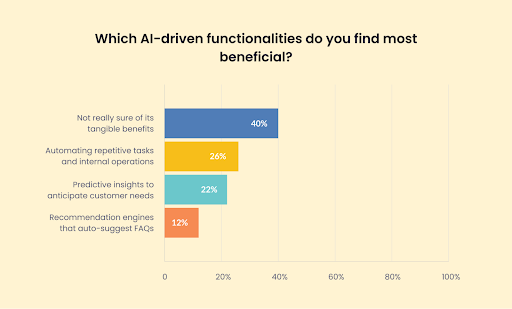
We recently surveyed 500+ customer service professionals as part of Hiver’s Report on AI vs. Human Support. Here’s what they told us:
- 26% said AI helps by automating repetitive tasks such as sorting tickets, answering common FAQs, and sending order confirmations.
- 22% value AI’s predictive capabilities that help teams preempt issues before they escalate — improving retention and NPS.
- 12% use AI copilots or assistants to recommend the next steps and suggest relevant help articles and even products.
Build a customer service strategy that actually delivers
Customer service today isn’t just about resolving tickets — it’s about building trust, loyalty, and long-term relationships.
The best strategies align people, processes, and tools around the customer experience, not just internal efficiency. They evolve with customer expectations, not react to them. And they give support teams the clarity they need to consistently deliver great service — even when things go wrong.
If there’s one takeaway, it’s this: don’t overcomplicate it. A solid customer service strategy comes down to a few essentials done really well: meeting customers where they are, listening actively, empowering your team, and tracking what matters.
Frequently Asked Questions (FAQs)
1. How can small businesses develop an effective customer service strategy?
Small businesses should start by understanding their customers’ needs through direct feedback and interactions. Implementing simple tools like help desk software can streamline communication. Also, training staff to handle queries with empathy is crucial.
2. Why is a customer service strategy important?
Implementing a customer service strategy helps businesses deliver consistent and efficient support, enhancing the overall customer experience. It aligns the team with clear objectives, improves response times, and fosters customer trust.
3. What are the key components of an effective customer service strategy?
An effective customer service strategy typically includes:
- Clear objectives: Defining what the strategy aims to achieve.
- Customer understanding: Gaining insights into customer needs and expectations.
- Training and development: Equipping staff with the necessary skills and knowledge.
- Technology integration: Utilizing tools like AI to enhance service delivery.
- Feedback mechanisms: Collecting and acting on customer feedback to improve services.
4. How can AI enhance a customer service strategy?
AI can significantly improve customer service by automating routine tasks, providing instant responses through chatbots, and analyzing customer data to offer personalized experiences. It enables support teams to handle higher volumes of inquiries efficiently and allows human agents to focus on more complex issues.
5. How often should a customer service strategy be reviewed and updated?
It’s advisable to review your customer service strategy at least annually. However, more frequent reviews may be necessary when there are significant changes in customer expectations, market trends, or business objectives. Regular assessments ensure that the strategy remains aligned with current needs and continues to deliver optimal customer experiences.
6. What are some common pitfalls to avoid when developing a customer service strategy?
Common pitfalls include neglecting employee training, failing to gather customer feedback, and not leveraging technology effectively. Additionally, a lack of clear objectives and a lack of alignment of the strategy with overall business goals can hinder its success.














