


How do you talk to customers so that they feel like real people instead of ticket numbers?
We’ve tried cut‑and‑paste responses in the past, but they rarely left a memorable impression. Then we shifted gears and leaned into genuine empathy—asking the right questions, listening to real concerns, and following up to show we actually care.
Yes, it takes more thought and collaboration on our end, but we’ve seen the difference firsthand: customers stick around longer, recommend us to friends, and don’t feel like they’re just another face in the crowd.
In this guide, we’ll discuss how a genuine, customer‑focused approach to communication can strengthen every part of your business.
What Is Customer Communication?
?Customer communication is how a business talks with its customers — from the moment someone first hears about your company to every support ticket, feedback request, and follow‑up message after purchase.
It includes all the ways you connect (email, phone, live chat, social media, even in‑app messages) and the tone you use. Good customer communication means quickly giving clear, helpful answers so people feel heard, understood, and confident in your brand.
“Communication, in particular customer conversation, is at the core of successful customer service. How you manage that communication will get in the way, or speed up, getting to a resolution.”
– Luis Lopez-Echeto, Engineering Support, Manager, Salsify.
Why Is a Customer Communication Strategy Important?
Having a communication strategy aligns your entire organization around one goal: create positive experiences. It also sets standards for response times, tone of voice, escalation paths, and follow-up processes. A proactive customer communication strategy brings three main benefits:
1. Ensures consistency across all channels
When you offer support across various channels—including email, chat, phone, and social media—maintaining consistency can be challenging. That’s where having a communication strategy helps. It serves as a blueprint, ensuring that your brand’s voice, messaging, and quality of service remain uniform across all channels.
This consistency reinforces your brand identity and builds customer trust, ensuring they receive the same level of service no matter how they reach out.
2. Resolve issues faster
When support teams engage in clear, concise, and empathetic interactions, they can accurately diagnose problems and provide solutions promptly. This reduces the need for follow-up contacts and enhances customer satisfaction. In fact, customer satisfaction rates peak at 84.7% when the first response time is between 5 to 10 seconds.
3. Drives revenue
Effective communication can directly impact your bottom line. That’s because satisfied customers are more likely to make additional purchases and recommend your services to others. According to a study by Bain and Company, companies that excel in customer experience, including effective communication, grow revenues 4-8% above their market average.
Best Practices for Customer Communication in 2025
1. Set brand voice guidelines for your team
The first step is to create a framework to ensure your team uses the same brand tone, style, and standards across all channels. This way, you’re not sending a friendly, casual tweet one minute and a stiff, formal email the next—it all feels cohesive and authentic to who you are. Some best practices include:
- Write down keywords and phrases that reflect your brand’s personality (e.g., warm, knowledgeable, playful), and share them with your team.
- Include fonts, logos, and color palettes so every touchpoint—from emails to social posts—looks and feels consistent.
- Hold quick audits of emails, chats, or social messages to spot any off-brand elements early.
- Show your team sample replies or social updates they can reference so they’re never guessing how to sound. The examples below will help:
| Channel | Template |
| Hi {{Customer Name}}, Thanks for reaching out. I’m sorry you ran into this issue — let me fix it right away. Could you please share your order number so I can look into it? Thanks,{{Agent Name}} | |
| Live Chat | ? Hey [Customer Name]! I’m {{Agent Name}}. I understand you’re having trouble with {{Issue}} — I’m on it. Can you give me a few more details so I can resolve this ASAP? |
| Social Media | Hi @{{Username}} — we’re really sorry you had this experience. Please DM us your order number, and we’ll make it right within 24 hours. Thank you for letting us know! |
2. Personalize communication
Personalizing each interaction—like addressing customers by name or referencing recent orders—helps them feel you’re actually paying attention. In fact, according to Zendesk, 77% of business leaders say that personalized support leads to higher retention. When you speak to people’s individual needs, they feel seen and valued, which sparks loyalty and great word‑of‑mouth.
“You have to want to help customers and provide great service. More often than not, customer service roles are treated as simple roles within an organization that don’t require high skill. But to truly be great at it, you need people who thrive on making others’ lives better. When fielding a complaint, you need to feel the customer’s pain and understand how it is affecting the customer.”
– Barry Pepper, VP of Customer Experience at PushPress.
Here are three practical ways to add personalization:
- Segment your audience: Group customers by behavior, purchase history, or demographics. Send targeted emails or messages that speak directly to each segment’s interests and pain points (e.g., onboarding tips for new users vs. upgrade offers for power users).
- Match channel to preference: Meet customers where they are. If a customer frequently uses live chat, prioritize proactive outreach there. If they prefer email, send personalized check‑ins and product tips there.
- Leverage purchase and support history: Pull up each customer’s past orders and support tickets before responding. Use that context to anticipate needs (Hey Sam, “I see you ordered X—here’s a guide to help you get started”) and avoid repetitive questions.
?How AI can help with personalization
AI can tailor each interaction by analyzing data such as past purchases, browsing patterns, and chat history. That means you can greet customers with relevant suggestions, highlight features they’ve shown interest in or even spot signs of frustration—so your team can reply with empathy.
You can also use AI-driven chatbots for everyday tasks like password resets or shipping updates, freeing your agents to focus on trickier issues. Adding sentiment analysis lets you catch early warning signs of customer frustration and step in before it grows.
3. Focus on clear communication
Clear communication can make or break your support experience. If someone reports a delayed order and only hears “We’re looking into it,” they learn nothing about timing or next steps.
In contrast, “Hi Alex! Your package is stuck in transit and should arrive tomorrow afternoon. I’ll send you a tracking link and follow up once it’s delivered” instantly reduces worry and builds trust.
?Pro Tip: Ask, “What does this customer need to know right now?” If a detail doesn’t serve that need, cut it. Stick to simple language, break bigger topics into bullets or headings, and close with a clear next step—like sending a link, scheduling a call, or requesting feedback.
4. Go omnichannel
An omnichannel approach gives customers a unified, seamless experience—whether they reach out via email, chat, phone, or social media. That way, they’re not stuck repeating themselves every time they hop channels.
To provide omnichannel support, start by centralizing all conversations in one platform so agents always see a full history of interactions. Tools like Hiver, Front, or Zendesk can centralize every conversation in a unified platform, so agents always see a full history of interactions.
5. Provide options for self-service
Self‑service gives customers control — and cuts down on tickets. In fact, 60% of customers prefer web self-service for sales transactions, highlighting the demand for self-service options in the purchasing process.
Easy ways to provide self-service options include:
- Building a searchable KB: Build a knowledge base with clear, step‑by‑step articles and FAQs so customers can quickly find answers to common questions. Look for tools that can not only help you create a knowledge base easily but also keep it up-to-date. Tools like Hiver help you create and manage a Knowledge Base of FAQs, articles, and how-to guides easily.

- Publishing video tutorials: Short how‑to videos address complex topics visually and make it easy for customers to follow along.
- Deploying AI chatbots: Use AI-powered chatbots to instantly suggest relevant help‑center articles or walk users through routine tasks (like password resets) without waiting.
- Host a community forum: Let customers help each other, share tips, and vote on popular solutions — turning your user base into a powerful support resource.
6. Gather feedback
Collecting customer feedback is the fastest way to gain insights into and refine your customer communication strategy. You can use CSAT surveys, post-interaction polls, and feedback widgets to streamline this process.
Analyzing this feedback will help you identify pain points—such as unclear instructions or delayed responses—allowing for targeted improvements. For instance, if customers find certain how-to guides confusing, you can revise them for clarity or add visuals.
Beyond surveys, social listening tools like Hootsuite or Sprout Social are employed. They allow you to track brand mentions to quickly respond to concerns. This proactive approach shows you care and helps build stronger customer relationships.
Recommended Reading:
7. Employee engagement
You’re probably wondering what employee engagement has to do with customer communication. But, the difference is noticeable: an enthusiastic greeting, a genuine willingness to solve problems, and a friendly tone all stem from employees who care about their work and customers.
Take Southwest Airlines, for example. The company attributes much of its success to a strong culture of employee recognition and empowerment. Programs like the SWAG (Southwest Airlines Gratitude) initiative allow employees to acknowledge each other’s contributions, fostering a sense of community and pride. This internal culture translates directly into positive customer interactions, as engaged employees are more inclined to provide outstanding service.
Consider boosting engagement by giving your team real perks—think health insurance, paid time off, or wellness stipends—and regularly asking them through simple surveys what’s working (and what isn’t).
8. Gauge performance using metrics
To assess how well your team communicates with customers, track metrics that provide insights into your team’s responsiveness, clarity, and overall service quality. The following metrics can help you get an idea:
1. Average Resolution Time (ART): Average Resolution Time tracks how quickly issues are resolved. Shorter resolution times generally lead to higher customer satisfaction and loyalty, as quick solutions prevent frustration and build trust
2. First Contact Resolution: Measures the percentage of issues solved on the first interaction. A high FCR indicates clear, effective communication that prevents repeat outreach and boosts customer confidence.
3. First Response Time (FRT): Measures the time to respond to a customer’s initial inquiry. Prompt responses can set a positive tone for the interaction and demonstrate attentiveness.

3. CSAT: Use CSAT scores to gauge how customers feel about interacting with you. In the surveys, you can ask them questions like:
- How satisfied were you with the ease of communicating with our support team?
- How satisfied were you with the clarity of the information provided?
A high CSAT score means customers found your communication helpful and easy to understand, while a low score flags clarity, tone, or responsiveness breakdowns. Tools like Hiver simplify the process of collecting and analyzing CSAT data. It helps you automatically send CSAT surveys at the end of every support interaction.

9. Choose a scalable Help Desk
A help desk brings all customer queries — emails, live chat, WhatsApp messages, and even phone calls — into one easy‑to‑navigate interface. There are several help desk solutions available, each offering unique features to manage customer communications across different channels.
For instance, Zendesk, provides robust ticketing systems and analytics, while Intercom focuses more on AI capabilities. One more solution is Hiver, an AI-powered customer service platform that centralizes all customer communication from various channels into one inbox-like interface.
Here are some key features of Hiver that directly improve customer interactions:
- Shared Inbox: Allows teams to efficiently manage group emails such as info@, support@, and help@. With a shared inbox, teams can access, handle, and reply to all conversations as a team.
- Shared drafts: Share email drafts with your team and collaborate on responses in real-time. Team members can review, edit, and finalize replies to ensure accuracy and consistency.
- AI Copilot: Use AI to draft responses quickly. It helps by scanning your knowledge base and third-party apps for relevant information. For instance, if a customer asks about your refund policy, it quickly pulls the latest details and generates a draft for you to review and personalize.
- SLA management: Set service level agreements (SLAs) to guarantee timely responses and resolutions. This helps maintain accountability.
- Analytics and reporting: Gain detailed insights into performance metrics like response times, resolution times, and CSAT scores to identify trends and improve communication.
3 Examples of Great Customer Communication
Each of these brands takes varying approaches to communicating with consumers, but one thing they have in common is their clear understanding of customer expectations.
1. Drift: Crafts Catchy Emails
While many software companies use email for customer service, the chatbot software Drift goes a step further by staying true to its focus on conversational messaging.
The company’s emails typically look like a conversation between friends. Unlike a standard marketing automation email, the informal tone of phrases — like “I just wanted to say hey” and “You have my word” — in the example below makes readers feel like a real person is talking to them.
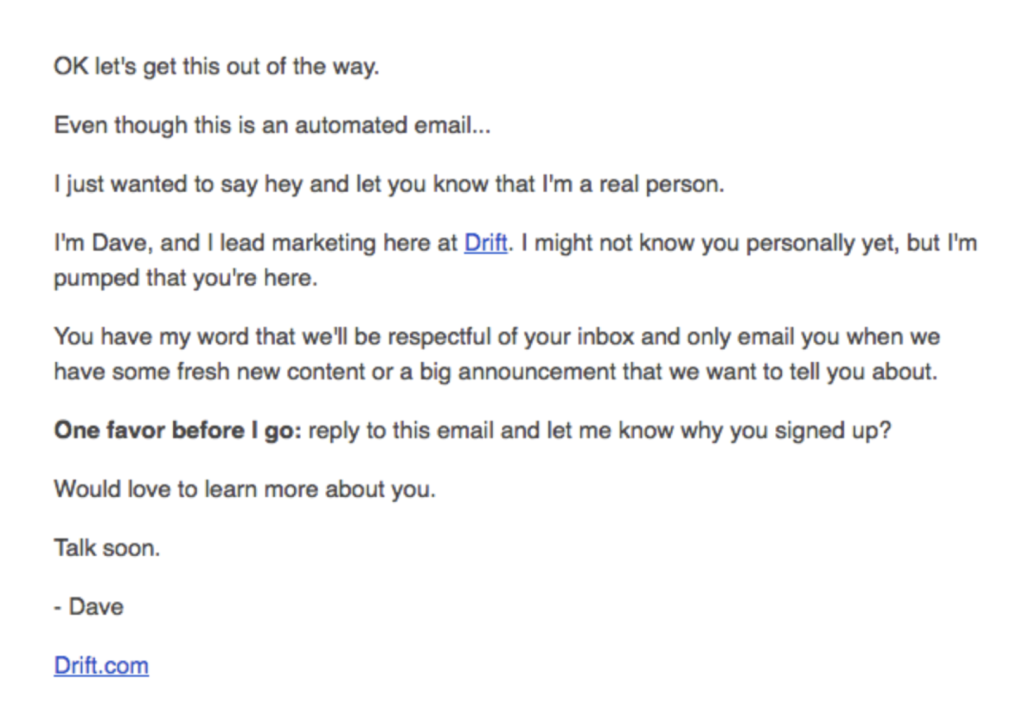
Drift‘s welcome email to customers
By adding a personal touch to messages, Drift has endeared its brand to existing and potential customers.
2. Payoneer: Provides Self-Help Resources
Customers today expect faster support from brands; self-service options give them just that.
Financial services company Payoneer knows the value of helping its customer base independently find quick solutions to technical issues. The brand offers a knowledge base and a support chatbot on its website.

Beyond self-help resources, Payoneer’s social media presence helps it build consumer trust.
On Twitter, for instance, the brand responds to mentions quickly via its customer care handle and closes out conversations in the DMs (direct messages).
3. Neat: Anticipates Customer Wants and Prepares for Them
Neat is a SaaS company offering innovative bookkeeping software, and their customer service team goes the extra mile to make every customer feel welcome—whether they’re ready to subscribe or just looking for tips on small business growth and freelancing.

A standout feature is Neat’s live chat tool. They use a chat widget on their website to engage visitors, helping to generate leads and drive upsells or cross-sells. In addition to 11 hours of live support daily, Neat also provides a 24/7 chatbot that uses preset questions and automated knowledge-base responses to assist customers anytime.
Next Steps to Strengthen Your Customer Communications
One practical way to get started is to pick your busiest channel—say, email—and focus on making it more personal and consistent
Set up short, friendly response templates and share a straightforward style guide with your team so everyone stays on the same page. After each interaction, follow up with a quick “Was this helpful?” or a rating, giving you instant feedback you can use to refine replies.
Also, evaluate a tool that fits seamlessly into your existing workflow (look for free trials to test functionality without commitment).














