


When you run into a problem with a product, chances are you don’t reach for the phone—you start searching for answers yourself.
That’s why customer self-service has become non-negotiable. Whether it’s a help center, an FAQ page, or a chatbot, customers expect to find solutions quickly, without the back-and-forth of traditional support.
But here’s the thing: self-service only works when it’s simple and intuitive. If customers struggle to find clear information or get stuck in endless chatbot loops, frustration builds—and loyalty slips away.
In this guide, we’ll break down why customer self-service matters, show real-world examples, and share practical tips to create a self-service experience that actually helps.
What is customer self-service?
Customer self-service means giving your customers the tools they need to solve problems on their own—without waiting for a support agent.
Think FAQ pages, knowledge bases, chatbots, how-to guides, and AI assistants. If a customer finds an answer without needing to contact your team, that’s self-service working as intended.
Tracked an order through a chatbot? Self-service.
Looked up your return policy in the FAQ? Self-service.
The point is this: customers get what they need faster, and your support team saves valuable time for complex, high-impact queries.
What are the Benefits of Offering Customer Self Service?
Let’s face it—most customers would rather solve an issue themselves than wait on hold or explain their problem multiple times. They want answers fast, on their own terms, and without extra effort.
So, here’s why building great self-service matters:
1. It’s available 24/7 (because customer problems don’t stick to business hours)
Self-service tools work round the clock—whether someone is troubleshooting at 2 a.m. or browsing your return policy during a lunch break.
This is especially important for businesses with global customers—your support shouldn’t “sleep” just because your agents do.
And it’s not just about availability. Research shows the number one way to lower customer effort—and boost satisfaction—is to enable effective self-service.
Brian Seidel, CEO and Co-Founder of CIMcloud summed it up perfectly on the Sage Thought Leadership Podcast: “The number one tactic for lowering customer effort is allowing customers to do self-service.”
Recommended reading
What is customer effort score? (+How to Calculate it)
2. It significantly reduces support costs
Live agent interactions cost money—sometimes upwards of $13 per ticket.
Every query resolved through self-service slashes that cost by nearly 80–85%. Think about it: writing a detailed FAQ once can deflect hundreds of repetitive tickets over time.
It’s a one-time investment that keeps paying off—with less strain on your support headcount and budget.
3. It boosts agent productivity and prevents burnout
The fewer “How do I reset my password?” tickets your team has to handle, the more bandwidth they have for complex, high-value conversations.
Self-service frees agents to do what matters most: solving tougher issues, handling escalations, and delivering personalized support where it’s needed.
4. It builds loyalty and trust (not just convenience)
Fast, effortless experiences leave a lasting impression. In fact, 96% of customers say excellent service makes them more loyal—and self-service is a big part of that.
When customers can easily help themselves, they feel empowered, respected, and confident that your brand “gets it.” Loyalty doesn’t just come from solving big problems—it’s built by making everyday interactions smooth and frustration-free.
5. It supports every stage of the customer journey
Self-service isn’t just for existing customers anymore. It now helps at every stage—from pre-sales to onboarding to troubleshooting:
- Prospects can explore your product without needing a sales call.
- New users can self-onboard using searchable guides and tutorials.
- Employees can ramp up faster with internal knowledge bases.
In short, great self-service isn’t about ticket deflection—it’s about enablement. Helping users get value faster, whenever they need it.
Types of Self-Service Customer Support (+Examples)
There are various types of customer self-service channels you can offer. Here are some popular ones:
1. FAQ Pages
FAQ (Frequently Asked Questions) pages act as your first line of defense in self-service. They answer the most common customer queries upfront—saving both your team and your users valuable time. Think of it like a searchable library for quick wins: basic product questions, return policies, shipping timelines, account setup—all in one place.
A great example is Mailchimp’s FAQ page. It not only answers common queries clearly but also keeps a “Need more help?” chat option handy at the bottom, creating a seamless bridge between self-service and human support.
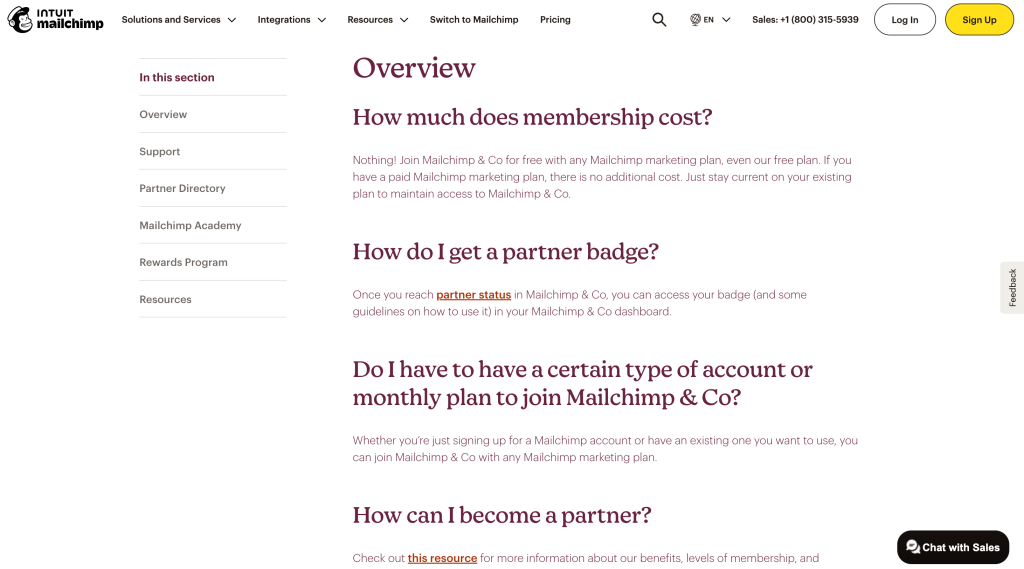
FAQs also offer an SEO advantage—you can naturally weave in keywords, link to detailed blog posts or help guides, and drive more organic traffic to your website. Even long after it’s published, such pages continue saving you time and support costs.
?Pro tips to create FAQ pages
- Regularly update FAQs based on real support tickets and evolving customer needs.
- Organize questions into clear sections—like “Getting Started,” “Billing and Payments,” “Returns and Refunds”
- Keep answers short, clear, and free of jargon. Use plain language that even a first-time user would understand.
- Link to detailed guides, troubleshooting articles, or product documentation where needed.
- Link-related content, or detailed guides or blog posts when needed
- Add a dynamic search bar to help users find answers faster—and place a visible chat/contact option nearby for customers who still need help.
2. Knowledge base or Help center
A knowledge base is like your product’s digital handbook—but faster, smarter, and built for on-demand answers. It’s where users find step-by-step guides, feature walkthroughs, troubleshooting tips, and product updates, without needing to reach out to support.
If FAQs cover the “quick fixes,” think of your knowledge base as the next layer—helping users dig deeper into complex questions and self-resolve issues more confidently.
For instance, take Gratitude’s knowledge base, powered by Hiver. It’s clean, minimalist, and user-centric: articles are neatly grouped into categories like “Account Settings,” “Journaling,” and “Backup Issues.” There’s a dynamic search bar, clear visuals, and in-article links to keep navigation intuitive.
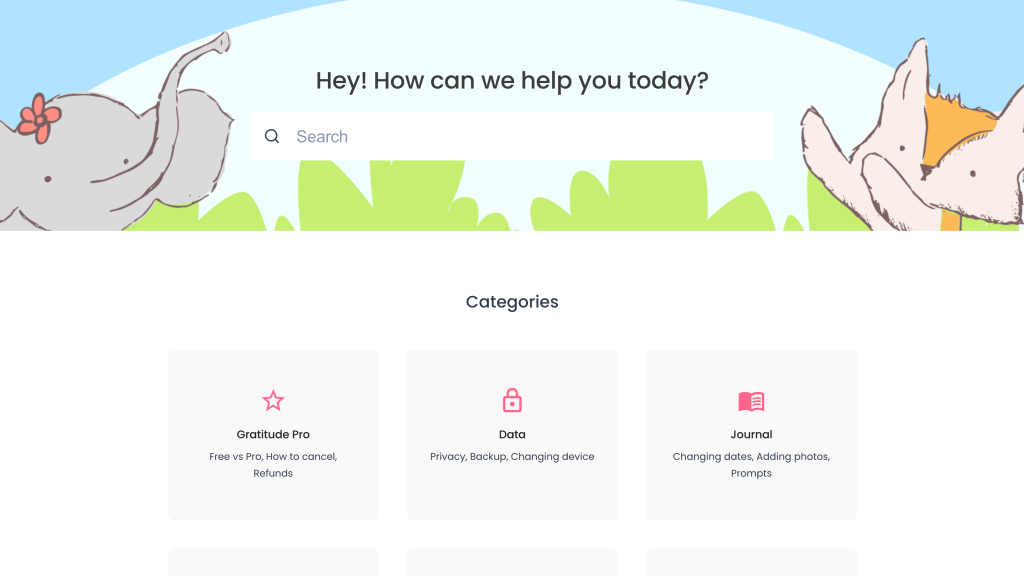
Done right, a knowledge base doesn’t just reduce tickets. It builds customer confidence and loyalty by enabling users to explore, troubleshoot, and succeed independently.
?Pro tips to build an effective knowledge base
- Regularly update articles whenever you add new features, spot recurring issues, or update product workflows.
- Prioritize based on real support queries—start with “How do I…” and “Why is my…” type questions customers ask most.
- Organize content into clear, searchable categories and subcategories.
- Use visuals (GIFs, screenshots, short videos) wherever they can simplify explanations.
- Craft titles and meta descriptions with keywords users actually search for (e.g., “How to reset your password” vs. “Password Reset Guide”).
3. Community forums
Community forums are online spaces where users can ask questions, share tips, and solve problems together. They’re a hub for peer-to-peer support, real-world product insights, and collaborative problem-solving.
A strong example is Adobe’s community forum: discussions are neatly organized by product, popular questions are pinned, and users can vote on feature ideas or troubleshooting solutions. It’s more than just support—it’s a space for users to learn, connect, and influence the product roadmap.
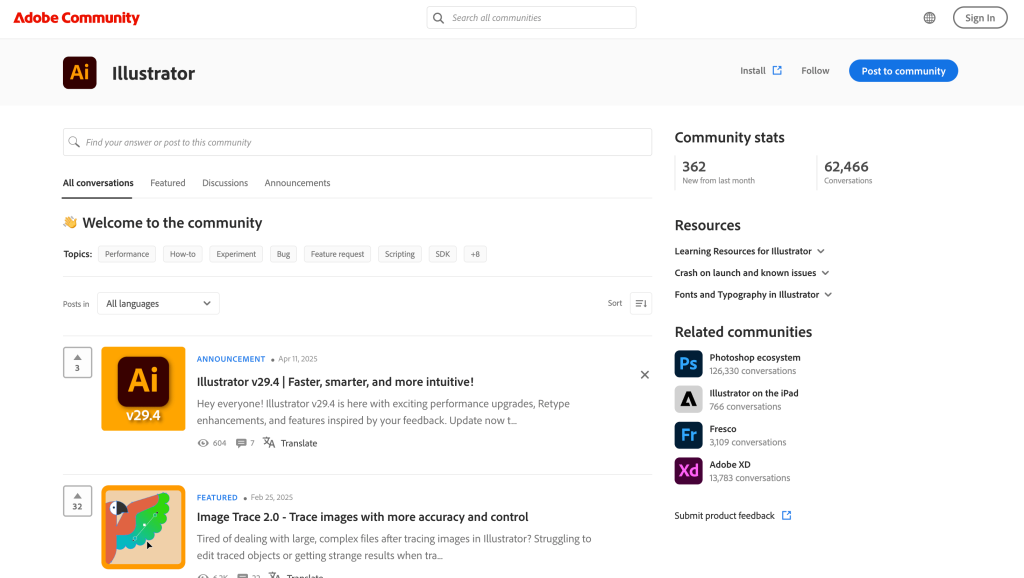
Community forums don’t just benefit users—they also reduce ticket volume and help surface recurring pain points, giving your team insights into what matters most to your customers.
?Pro tips to build a strong community forum
- Track trending issues and use insights to update knowledge bases or prioritize product improvements.
- Organize discussions by clear topics (e.g., onboarding, troubleshooting, feature requests) for easier navigation.
- Pin verified answers or popular threads to help new users get started quickly.
- Empower superusers or moderators to keep discussions active, helpful, and respectful
- Regularly encourage feedback, feature voting, and best-practice sharing to foster engagement.
4. Chatbots
We’ve all landed on a website and seen that little chat bubble pop up—“Hey! Need help?” That’s a chatbot doing its job. But when built well, chatbots are much more than just greeters. They can answer FAQs, walk users through troubleshooting steps, and even capture support requests for escalation.
Think of them as your frontline support: immediate, always-on, and able to resolve repetitive queries at scale.
Take SayHello’s chatbot, powered by Hiver: it acts as a 24/7 virtual agent, helping customers browse FAQs, surface relevant help articles, or instantly connect with a live agent when needed.

For businesses, chatbots mean fewer tickets, faster responses, and happier customers. For agents, they mean less time spent answering “Where’s my order?”, and more time spent solving complex issues. The best part is that when escalation happens, a well-integrated chatbot passes the full conversation history, customer details, and context to the live agent.
?Pro tips to create helpful chatbots
- Regularly refine chatbot flows based on real customer interactions and feedback.
- Design task-specific paths (e.g., “Track my order,” “Reset my password”) to keep flows simple and focused.
- Connect your chatbot to your knowledge base for dynamic, real-time answer suggestions.
- Always offer a clear, easy way for users to escalate to a live agent when needed.
5. In-App Self-Help Widgets
Ever been stuck while using an app and wished for instant guidance—without switching tabs or opening a new support ticket? That’s exactly what in-app self-help widgets solve for.
These widgets offer contextual, real-time assistance directly within the product experience. Whether it’s surfacing tooltips, help articles, or step-by-step tutorials, they empower users to troubleshoot or learn without leaving the workflow—keeping frustration (and ticket volume) low.
For example, consider Notion’s in-app help widget. When you’re trying to create a database or customize a template and hit a snag, clicking the “?” button at the bottom right instantly pulls up:
- A searchable help center
- Quick-start guides and templates
- Keyboard shortcuts
- A direct link to live chat or email support
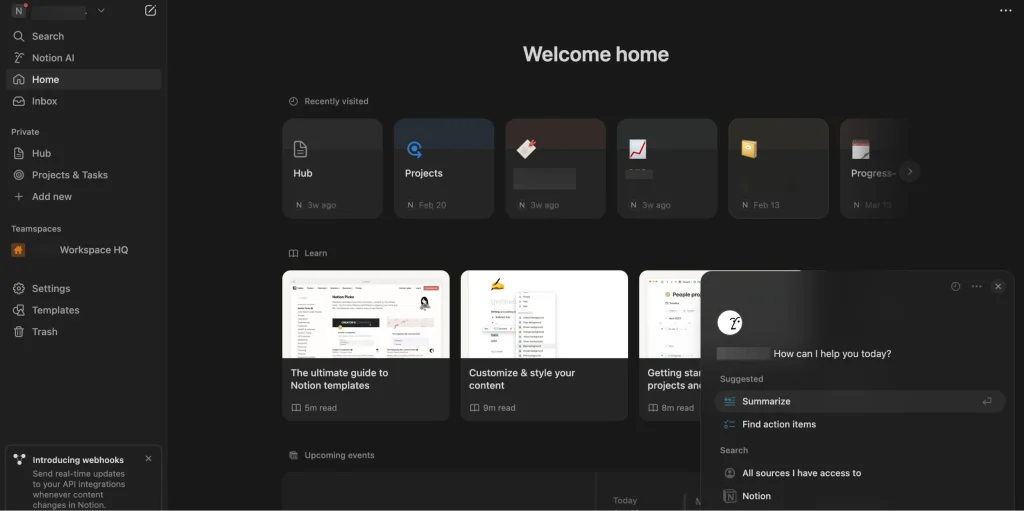
In-app self-help doesn’t just benefit customers—it reduces repetitive queries for your support team and accelerates feature adoption across your user base.
?Pro tips to implement effective in-app self-help widgets
- Brand the widget to match your app’s look and feel for a seamless experience.
- Connect it to your knowledge base and tutorials to surface relevant resources dynamically.
- Ensure it’s responsive and accessible across mobile, desktop, and tablet interfaces.
- Add a search bar so users can instantly find what they need.
6. Customer Portal
When customers have open issues or pending tickets, what they want is clarity—“What’s the status?” “Has someone replied yet?” “Is this resolved?”
A customer portal solves this by giving users a dedicated space where they can:
- Create new support requests
- Track the status of existing tickets
- View conversation history
- See which agent is handling their case
For example, Hiver’s customer portal lets users log in, view all their open and past tickets, reply directly to ongoing conversations, and get real-time updates, all from one dashboard. When connected to a help center, it can even surface related articles, enabling users to self-serve while waiting for agent responses.
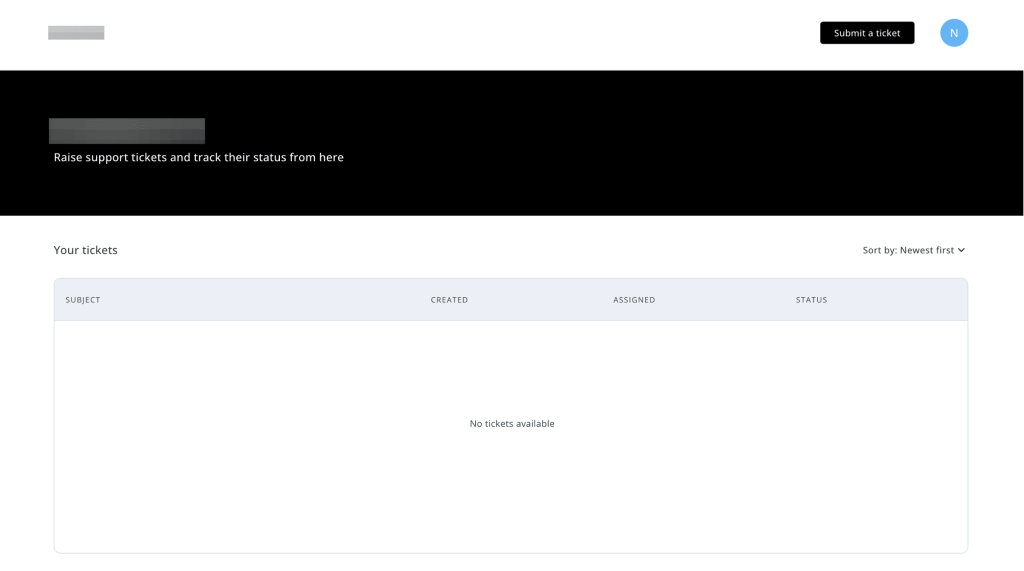
For support teams, a portal doesn’t just improve customer transparency—it reduces ticket update requests, cuts down back-and-forth via email, and builds trust through visibility.
?Pro tips to build an effective customer portal
- Monitor usage data (portal traffic, ticket deflection rates, CSAT) to continuously optimize layout and flows.
- Match the portal design to your brand’s style for a seamless user experience.
- Include filters, status tabs, and a search function so users can easily find what they’re looking for.
Recommended reading
7. Product Training
Product training helps customers learn and level up—whether they’re just getting started or looking to master advanced features. It’s one of the most scalable forms of self-service because once built, a training library can continuously grow with your product. New feature? New course. Common customer confusion? New quick tutorial.
Good product training empowers users to get more value from your product, solve problems independently, and reduce reliance on your support team.
Ahrefs Academy nails this approach. It offers free, on-demand courses that guide users through everything from SEO basics to advanced keyword research—all tied directly to using Ahrefs. The courses are structured, easy to digest, and cater to both beginners and experienced users.

?Pro tips for creating engaging content
- Keep your training library updated alongside product releases or UI changes.
- Break courses into short, goal-driven modules (5–10 mins each) to keep users engaged.
- Mix formats: video walkthroughs, interactive quizzes, downloadable guides.
- Focus on real-world tasks and workflows—not just feature explanations.
Best Practices to Provide Better Self-Service Customer Support
Today’s customers are happy to solve issues independently—as long as you remove the friction. That means your self-service channels need to work across devices, stay constantly updated, and always offer an easy path to a real human if needed.
Here’s how the best support teams do it:
1. Map Self-Service to the Customer Journey
Throwing up an FAQ page isn’t enough. To create truly helpful self-service, you need to design around how your customers move—from sign-up to onboarding, troubleshooting to scaling. Start by asking:
- Where in the journey (touchpoints) are customers most likely to get stuck?
- What type of help is needed at each stage—product tours, troubleshooting guides, feature tips?
- How do customers prefer accessing help—mobile, desktop, in-app?
- What formats resonate more—quick articles, videos, live widgets?
When you map self-service solutions to specific customer milestones, you create a smoother experience and get to deflect repetitive queries before they reach your support team.
Recommended reading
2. Keep Your Self-Service Content Fresh
An outdated help article does more harm than no article at all. If customers find instructions that don’t match what they see, it instantly erodes trust and sends them straight to live support (or worse, your competitors).
Make regular updates a core part of your workflow:
- Audit your help center quarterly: Flag outdated articles, broken links, old screenshots, and obsolete feature guides.
- Sync with product teams: Every time a feature is launched, updated, or retired, your help content should be updated within days, not months.
- Version your content: Instead of overwriting old articles, archive them with proper labeling (e.g., “Legacy 2022 version”) to avoid confusion.
- Use update logs: Note when a page was last updated. This builds trust with users as they’ll know that the information is current.
- Monitor search terms: Check what customers are searching for. If they’re frequently landing on outdated topics, prioritize updating or expanding those areas.
? Treat your knowledge base like your product—not a one-time project, but a living, evolving resource that grows with your customers.
3. Make Help Content Instantly Discoverable
Even the best-written guides are useless if customers can’t find them when they need them. Great self-service isn’t just about what you write—it’s about how easy it is to navigate.
Here’s how to make answers easier (and faster) to find:
- Organize content into intuitive categories: Group articles by themes your customers recognize—like “Billing,” “Account Setup,” “Troubleshooting,” and “Product Features.” Avoid internal jargon.
- Implement a dynamic, predictive search bar: Let users find answers by simply typing keywords. Bonus points if your search suggests articles as they type (like autocomplete for help content).
- Use filters and tags: Help users narrow down content by topic, product line, use case, or audience (e.g., “For Admins,” “For New Users”).
- Surface relevant articles proactively: Don’t wait for users to search—show suggested help content on 404 pages, within in-app flows, or next to related features.
- Optimize titles and snippets: Write your article headlines like search queries (“How to reset your password” vs. “Account security overview”) so users immediately know it’s the right answer.
Track what users are searching but not finding—this reveals gaps in your help content and new article opportunities.
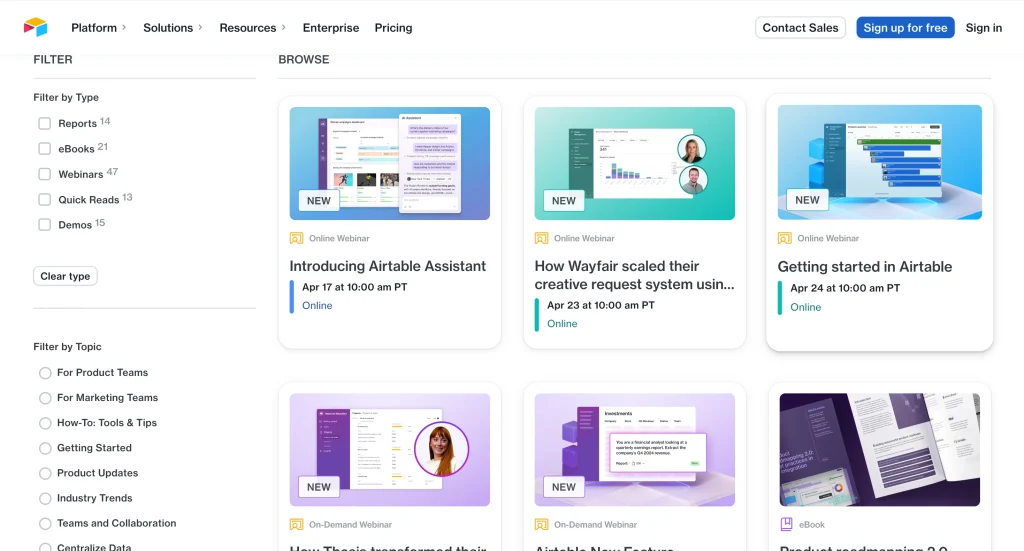
Airtable’s resource center, for example, organizes content into clear sections like tutorials, templates, webinars, and best practices, making it easy for users to find the type of help they need. It also offers a filter-based search that suggests content by topic and type, along with a dynamic search bar for keyword-based discovery.
4. Make Your Self-Service Experience Mobile-First, Not Just Mobile-Friendly
Today’s customers aren’t just browsing your website on mobile. They’re troubleshooting, resetting passwords, and managing orders too. So, if your self-service experience isn’t fully optimized for small screens, you’re introducing unnecessary friction.
Here’s how to build a dynamic self-service experience:
- Prioritize responsive design: Your FAQ pages, knowledge base, and chat widgets should automatically resize and reformat for different devices—phones, tablets, and desktops alike.
- Simplify navigation: Use collapsible menus, expandable FAQs, and sticky search bars to minimize scrolling. Nobody wants to pinch-zoom to find a refund policy.
- Optimize load times: Compress images, minimize heavy scripts, and use lazy loading so help articles and chatbots load instantly.
- Test on real devices: Simulators aren’t enough. Test your knowledge base and chatbot flows on different screen sizes (iOS, Android, tablets) to spot hidden UX issues.
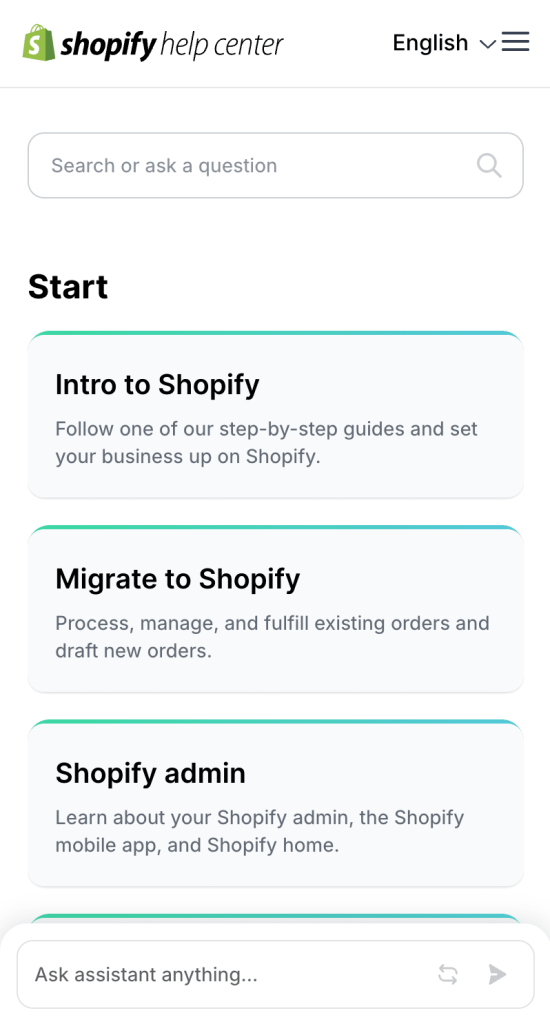
Shopify’s help center doesn’t just “work” on mobile—it’s built for it. The dynamic search bar is prominent, articles are collapsible for faster scanning, and navigation is effortless even on small screens. More and more users are accessing support from their phones, and if your portals aren’t mobile-optimized, that creates friction.
5. Build Seamless Escalation Paths from Self-Service to Human Support
When customers hit a wall, it’s crucial that moving to human support feels effortless and not frustrating.
Here’s how to make that transition smooth:
- Preserve conversation context: When escalating from a chatbot, help widget, or customer portal, carry over the full conversation history, form inputs, and customer details. This way, the support agent picks up exactly where the self-service flow left off—without asking customers to repeat themselves.
- Offer multiple escalation options: Don’t force customers into a single path. Give them flexibility—whether that’s live chat, email, scheduling a call, or creating a support ticket.
- Set clear handoff triggers: Program your chatbot or help widget to recognize when escalation is necessary, like when the customer asks to speak to a human, expresses frustration, or the conversation goes off-script.
- Acknowledge the handoff: Let the customer know, “We’re connecting you to a support specialist, and they already have your details.” This reduces uncertainty and builds trust during the transition.
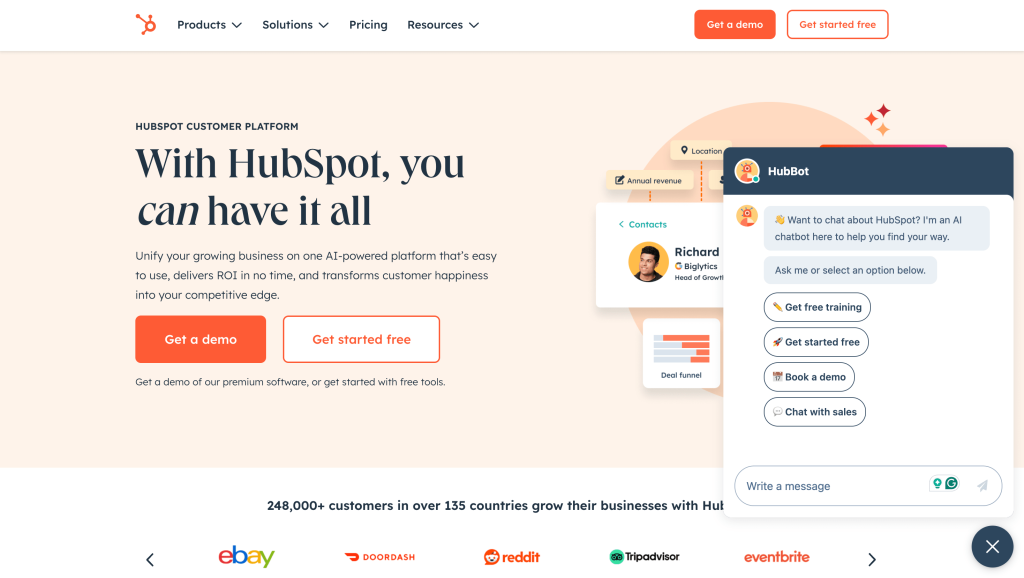
HubSpot’s chatbot does this beautifully. If it can’t resolve a user query, it offers instant escalation options—connecting the customer to a live agent, escalating via email, or even scheduling a call. The chat history and context are passed forward, so the conversation picks up smoothly without backtracking.
Empower Customers with Seamless Self-Service
Not every support challenge needs a human conversation. Customers want fast, frictionless answers—without waiting on hold or repeating themselves.
When done right, self-service isn’t just about deflecting tickets. It’s about building trust, improving efficiency, and helping users feel confident and empowered.
From knowledge bases and chatbots to in-app guides and learning hubs, self-service can meet customers where they are—and keep them moving forward. The best customer support doesn’t always start with a human. It starts with making help easy to find, easy to use, and easy to trust.
Frequently asked questions
1. What self-service options do customers prefer?
Customers prefer self-service options that are fast, intuitive, and accessible anytime. Popular choices include searchable knowledge bases, FAQ pages, AI-powered chatbots, account portals (for tracking orders or managing billing), and community forums. The best self-service tools are easy to navigate, regularly updated, and allow users to find answers without needing to escalate to live support.
2. Why do customers like self-service?
Self-service gives customers control and speed. Instead of waiting for an agent, they can troubleshoot on their own, at their own pace. Whether it’s resetting a password, finding shipping details, or following a how-to guide, customers appreciate being able to solve simple issues independently—without friction or delay.
3. What are some examples of website self-service?
Some common examples of website self-service include:
- A searchable FAQ or help center
- AI chatbots for answering quick questions
- Interactive onboarding tours and tutorials
- Community forums where users help each other
- Customer portals to manage orders, subscriptions, or support tickets
Each of these options reduces dependency on live agents and improves the customer experience.
4. What is the customer self-service model?
The customer self-service model is a support strategy where businesses empower customers to solve issues themselves—without needing to contact a live agent. This can include help articles, video tutorials, chatbots, and in-app guidance. Done well, it reduces ticket volume, speeds up resolutions, and helps support teams scale more efficiently while keeping customer satisfaction high.














