


Customer support has moved far beyond phone calls and physical counters. Today, most customers prefer digital channels—email, chat, and social media—because they’re faster, more convenient, and don’t involve waiting on hold.
Whether it’s a quick product question or a refund request, people expect answers in minutes—not hours.
That’s where digital customer service platforms come in. These tools let support teams manage conversations across multiple channels from one unified space.
They also layer in automation, AI, and analytics to improve productivity and raise customer satisfaction—without overwhelming your team.
In this post, we’ve curated 10 of the best digital customer service software to consider in 2025. For each, we break down how it works, what makes it unique, the trade-offs to be aware of, and pricing—so you can find the right fit, no matter your team size or tech stack.
Start using Hiver today
- Collaborate with ease
- Manage high email volume
- Leverage AI for stellar service
What is a digital customer service platform?
Digital customer service platforms let you manage and respond to conversations across multiple channels—email, live chat, social media, and messaging apps—all from one place. They centralize customer interactions so teams can deliver faster, more consistent support—without switching between tools or losing context.
Benefits of Using a Digital Customer Service Platform
The right platform doesn’t just help you respond to customers. It helps you do it faster, smarter, and with fewer resources. Here’s how:
- Always-on support: Many tools include AI chatbots that can answer common questions 24/7—so customers get help instantly, even outside business hours.
- Multi-channel coverage: Serve customers on their preferred channels—chat, email, social media—without losing the thread. All conversations stay connected in one place.
- Centralized management: Agents have full visibility into current and past conversations, so they can respond quickly and accurately without back-and-forth or digging through tools.
- Smarter decisions with analytics: Most digital customer service tools include dashboards that track metrics like CSAT, response time, and issue trends—helping managers optimize workflows and team performance.
- Cost-efficiency: Automated workflows and streamlined routing mean less manual work—and lower cost per resolution.
10 Best Digital Customer Service Software in 2025
Now, let’s look at the 10 best digital customer service platforms on the market and compare their features, pros and cons, and pricing.
1. Hiver
Hiver is an AI-first customer service platform designed to help teams manage multiple support channels—email, chat, phone, and WhatsApp—from a single, intuitive interface. Its familiar workspace ensures teams can provide fast, efficient support without the need to toggle between multiple tools.

Here a breakdown of the main features:
Shared Inbox
Collaboratively manage customer emails that arrive in group addresses like support@ or help@. Assign conversations to specific team members, reducing duplication and confusion. Track the status of every email—open, pending, or resolved—in real-time.
Collaboration Tools
Collaborate directly within email threads using shared drafts, @mentions, and internal notes, eliminating the need for long CC chains or external chats. Create and reuse email templates for faster, more consistent replies.
Automation & SLAs
Automate repetitive tasks such as assigning emails, adding tags, or setting conversation statuses. Define SLAs (Service Level Agreements) to ensure timely responses, with alerts to notify teams when targets are at risk of being breached.
Knowledge Base
Build internal or external knowledge bases to help your team access answers quickly or empower customers to resolve queries on their own.
Analytics & Reporting
Access built-in analytics dashboards that track key metrics like average response time, SLA adherence, resolution rates, and agent performance—all within the platform.
AI Features
Leverage AI capabilities to reduce manual effort and boost agent productivity
- Summarize long emails with the AI Summarizer
- Suggest relevant templates based on customer queries
- Auto-close non-actionable conversations like “thank you” messages
- Use the AI CoPilot feature to scan your knowledge base and integrated tools, suggesting accurate, context-aware responses—so agents spend less time searching and more time solving customer queries.
Pricing:
- Forever Free Plan: Includes 1 shared inbox, knowledge base, live chat, collaboration features, and 24×7 email and live chat support for unlimited users—ideal for small teams just getting started.
- Lite: $19/user/month: Offers shared inbox, automations, round-robin assignments, SLAs, and basic analytics.
- Growth: $29/user/month: Includes everything in Lite, plus custom reports, advanced integrations, and analytics.
- Pro: $49/user/month: Adds chatbots, CSAT surveys, AI features, SLA reporting and tracking, and advanced analytics.
- Elite: $79/user/month: Unlocks the full suite, including skill-based routing, SSO, advanced analytics and reports, and deeper automation.
Hiver also offers a 7-day free trial with access to the Elite plan, allowing teams to explore all features before committing.
2. Help Scout
Help Scout is a customer service platform that brings email and chat support into a single, easy-to-use dashboard. One of its most useful features is the customer profile sidebar—whenever an agent opens an email, they also see the customer’s history alongside the thread. This includes previous interactions, purchase data, and other context that helps agents respond quickly and personally.

The platform is built for teams that want to prioritize personalization without overcomplicating setup. It offers shared inboxes, an embedded chat widget called Beacon, a self-service knowledge base (Docs), and built-in workflows to automate tagging, routing, and follow-ups. Reporting is simple but insightful, covering key metrics like response time, resolution rates, and CSAT.
Their AI features are another time-saver. AI Summarizer condenses long email threads into clear summaries, while AI Assist helps shorten or translate content quickly. AI Drafts goes a step further by generating personalized email replies based on past customer interactions—giving agents a strong head start without losing the human touch.
However, one drawback that many Help Scout users mention is the lack of a native SLA tracking feature. You’ll either need to create custom workflows to detect aging conversations or rely on third-party integrations to track SLA compliance more traditionally.
| Pros | Cons |
|---|---|
| Intuitive and clean interface | Lacks built-in SLA tracking |
| Collaborative workspace (shared inbox) and customer history | Limited customization options |
Pricing:
Plans start at $50/month for 100 contacts. Higher tiers ($75+) add CSAT, advanced reporting, SLA tracking (via integrations), and HIPAA support.
3. Freshdesk
Freshdesk’s flexibility, comprehensive feature set, and competitive pricing make it a popular choice for support teams of all sizes. It provides a central, unified platform for businesses to manage customer interactions across multiple channels.
Custom ticket views enable agents to sort and prioritize tickets by status, urgency, or assignee. Freshdesk also supports parent-child ticketing, which is useful for breaking down complex issues into smaller, trackable tasks that different agents can work on.

The built-in knowledge base includes article versioning, so teams can view edit history and restore previous versions when needed. Higher-tier plans add Freddy AI for auto-responses and insights, SLA management, workflow automation, and detailed analytics to improve support performance.
Freddy AI, Freshdesk’s AI bot, can handle common customer queries around the clock, automate tasks like categorizing or assigning tickets, escalate issues, and suggest ticket responses. It also offers predictive insights, like alerting teams to sudden spikes in ticket volume or recurring issues, helping them take a more proactive approach.
| Pros | Cons |
|---|---|
| Robust ticket management with multichannel support | Users report software can get laggy at times |
| Easy access to monthly, daily and weekly reports | Poor at detecting spam/promotional emails |
Pricing:
Free plan available for up to 2 agents. Paid plans start at $15/user/month (Growth), with Pro ($49) and Enterprise ($79) adding AI, custom roles, SLA policies, and advanced automation.
Recommended reading
4. Zendesk
Zendesk unifies support channels—including email, phone, live chat, self-service, and social media—into a single interface. It’s particularly suited for teams that manage complex support operations, offering customizable workflows and extensive configuration options.

The platform features an omnichannel ticketing system where incoming messages are converted into tickets and automatically assigned to agents. Agents can utilize macros (prewritten responses) for common issues, build a knowledge base, and access analytics to monitor ticket volumes and key performance metrics.
Zendesk’s AI capabilities enhance support efficiency:
- AI Agents leverage your knowledge base to handle routine queries end-to-end, providing instant resolutions without human intervention.
- Intelligent Triage analyzes incoming tickets to determine intent, language, and urgency, facilitating accurate routing.
- Agent Copilot assists agents in real-time by suggesting relevant responses and surfacing help articles during customer interactions.
The platform also boasts a robust analytics suite, offering granular insights into performance metrics, SLA adherence, customer sentiment, and workflow efficiency. Its extensive integration ecosystem allows seamless connectivity with CRMs, eCommerce systems, and internal tools. However, Zendesk’s extensive feature set can lead to a steep learning curve, potentially resulting in longer onboarding times for agents.
| Pros | Cons |
| Highly customizable with a wide range of integrations and automation tools. | Complicated to set up and use |
| Strong reporting and diverse API integrations | Vendor support has been a concern for some users. |
Pricing:
Plans start at $55/user/month (Suite Team), with higher tiers like Suite Growth ($89) and Suite Professional ($115) offering advanced features such as SLA management, custom dashboards, and AI enhancements.
5. Front
Front blends the familiarity of email with the capabilities of a modern help desk, consolidating communication channels like email, chat, social media, and SMS into a unified dashboard.

Teams can collaborate on responses, leave internal comments, and see in real-time who is viewing a specific draft. This level of transparency is particularly beneficial when onboarding new agents or managing sensitive tickets that require multiple inputs.
A notable feature is Front’s ability to transform incoming emails into actionable tasks, enabling teams to assign, track, and collaborate on customer messages similarly to project management tools. Additional functionalities include automated workflows, customer conversation histories, reporting, auto-assignment, and message templates.
Front’s AI suite enhances productivity by summarizing threads, drafting responses, and resolving chat queries using information from your knowledge base.
| Pros | Cons |
|---|---|
| Facilitates team collaboration with shared inboxes and real-time visibility. | The mobile version of Front lacks the same functionality as the web app |
| Integration capabilities unify workflows | Instances where the platform is slow to load or crashes |
Pricing:
Plans start at $19/user/month (Starter) for shared inboxes and basic analytics. Growth ($59) adds live chatbots, AI features, and SLA rules; Scale ($99) offers custom roles, advanced analytics, and multiple knowledge bases; Premier has custom pricing with enterprise-level support.
Recommended reading
6. Zoho Desk
Zoho Desk is particularly appealing for businesses already utilizing other Zoho products due to the seamless cross-product integration. But it can work even as a standalone customer service tool.
Support teams can add customers as contacts, providing full visibility into past interactions and customer history with each new ticket. The platform also offers robust customization options, allowing teams to tailor ticket layouts, fields, and workflows to align with their support processes.
Sub-tickets can be created to break down complex issues into manageable tasks assigned to different agents. Additional features include a knowledge base builder, community forums, and automation tools to streamline support operations.

A standout feature is Zia, Zoho’s AI assistant (available in enterprise plans), which detects ticket sentiment, recommends solutions, and auto-tags or categorizes issues based on historical trends. Zia assists agents by focusing on high-priority tickets and automating routine tasks. The platform has a mild learning curve for basic use, though advanced customizations and automations may require additional training.
| Pros | Cons |
|---|---|
| Powerful automation and workflow capabilities | Initial setup can be overwhelming for some users |
| Seamless integration with other Zoho apps | Inconsistent response time from their customer service team |
Pricing:
Free plan available for up to 3 agents. Paid plans start at $7/user/month (Standard) with workflows and social channel support; $12/user/month (Professional) adds multi-department support and time tracking; $20/user/month (Enterprise) unlocks Zia, custom modules, guided conversations, and live chat.
7. HappyFox
HappyFox is a cloud-based help desk solution designed to streamline customer support and internal IT operations. It offers multi-channel ticketing across email, chat, social media, and phone, along with IT-specific features like asset management, incident tracking, and a service catalog.

Support teams benefit from built-in task management capabilities which enable agents to break down tickets into actionable subtasks. Additional features include ticket templates, a knowledge base builder, canned responses, tagging, workflows, and SLA management.
A standout feature is the Agent Scripting tool, which provides on-screen prompts and guidelines tailored to specific ticket categories. This ensures agents ask the right questions and follow consistent troubleshooting procedures, enhancing first-call resolution rates and reducing training time. HappyFox also automates CSAT surveys post-ticket resolution, feeding insights into its detailed analytics dashboard. This helps teams monitor satisfaction levels, resolution times, and agent performance.
| Pros | Cons |
|---|---|
| Easy and intuitive to set up | Sluggish load time with some minor UI inconveniences |
| Can be used from the mobile web interface or from the desktop application | Scope to improve reporting functionality |
Pricing:
HappyFox offers both agent and ticket-based pricing. Based on whether your team has more agents or more tickets, you can go for the plan that best fits your organization.
Its agent-based pricing starts at $21/per agent/month and includes ticketing, knowledge base, SLAs, and basic reports. Its ticket-based plan starts at $1599/month for unlimited agents, 20,000 tickets a year, smart rules, and a knowledge base.
8. Gorgias
Gorgias is a customer support platform tailored for e-commerce businesses, integrating seamlessly with platforms like Shopify, Magento, and BigCommerce. It centralizes support across email, chat, social media, and SMS, providing agents with real-time access to customer order details and interaction history.

Key features include rule-based ticket routing, AI-generated replies, reusable response templates, and custom variables for personalized messaging. Gorgias’s AI Agent, trained on your store’s data and policies, can autonomously handle tasks like order tracking, cancellations, and refunds, enhancing efficiency for high-volume support teams.
The platform’s automation engine combines customer data and intent detection to trigger tailored replies, assign tags, or escalate issues automatically. This is particularly beneficial for e-commerce stores experiencing high support volumes.
| Pros | Cons |
|---|---|
| Easy and intuitive to set up and use | Can be sluggish load-time wise, with some minor UI inconveniences at times |
| Has multiple platform support, can be monitored from the mobile web interface or from the desktop application | Scope to improve reporting functionality and the ability to create custom reports |
Pricing:
Gorgias employs a ticket-based pricing model. Plans start at $10/month for 50 tickets (Starter), $60/month for 300 tickets (Basic), $360/month for 2,000 tickets (Pro), and $900/month for 5,000 tickets (Advanced). Overage charges apply beyond these limits.
Recommended reading
9. Kayako
Kayako is a customer service platform designed to unify support channels like email, live chat, and social media into a single system. Its standout feature, SingleView™, offers agents a comprehensive timeline of each customer’s interactions, providing full context to resolve issues efficiently.
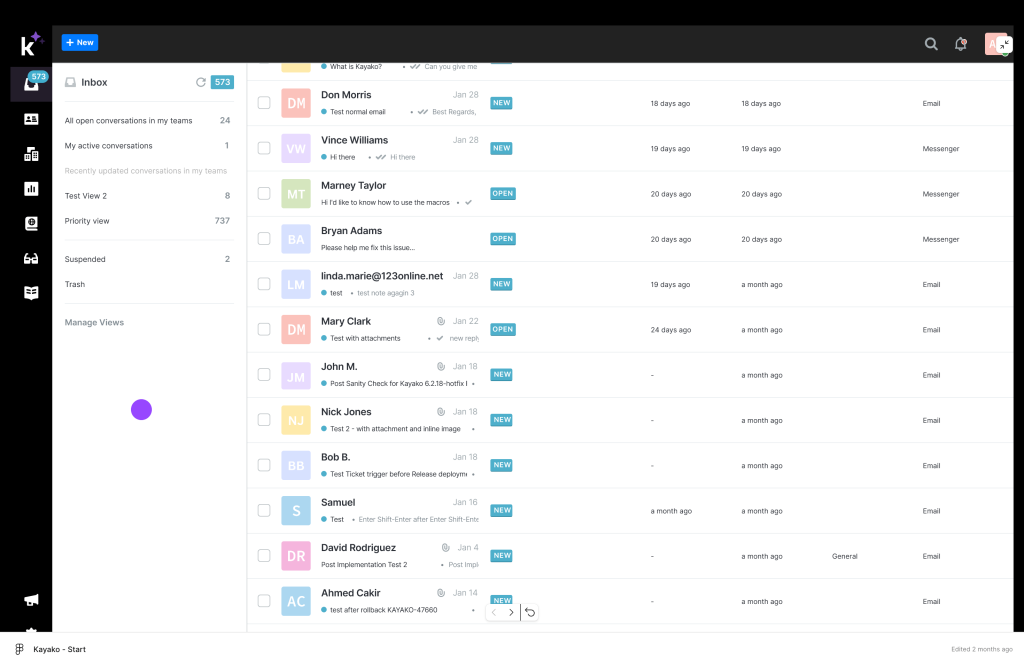
The platform includes collaboration tools such as internal notes and tagging, enabling multiple agents to work together seamlessly on complex tickets. Agents can also use the “collaborators” feature to invite external members to resolve issues. Macros—prewritten responses—help handle common inquiries swiftly.
Kayako’s AI capabilities assist in automating routine tasks. The AI learns from previous interactions to suggest relevant responses, categorize tickets, and prioritize them based on urgency. Additionally, Kayako provides built-in analytics to monitor key performance metrics such as response times, resolution rates, and customer satisfaction scores.
| Pros | Cons |
|---|---|
| Organize tickets into folders based on departments, status, and nature of the content. | Users report that the after-sale support is not upto the mark |
| Routing tickets to different departments is very easy | Pulling reports is a hassle and one needs to a struggle a bit to find or define a specific report |
Pricing:
Kayako offers two main plans: Essential and Enterprise. The Essential plan includes advanced ticketing, unlimited AI-suggested responses, and multiple chatbots. The Enterprise plan adds features like fully autonomous resolutions and multilingual content. Pricing details are available upon request.
10. Missive
Missive is a collaborative email platform that combines team inboxes and chat into a single interface, streamlining communication for support teams. It’s particularly beneficial for teams aiming to reduce tool-switching between email clients and messaging apps.

A standout feature is its shared email drafting, allowing multiple agents to compose responses together in real-time, with live edits and @mentions for seamless collaboration. This is especially useful for approval workflows and ensuring message accuracy.
Missive’s internal chat capability enables one-on-one or group discussions directly within the app, reducing the need to switch between tools. The platform also offers templates and canned responses to enhance response times.
Its AI capabilities, powered by OpenAI, allow users to generate email drafts, translate messages, and summarize conversations. There’s an ‘AI Rules’ feature that allows you to build workflows which detect customer sentiment and accordingly identify time-sensitive requests. Such tickets are then highlighted so that agents can prioritize well.
| Pros | Cons |
|---|---|
| Snooze feature to focus on more immediate tasks and revisit tickets at a more convenient time | No search functionality for a specific inbox. All searches are global. |
| Ample integrations making it accessible not only for developers but also for non-technical users | Limitation to message history you can search or view. |
Pricing:
Missive offers a 30-day free trial. Paid plans include Starter at $14/user/month (up to 5 users), Productive at $24/user/month (up to 50 users, includes AI features and basic analytics), and Business at $36/user/month (adds admin controls, advanced analytics, SSO, task management, SLA reports, and priority support).
Recommended reading
Which Digital Customer Service Platform Should You Go For?
Investing in a digital customer service tool isn’t optional anymore—it’s the baseline for meeting today’s customer expectations. But the right platform isn’t the one with the longest feature list. It’s the one that fits your workflows, your team, and the kind of experience you want to deliver.
Here’s a quick breakdown to help you narrow it down:
- Need a powerful, all-in-one helpdesk? Go with Hiver
- Want something simple for shared inboxes and collaboration? Try Missive
- Growing team that needs structure without bloat? Look at Help Scout or Freshdesk
- Handling high ticket volume across multiple channels? Zendesk or Zoho Desk
- Running an e-commerce store? Gorgias is built for this
- Prioritizing speed and collaboration? Consider Front or Kayako
No matter which tool you choose, your support platform should work the way your team does—not the other way around. Choose something that helps agents move faster, customers get answers sooner, and your ops run smoother. That’s the kind of support setup that scales with you—not against you.
Frequently Asked Questions
1. How to choose the right digital customer service software?
Start by looking at your support volume, team size, and the channels you serve—email, chat, social media, or all three. Then consider your need for features like automation, AI, customization, and integration with tools like CRMs. The best platforms grow with you, are easy for agents to use, and help your team respond faster without adding complexity.
2. What skills do you need for digital customer service?
Strong writing, problem-solving, and empathy are must-haves. Agents should also be comfortable using ticketing tools, live chat platforms, CRMs, or shared inboxes. As more tools include automation and AI, a working knowledge of features like smart routing, AI-generated replies, or dashboard analytics can give agents an edge.
3. Which tool is most useful in digital customer service?
There’s no one-size-fits-all tool—it depends on your team’s workflows and your customers’ expectations. But the most effective platforms typically include the following capabilities:
- A shared inbox or omnichannel workspace to manage all conversations
- A reliable ticketing system to track and prioritize issues
- Automation and routing to reduce manual work
- AI tools like chatbots or agent assist for faster replies
- A help center or knowledge base for self-service
- Reporting tools to track performance and CSAT
- Integrations with your CRM, eCommerce tools, or internal systems
Often, the best results come from combining the right features—or even multiple tools—so your team can scale support without losing the human touch.














