

Most SaaS companies operate on a subscription model. While this promises recurring revenue every month, there’s a flip side to it: unhappy customers have the option to cancel their subscription anytime and take their business elsewhere.
One of the main reasons this could happen is if customers don’t feel heard, and have issues that are either neglected or aren’t resolved on time. This is where having a SaaS help desk software can help. It ensures all user queries are actioned in a streamlined manner and that nothing gets missed.
But which SaaS help desk is the best one? Here’s a list of 16 such tools. Let’s dive in!
TL;DR
- Features That Matter: SLA tracking, omnichannel communication, automation, and analytics are some of the most essential features needed in a SaaS helpdesk.
- Top SaaS Helpdesk Software: The list explores top tools – Hiver, ClearFeed, BoldDesk, and WowDesk, amongst others – that can help SaaS businesses deliver excellent customer support.
- Benefits of Helpdesk Software: The top benefits of SaaS help desks include centralized customer interactions, organizing workflows, tracking performance metrics, and offering actionable insights.
- Actionable Checklist: A comprehensive checklist of must-have features and a clear roadmap to implementing help desk software.
What is SaaS Help Desk Software?
Simply put, SaaS help desk software is a tool used by customer service teams in SaaS companies to assign, track, and resolve user issues.
It typically comes with a central dashboard where customer queries from various channels – email, chat, and even social media – are collated. Some SaaS helpdesk software also offers self-service options such as a knowledge base, enabling users to find answers to FAQs independently.
The primary goal of such a tool is to support your users and in turn, retain them in the long run.
An Overview of the Best SaaS Helpdesk Software in 2025
Whether you need AI-powered automation, a shared inbox, or full-fledged ticketing, this breakdown highlights the best helpdesk solutions for SaaS companies.
| Name | Features | Pricing |
|---|---|---|
| Hiver | Email management Inbox-like interface Notes and drafts for collaboration Real-time analytics AI Co-Pilot | Starting at $19/user/month. |
| Zoho Desk | AI-powered assistant (Zia) Multi-channel support Automated ticket routing Seamless integration with Zoho Suite | Free for 3 agents, Paid plans start at $7/agent/month. |
| Zendesk | Omnichannel customer support AI-powered ticket management Customizable dashboards Extensive third-party integrations | Starts at $19/agent/month. |
| Freshdesk | Freddy AI for ticket automation Shared inbox Self-service knowledge base Strong SLA management features | Free plan, Paid plans start at $15/agent/month. |
| ClearFeed | Slack-first support tool AI-based ticket prioritization Real-time ticket syncing with existing helpdesk systems | Custom pricing, Free trial available. |
| Intercom | Conversational customer support with live chat AI chatbots Targeted messaging for user engagement | Starts at $74/month, Custom pricing for enterprise. |
| Helpshift | Mobile-first support AI-powered automation for issue resolution in-app messaging Self-service capabilities | Starts at $150/month, Custom pricing for enterprise. |
| Help Scout | Simple shared inbox Live chat with Beacon Automated workflows Easy integration with CRM & e-commerce tools. | Starts at $25/user/month. |
| Front | Personalized email support Collaborative inbox Automated email routing Seamless SaaS integrations | Starts at $19/user/month. |
| ProProfs Help Desk | Shared inbox for team collaboration AI-driven customer feedback surveys Knowledge base for self-service | Starts at $30/user/month (Monthly). |
| Kayako | Unified customer conversations across email Live chat Social media support Mobile app | Starts at $15/agent/month. |
| Groove | Easy-to-use ticketing system Knowledge base builder Support widgets for websites Basic automation tools | Starts at $12/user/month, Advanced plans available. |
| LiveAgent | Live chat Automated ticketing system with intuitive UI Built-in call center features Social media integration | Basic: $15/agent/month, Advanced: $39/agent/month |
| BoldDesk | Email-to-ticket functionality Shared inbox for multiple channels Generative AI copilot Knowledge base Automation | Starts at $10/agent/month, Advanced plans available. |
| HappyFox | Task automation with Smart Rules Omnichannel support Customizable ticket categories Real-time reporting | Starts at $29/agent/month. |
| Wowdesk | Omnichannel ticketing AI-driven automation Self-service portal Highly customizable workflows | Starts at $15/agent/month, Free trial available. |
Top 16 SaaS Helpdesk Software in 2025
Now, let’s look at my curated list of top 16 SaaS helpdesk tools for 2025 in detail. I’ve categorized them based on their standout features.
For Small and Medium-sized Businesses: 10 affordable options under $30/user per month
For SaaS companies that want an affordable help desk, these tools are worth taking a look at. They have solid functionalities without burning a hole in your pocket.
1. Hiver
Hiver is built for teams that want a full-fledged help desk without the complexity of one. It brings all customer conversations into one clean, organized interface that looks and feels like your inbox.
Your important support channels – email, chat, WhatsApp, and phone – are stacked in a left-side panel, and it’s just like how you navigate your Slack channels or inbox folders. Each channel gives you a clear view of what’s pending, who’s working on what, and what’s been resolved.
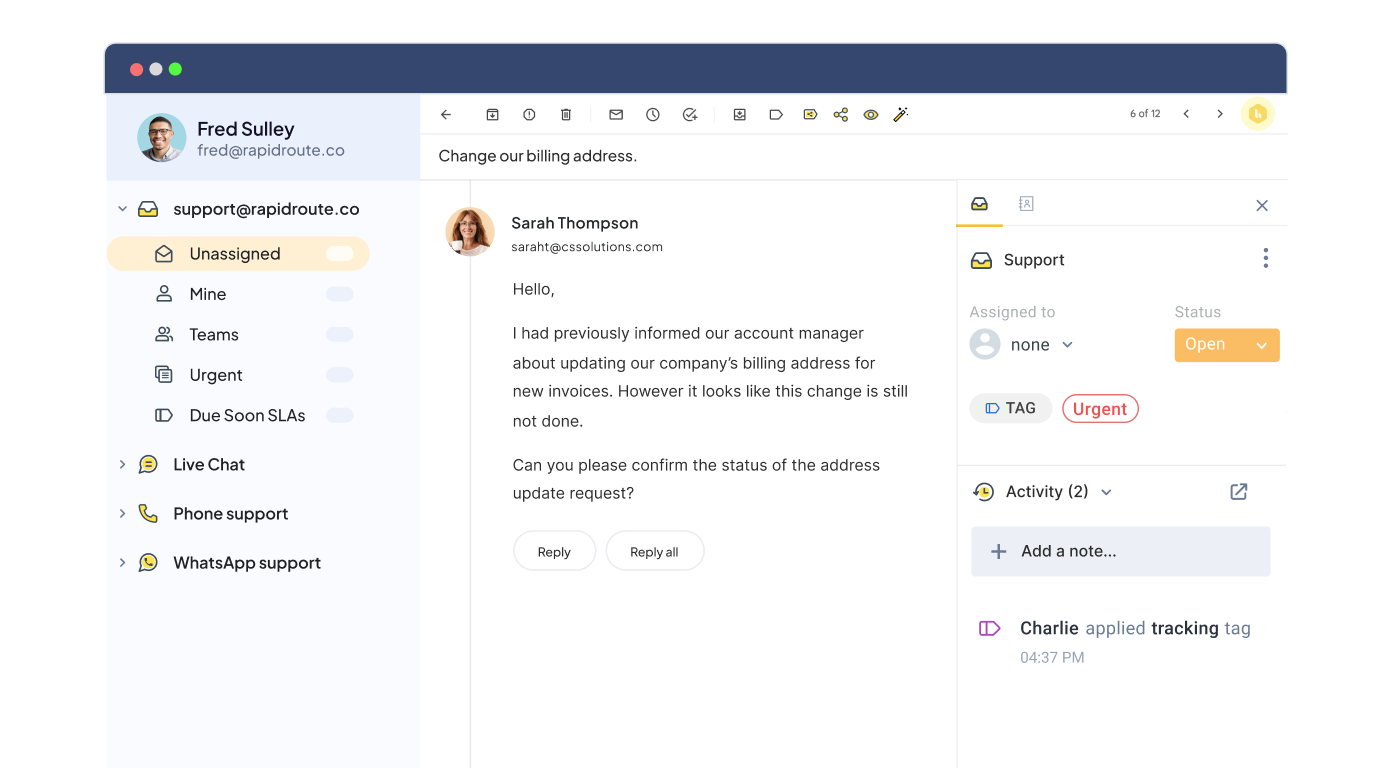
SaaS businesses, in particular, prefer Hiver because it is extremely easy to set up and get started with, usually taking less than one hour.
As Dakotah Shore, IT Manager at WS Display, says, “We didn’t want our team to spend time on training. It was really cool that we found Hiver.”
Whether assigning conversations to team members, adding internal notes for discussing emails with colleagues, or setting up automation to streamline workflows, it can all be done without extensive training.
Top Features
- Manage shared inboxes like support@ or info@ with assignments and clear ownership.
- View all open, pending, and resolved conversations across channels in one panel.
- SLA tracking & detailed analytics dashboard to keep track of performance.
- AI for reply suggestions & conversation summaries.
- Workflows to assign and tag conversations and send auto-responders.
- Add notes & shared drafts for internal collaboration.
- 100+ integrations with CRMs, e-commerce, and ERP systems.
Pricing
Hiver has a forever-free plan that comes with the most essential help desk features. Teams can set up one shared inbox, a knowledge base, and more. Paid plans start at $19/user per month and include shared inboxes, ticket assignments, and basic analytics. Higher plans offer SLA tracking, omnichannel support, automation features, and advanced reports.
2. Help Scout
Unlike most SaaS help desks, which charge per user, Help Scout doesn’t have a cap on the number of users across all pricing plans. Its unique pricing model charges based on the number of people who receive a reply from your team on a monthly basis.
This approach is ideal for fast-growing support teams or companies that want everyone – even technical departments – to jump in and help when needed.
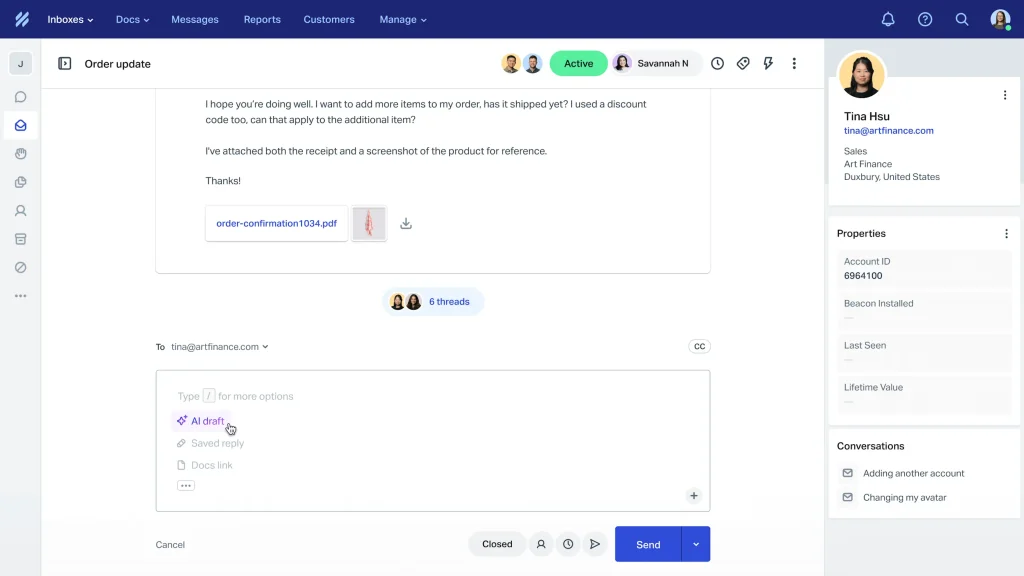
Originally a shared inbox tool, Help Scout now offers channels such as live chat and a knowledge base. Once you install Help Scout, your team will notice that they see real customer names and emails, not ticket numbers.
There’s no complicated backend that takes time to get used to; it’s an intuitive, collaborative inbox with tools to assign, tag, and collaborate on replies.
The platform also comes with AI capabilities that handle everyday support tasks like drafting replies, summarizing long threads, and surfacing relevant articles.
Top Features
- Built-in knowledge base (Docs) for self-service support.
- Live chat & proactive messaging (Beacon).
- Rule-based workflows for routing and tagging.
- Customer profiles and history of interactions are attached to every conversation.
Pricing
Help Scout doesn’t charge per user. All plans include unlimited users and are priced based on the number of customer contacts. The Standard plan is $20/month for up to 750 contacts and includes a shared inbox, knowledge base, and live chat. Higher plans offer advanced reporting, API access, Salesforce integration, and AI features.
Recommended reading
3. Front
Most help desks are built around ticket numbers and transactional replies. Front flips that model by letting support team members respond to queries as themselves and not as the company.
This means replies go from the individual’s work email ID and not from the support inbox email ID, which is usually something like info@ or support@.
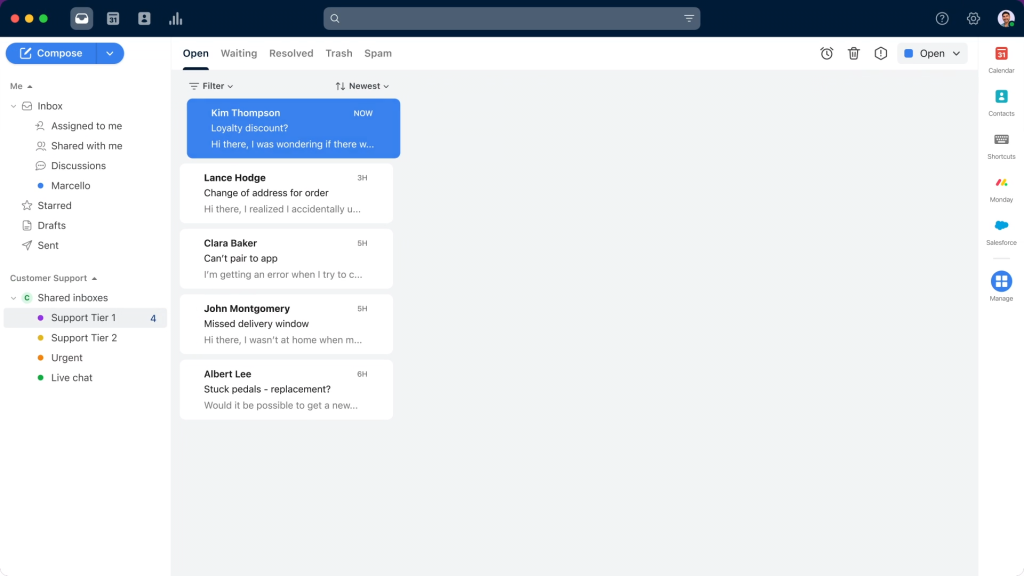
You can use Front to centralize conversations from email, chat, and other channels into one dashboard. Teams can manage their shared and personal work inboxes from the same interface.
Top Features
- Shared drafts & internal comments for real-time team collaboration.
- AI tools offer conversation summaries, sentiment detection & reply suggestions (Front Intelligence).
- Automated workflows for triaging, routing & tagging messages.
- Customer data & context visible alongside every conversation
Pricing
Front offers a free trial of 14 days for new users. Its paid plans start at $19 per user per month, which provides access to core features such as setting up a shared inbox, live chat, ticketing system, knowledge base, and more. Advanced plans include functionalities like AI assistance, enhanced analytics, and premium integrations, catering to the needs of growing teams and enterprises.
4. ProProfs Help Desk
ProProfs Help Desk is specifically designed for small and medium-sized businesses, which is evident when you see that its pricing is neither dependent on the number of tickets nor users.
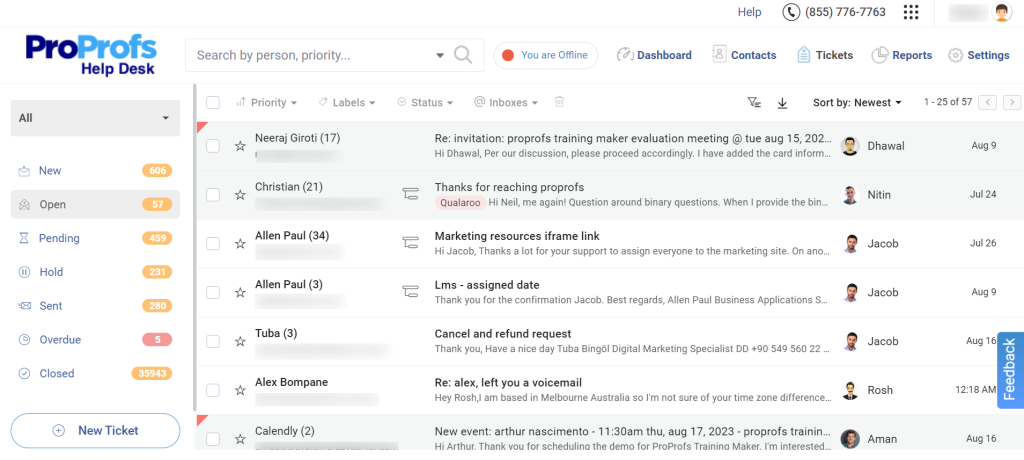
The setup process is quick, and once your team is onboarded, they can manage support channels such as email, chat, and knowledge base from a central dashboard. Collaboration is built into the interface with features like internal chat, private notes, and ticket assignments.
Top Features
- Manage email IDs like info@ and support@ using a collaborative inbox.
- AI-powered response suggestions and ticket summaries.
- Parent-child ticketing to break down larger tickets into smaller ones and assign them to different support staff.
- Private notes, automated ticket assignments, and internal chat for team collaboration.
- Canned responses for handling common inquiries.
- Option to recover deleted tickets when needed.
- Detailed reports on agent performance and other important customer service metrics.
- Data security with two-factor authentication and IP restrictions.
Pricing
ProProfs offers a free plan for single users with access to core features. Paid plans start at $19.99/user per month and include unlimited ticketing (no limit on the number of tickets that can be handled), automation, reporting, and team collaboration features.
5. Kayako
Kayako is an AI-powered help desk that claims to automate up to 80% of your support operations. One of its standout functionalities is Customer Journey SingleView, which allows support agents to access every customer’s history of interactions.
They can see CSAT ratings, the number of times the customer has reached out to support, and the help articles they’ve visited, among other things.
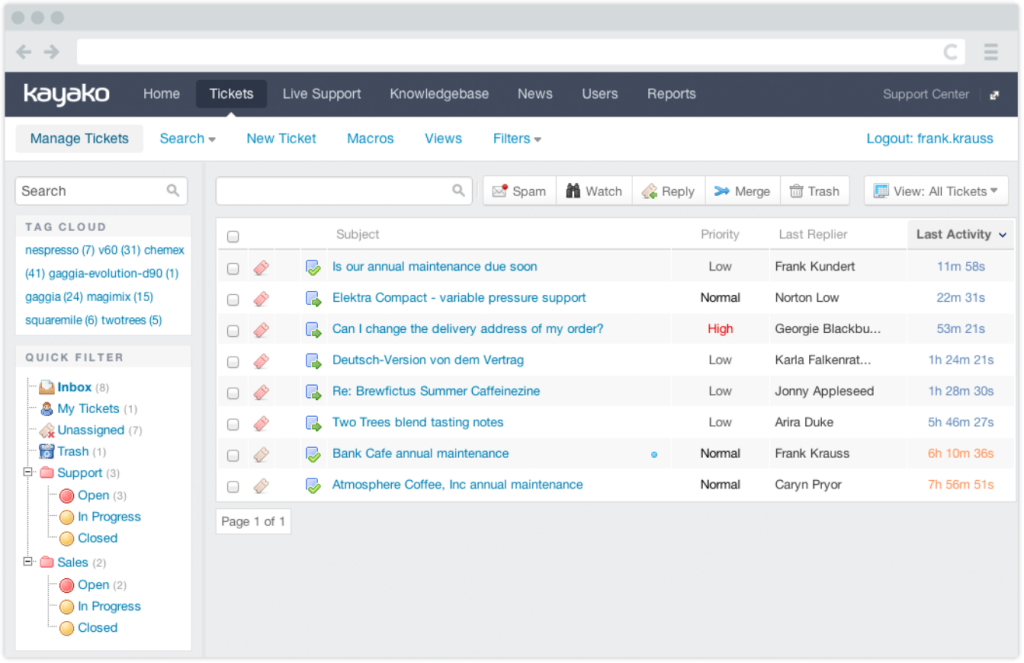
With all this information, it becomes easier for your support team to provide context-aware, proactive support rather than merely treating customer problems as tickets.
Kayako also offers an AI-powered knowledge base that offers insights into which articles are helpful and which ones aren’t. Having these insights by your side helps you improve the content on your knowledge base over time.
That’s not all; its AI learns from every conversation and improves its suggestions over time, so your team spends less time writing replies to repetitive queries.
Top Features
- Identify search trends and content gaps using the Knowledge Base Audit tool.
- Supports multi-language help centers for international teams.
- Internal collaboration via private notes & collaborators.
Pricing
Kayako has custom pricing plans, which are available based on business needs. All plans include multi-channel support, automation tools, and customer journey tracking.
6. Groove
Groove specializes in helping businesses manage their support email IDs using a collaborative inbox. The platform is easy to set up and use without needing any extensive customization or training.

In addition to a shared inbox, Groove offers other critical support channels, including chat and a knowledge base.
Top Features
- Shared inbox with assignments and tags.
- Create a knowledge base and embed it on any page across your website.
- iOS and Android apps for managing tickets on the go.
- Automation for ticket routing & canned responses.
- Conversation collision detection and internal notes.
- Reporting on agent performance and help center activity.
Pricing
Groove’s paid plans start at $24/user per month for basic shared inbox features. Higher plans unlock live chat, knowledge base, AI tools, and reporting.
Recommended reading
7. LiveAgent
Support teams can use LiveAgent to bring all customer communication and insights in one place – via 200+ integrations.
The platform, originally built for chat conversations, now supports multiple channels, including email, phone, WhatsApp, and social media. The built-in call center means no third-party phone tools are needed, and agents can route and record calls directly from the help desk.
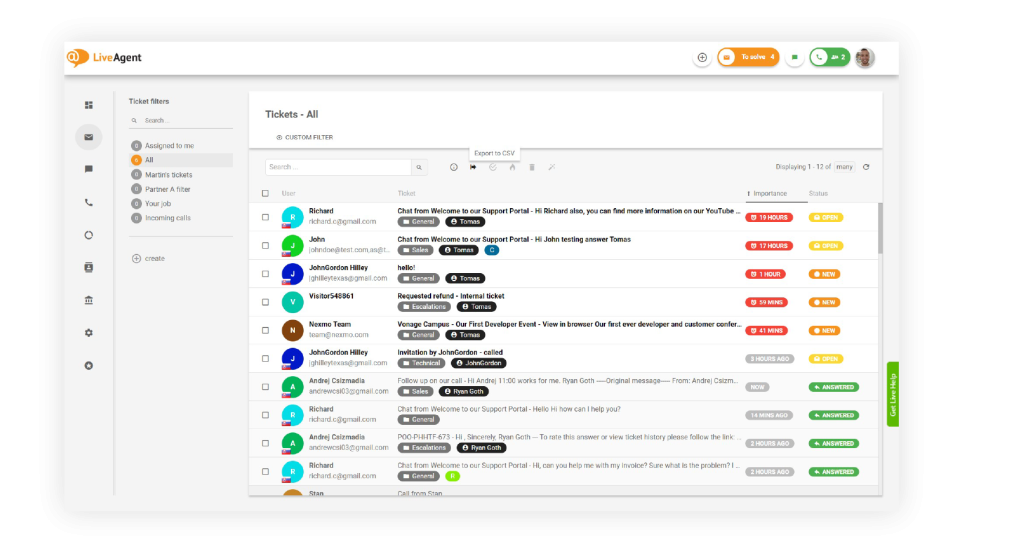
Slack-style internal messaging, agent collision detection, and custom workflows help teams stay coordinated as volume increases. The analytics dashboard includes an option to gamify team performance using scorecards, badges, and achievements.
Top Features
- Live chat integration with real-time visitor monitoring
- AI-powered ticket routing and response suggestions
- Customizable workflows to automate repetitive tasks
- Engage customers using visual elements like GIFs
- Face-to-face virtual assistance for complex customer inquiries
Pricing
LiveAgent has different plans for small, medium, large, and enterprise businesses. The pricing for small businesses is $15/agent per month for ticketing features. Higher plans include live chat, call center, gamification, AI tools, and advanced reporting.
8. BoldDesk
BoldDesk was launched by Syncfusion, a company known for creating developer tools – to help teams manage customer conversations.
It brings together email, chat, and social media inquiries into a single workspace and converts them into trackable tickets.

You don’t need technical skills to get started. The platform’s no-code interface allows you to build workflows for assignments, escalations, and follow-ups. This helps teams streamline their processes quickly without relying on engineering resources.
The built-in AI Copilot adds efficiency by drafting responses, tagging tickets, and recommending categories based on message content.
Top Features
- Internal task tracking lets agents assign and follow up on action items linked to tickets.
- Audit logs record every agent’s action for visibility and compliance.
- CSAT surveys give insight into how customers rate support interactions.
- Role-based access controls limit who can view or edit sensitive data.
- Multilingual support for global help centers and diverse customer bases.
Pricing
You can get started with BoldDesk at $12 per agent/month. This includes ticketing, live chat, a knowledge base, and workflow automation.
9. HappyFox
HappyFox offers multilingual support, which makes sure that your business can cater to customers across the world.
Martin Hartvigsen, Director of Global Technical Support at Jabra GN, called HappyFox their “one-stop shop for help desk software to support their global customer network”.
Irrespective of whether your customers reach out via email, phone, or chat, all queries are converted into tickets. Each ticket has a unique ID, which makes it easy for your support team to track its status at any given point.

Another of its unique features is the Agent Scripting tool. It lets you create pre-defined scripts so agents can deliver consistent, accurate responses every time. The platform also includes an internal and external knowledge base to make information easily available for both agents and customers.
HappyFox offers a great degree of flexibility in its pricing. You can either opt for per-agent pricing or unlimited agent pricing plans.
Top Features
- Easy-to-use knowledge base builder.
- Tickets can be categorized, escalated, and assigned using custom workflows.
- Task management allows large issues to be broken into trackable sub-items.
- Mobile apps for on-the-go ticket management.
- Canned responses and internal knowledge sharing.
Pricing
HappyFox’s paid plans start at $39 per agent/month and include ticket management, task workflows, live chat, SLA policies, and a knowledge base. Higher-tier plans offer advanced automation, custom roles and permissions, reporting, and integration options, making them flexible for teams with growing support needs.
10. WowDesk
Wowdesk automates the entire support process—from receiving customer inquiries to assigning and resolving them. At the same time, it gives customers simple ways to find answers on their own.
It takes emails, chats, calls, and social media messages and turns them into structured cases. Then, it uses AI to understand the message’s tone and urgency and then route it to the right team member.

The platform is tailored for businesses that are in search of an all-in-one solution to organize and simplify their customer support activities.
It also uses predictive analytics to flag cases that are going to miss an SLA and alerts managers early so they can act before issues grow.
Top Features
- Role-based controls restrict access based on department or role
- A built-in service catalog supports structured service request intake
- Load balancing helps distribute incoming case volume evenly across the team
Pricing
WowDesk’s entry-level plan starts at $6 per user/month and includes core features like a support center, email and live chat case capture, and access for up to three agents. Higher-tier plans have advanced features such as automation, SLA management, and custom workflows for larger teams.
AI-leaders in SaaS help desk software: Top 6 options
These tools use cutting-edge AI, like automated ticket routing and sentiment analysis, to improve customer support.
1. Zoho Desk
One of Zoho’s flagship products, Zoho Desk is an AI-powered help desk designed to improve agent productivity and customer satisfaction.
If you’re already using other tools in the Zoho ecosystem, this might be a good choice. I’ll explain why support teams can pull data from other Zoho products and connected apps to get full context for every customer. This reduces the need to switch tabs or chase down information.
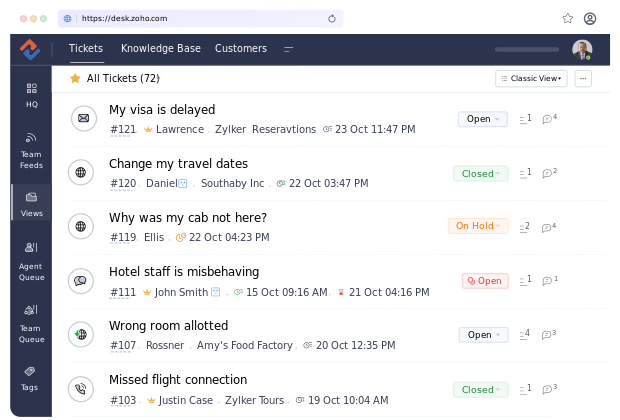
The built-in AI assistant Zia helps draft responses by suggesting ticket fields, analyzing sentiment, and recommending help articles in real-time. You can also use Guided Conversations, which are automated, bot-led chat flows that solve common issues without involving an agent.
For teams supporting multiple products or business units, Multi-Department Management allows you to set up separate help centers under one account.
Top Features
- Control who can view or edit specific ticket data
- Add no-code chat widgets across web and mobile apps
- Parent-Child Ticketing to manage complex issues
- Monitor agent workload with built-in time tracking
- Seamless integrations with Zoho apps and other external tools
Pricing
Zoho Desk offers a free plan for up to three agents, with access to a shared inbox and a help center — ideal for small teams. Paid plans begin at $9 per user/month (billed annually) and include additional features like workflow automation, SLAs, and multi-channel support as your team scales.
2. Zendesk
Zendesk is built for enterprise teams that need to manage customer support at scale across multiple channels and regions. It’s structured to handle complexity without slowing teams down.
Zendesk AI can predict intent, auto-tag tickets, and suggest replies — reducing the need for manual triaging. Voice support is built-in and includes IVR, call routing, and voicemail. To maintain service quality, managers can track agent performance and customer feedback using built-in QA tools.
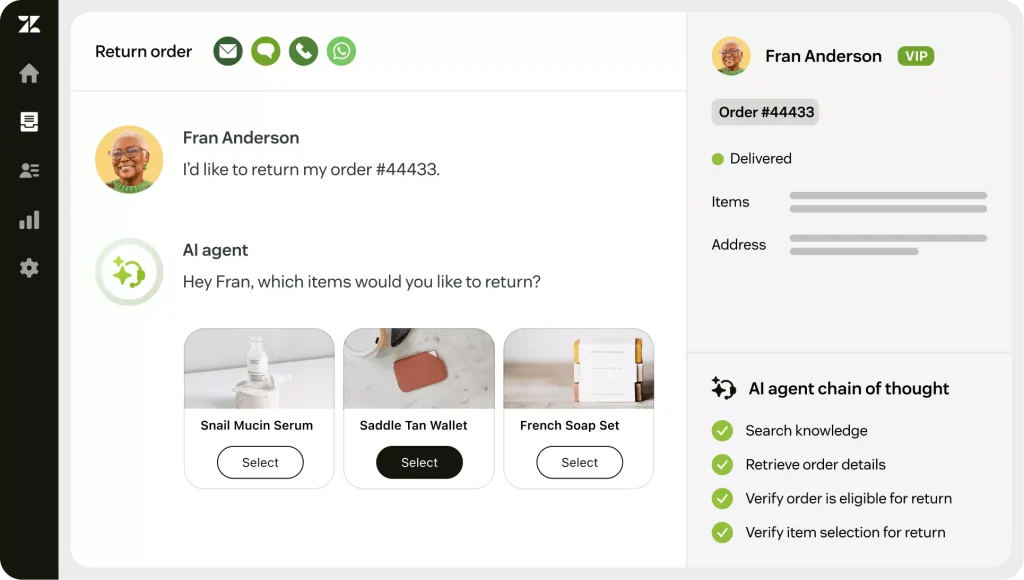
For teams with more advanced needs, the Sunshine Platform offers flexibility to build custom workflows, integrate external data, and tailor support at scale.
Top Features
- Multilingual Help Center to create localized self-service portals for global users.
- Manage tickets from email, chat, messaging, and voice in one place.
- Group and prioritize conversations by SLA, topic, or urgency.
- Enterprise-grade compliance and privacy controls.
- 1,200+ pre-built apps & integrations in the Zendesk Marketplace.
Pricing
Zendesk’s basic plan starts at $19 per agent/month and includes email ticketing, reporting, and access to basic integrations. Higher-tier plans have features like advanced automation, AI tools, and omnichannel support, starting at $55 per agent/month. Keep in mind — Zendesk can get significantly more expensive than most tools on this list as you scale.
Recommended reading
Check out this detailed analysis of how Zendesk compares with Hiver.
3. Freshdesk
If your team spends too much time sorting, tagging, and following up on support requests, Freshdesk is built to fix that. The platform offers a centralized dashboard where team members can access all incoming customer emails from multiple addresses (like support@ or info@) into organized, trackable tickets.
Freshdesk’s AI, known as Freddy, can predict what a ticket is about, draft responses, and auto-resolve straightforward inquiries without involving an agent.
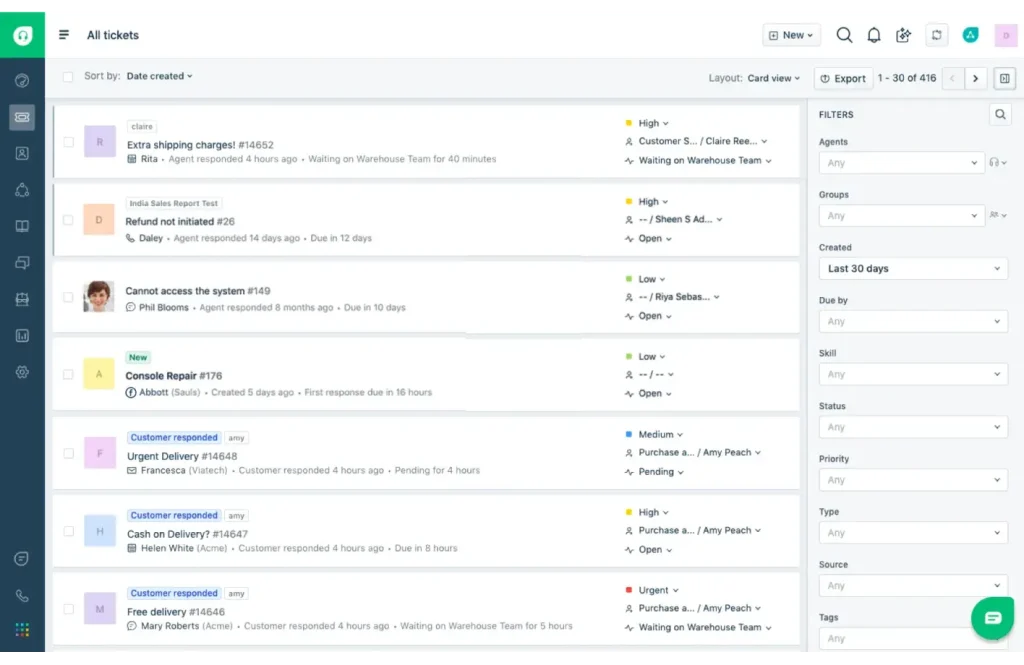
For more complicated cases, agents can merge duplicate tickets, split one ticket into smaller tasks, or link related tickets to maintain visibility across similar issues. Permission controls help control access levels across the team, while Audit Logs provide full visibility into who did what.
Top Features
- Self-service portal where customers can find answers on their own — through a searchable knowledge base and community forums.
- Trigger multiple actions with one click (e.g., assign, tag, and reply).
- Agent collision detection to alert agents when someone else is viewing or replying to a ticket.
Pricing
Freshdesk’s paid plans begin at $11 per agent/month (billed annually), giving teams access to essential features like ticketing, a knowledge base, and automation rules. It’s one of the more budget-friendly options on this list — though costs can add up as you scale into higher-tier plans with advanced AI and reporting.
4. ClearFeed
ClearFeed helps teams handle support requests directly in Slack. Instead of asking users to fill out forms or log into portals, it turns Slack messages into tickets that can be tracked and resolved.
Customers create and follow tickets in Slack. Support teams get private threads to discuss each request internally before responding.
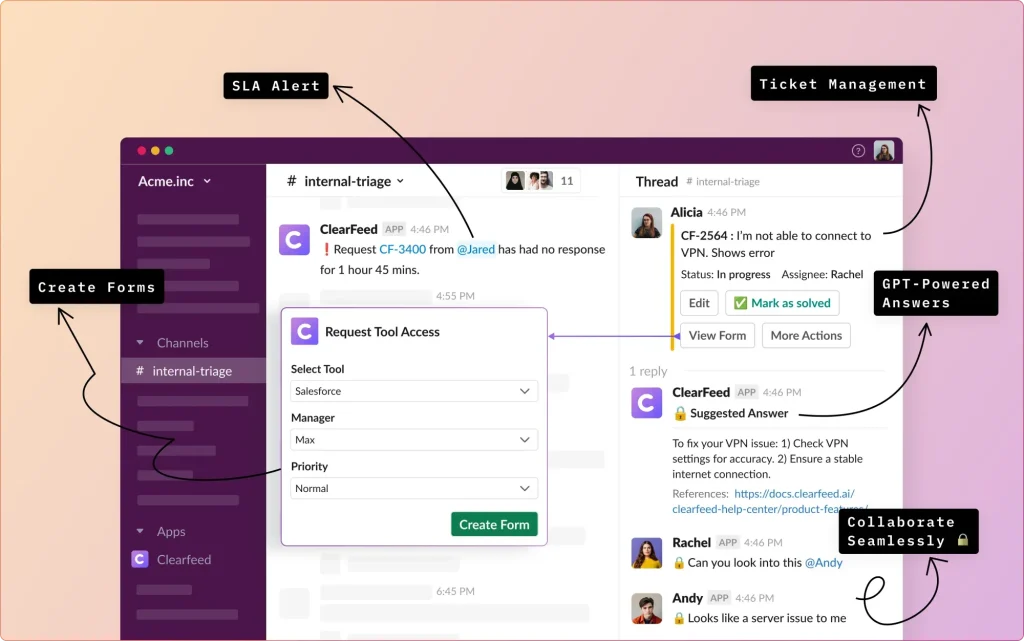
All updates sync with platforms like Zendesk, Freshdesk, and Jira, so nothing is lost or updated twice. For employees on internal Slack channels, ClearFeed offers a complete help desk with tagging, assignments, and SLAs within Slack.
Clearfeed offers something called a Triage Channel, which brings all customer requests from multiple Slack channels into one queue for easier prioritization. ClearFeed sends reminders for missed or delayed items without manual follow-up.
Top Features
- Turns Slack messages into tickets.
- GPT-powered answer suggestions.
- Internal help desk setup within Slack for managing employee requests.
- AI-driven ticket routing and auto-categorization (AI Fields).
- Missed message alerts and follow-up tracking.
Pricing
ClearFeed’s internal helpdesk plans start at $24/agent per month and include private ticketing in Slack, unlimited tickets, and integrations. The professional tier ($49/agent/month) adds SLA management, CSAT surveys, and GPT-powered answers.
For external support, pricing starts at $40/month for up to 10 Slack Connect channels. Advanced plans ($80/month) include multiple workspaces, email-based ticketing, and detailed reporting. Custom enterprise plans are available for teams managing over 200 channels.
5. Intercom
Intercom is built for teams that want to offer real-time, automated support directly— through chat widgets embedded in the app or website. Customers can get help right where they use the product without switching to email or a separate portal.
Fin AI, Intercom’s AI Agent, is trained on your help docs and past conversations and can reportedly resolve over 50% of queries without intervention from a support agent. For anything it can’t answer, Intercom creates a ticket and routes it to a shared inbox for the support team to handle.
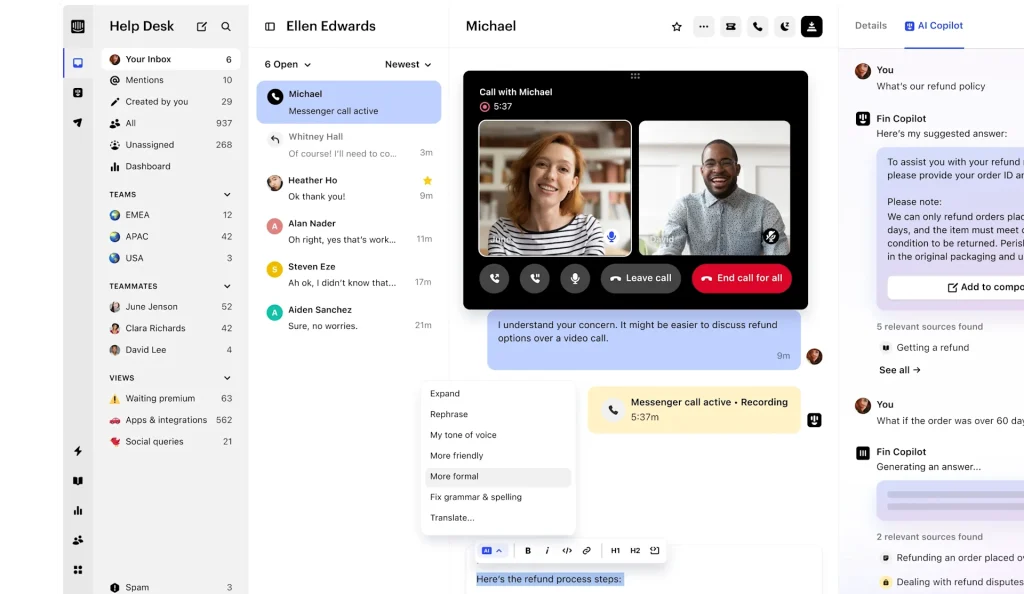
Support teams can work faster with Copilot, which suggests replies, summarizes threads, and auto-fills ticket fields. Ongoing issues are tracked in the Tickets view, and SLA timers notify the team before deadlines are missed.
Outside of day-to-day support, you can use Intercom to build something called Checklists which serve as an onboarding guide for new users of your SaaS platform.
Top Features
- Inbox & Tickets for handling complex issues.
- Custom event-based automation using user behavior.
- Role-based access for managing data visibility.
Pricing
Intercom’s pricing starts at $29 per seat/month for access to the shared inbox and basic messaging features. To use AI automation, SLA tracking, and advanced reporting, you’ll need to upgrade to higher-tier plans. Custom pricing is available for larger teams with advanced support needs.
6. Helpshift
Helpshift helps companies offer customer support directly inside mobile apps and web apps. The biggest advantage to doing so is that end users can message support without leaving the app. They can ask questions via the embedded widget or even visit the help center, which can be accessed from the app.
AI-powered bots handle routine queries instantly. They can collect information, guide users through troubleshooting, or escalate the issue when needed. Each message is scanned using Intent Detection to decide whether it needs human input, while Sentiment Analysis flags frustrated users for faster intervention.
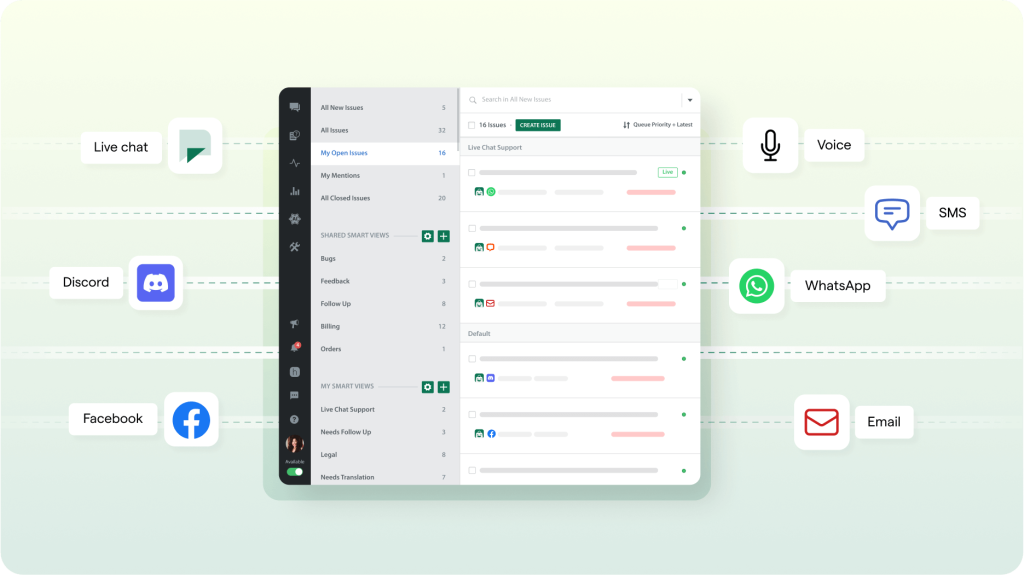
For console games and PC apps, Helpshift offers QR Code-based support access. Players can scan a code and move the conversation to their mobile device without stopping the gameplay.
Top Features
- Self-service Help Center built into the app.
- AI bots for replies, routing, and data collection.
- Real-time translation for multilingual users.
Pricing
Helpshift’s pricing is based on the number of issues raised, not agent seats. The Starter plan begins at $150/month and includes in-app messaging, a Help Center, and up to 250 issues per month.
How can your business benefit by using SaaS helpdesk software?
Here are the several benefits of using a SaaS help desk:
- Track and resolve issues without missing anything: Every customer query becomes a ticket that your team can track from start to finish. Agents can tag developers for technical issues or loop in account managers for priority customers. This ensures nothing falls through the cracks, reducing the need for customers to follow up.
- Let customers help themselves: Most SaaS help desks include a knowledge base where you can add FAQs, guides, and troubleshooting tips. Customers can find answers without raising a ticket, which reduces support volume.
- No complex maintenance: As it’s cloud-based, the software updates automatically. You always get the latest features and security updates without extra effort. Many platforms also follow strict data security standards like GDPR and HIPAA.
- Spot trends and improve your product: Support data shows you where customers struggle — whether it’s a product bug or a confusing feature. You can use this feedback to fix issues and improve your product faster.
- Make your support team faster and smarter: Many SaaS help desks now use AI to suggest replies, automate workflows, and route tickets to the right person. This saves your team time and gives customers quicker answers.
AI SaaS help desk software makes your support team more efficient, keeps customers happy, and helps your business grow. It turns customer feedback into data you can act on.
How to set up your new help desk software for your SaaS business?
Here’s a simple, step-by-step guide to get started:
- Set clear goals: Decide what you want to improve. Set 2-3 specific goals, like cutting response times by 20% or resolving 80% of tickets within SLA.
- Simplify customer touchpoints: Make it easy for customers to contact you. Keep forms short — ask only what you need. Update automated replies to match your brand tone. Test every channel (email, chat, forms) to ensure they work without errors.
- Organize workflows: Set clear rules for how tickets move through your team. Assign tickets automatically based on issue type or agent expertise. Clean up old tags, filters, and folders to avoid clutter. Review workflows quarterly and remove outdated ones.
- Automate routine tasks: Set up automation for ticket routing, tagging, and acknowledgment emails. Use pre-written responses for common queries. Keep filters, tags, and rules organized to avoid confusion.
- Build a knowledge base: Create a self-service portal with answers to FAQs and other step-by-step guides. Focus on the most common issues first. Keep articles short, clear, and easy to search.
- Track key metrics: Monitor the most essential customer experience metrics like response time, resolution time, and customer satisfaction. Set up reports and review them weekly. Hold monthly check-ins to discuss trends and fix bottlenecks.
- Test the entire process: Before going live, test everything end-to-end. Submit a ticket, check automation, and ensure resolution workflows are smooth.
- Train your team: Create simple guides on how to use the help desk, including workflows, tags, and common processes. Walk your team through the setup and get feedback.
- Review regularly: Review workflows, templates, and tags every few months. Remove anything outdated and refine based on team and customer feedback.
A clear setup today will save your team time and create a better support experience for your customers.
Choosing the right SaaS helpdesk software for your business
For SaaS businesses, customer support isn’t just about resolving tickets. It’s about keeping users engaged, reducing churn, and scaling support as the product grows. That’s why investing in the right SaaS helpdesk is important.
The tool you choose should help your team stay organized, respond faster, and automate the repetitive parts of support. It should also fit into your existing workflows and not force you to build new ones from scratch.
Here’s a simple way to approach the decision:
- Identify the specific challenges that your team is facing and match them to the features that can solve those problems.
- You can use our checklist to compare notes on the best helpdesk tools, focusing on the features that matter most to you.
- Take advantage of free trials or demos to ensure the software works effectively for your team and customers.
- Choose a solution that supports your current operations and scales with your business as your customer base grows.
Once you’ve shortlisted your options, look for the tool that your team will enjoy using daily, not just one that checks boxes on paper. A good SaaS helpdesk should remove the friction from support, not add more layers to it.














